How experts center divs: the eternal one-word answer, flexbox every time
Why is this Frontend meme funny?
Level 1: Magic Word: Flexbox
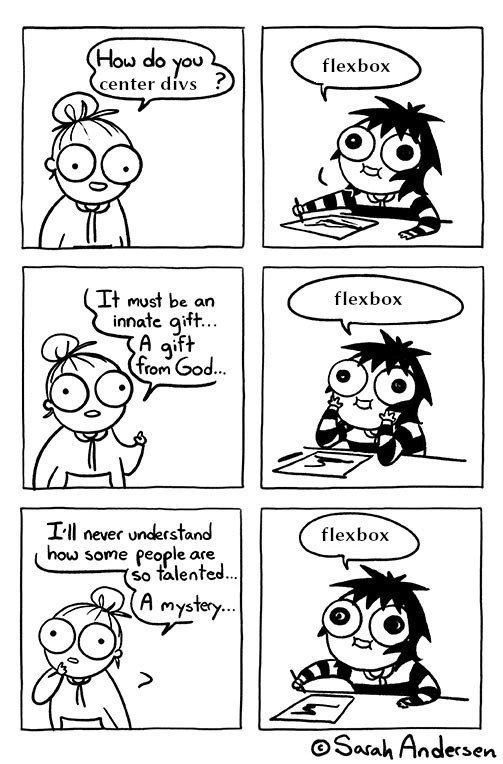
Imagine a kid trying to solve a puzzle and feeling completely stumped, calling it impossible. Then a big sibling comes along and says one simple word that fixes everything. In this meme, a young developer is the kid, and “flexbox” is the magic word. The young developer is baffled about how to put a box right in the center of the page – it seems like a crazy mystery or a special gift only certain people have. But the experienced developer knows it’s actually easy now. They keep calmly saying “flexbox,” because that’s the name of the tool that does the trick. It’s like a child amazed by an adult easily tying a shoe: to the child it’s like a gift from the gods, but the adult is just using a simple method they learned. The comic makes us laugh because we’ve all felt like that confused kid at some point, until someone showed us the “secret.” And the best part? In this case the secret isn’t complicated at all – it’s just a single word, flexbox, that makes the impossible task suddenly super simple.
Level 2: Flexbox to the Rescue
So, what’s actually happening here? The comic is about centering a div – in other words, placing an HTML element perfectly in the middle of its container, both horizontally and vertically. This is a classic FrontendHumor scenario. In the past, newcomers would struggle with CSS (Cascading Style Sheets) trying to accomplish this seemingly simple task. A <div> is just a generic container in HTML, and “centering” it used to require tricky workarounds. You might hear older developers joke that “CSS is easy, except when it’s not,” often referencing centering as that notorious example.
Enter CSS Flexbox (short for the Flexible Box Layout Module). Flexbox is a modern layout system in CSS that fundamentally changed how we design web page layouts. By setting a container’s display property to flex, that container becomes a flex container. This one change unlocks a plethora of easy alignment options for its child elements (the flex items). In our context, when the expert says “flexbox,” they’re hinting at using flex container properties to achieve centering effortlessly. Concretely, a developer can write CSS rules like these:
.container {
display: flex; /* turn the container into a flex container */
justify-content: center; /* center items horizontally (along the main axis) */
align-items: center; /* center items vertically (along the cross axis) */
}
With this, any item (say another <div>) inside the .container will be smack dab in the center – no extra hacks needed. The meme’s joke is that the junior developer sees centering as an impossible mystery (“innate gift… from God”), because without knowing about flexbox, they might have tried convoluted methods (like margin:auto tricks, absolute positioning with top:50% plus negative margins, or even old-school table layout hacks). Those methods were tedious and often confusing. But the senior developer in the comic—calm and unimpressed—knows the modern best practice is just to use flexbox. Frontend folks love this kind of joke because almost everyone has struggled with CSS quirks, and CSSFlexbox feels like a superpower by comparison. The straightforward one-word answer “flexbox” highlights how a complex layout problem now has a clean and simple solution. It’s also a bit of CodingHumor about how experienced engineers sometimes give very terse answers. They’ve solved this so many times that to them it’s obvious – almost too obvious – while the newcomer is left thinking there must be some secret magic involved. The comic style (inspired by Sarah Andersen’s cartoons) exaggerates these emotions: the newbie’s eyes bulge in disbelief and frustration, while the expert sits almost bored, repeating the single solution. In summary, the meme is teaching us (with a wink) that centering_divs in CSS isn’t magic at all – you just need to know the right tool, and in modern web development that tool is flexbox.
Level 3: Arcane Alignment Arts
In the realm of front-end development, centering a <div> has a legendary reputation. It’s a seemingly arcane art that haunted developers for years. This meme taps into that shared trauma: a wide-eyed junior developer treats the act of centering elements in CSS as if it were mystical wizardry, while the seasoned expert casually reveals the one-word spell: “flexbox.” The humor hits because any experienced web developer knows that for all the Stack Overflow pages, quirky hacks, and CSS incantations we used to mumble, the modern answer really is as simple as setting display: flex. The comic exaggerates the junior’s awe (“a gift from God… a mystery…”) to highlight how far we’ve come—what was once a maddening CSS challenge is now solved with a single, almost trivial, technique. The expert’s deadpan flexbox reply in each panel underscores that consistency: no matter how dramatic the plea (“How do you center divs?”), the solution doesn’t change. It’s a one-size-fits-all answer in 2022. This repetitive one-word response is funny because it contrasts the novice’s FrontendPainPoints anguish against the expert’s matter-of-fact confidence. It’s also a gentle jab at how CSS knowledge, especially CSS layout, can feel like secret lore to the uninitiated. Seasoned devs might chuckle remembering when they felt that desperation, only to later discover the CSS Flexbox layout module and think, “Was it really that easy all along?” The minimalist black-and-white art, drawn in a Sarah Andersen-esque style (big round eyes, comically bewildered expressions), perfectly amplifies the punchline. The calm guru character is literally and figuratively flexing their CSS prowess with just one word. In essence, the meme is a satirical salute to a universal experience in FrontendDevelopment: the moment you realize that the hardest problems can have the simplest answers (with the right tools). And for centering anything in CSS, Flexbox is eternally that answer.
Description
Black-and-white, six-panel Sarah Andersen style comic. The left column shows a wide-eyed developer with a messy bun asking in panel 1, “How do you center divs?” and later proclaiming in panel 3, “It must be an innate gift… A gift from God…” and in panel 5, “I’ll never understand how some people are so talented… A mystery…”. The right column shows a calm, desk-seated developer; in panels 2, 4, and 6 a speech bubble above them simply says “flexbox”. The joke highlights the perennial frontend struggle of vertically and horizontally centering elements in CSS, contrasting perceived wizardry with the straightforward modern solution of using the flexbox layout module. Visually minimalist with thick outlines, no color, and exaggerated facial expressions for comedic effect, the strip satirizes how seasoned web engineers reduce mystifying layout problems to a single CSS technique

Comments
21Comment deleted
I spent years teaching Paxos to get five datacenters to eventually agree, only to learn flexbox makes every browser agree on “center” in one line
After 15 years in the industry, I've seen engineers build distributed systems spanning continents, but ask them to vertically center a div without flexbox and watch them contemplate a career change to farming
The real mystery isn't how talented flexbox users are - it's how we survived the dark ages of `position: absolute; top: 50%; left: 50%; transform: translate(-50%, -50%);` and convinced ourselves that was a reasonable solution. Flexbox didn't just solve centering; it exposed decades of collective Stockholm syndrome with CSS layout hacks
Senior move: whisper “display:flex; justify-content:center; align-items:center;” and pray the container has a height - and that nobody says “IE11”
After two decades of float-clears, table-cells, and translate(-50%, -50%), the new hire says “display:flex; justify-content:center; align-items:center” - the CSS equivalent of “just use a hashmap.”
Flexbox didn't democratize centering - it just exposed how we'd all been ritualistically sacrificing goats to the positioning gods for years
Wow, cool meme, who's the author? Comment deleted
I don’t know, maybe @RiedleroD knows? Comment deleted
no idea Comment deleted
look at the sign Comment deleted
what sign? Comment deleted
😱😱😱 Comment deleted
flexbox Comment deleted
Meme cells so centered with same margins… Maybe author used flexbos Comment deleted
flexboss😎 Comment deleted
Imagine there were days when you had no other choice than margin: auto... Comment deleted
there's people in every language who think the old standards were better in every one, except CSS lol Comment deleted
Didn't say it was better. It sucked and I thank God for flexbox that it's no longer required to swear on layouts. Comment deleted
aye, I know Comment deleted
) Comment deleted
. Comment deleted