Skip to content
DevMeme
6194 of 7435
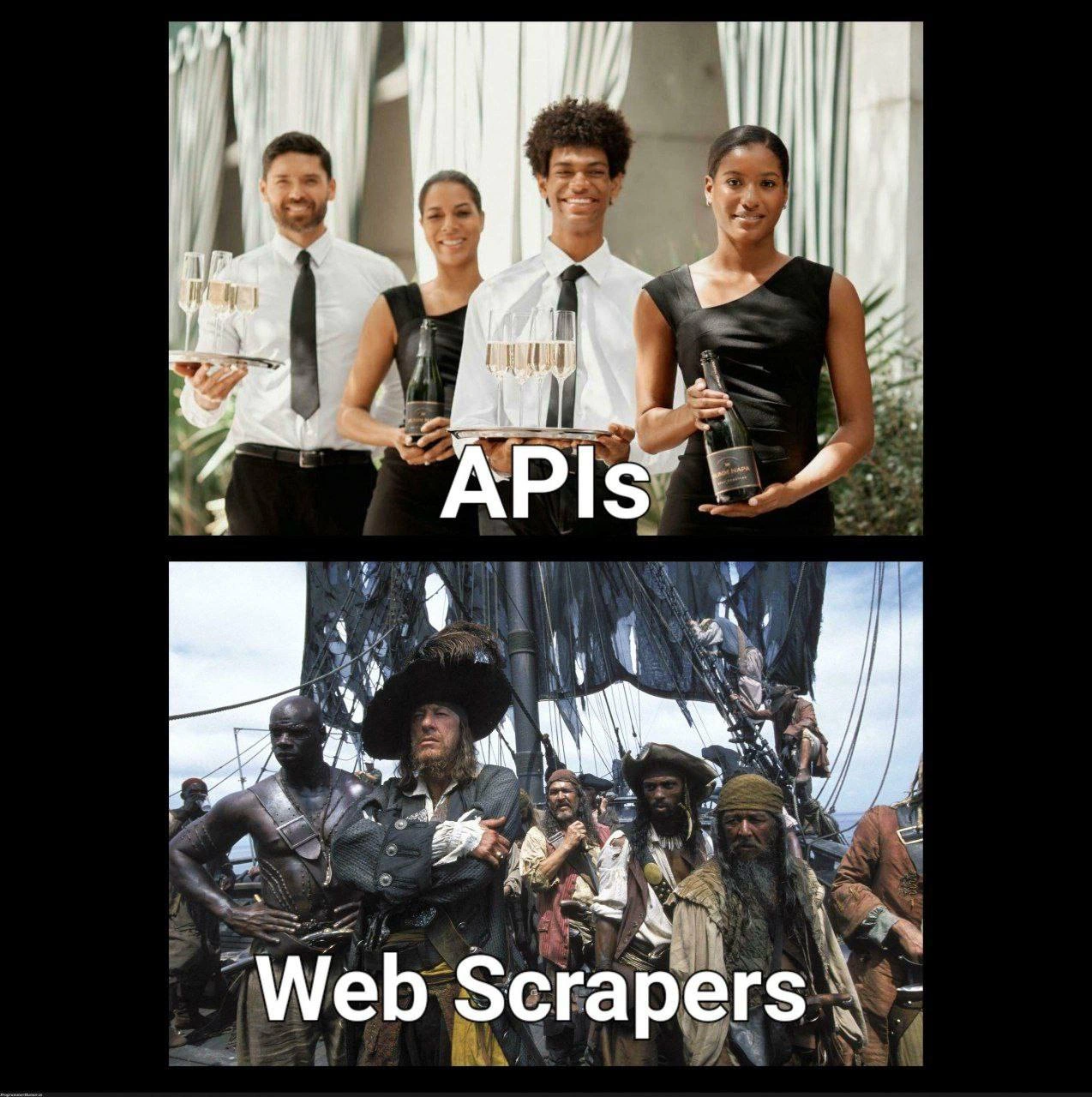
The Polished Waitstaff of APIs vs. the Swashbuckling Pirates of Web Scraping
API Post #6792, on May 23, 2025 in TG

The Polished Waitstaff of APIs vs. the Swashbuckling Pirates of Web Scraping

Why is this API meme funny?

Level 1: Polite vs Pirate

Imagine you want some candy from a friend’s house. The nice way (like an API) is to ask your friend, and they hand you a bowl with exactly the candies you wanted. Everything is orderly and you got permission – easy, right? Now, the sneaky way (like web scraping) is to wait until your friend isn’t looking, then you sneak into their kitchen and rummage through all the cabinets to find a candy. You might make a mess, or maybe the candy isn’t where you thought, and if your friend catches you, you could get in trouble! The meme is funny because it’s showing this same idea with pictures: the top shows well-dressed waiters politely serving things (that’s the API method), and the bottom shows rowdy pirates who just grab what they want (that’s the web scraping method). In simple terms, one way is polite and organized, and the other way is wild and risky. It makes people laugh because we don’t usually compare computer stuff to fancy parties and pirate adventures – but the comparison actually fits perfectly, and now you can see why!

Level 2: Waiters vs Raiders

So what exactly is going on with this “polished vs pirate” data fetch scenario? Let’s break down the key terms and concepts for a newer developer or anyone who hasn’t had the pleasure of wrangling data from the web yet.

API – Application Programming Interface: In web development, an API usually means a set of HTTP endpoints that a service provides for programmers to retrieve or send data in a structured way. Think of an API as a friendly waiter at a restaurant: you (the client) ask for specific data on the menu, and the service (waiter) brings it to you in a neat format. For example, a weather service might have an API endpoint like /api/weather?city=London that returns a tidy package of data, often in JSON (JavaScript Object Notation) format. JSON is just a lightweight data format that looks like key-value pairs, perfect for computers to parse. APIs come with documentation (sometimes using frameworks like Swagger/OpenAPI that developers love for their clarity). Documentation is basically a menu card telling you what you can ask for and what you’ll get back. Think of how nice it is to have instructions: “Call this URL, with these parameters, and you will receive that data in return.” This is why developers often express swagger_documentation_love – it’s so much easier when the service tells you exactly how to interact with it. In practice, using an API might be as simple as writing a small script or using a tool like curl or Postman to hit the URL and get data. Here’s a quick illustration:

import requests

# Using an API to get data (clean and straightforward)
response = requests.get("https://fancyservice.com/api/data?item=42")
data = response.json()  # Parse JSON response into a Python dict
print(data['result'])   # Access data by keys, as defined by the API's contract
# This prints something like: {"name": "Item42", "price": 9.99, "in_stock": True}

In the code above, requests.get fetches data from a hypothetical API. The response comes back in a structured JSON, so response.json() directly gives us usable data. No muss, no fuss. The API is doing the heavy lifting to serve exactly the info we asked for. If this were a restaurant, we just ordered a meal off the menu and it arrived exactly as described.

Web Scraping: Now imagine there’s no waiter and no menu. You still want that data, so what do you do? You go looking for it yourself among the HTML pages of the website. Web scraping means writing a script or using a tool to retrieve the raw HTML of a webpage—the same stuff your browser renders—and then extracting the specific bits of information you need from that HTML. The HTML is intended for human eyes (browsers format it into pretty pages), not for direct data queries. So scraping is inherently a bit of a hack: you’re using the website’s presentation as a data source. If an API is like ordering from the kitchen, scraping is like sneaking into the kitchen pantry to find ingredients on your own. It’s DIY data gathering. Typically, a web scraper might fetch a page and then parse it. Parsing can be done with libraries: in Python, common choices are BeautifulSoup or Scrapy, and in JavaScript, something like Cheerio. These tools let you navigate the HTML structure (the DOM) and pick out elements, say the <span> that contains a price, or the <div> that contains a weather forecast.

Here’s what a simple scraping task might look like in code:

import requests
from bs4 import BeautifulSoup

# Using web scraping to get data (the pirate way)
page = requests.get("https://fancyservice.com/items/42")        # Fetch the whole HTML page
soup = BeautifulSoup(page.text, "html.parser")                  # Parse HTML into a DOM-like structure
result_div = soup.find("div", class_="result")                  # Find a <div> with class "result"
print(result_div.get_text())                                    # Extract the text inside that div

# The output might be something raw, e.g.: "Item42 - Price: $9.99 (In stock)"
# We would then have to manually split or regex this string to get the pieces we want.

As you can see, this approach is more involved. We fetched an entire webpage (which might include headers, footers, navigation menus, lots of unrelated stuff) and then we dig through it for what we need. We looked for a <div> with a specific class name that we expect holds our data. It’s a bit like rummaging through a treasure chest: you have to know what clue to search for (in this case, an HTML tag or text pattern). We might even need to use regular expressions (re in Python) to extract the numerical value from the text blob (for example, pulling "9.99" out of "Price: $9.99"). Here be dragons – using regex on HTML is notoriously error-prone, leading to those "regex parsing regrets" the meme tags hint at. A famous developers’ joke goes: "Some people, when confronted with a problem, think, 'I know, I’ll use regular expressions.' Now they have two problems." Parsing HTML with regex often feels like that; it can get messy quickly.

Key differences: An API gives structured data; scraping deals with unstructured data. Structured means the data is already labeled and organized (like JSON with field names, or CSV columns). Unstructured means the data is hiding in a blob of text/markup and you have to impose structure on it yourself. For example, an API might return {"temperature": 72} whereas scraping might require you to find the phrase "Temp: 72°F" in a page and then figure out that 72 is the temperature. The latter is clearly more work for you as the developer.

Why “Waiters vs Raiders”? The top image labeled "APIs" shows professional servers with trays – a metaphor for how APIs serve data elegantly. They follow rules and have a certain etiquette (just like a well-defined request/response format). In tech terms, an API often has usage rules and clear responses. You typically need to follow their instructions, maybe include an API key or token (like a reservation or ticket to be served), and you get exactly what’s on the documentation. The bottom image labeled "Web Scrapers" shows pirates on a ship deck – symbolizing that scraping often feels like a rogue operation: you’re grabbing data without an official invitation. Pirates don’t get menus or waiters; pirates raid and take things in a more unpredictable manner. In development, scrapers often have to bypass obstacles: for instance, if a site requires you to click a button to load data (via JavaScript), a basic scraper might miss it because it only fetched the initial HTML. That’s when developers resort to BrowserAutomation tools, basically launching a headless browser that can run the site’s JavaScript and then scrape the results — it’s the programming equivalent of a pirate sneaking in by pretending to be a regular visitor. But doing that is slow and resource-heavy, and websites might still try to block you (some recognize when you’re not a real browser or if you’re too fast or coming from the same IP repeatedly).

Rate limiting and rules: When using an API, you usually agree to some limits (like “no more than 10 requests per second” or you'll get a specific error). With scraping, if you send too many requests too quickly, the website might not respond nicely. There’s no polite error message; instead, you might get blocked or served a fake page (some sites return a warning or CAPTCHA if they suspect a bot). That’s like the difference between a restaurant saying “please wait, you’ve ordered too much at once” versus a guard dog chasing you off the property for trying to grab too much. Also, APIs often require you to sign up for a key and agree to terms of service upfront. Scrapers don’t, because you’re just accessing the public website, but that might violate the website’s Terms of Service if they say not to do it. It’s a risk: you might be stepping outside what’s allowed. Companies can and do deploy anti-scraping measures — from simple ones like requiring login, to complex ones like monitoring patterns of access. This cat-and-mouse game is well-known to developers who maintain scrapers. For instance, have you ever wondered why some web scrapers randomize their delays between requests or rotate through a list of proxy IP addresses? It’s to avoid getting caught by these defenses (just like pirates try to evade patrol ships by taking unpredictable routes or flying flags of neutral countries).

In summary, for a junior developer: APIs are the officially supported, clean way to get data, with consistent formats like JSON and a clear contract of what you’ll receive. Web scraping is the unofficial, hacky way, where you programmatically fetch webpages and parse out what you need, dealing with whatever the site’s HTML throws at you. The meme’s joke is that these two approaches couldn’t feel more different — one is prim and proper (like fine dining in the data world) and the other is rough-and-tumble (like raiding for loot). Yet, as a developer, you might encounter both. When an API is available, you’ll likely choose it every time for sanity’s sake. But when it’s not, well… time to channel your inner pirate and scrape away (carefully).

Level 3: Swagger vs Swaggering

On one side of this meme, we have APIs presented like impeccably polite waitstaff offering data on a silver tray. On the other, Web Scrapers are portrayed as a ragtag pirate crew, pillaging HTML pages for treasure. This humorous juxtaposition hits home for seasoned developers because it exaggerates a very real contrast in data ingestion approaches. An official API is the white-glove service of the web: a structured, well-documented interface (often with a neat Swagger UI) that hands you JSON data in clean formatted responses. In contrast, writing a web scraper can feel like arming a galleon and yelling "Arr, we'll take what we need!" as you send code crawling through someone else’s HTML, parsing whatever you can find. The meme’s two panels capture the ideal vs. reality many of us know:

  • Polished API (Ideal): Predictable endpoints, stable output, clear documentation, and usually an understanding with the provider (you’re an invited guest at the data buffet). A well-designed RESTful or GraphQL API typically returns data in a structured format like JSON over HTTP. This is data served properly, with known contracts and even versioning. You know what you’ll get, and if things change, there’s a changelog or version bump. It’s like having a formal menu and waiters — you ask for user/42/orders and get a neatly plated JSON containing just that user’s orders. The interface is clear and intentional. You might even say it has that APIDevelopmentAndWebServices finesse that enterprise architectures dream of.

  • Scrappy Web Scraper (Reality): Unofficial, brittle hacks that comb through site HTML. Here you’re not requesting data via a contract; you’re web scraping content meant for human eyes, hoping the patterns don’t change. It’s akin to a pirate boarding a ship to rummage for goodies: no invites here. In code, this means fetching a webpage and using tricks like DOM traversal or regex (we’ve all had those regex_parsing_regrets 😅) to extract pieces of information buried in tags. It’s a wild adventure where one day your script triumphantly grabs the prize, and the next day it fails because a front-end developer innocently changed a <div> class name. There’s a shared trauma here: experienced devs have countless war stories of scrapers breaking at 3 AM because the target site deployed a redesign. We laugh (painfully) at the pirate analogy because we’ve lived it — swinging from rope to rope (or from one HTML element to another), trying not to crash into the sea of 404s.

The humor is amplified by how orderly vs. lawless the images are. Using an API in production feels civilized: you often get an HTTP 200 OK with well-formed JSON and maybe some polite rate-limit headers (“Please, 100 calls/minute max, thank you”). If you misuse it, you get a formal rebuke (like a structured error or a 429 Too Many Requests). On the pirate side, a web scraper might get nothing at all or weird junk data if the site decides to obfuscate content. You might hit an HTTP 403 Forbidden or a stealthy anti-bot CAPTCHA, essentially the website yelling “No trespassing!” Many sites’ Terms of Service explicitly ban scraping, making you literally feel like an outlaw when you attempt it. That’s why the pirate theme is perfect: scrapers often operate in a gray area, tiptoeing (or rather, boarding with a cutlass in teeth) around terms-of-service. As a veteran dev, you chuckle because you’ve weighed that very risk: “Do we risk a cease-and-desist by scraping, or do we play nice and live within the strict limits of their official API?” Spoiler: if the CTO wants the data badly and the API’s not available, the pirate flag gets hoisted.

Another level to this joke is maintenance and reliability. Real-world data engineers know that consuming a well-documented API is part of good data_ingestion_hygiene – it’s clean and sustainable. In contrast, scrapers are high-maintenance rascals. The meme practically screams the difference: APIs are predictable contracts, while scrapers are fragile truce. One day you’re proudly pulling structured data; the next day the provider deploys a minor UI revamp and your parser code collapses like a three-masted ship in a storm. An experienced developer has that thousand-yard stare from debugging why the scraper suddenly started capturing nothing or the wrong text (perhaps a mis-nested tag fooled your parser, or your regex greedily gobbled too much). The pirate crew image conjures the feeling of that chaotic scramble: “The HTML changed! All hands on deck to fix our script!” – a scenario many of us know too well during on-call rotations. Meanwhile, those fancy waiters (APIs) wouldn’t spill your drink so recklessly; they adhere to a schema and often even notify you of upcoming changes. The difference in coupling is key: with an API, your client is loosely coupled to an abstract interface. With scraping, your code is tightly coupled to the website’s presentational markup (a big no-no in software architecture, but hey, the business wants data now). Essentially, you’ve tied your fate to the whims of someone else’s front-end deployment cycle. If that isn’t sailing under a stranger’s flag, what is?

Industry patterns and pain: This meme also hints at the classic tug-of-war between ideal engineering and practical necessity. In an ideal world, every data source we need has a nice API. In reality, companies often guard their data or lack the resources to provide a proper API, leaving developers with no choice but to improvise. It’s a systemic issue: tight deadlines and competitive pressure mean smart people keep resorting to scrapers, even though we all know it’s technical debt. Why? Sometimes the API exists but costs money or has harsh rate limits (the dreaded “freemium” model: 100 calls/day, then $$$). Other times, to get a piece of data, you’d have to partner with the provider formally – an option that’s slow or impossible. So the pragmatic dev team says “Arr, we’ll get it ourselves.” We’ve seen tools and libraries promise to make scraping easier – headless browser automation with Selenium or Puppeteer, services to stealthily handle rotating proxies and user-agent strings (like pirates raising false flags to avoid detection by the navy 🏴‍☠️). But those solutions are often resource-intensive and bring their own headaches (ever tried running a fleet of Chrome instances on a server to mimic real users? It’s like keeping a crew of unruly privateers fed and happy). Even when such tools help, it still feels like building a contraption of duct tape and hope. There’s a reason veteran devs are cynical: we’ve patched up one too many web-scraping scripts at ungodly hours because “the treasure map moved”.

The shared laughter here is partly catharsis. We laugh because we’ve battled these absurd situations and survived to tell the tale. It’s funny in the same way an inside joke at a post-mortem meeting is funny – it hurts a little, but you can’t help grinning at the sheer pirate absurdity of it all. As one grizzled data engineer quipped when the legal team fretted about scraping a site:

Pirate Developer: "The ToS? They’re more like guidelines than actual rules." 😏

That cheeky line (a nod to Pirates of the Caribbean) perfectly encapsulates the rogue ethos behind many scraping projects. Sure, we prefer the legitimacy of an API with proper keys and OAuth tokens, but when you’re desperate for data and the official gatekeepers say “No,” well… Yo-ho-ho, it’s coding time. In summary, the meme humorously contrasts the calm, contract-abiding world of API consumers with the adventurous, risk-embracing world of web scraping. Seasoned devs recognize both the appeal and the peril of each side: the API’s promise of reliability and JSON bliss, and the scraper’s reality of regex headaches, sleepless nights, and a dash of piracy. We’ve dined at the elegant API table, and we’ve also stolen rations below deck — and we have the scars (and Stack Overflow questions) to prove it.

Description

A two-panel comparison meme contrasting APIs with web scrapers. The top panel, labeled 'APIs' in a white sans-serif font, shows four impeccably dressed, smiling waiters and waitresses holding trays with champagne glasses and bottles in a bright, elegant setting. They represent order, professionalism, and sanctioned service. In stark contrast, the bottom panel, labeled 'Web Scrapers,' depicts a scene from 'Pirates of the Caribbean,' featuring a group of rugged, disheveled pirates on the deck of a ship. They look chaotic, opportunistic, and unruly. The meme humorously analogizes the clean, structured, and intended method of data retrieval via APIs with the messy, sometimes ethically gray, and brute-force approach of web scraping. For experienced engineers, this resonates with the common dilemma of using a well-defined interface versus parsing raw HTML to get needed data, perfectly capturing the elegance of the former and the chaotic reality of the latter

Comments

14
Anonymous ★ Top Pick An API is a contract. Web scraping is a hostage negotiation with the DOM where the hostage might change its clothes, name, and location every five minutes
  1. Anonymous ★ Top Pick

    An API is a contract. Web scraping is a hostage negotiation with the DOM where the hostage might change its clothes, name, and location every five minutes

  2. Anonymous

    APIs come with Swagger docs; web scrapers come with a treasure map where every X-Path is ‘here be dragons’.

  3. Anonymous

    The irony is that half the 'elegant' APIs are just poorly documented wrappers around the same web scrapers we built in 2015, except now they charge $500/month and have a 100 request per hour rate limit that somehow makes our original BeautifulSoup script look like a Ferrari

  4. Anonymous

    APIs are like having a well-documented contract with proper authentication, versioning, and rate limits - champagne service with SLAs. Web scrapers are what you build at 2 AM when the vendor says 'we don't have an API' but you need the data anyway, hoping their frontend doesn't change and break your brittle CSS selectors. One gets you invited to the architecture review; the other gets you a Jira ticket titled 'scraper broke again' every three months when they redesign their homepage

  5. Anonymous

    APIs have contracts and SLAs; scrapers have brittle CSS selectors, rotating proxies, and a 2am on-call when marketing silently ships a redesign

  6. Anonymous

    When your data pipeline hinges on div class='content', pray no frontend dev deploys this sprint

  7. Anonymous

    Nothing says governance like replacing a contract with a headless browser: our pipeline negotiates CSRF tokens, proxy pools, and fresh 403s after every redesign, while the partner REST endpoint politely returns 429s and documentation - one is fine dining, the other is boarding the DOM

  8. @LonelyGayTiger 1y

    If they'd just expose an API I wouldn't need to make a web scraper. But they never do.

  9. @NaNmber 1y

    I currently struggle to get a 0.5+ score from recaptchav3 even in non-headless mode and even through antidetect browsers. Not sure if I should tweak settings or find a better browser 💀 Capsolver works though, so dont care

  10. @TheFloofyFloof 1y

    If they use a browser ua you can always use Anubis

  11. @SamsonovAnton 1y

    In practice, virtually all scrapers do not need to be blocked, as they make requests at a very modest rate, adding just a negligible load. Just a few of them make no pause between requests.

    1. Sure Not 1y

      I am very modest and humble with 20k paid proxy list and 20 tor-rotating containers.

      1. @NaNmber 1y

        oh hell nah 💀

  12. @NickRaspy 1y

    I tried to do some web scrapping for diploma it was kinda funny ngl

Use J and K for navigation