
The Four Stages of a Linux Update: Pride, Confidence, Failure, and Despair
Why is this OperatingSystems meme funny?
Level 1: Where Did It Go?
Imagine you have a favorite toy that you’ve decorated and played with every day — let’s say a super cool custom LEGO castle. You’re very proud of how awesome it looks (you might even say “I love my castle!”). One day, you decide to improve it by adding the latest new LEGO pieces to make it even cooler. You carefully put on these new pieces as an “update” to your castle. But as soon as you do, uh-oh! The next time you try to play with it, the castle falls completely apart. All you see are scattered pieces on the floor, and the main part of your castle is missing. You stare at the empty spot where your castle used to be and ask, “Where did it go?”
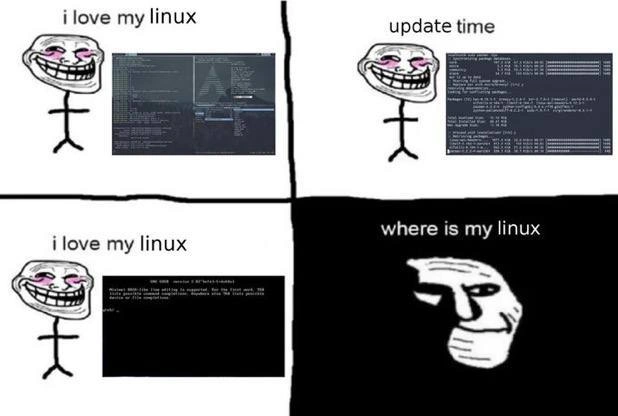
That’s exactly the feeling this meme is joking about. The person had a computer system (their “Linux” computer) that they loved and had made just the way they liked it. Then they performed an update (like adding new pieces to the castle) which was supposed to make things better. But instead, it made the whole system stop working — it’s like the computer won’t start up anymore, showing only a basic error screen (just like an empty spot or a broken base where the castle was). The last panel’s sad face and the caption “where is my linux” is just like a kid looking at the scattered LEGOs and sadly wondering, “where’s my castle?” It’s funny in a cheeky way because the person tried to do something good for their computer, but it backfired and now they have a big problem. The meme is using a silly cartoon to say: sometimes when you try to fix or update something complicated, it might break completely, and you’ll feel both shocked and a little foolish — even though later, you might laugh about how crazy it was that a simple update made it disappear!
Level 2: Bootloader Blues
Let’s break down what’s happening in this meme for those newer to Linux. The character is using Arch Linux, a popular but advanced distribution of the Linux operating system. Arch is known for being bleeding-edge, which means it doesn’t wait to bundle updates into infrequent big releases; instead, it constantly pushes out the latest versions of software through a rolling release model. The upside is you get new features and fixes right away. The downside? Sometimes those updates aren’t thoroughly tested together, so a regular update can occasionally break things in surprising ways.
In the second panel the user runs sudo pacman -Syu. Here pacman is Arch’s package manager (similar to apt on Ubuntu or dnf on Fedora). The flags -Syu specifically tell it to Synchronize package lists (-Sy) and upgrade all installed packages to their newest versions. In simpler terms, this command is “update my entire system to the latest software”. It’s something Arch users do frequently to stay current. The meme calls this a “quantum leap” because one small command can leap your system from a working state to a broken state almost instantly.
After the update, the user’s monitor in the third panel isn’t showing the pretty desktop anymore. Instead, it’s a black screen with white text from the boot process. We see an error from GNU GRUB, which is the bootloader many Linux systems use. The bootloader’s job is to start up the main operating system. When you turn on your computer, the firmware (like BIOS or UEFI) hands control to GRUB, and GRUB’s job is to load the Linux kernel (the core of the OS) from the hard drive into memory and run it. If GRUB can’t find the kernel, it throws an error and can’t continue. That’s exactly what the error message in the comic shows:
GNU GRUB version 2.XX
error: file '/boot/vmlinuz-linux' not found.
Entering rescue mode...
grub rescue> _
This means GRUB looked for the file called vmlinuz-linux in the /boot directory – that’s the expected filename for Arch’s Linux kernel – and it wasn’t there. Now the system is stuck at the grub rescue> prompt, which is a minimal environment you get when GRUB fails to boot normally. Essentially, the computer can’t launch the operating system at all, leaving the user at a dead end (just a blinking prompt).
So why did this happen right after an update? In Arch Linux, that pacman -Syu likely updated the kernel (the core part of the OS) to a new version. During that process, the package manager might have removed the old vmlinuz-linux file and placed a new one (maybe with a slightly different name or path). If for some reason the GRUB configuration didn’t update to point to the new kernel, or if the new kernel file didn’t get copied where it should (for example, due to a misconfigured separate /boot partition or an out-of-sync dependency), then on reboot GRUB is still looking for the old one and fails. A less common but possible issue is a kernel panic or other boot failure due to an incompatible update (like a new graphics driver module not loading), but the error shown is literally “file not found,” a pretty direct bootloader problem.
For a newer Linux user, this scenario is basically your computer saying: “I can’t find the operating system to start it up.” The joke in the meme is that the user went from happily saying “I love my Linux” to, after the update, staring at the screen asking “Where is my Linux?” It’s as if the entire OS disappeared—which, in a sense, it did become inaccessible. This kind of situation is a classic “oops” moment in the Arch community. It usually requires manual recovery: one might have to use an Arch installation USB, boot into a live environment, and then perform a chroot (which means basically accessing your system’s files from an external booted system) to fix the issue, like reinstalling the kernel package or repairing the GRUB config. It’s advanced troubleshooting, and not what our poor trollface character was expecting from a routine update!
Key terms in the meme include “riced desktop”, which is slang for a highly customized and visually polished Linux desktop (the term “ricing” means personalizing the look-and-feel, like fancy themes, layouts, and configs — the Arch community is famous for this). The irony is that all that effort spent making a gorgeous, personalized setup can be rendered moot by one bad update that dumps you to a text-only error screen. “Dependency hell” is also alluded to: that’s when software updates have so many interdependent packages that one mismatch can break the whole system. Arch tries to avoid this by updating everything together (no partial updates!), but it assumes the user merges config files and reads upgrade notices. If you skip those steps, you can definitely end up in, well, bootloader hell as shown.
In summary, the meme is playing on an experience that might be unfamiliar to beginners but is a known pitfall in the Linux world: system updates can sometimes go sideways, especially on a distribution that prioritizes staying cutting-edge. The once proud Arch user now has to confront a scary error screen, wondering where their beloved system went. It’s a tongue-in-cheek warning: with great power (of a rolling release) comes great responsibility (to fix it when it breaks)!
Level 3: Rolling Release Roulette
This meme hits home for seasoned Linux users because it satirizes the well-known gamble of running Arch Linux on your personal machine. In the first panel, the smug trollface character proudly proclaims “I love my Linux” while showing off a heavily customized (or “riced”) desktop. Seasoned devs recognize this archetype: the Arch user who has tweaked every UI detail, running a tiling window manager with an Arch logo proudly in the terminal. There’s even an inside joke here about Arch users often bragging — “btw I use Arch” — implying a certain pride in mastering a complex system. But as the second panel (“update time”) foreshadows, that pride is about to meet its nemesis: the infamous pacman -Syu command. This is Arch’s full system upgrade, and running it can feel like spinning a chamber in Russian roulette. Most days you get away with pulling the trigger — updated packages slide in smoothly. But every once in a while, you hit the bullet: a critical component update that doesn’t play nice.
The bottom-left panel mirrors the first, repeating “i love my linux” — except now the monitor shows a terrifying wall of text instead of the sleek GUI. It’s the kind of black-and-white boot output that instantly quickens an old sysadmin’s pulse. We see GNU GRUB complaining it can’t find vmlinuz-linux (the Linux kernel file) and maybe other ominous lines. This is the moment any experienced Arch user dreads: the system can’t even begin to boot. The joke’s punchline comes in the final panel: “where is my linux” captioned over the sad, masked face. The smug troll is gone; all that’s left is despair in the dark. It’s a hilarious exaggeration because we’ve all seen posts on forums like, “Help! I did an update and now my system won’t boot!” — the meme distills that into a four-pane tragedy-comedy.
What makes this funny (in a painful way) to a veteran developer is how precisely it captures the rite of passage on Arch. The rolling-release model means you’re constantly getting the newest versions of everything from the kernel on down. Great for latest features; not so great for stability. A minor version bump in a core library, a new kernel that invalidates a third-party driver, or an unnoticed post-install step from Arch News — and suddenly you’re in dependency hell or bootloader purgatory. The meme illustrates that absurd feeling: one minute you’re tiling windows like a 1337 power user, the next minute you’re staring at a GRUB rescue console at 3 AM, asking “What the heck just happened?” It’s the ultimate punch in the gut after bragging about your leet setup.
In real life, the scenario often goes like this: you run pacman -Syu to update. Perhaps a new Linux kernel package installs and the old one is removed. Arch, being minimalist, typically keeps only one kernel version (unless you manually keep backups). If something wasn’t aligned — say you had a separate /boot partition that wasn’t mounted during the upgrade, or the bootloader config didn’t auto-update — GRUB will still point to the old kernel file that’s no longer there. Result: error: file not found. Another common gotcha is when critical libraries (like the C library or drivers) update; if the update is incomplete or you have out-of-tree modules from the AUR (Arch User Repository) that you forgot to rebuild, you might get kernel panics or missing module errors on reboot. The meme doesn’t show the recovery, but every senior dev knows the drill: scramble for a live USB, chroot into the system, comb Arch forums on your phone for a fix, and rue the timing of that “quick update”. It’s funny because it’s true. We laugh, having been that person frantically Googling error messages while our beautiful riced desktop is now as useful as a paperweight. In short, Rolling Release Roulette occasionally lands on double zero – and this meme captures that communal facepalm moment when it does.
Level 4: Schrödinger’s Kernel
At the bleeding edge of a rolling-release distro like Arch, your system sometimes exists in a state of quantum uncertainty: bootable and bricked at the same time. Only when you reboot do you “open the box” to collapse the waveform and discover which reality you’re in. The meme’s title jokes about a “quantum leap” from a perfectly tuned desktop to a GRUB prompt – an abrupt, discontinuous jump as mystifying as an electron teleporting orbits. Under the hood, sudo pacman -Syu isn’t just updating a few apps; it’s performing a high-wire act of replacing your OS’s core components in place. This operation must maintain a consistent state across the kernel, modules, bootloader configuration, and userland libraries all at once. If any part of that synchronization fails, you end up with a system in a logically impossible state – like a puzzle where one crucial piece (say, the kernel image) is missing. In theoretical terms, the update process aspires to an atomic transaction: either everything updates perfectly or nothing does. But unlike a database commit, package managers don’t get a simple “rollback” button when something subtle goes wrong. Instead, you wake up to a boot process that hits a fatal exception on the most fundamental resource: the operating system’s kernel itself is MIA.
From a systems theory perspective, this is a catastrophic violation of consistency. The bootloader (GRUB) has stale pointers to a kernel file that no longer exists or mismatches the new version. It’s a bit like a dangling pointer in memory – one moment of mismatch and the whole program (or computer, in this case) crashes. The humor here is laced with dark irony: a routine maintenance command has invoked chaos akin to the observer effect in quantum physics. Arch’s philosophy of “latest is greatest” means you’re essentially beta-testing updates live on your machine, collapsing the superposition of works vs. breaks by simply rebooting. In a way, every Arch user becomes Schrödinger’s sysadmin, and this meme is the moment they realize the experiment’s outcome: the cat (their Linux) might just be dead.
Description
The image is a four-panel comic strip meme using the 'Trollface' character to illustrate the perilous journey of updating a Linux system. In the first panel, a happy, blushing Trollface is captioned 'i love my linux' next to a screenshot of a functioning, customized desktop environment. In the second panel, the same happy character initiates a system update via the command line, with the caption 'update time'. The third panel, ironically captioned 'i love my linux' again, shows the aftermath: the system has failed to boot, displaying only a black screen with command-line error messages. The final panel shifts to a dark, shadowy background with a sad, contemplative version of the Trollface (often called 'Trollge'), and the caption 'where is my linux'. The humor captures a classic, painful rite of passage for Linux users: a routine software update that catastrophically breaks the entire operating system, destroying hours of work and customization. This is especially relatable for users of rolling-release distributions, where the risk of such breakages is higher

Comments
26Comment deleted
It's not a bug, it's a feature. The system is just giving you a hands-on opportunity to practice your chroot and GRUB reinstall skills from a live USB
Rolling releases: because sometimes your uptime needs the excitement of a surprise GRUB-rescue deep-dive
The four stages of grief in Linux administration: love, optimism, denial, and finally accepting you should have taken that ZFS snapshot before running 'sudo do-release-upgrade' on a Friday afternoon
The classic Linux update experience: 'sudo pacman -Syu' is basically Schrödinger's command - your system is simultaneously stable and completely broken until you reboot and observe the outcome. The real question isn't whether you love Linux, it's whether Linux still loves you after you've updated the keyring without reading the Arch Wiki first
pacman -Syu is laptop-scale chaos engineering - DKMS misses a beat, initramfs forgets your GPU, and GRUB delivers the postmortem
Running a full -Syu without snapshots is the desktop equivalent of a Friday prod deploy - no canary, no rollback, and GRUB as the blast radius
The Arch way: Update early, update often, boot from live USB frequently
rm rf deez Comment deleted
what's deez Comment deleted
He uses arch, btw Comment deleted
*used (prior to third panel) // also: not every computer toucher goes by he/him Comment deleted
The third panel is a typical state of Arch Linux Comment deleted
my experience with arch linux deviates from what you consider to be typical Comment deleted
it did not break in unexpected ways, only in expected ones, and only when i was messing with it on purpose Comment deleted
So getting better at linux implies learning to expect all the ways in which it might fail Comment deleted
Note to self: DO NOT UPDATE LINUX MINT Comment deleted
Why? :0 Comment deleted
Did you see the meme? Comment deleted
try gentoo! once you'll fix all the stuff that can break, nothing will seem "hard" and compilling stuff will teach you patience :P Comment deleted
gnome took forever to compile😭 can't imagine how I'm gonna update it again,legit took me like 8 hours Comment deleted
Just joking around Comment deleted
So true, just reinstalled my Ubuntu today Comment deleted
Your Linux is Error: filesystem not found Comment deleted
What's better than linux? isn\t it?😁 Comment deleted
Been using linux for more than 5 years, never experienced that Comment deleted
Tfw no NixOS Comment deleted

