Skip to content
DevMeme
1694 of 7435
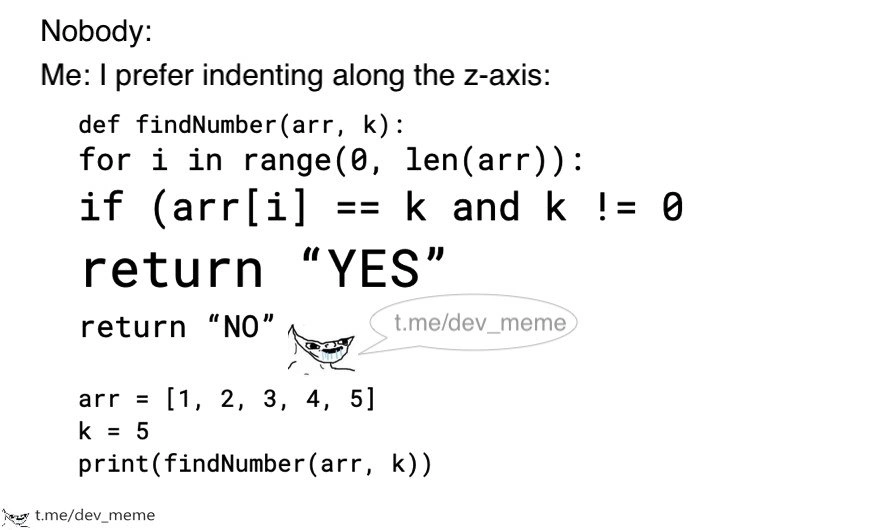
When your Python indentation jumps into 3D and destroys code readability
CodeQuality Post #1890, on Aug 9, 2020 in TG

When your Python indentation jumps into 3D and destroys code readability

Why is this CodeQuality meme funny?

Level 1: Coloring Outside the Lines

Imagine you’re reading a story, and whenever there’s a new paragraph or a sub-story, instead of moving a bit to the right or using a new line, the writer just makes the text bigger and bolder to show it’s a sub-section. Soon, you have huge, giant letters popping out of the page for the deeply nested parts of the story. That would be pretty confusing, right? You might lose track of which part belongs to what because everything is just screaming at you in different sizes. Normally, writers use indentation (like moving text in a bit) or bullet points or numbering to show structure – kind of like how you color inside the lines in a coloring book to keep things neat. If someone suddenly started coloring outside the lines in 3D puff paint, the picture would get really messy and hard to see. In the same way, this meme shows a programmer doing something silly: instead of using the normal way to structure code (adding spaces at the start of lines for sub-steps), they pretend they can just make the text larger for each sub-step. It’s funny because it’s a ridiculous idea – it’s like a kid using a bigger crayon for each line of homework to show new paragraphs. The result would be a messy, unreadable assignment that the teacher couldn’t understand. In coding, being neat and following the basic spacing rules is important so everyone can read your work. This person’s approach would be super hard for others to read, just like a story written with jumping font sizes would be hard to follow. The meme makes us laugh because it’s an exaggeration: no real programmer would do that, just like no sane writer would print each new sentence larger than the last. It’s a goofy way to remind us that in both writing and coding, playing by the basic formatting rules is there to help everyone understand what’s going on.

Level 2: Indentation Intervention

Let’s break down what’s going on in simpler terms. Python is a programming language that cares a lot about indentation (the spaces or tabs at the beginning of a line). In many languages like C, Java, or JavaScript, you might see curly braces { } or keywords to mark where a loop or function starts and ends. In Python, there are no braces – it uses the whitespace at the start of lines to decide what’s inside what. This is often called being whitespace-sensitive. It means if you indent a line (move it rightward with spaces), Python knows that line is part of the block above it (like inside a loop or function). Remove the indent, and Python thinks the block ended. If the indenting is wrong or inconsistent, you’ll get errors or misbehaving code.

Now, Python has an official style guide called PEP 8 (Python Enhancement Proposal #8) which gives recommendations on how to format code for best CodeReadability. One big rule is: use 4 spaces for each indentation level (some projects allow a tab, but spaces are the norm). The reason is to keep everyone’s code looking the same so it’s easy to read and share. For example, a properly indented Python function might look like this:

def findNumber(arr, k):
    for i in range(len(arr)):
        if arr[i] == k and k != 0:
            return "YES"
    return "NO"

In this example, the lines inside def findNumber(arr, k): are indented with 4 spaces. Then the line inside the for loop has another 4 spaces (making 8 from the left margin), and the line inside the if has yet another indent (12 spaces from the margin). Those spaces are not just for show – Python uses them to group the code. The return "YES" is indented under the if, so it executes only if the if condition is true. The final return "NO" is indented under the def but not under the for (it aligns with the for, meaning it runs after the loop finishes). If any of these lines had the wrong number of spaces, Python would complain with an IndentationError (basically saying “I was expecting an indented block here” or “unexpected indent”).

Now, what does the meme depict? It’s showing a ridiculous way to indent code: instead of using the normal 4 spaces or a tab, each nested line is written in a bigger font size – like visually “popping out” of the screen (as if going into the page’s Z-axis). Of course, when you actually write code in a file, you can’t have “bigger font” per indent level – font size is a display thing, not something the code file stores. The meme is a joke: if someone literally tried to indicate nesting by making text larger, it would destroy the code’s structure. The Python interpreter can’t interpret font size; it would just see all lines starting at the same column if no real spaces were added, effectively meaning no indentation at all. That code wouldn’t run correctly. It would likely throw a syntax error at the first sign of something unexpected (probably at the second line where an indent was needed after the def line). So this idea of font_size_indentation is completely absurd – it’s a bit like saying “I’m going to sort my books by smell instead of by title or author.” It just doesn’t work in any practical or logical way.

The humor is also in the format of the meme text: you see the lines “Nobody:” and then “Me: I prefer indenting along the z-axis”. This “Nobody/Me” format is an Internet meme convention. “Nobody:” (often “Nobody: crickets”) implies absolutely no one asked for or does this thing; then “Me:” is the meme-author doing a bizarre or exaggerated action anyway. Here, it means no normal programmer does crazy 3D indentation, but this person (the “Me” in the meme) proudly does it, as if it’s a preference. It’s poking fun at the idea of a developer who deliberately chooses a formatting style that no one else would ever choose because it’s so impractical.

The code shown in the meme is a function findNumber(arr, k) that goes through a list arr and checks if the number k is in there. If it finds k and k isn’t zero, it returns "YES". If it finishes the loop without finding it, it returns "NO". That logic is fine (though one might wonder why k has to be not zero – maybe just an extra condition from some problem definition). The point is, it’s a simple function that could be written by a beginner or as a coding exercise. However, the way it’s formatted in the meme is not fine. Each indent level was displayed by increasing the font, which would be terribly confusing in any real code editor or printout. Normally, programmers keep all code text the same size and use indent rules to show structure; here the structure is (attempted to be) shown by text scaling, which isn’t a thing in raw code. If you tried to actually replicate this absurd_indentation_style in a code editor, you might literally have to insert a bunch of spaces and manually adjust font sizes for certain lines, which no environment supports because it’s contrary to how code is meant to be written.

Why is this a CodeStyleGuides and CodeFormatting issue? Because readability matters. Code is read by developers far more often than it’s written. A key part of CodeQuality is making sure your code style is consistent and easy to follow. That’s why teams adopt style guides like PEP 8 and use tools (like linters) to check formatting. The person in the meme is basically ignoring all that and doing something wild that would make others yell “What the heck is this?!” If you were a new programmer (junior dev) working on a team and you formatted your code in a crazy unconventional way (like aligning things oddly, or using non-standard characters, or in this case imaginary 3D spacing), your senior teammates would likely pull you aside for an indentation intervention – gently (or firmly) explaining why that’s not okay. They’d say: “Look, we know you want to be creative, but code isn’t the place for freestyling with fonts. We have conventions for a reason!” In short, the meme underscores how silly it would be to break a fundamental LanguageQuirk of Python (significant whitespace) just to be quirky. It teaches, through humor, that while coding can be creative, there’s a fine line where creativity starts harming collaboration and clarity. Even without deep Python knowledge, one can grasp that making each nested line bigger and bigger is not normal – it’s a joke about taking something simple (indenting with spaces) and doing it in the most over-the-top way.

And yes, the small cartoon cat with the speech bubble “t.me/dev_meme” is just a watermark crediting the Telegram channel where this meme was posted. 😸 It’s not part of the Python code (in case anyone was worried the cat was some weird syntax!). Think of it like the artist’s signature.

Level 3: Z-Axis Insanity

At first glance, every seasoned Pythonista’s eyes are bleeding. The meme shows a developer proudly claiming “I prefer indenting along the z-axis”. In Python, code blocks are defined by indentation (a language design known as the off-side rule). Indentation is normally purely horizontal (spaces or tabs at the start of a line – think X-axis) to nest code like for loops or if statements. But this joker has cranked indentation into a fictitious third dimension – using font size as an indent cue 😱. It’s a direct violation of both logic and style: the Python interpreter doesn’t care if your text is bigger; it cares about actual leading whitespace characters. In practice, this absurd indentation style would either flatten all code to the same block (if no real tabs/spaces) or confuse anyone reading it. It’s a CodeQuality nightmare and a war crime against PEP 8 (Python’s style guide). PEP 8 and other CodeStyleGuides are obsessed with consistency (e.g. “Use 4 spaces per indent level” – no mention of cranking up the font to 48pt 😅). The humor here riffs on Python’s whitespace sensitivity: the language forces you to format correctly, so doing something so off-the-wall as font_size_indentation is comically self-sabotaging. Every experienced dev shares an inner cringe because we’ve all spent late nights tracking an IndentationError or cursing misaligned blocks. Seeing someone deliberately choose a format that would destroy CodeReadability and maintainability triggers that exasperated “what on Earth?!” reaction. It’s like the dev is flexing creative muscles nobody asked for (hence the classic nobody: ... me: meme setup). The snippet itself defines a findNumber function that searches a list for a value k and returns "YES" or "NO" – straightforward logic utterly upstaged by the formatting stunt. In real life, trying this font-based indent would prompt Python to throw a fit (IndentationError: expected an indented block), and any teammate or code reviewer would likely do a double-take followed by a long facepalm. The meme exaggerates a real principle: code should be readable. By pushing indent into a goofy 3D visual, it destroys code readability so thoroughly that even the little cartoon cat watermark (from the dev meme channel) looks horrified. It’s a senior dev fever dream of what not to do – blending SyntaxHumor with a dash of horror. In summary, this is poking fun at a LanguageQuirk (Python’s strict indent) by imagining the most insane way to abuse it. The result? A hilarious DeveloperHumor cautionary tale: Just because you can style your code like an Escher painting doesn’t mean you should.

Why is this so funny to experienced devs? It’s the clash between Python’s elegant simplicity and a ridiculously over-complicated personal quirk. We spend careers preaching “CodeFormatting standards exist for a reason” and then someone goes and invents a 3D indent. It’s a joke at the expense of those who prioritize flashy individuality over team-friendly clarity. Seasoned developers immediately recall painful code reviews or production bugs caused by something as silly as a misplaced space or a mix of tabs and spaces. We have scars from debugging invisible whitespace issues. So the idea of a colleague who literally embiggens each indent level is equal parts absurd and distressing. This comic exaggeration works because it takes a real Python rule (indentation defines scope) and violates it in a way that is physically impossible yet spiritually reminiscent of real bad practices. It’s a SyntaxHumor gem — mocking the kind of “creative” formatting that would give any linters a heart attack. The Languages category tag fits perfectly: only in Python (and a few off-side rule languages) would whitespace be such a holy thing that messing with it feels sacrilegious. The shared understanding among devs is what sells the joke: we all know that one person who thinks normal rules don’t apply to them, and here that rule-breaking is taken to an outlandish extreme.

To highlight the contrast, consider this quick comparison:

Standard Python Indent Z-Axis Indentation (Meme)
Use spaces/tabs to indent code blocks Use larger font size to “indent” visually
Recognized by the Python interpreter (valid syntax) Interpreter has no clue about font size 😜
Follows PEP 8 and keeps code uniformly readable Violates all style guides; unreadable mess
Tools like pylint/flake8 enforce it No tool supports this (maybe PowerPoint?)
Teammates will thank you for clean code Teammates will hunt you down with printouts

In short, it’s obvious to veterans that indentation is semantic in Python – you can’t just redefine it on a whim. The meme tickles that inner cynic and teacher in us: “Imagine the chaos if someone actually did this!” It’s a senior-level inside joke about code readability taken to a ludicrous extreme.

Description

Black-on-white meme starts with the call-and-response format: "Nobody:" on one line, then "Me: I prefer indenting along the z-axis:". A Python code block follows where each nested line is rendered in progressively larger font sizes instead of using spaces or tabs: "def findNumber(arr, k):", "for i in range(0, len(arr)):", "if (arr[i] == k and k != 0", "return “YES”", "return “NO”". Beneath that, normal-sized lines set up test data - "arr = [1, 2, 3, 4, 5]", "k = 5", and "print(findNumber(arr, k))". A small cartoon cat with a speech bubble watermark reads "t.me/dev_meme". The joke riffs on Python’s whitespace sensitivity: replacing indentation with font-size “depth” would completely break PEP 8 style rules and ruin maintainability, poking fun at developers who take formatting creativity too far
Comments

6
Anonymous ★ Top Pick Sure, switch to font-size indentation - Black will rage-quit, Git blame turns abstract art, and the FORTRAN veteran will smugly note we solved columns in ’66
  1. Anonymous ★ Top Pick

    Sure, switch to font-size indentation - Black will rage-quit, Git blame turns abstract art, and the FORTRAN veteran will smugly note we solved columns in ’66

  2. Anonymous

    This is what happens when you tell a senior engineer that code reviews are now measuring 'depth of implementation' as a KPI - they take it literally and start implementing depth perception requirements in their indentation strategy

  3. Anonymous

    This is what happens when a developer takes 'thinking in three dimensions' too literally - PEP 8 explicitly forbids z-axis indentation, but apparently nobody told them about the `--max-depth` linter flag. The real tragedy? This code would still run perfectly in Python, proving that syntactic correctness and maintainability exist in entirely different dimensional spaces

  4. Anonymous

    After two decades of tabs vs spaces, I’ve upgraded to z-axis indentation: every level bumps the font size until the return screams “YES”; algorithm still O(n), but code reviews are O(dB)

  5. Anonymous

    PEP8? Nah, this code achieves escape velocity from readability - straight into the event horizon of merge conflicts

  6. Anonymous

    Tabs vs spaces was survivable; then design proposed “indent by z-index” - Black shrugged, Flake8 filed a 3D bug, and code review needed a typographer

Use J and K for navigation