Calling npm install 'hot' then frantically correcting yourself to praise yarn add
Why is this PackageManagement meme funny?
Level 1: Oops, Wrong One!
Imagine you have two favorite toys, a red one and a blue one. One day, you’re with a bunch of friends who all really love the blue toy. You accidentally blurt out, “Wow, the red toy is the coolest!” Then you see everyone staring at you because they all think the blue one is best. You get a little scared you picked the “wrong” favorite. So immediately you wave your hands and shout, “No, no – I meant the blue one is the coolest, the blue one!”
In this meme, the developer did just that, but with computer tools. They first praised the wrong one by mistake and then hurried to praise the right one. It’s funny because we all understand that panicky feeling of saying the wrong thing and trying really hard (maybe a little too hard) to fix it right away.
Level 2: A Tale of Two Commands
Let’s break down the joke in simpler terms. In JavaScript development, npm and Yarn are two popular tools for managing project libraries (we call these libraries “dependencies”). If your project needs an external package (say a date utility or a web framework), you use a package manager to download and install it for you. npm (short for Node Package Manager) is the default tool that comes with Node.js. The usual way to add a new library with npm is by typing a command in your terminal like:
npm install <package-name>
For example, npm install express would fetch the Express library from the online npm registry and add it to your project. This command also updates a file named package.json (which lists your project’s dependencies) and generates or updates a lockfile (npm’s lockfile is called package-lock.json) to pin down the exact version installed.
Yarn is an alternative package manager that was created to address some speed and consistency issues developers encountered with npm, especially in large projects. Yarn’s syntax is a bit different. Instead of install, Yarn uses the yarn add command for adding a new dependency:
yarn add <package-name>
So, doing yarn add express achieves the same goal: it installs the Express package and updates your package.json. Yarn also creates its own lockfile named yarn.lock to ensure every developer on the team installs the exact same versions of dependencies.
To compare the two side by side:
| Using npm (Node Package Manager) | Using Yarn (Alternative Package Manager) |
|---|---|
npm install lodash |
yarn add lodash |
Updates package.json + creates/updates package-lock.json |
Updates package.json + creates/updates yarn.lock |
| Installs packages one by one (legacy npm) | Installs packages in parallel (faster downloads) |
| Comes bundled with Node.js | Must be installed separately (one extra step) |
Both npm and Yarn essentially do the same job: they help you download dependency packages (like the lodash library in the example above) and keep track of them. Yarn became popular because it introduced improvements like caching files locally (so you don’t re-download the same package over and over) and faster, more reliable installs. Npm later caught up on many of these features (for instance, npm v5+ also does automatic saving to package.json and has its own lockfile).
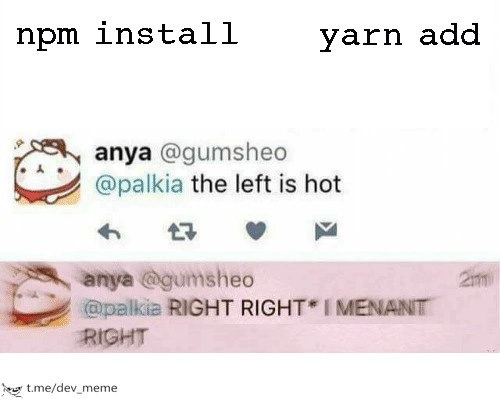
Now, what’s happening in the meme? The text “npm install” is shown on the left and “yarn add” on the right, like two choices. The meme uses a twitter_screenshot_meme format (an image of real or fake tweets). In the top panel tweet, a user says “the left is hot” in reply to someone – meaning they’re calling the left option (npm install) “hot” (slang for cool or awesome). This implies the person initially thought npm’s command was the better or more attractive choice.
However, the second panel (tinted pink/red to indicate alarm or embarrassment) shows that same user two minutes later, urgently correcting themselves: “RIGHT RIGHT I MENANT RIGHT”*. They tried to say “Right, right – I meant right!” but in their haste they even misspelled “meant” as “menant”! The asterisk after the first “RIGHT” is a nod to how people often correct a mistake in text by using an asterisk. Here it’s as if they first said the left side was hot, and now they’re replying to fix that mistake: “Right is what I meant to say!”
This alludes to a common scenario in developer culture: sometimes people have very strong preferences for tools. There was a period when many developers swore by Yarn and playfully poked fun at npm for being slower or old-school. In such circles, calling npm install the “hot” choice might raise some eyebrows. The meme exaggerates this into a funny story: the developer accidentally praises npm (perhaps their fingers typed it out of habit, since npm install was ingrained in so many tutorials and muscle memory). Immediately, they realize the “correct” trendy answer (at least among their peers) should have been yarn add. So they panic-post a correction, basically saying “No no, I meant Yarn is the great one!”
The humor comes from how over-the-top the correction is. The person is so flustered that they’re virtually yelling (all caps “RIGHT RIGHT”) and typing so fast they make a typo. It’s like watching someone cheer for the wrong team for a second, then quickly switch sides when they see their friends glaring. If you’re new to this joke, just know it’s riffing on the idea that developers sometimes treat tools like fandoms or sports teams. CLI (Command Line Interface) commands like npm install vs yarn add became a lighthearted battleground in the JavaScript world. The meme makes it accessible and silly: everyone can relate to the embarrassment of a quick “Oops, that’s not what I meant!” – even if the subject here is just a nerdy detail of how we install our code libraries. In short, it’s developer humor showing how we can be passionate (perhaps too passionate) about the tools we use, to the point of playfully “correcting” ourselves if we show affinity to the “wrong” one in front of the cool kids.
Level 3: Package Manager Panic
At first glance, this meme pokes fun at the JavaScriptEcosystem’s habit of turning tooling choices into team loyalties. In the world of PackageManagement and CLI tools, few debates got as heated as npm vs Yarn. The meme format is a classic “left vs right” showdown: on the left we see npm install, on the right yarn add. A Twitter screenshot frames the drama. In the first tweet, user anya confidently declares “the left is hot” – i.e. praising npm install as the cooler choice. But mere minutes later, panic sets in. The second tweet (blushed pink with embarrassment) has her frantically backpedaling: “RIGHT RIGHT I MENANT RIGHT”* (typo and all). It’s a comedic portrayal of a developer who accidentally praised the wrong package manager and scrambles to correct it.
Why is this so relatable? Because many seasoned devs have almost muscle-memory with npm install after years of using Node.js. It’s the default way to grab NPMPackages from the registry. But around 2016, Yarn burst onto the scene, addressing some frustrations with npm’s speed and reliability. Yarn’s creators (Facebook engineers) promised faster installs through parallel downloads, a trusty yarn.lock for exact version control, and better offline caching. It quickly earned a reputation as the “cool new tool” in DependencyManagement, especially after npm’s infamous “left-pad” incident when a tiny package’s removal broke half the internet. Suddenly, saying you still used npm install could feel like admitting you hadn’t caught up with modern tooling. Many teams eagerly switched to yarn for their Node projects, sometimes almost treating it like a badge of honor – “We use Yarn because we value fast, reproducible builds!”
In that context, the meme’s hapless developer is caught in a CLI loyalty crisis. She instinctively calls npm’s command “hot” (maybe out of habit or a genuine feeling), only to realize her audience (or her own convictions) favor Yarn. The panicked correction is hilariously exaggerated – complete with a frantic double “RIGHT RIGHT” and a misspelling (“MENANT” instead of “meant”, showing just how flustered she is). That typo is the cherry on top: every developer knows the irony of making more mistakes while trying to fix an error under pressure. It’s like hitting Ctrl+C in the wrong terminal window – you think you’re fixing things, but you might be making it worse! Here, the poor tweeter even botches the correction tweet, amplifying the comedic effect.
At a deeper level, this meme satirizes the almost tribal nature of developer tool preferences. Just as some devs fiercely defend their text editor or a favorite framework, the npm vs Yarn rivalry was a real water-cooler (or Slack channel) topic. Yarn enthusiasts touted how yarn add was sleeker and more reliable, while npm loyalists noted that npm caught up by v5 with its own package-lock.json and performance boosts. The meme nails that feeling of “Oops, did I just compliment the wrong side?”. It’s as if a developer publicly said “I love tabs” in a room full of space-indent fans and then broke into a sweat, yelling “I mean spaces! Spaces are the best!” Everyone who’s been around dev communities recognizes this mix of sincerity and absurdity – we know these tool rivalries don’t truly matter in the end, but in the moment, they can feel oddly important. That’s why this meme gets knowing laughs from senior engineers: it humorously mirrors our own experiences of harmless tech zealotry and the quick about-face when we realize we’ve broken the unofficial team code. In short, it’s a playful jab at how attached we became to our favorite Tooling, and how silly (yet real) those attachments can be.
Description
White background meme with large monospace text across the top reading "npm install" on the left and "yarn add" on the right. Below, a two-panel screenshot of a tweet. Panel one shows user "anya @gumsheo" replying to "@palkia" with the text "the left is hot" alongside the usual reply, retweet, and heart icons. Panel two, tinted pink to show panic, shows the same user screaming "@palkia RIGHT RIGHT* I MENANT† RIGHT" (misspelling "meant") only two minutes later. The joke is that a developer initially praises the left-hand command (npm install) but immediately realizes they intended to compliment the right-hand command (yarn add), humorously reflecting package-manager loyalties and CLI muscle memory in JavaScript workflows
Comments
6Comment deleted
Whispered “npm install” in our Yarn monorepo and instantly triggered a Sev-1: “Unauthorized lockfile mutation in prod.” Turns out muscle memory is our scariest dependency
Switching package managers mid-project is like changing your mind about microservices after you've already deployed 47 of them - technically possible, but everyone knows you're just lying to yourself about the lock file conflicts
The real hot take? Both are wrong - it's actually `pnpm install` with its superior disk space efficiency and strict node_modules structure. But we all know the true winner is whoever's lockfile doesn't cause merge conflicts in your next PR
The only thing hotter than “yarn add” is the incident when someone commits both yarn.lock and package-lock.json to main
“npm install” is hot - until the monorepo’s hoisting combusts and the lockfile PR is 8k lines. RIGHT, RIGHT - I meant “yarn add.” Next week I’ll claim we always used pnpm for “deterministic installs.”
Yarn add: parallel bliss in 2s. npm install: sequential symlink purgatory for 5m - Anya's 'RIGHT' echoes every monorepo maintainer's soul