A Developer's Rite of Passage: The First Dissatisfied User
Why is this Stakeholders Clients meme funny?
Level 1: Not Everyone Likes It
Imagine you draw a picture for your friend, and you’re super proud of it. You think, “They’re going to love this!” But when you show it to them, they frown and say, “Hmm, I don’t really like it.” Ouch! 😬 That’s basically what happened here, but with a computer program. An older kid made a drawing game for a younger kid. The older kid was probably excited and thought his friend would have a lot of fun. Instead, the friend said something like, “This isn’t fun” or “I can’t do what I want with it.” It’s a funny situation because we usually think of kids just enjoying things, not giving serious feedback. But it turns out, just like grown-ups, not everyone likes everything even if you worked hard on it.
For the young developer, it’s a bit like baking a cake for someone and then finding out they don’t like the taste. It might feel disappointing because he tried his best. The humor (and the lesson) is that this happens to everyone who makes things for others – even adult programmers. You can spend a lot of time on something, and the first person who tries it might still say, “This isn’t what I wanted.” It doesn’t mean the thing is bad; it just means you might need to adjust it to make that person happy. In simple terms: you can’t always predict what someone else will want or how they’ll react. So the older kid learned a big lesson: listening to the user (his friend) is important if he wants to make the game better. And for the rest of us, it’s funny and heartwarming to see that, no matter your age, if you build something, you might hear a few “I don’t like this part” comments. It’s all part of learning and improving – and even an 11-year-old can experience that on his very first project!
Level 2: User Feedback 101
Let’s break down what’s happening in simpler terms. An 11-year-old developer made a drawing program (think of it like a simple paint app) for an 8-year-old user. In software terminology, the 8-year-old is the end user or even the client – basically, the person who’s supposed to benefit from or enjoy the software. Now, when this younger friend tried the program, he wasn’t happy. This is our young dev’s first experience with user feedback – that’s when the person using your app tells you what they think about it, be it good or bad. In this case, it’s negative feedback (the user is dissatisfied).
Some key concepts here: Stakeholder expectations refers to what the people involved (or stakeholders) hope to get from the project. A stakeholder can be anyone who has an interest in the software, often a client or user. In a professional setting, if you’re building an app for a client, that client expects certain features or quality – they have expectations. Here, the stakeholder is the 8-year-old (and maybe also the parent or teacher who encouraged the project), and his expectation was a fun drawing program he could use easily. The 11-year-old delivered a program, but apparently it didn’t fully meet those expectations. This leads to a dissatisfied user, which simply means a user who isn’t happy with the product. Maybe the app was confusing, or it was missing a feature the younger kid really wanted (like a rainbow brush or an undo button).
For many new developers (or juniors in the field), the first time you get real user feedback can be eye-opening. You might write code and think, “This is great, it works for me!” – a feeling often jokingly summarized as “Works on my machine.” But then someone else tries it on their machine or from their perspective and runs into problems. This is why early user testing is so valuable. In big software projects, developers do things like beta tests or have QA (Quality Assurance) testers to catch issues early. In our meme’s scenario, the 8-year-old friend is essentially a beta tester for the drawing program – trying it out and telling the developer what’s wrong or what could be better. The humorous twist is just how young this tester and developer are! It’s early user testing in the most literal sense: early in the project and early in life.
We also talk about Developer Experience (DX), which usually means the overall experience of developers building software (tools, processes, how easy or hard it is to develop). But here, I’d say the DX includes the personal learning experience of our young coder. He’s learning first-hand that coding isn’t done in a vacuum. RelatableDevExperience is a tag that fits because any developer can relate to this moment of “Oh no, my user isn’t happy.” It’s both a technical and an emotional lesson. Technically, he might have to debug issues or add new features to satisfy the user. Maybe the program has a glitch (like the save button doesn’t work right) – that would be a bug he needs to fix. Or maybe the user wants a new capability (like more colors or a thicker brush) – that would be a feature request. These terms are common in development: a bug is an error or flaw in the software, and a feature request is when a user asks for new functionality. The tweet doesn’t specify what the user’s complaint is, but developers reading it fill in the blank with all sorts of possibilities from their experience.
For a junior developer, handling feedback means going back to the code. Perhaps the 11-year-old will sit down and ask his friend, “What didn’t you like?” Then he might realize, for example, that the UI (user interface) wasn’t clear – maybe the 8-year-old didn’t know which icon was the paintbrush. That’s a UX (user experience) issue: how easy and enjoyable the software is to use. It’s quite possible our kid developer never thought about UX; after all, he’s just starting out and probably focused on making the program work at all. But now he’s learning about it the real way – by seeing someone struggle or complain. This is a classic early developer experience: you learn that making it work is only step one, and making it work for the user is step two.
Ultimately, what’s happening is a tiny example of the feedback loop in software development. You build something, someone uses it and gives feedback, and then you improve it. It’s how almost all software gets better, whether you’re Microsoft testing a new feature in Windows or a kid making a game for his friend. And importantly, the meme shows that no one is immune to a dissatisfied user, not even a kid programmer on his first project. It’s a humorous, endearing reminder that programming is as much about people as it is about code. The client expectations tag applies even here: the “client” (the friend) expected one thing, got another, and now there’s a gap to address. For any junior dev reading this, the take-home lesson is: don’t be discouraged by feedback. Even a first small project can have bumps. Listen to your users (or friends), learn from what they say, and use it to make your program better. That’s how even the pros do it – just usually with less crayons and more keyboards!
Level 3: Reality Bytes
At first glance, this tweet might seem like a cute anecdote, but it packs a surprisingly deep developer truth. An 11-year-old programmer built a drawing app for an 8-year-old friend, and now that friend (the end user) isn’t happy with it. Seasoned engineers can’t help but smile because this is a rite of passage every developer faces: the moment your software meets reality. The joke here is that even a kid coder can’t escape user feedback and stakeholder expectations. It’s a lighthearted scenario that mirrors grown-up software projects in miniature. The 11-year-old likely coded away happily, imagining he’d delight his user, only to discover the first bug report (or feature request) waiting for him. In developer terms, “Welcome to production, kid!” – where things work on your machine, but the user finds something to complain about.
From a senior perspective, the humor comes from how relatable this is. We’ve all been there: you demo your program to someone (a manager, a client, or in this case an 8-year-old friend) and they immediately run into an issue or say “Hmm, that’s not what I wanted.” It’s practically a law of software development that your first user test will reveal something you overlooked. Here the tiny tech startup consists of one 11-year-old developer and his single-digit-age client – an adorable echo of real-world projects. The tweet’s phrasing, “first dissatisfied user,” is something veteran devs read with a chuckle of recognition. It implies there will be more to come, both in this kid’s future and in any project’s lifecycle. No matter if you’re 11 or 40, writing your first script or deploying a major app, users will always find unmet needs or bugs. The difference is scale: an adult developer might get hundreds of support tickets; our young coder just has one vocal friend. But the feeling – that mix of surprise, disappointment, and determination to fix things – is universal in the DeveloperExperience_DX.
This scenario also pokes fun at stakeholder_management dynamics in the simplest form. The 8-year-old is effectively the client who had certain expectations (“I want to draw stuff easily and have fun!”) and now they’re dissatisfied – perhaps the app is missing purple ink, or it crashes when drawing too fast. The 11-year-old now has to navigate that feedback. In grown-up terms, he’s doing an impromptu user acceptance test and discovering the spec wasn’t fully met. Every senior engineer knows that delivering software isn’t just about coding; it’s about making sure the people who use it are happy. We can imagine the 11-year-old’s reaction: surprise that his friend isn’t praising his program to the skies. It’s a mild taste of the real world: even if something works technically, it also has to work for the user. Maybe the UI wasn’t intuitive for an 8-year-old, or a feature the younger kid really wanted wasn’t there. This touches on UX validation – did the developer design the interface and features with the end-user’s needs in mind? Often, our first projects are just made for fun (we code what we think is cool). This tweet jokes that the young dev is getting a crash course in building for someone else. It’s a lesson even experienced developers sometimes learn the hard way, when a client says “It’s not what we envisioned.”
Another layer here is how every project, no matter how small, can trigger feature requests. The tweet implies the 11-year-old now has a “dissatisfied user,” as if the 8-year-old might be filing a complaint: “It’s nice, but can it also do X? I don’t like how Y works.” This is funny to developers because it’s an inevitability – the moment someone else uses your software, you get ideas (or demands) for improvement. The meme cleverly reminds us that even a one-user application written by a kid can fall into the classic cycle of feedback -> iterate -> improve. In tech companies, we formalize this with feedback forms, issue trackers, and update roadmaps. For this duo of kids, it might be a more informal (and blunt) process: the friend just says “I don’t like this part,” and our young coder finds himself in the role of tech support and lead engineer all at once. It’s both adorable and a miniature version of what happens in real software teams. In fact, Paul Graham – the tweeter – is a prominent startup mentor (co-founder of Y Combinator), and he likely sees this as startup training in its purest form: make something people want (the 8-year-old wanted a drawing tool) and be ready when people want something different. The comedic twist is that usually we talk about million-dollar startups and demanding customers; here we have juice box economics and a playdate-level client expectation misalignment.
In short, the meme tickles developers because it compresses our world into a kid-friendly vignette. The Juniors category tag is fitting: the developer here is literally a junior (very junior!) and he’s encountering the classic gap between developer vision and user reality for the first time. The Stakeholders_Clients angle shines through because, well, an unhappy friend is essentially an unhappy stakeholder giving feedback. And the DeveloperExperience_DX is represented in that this young dev is experiencing the full cycle of development: from coding excitement to “uh-oh, the user found a problem.” As cynical as some veteran engineers might be, many will find this moment heartwarming – it’s like seeing a younger version of ourselves learning that coding isn’t just about making programs run, but also about making people happy with those programs. And yes, we’re all secretly relieved that in this case, the dissatisfied_user is just an 8-year-old and not a paying client threatening to cancel a contract 😅. It’s a gentle reminder that early user testing and listening to feedback are key, no matter if your user is a kid with an iPad or an enterprise with a contract. Reality bites (or bytes, if you will), and this 11-year-old just joined the club of developers who write code for others, not just for themselves.
Description
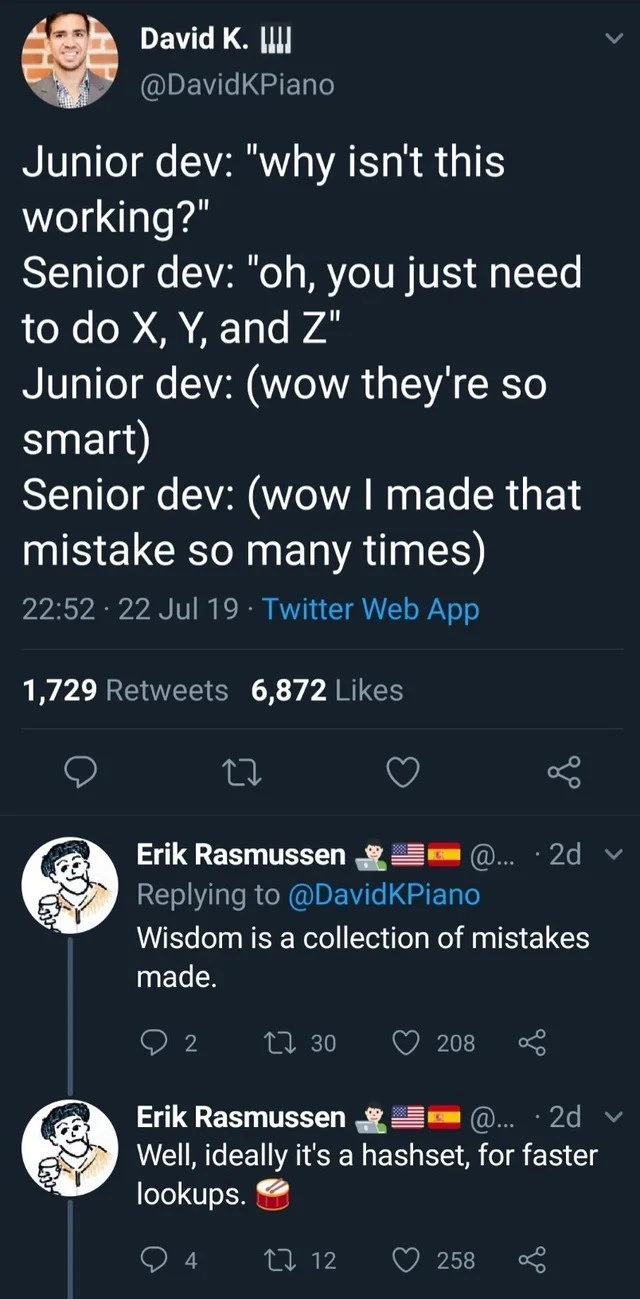
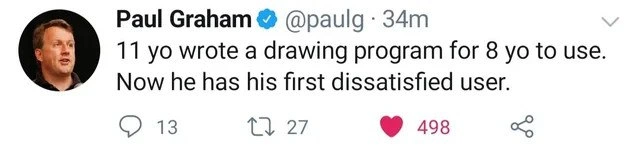
A screenshot of a tweet from Paul Graham (@paulg), a prominent figure in the tech industry. His profile picture shows a headshot of him. The tweet itself reads: '11 yo wrote a drawing program for 8 yo to use. Now he has his first dissatisfied user.' Social media engagement icons below the text show 13 comments, 27 retweets, and 498 likes. The image has a clean, light-mode Twitter interface. The humor is rooted in a universal experience for all software developers, regardless of age or skill level: the moment a user interacts with your creation, you get feedback, which is often criticism. The tweet distills this complex professional reality into a simple, relatable anecdote about children. For senior engineers, it’s a nostalgic and wry observation on the fundamental, unchanging nature of the developer-user relationship - a true rite of passage
Comments
7Comment deleted
This is how it starts. By 15, he'll be explaining to the 12-year-old why the feature request for 'AI-powered glitter brushes' is out of scope for the current sprint
First sprint review at age 11: the 8-year-old files a P0 because “the glitter fill isn’t intuitive,” and just like that he’s learned about feature creep, UX debt, and the eternal misalignment between PMs and reality
Twenty years later, the 8-year-old will be a product manager filing JIRA tickets about "unintuitive UX" while the 11-year-old, now a staff engineer, mutters "it worked on my machine" during sprint planning
Ah yes, the classic progression: 'It works on my machine' → 'It works for me' → 'Why doesn't my 8-year-old sibling love my masterpiece?' Welcome to the harsh reality that your most brutal code reviewer will always be family, and unlike your CI/CD pipeline, they won't just silently fail - they'll tell you exactly why your UX decisions were questionable at dinner
Age 11 and he’s already learned the core SaaS truth: acceptance tests are written by users, in production, minutes after launch
Scope creep at age 8: proof that dissatisfied users scale inversely with codebase complexity
11-year-old ships a drawing app to an 8-year-old - tests green, UAT red, NPS -100; welcome to production