
Skip to content
DevMeme
2230 of 7435
Obfuscation Level: Ancient Sumerian
Security Post #2484, on Dec 21, 2020 in TG

Obfuscation Level: Ancient Sumerian

Why is this Security meme funny?

Level 1: Secret Code

Imagine a guard who stops any notes that say something bad. If you write “ATTACK NOW” plainly, the guard catches it. But if you write your message in an ancient alphabet that the guard can’t read, he might not realize it’s a bad message at all! This meme is like that. A trickster wrote a secret computer command using very old symbols (the kind you’d see on clay tablets in a museum) so that the normal security “guard” on a website wouldn’t notice it. The website’s guard was looking for common dangerous words, but it didn’t recognize these strange squiggles as code. The result? The secret command sneaked through and the web page popped up a little box that said “1”. It’s funny because it’s like outsmarting a modern security system with a hidden message written in a language from thousands of years ago. Even though it looks like gibberish to us, the computer understood the secret and obediently showed the alert, proving the trick worked!

Level 2: Unicode Trickery

At its core, this meme is about Cross-Site Scripting (XSS), which is a type of web vulnerability where an attacker manages to run their own JavaScript code on someone else’s webpage. The classic newbie example of XSS is injecting something obvious like:

<script>alert('You got hacked')</script>

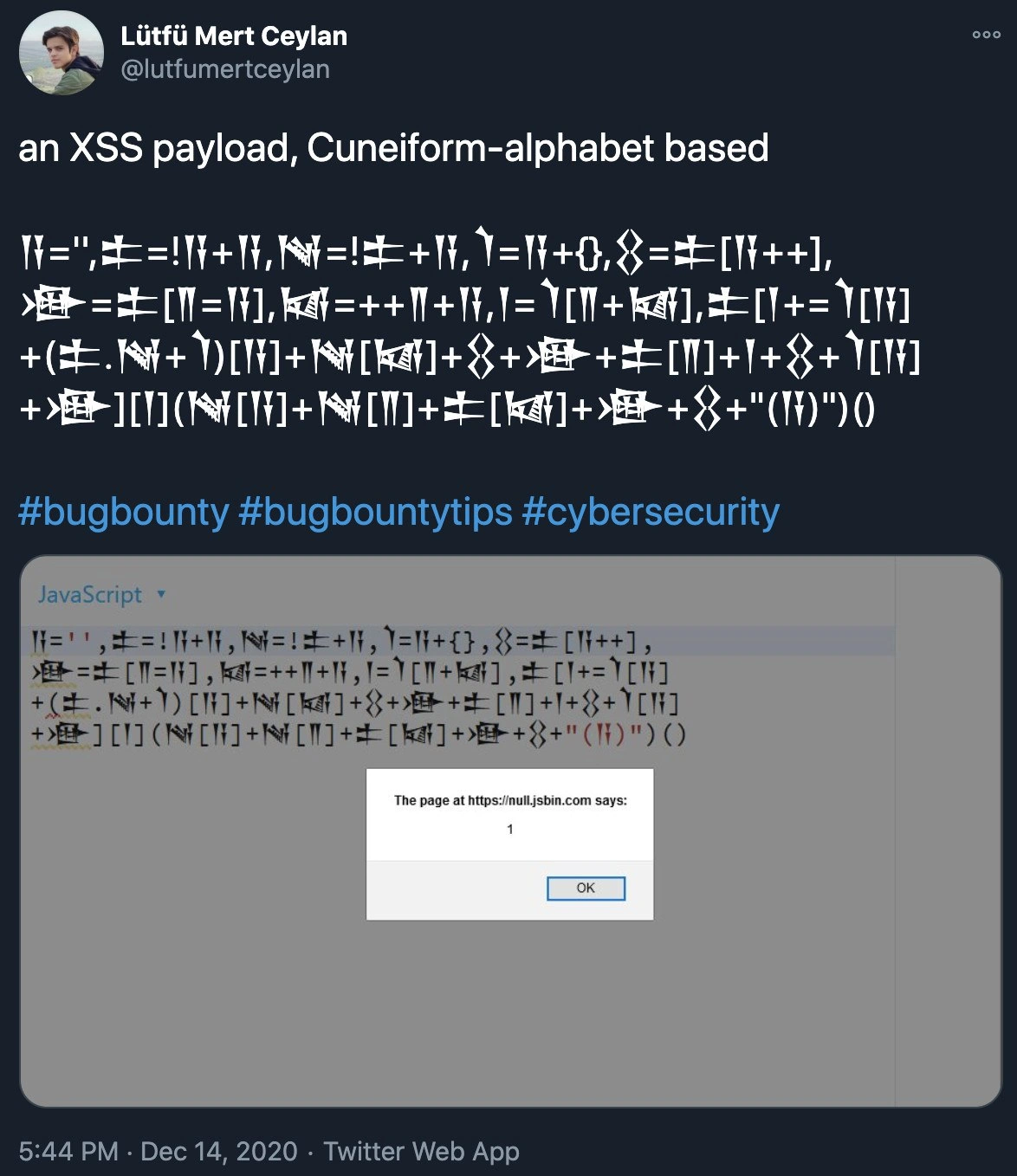
When that runs, it pops up an alert box. Of course, websites try to prevent this by filtering out <script> tags or keywords like “alert”. That’s where the trick in the meme comes in: the code does create an alert box with the message 1, but it does so in a completely obfuscated way – using ancient Unicode characters as parts of the code.

Unicode is the universal character set that includes virtually every writing system, from English letters to Chinese characters, and yes, even Cuneiform symbols from ancient Mesopotamia. Modern programming languages (including JavaScript) allow you to use many of these characters in variable names. That means you could literally do:

let 𒀀 = 42;  
alert(𒀀);  // This will show 42 in an alert dialog

This looks crazy, but it’s totally valid JavaScript! In the meme’s code, the user chose cuneiform symbols like 𒀀, 𒀁, 𒀂, 𒀃, 𒀄 as variable names. To the human eye (and to simple security scanners) this looks like gibberish or maybe harmless text, not like the word document or alert or other red flags. But to the JavaScript engine, it’s all legitimate. The exploit writer then used a series of sneaky operations to build the string and function call for alert(1) without ever literally writing “alert”. For instance, they rely on JavaScript quirks:

  • Expressions like !+[] produce numeric values in weird ways (!+[] is true because +[] is 0, and !0 is true). By stacking these odd operations, you can actually create characters like “a”, “l”, “e”, “r”, “t” from scratch!
  • They also use object properties like constructor. For example, an empty array [] has a property constructor which points to the Array constructor function. In JavaScript, many objects have a constructor that you can use to reach built-in functions, including the master Function constructor. If you do something wild like []["filter"]["constructor"]("alert(1)")(), it calls the JavaScript Function constructor to run alert(1) – effectively an indirect way to call alert.

All these tricks mean the payload can evasion filters by not containing any literal dangerous keywords. This is an example of code obfuscation: hiding the true intent of code behind complicated, hard-to-read syntax. It’s like writing the attack in code that looks like random noise. In the screenshot, after the tweet text, there’s a code editor showing the cuneiform-laden script and below it a small browser alert popup that says “1”. That popup is the expected outcome of a successful XSS attack (security testers often use a benign alert(1) to prove a vulnerability exists).

The tweet is by a security researcher sharing a pro tip (hence hashtags like #bugbounty and #bugbountytips). In the BugBounty world, finding a novel way to slip an XSS past a website’s defenses can earn you reputation and sometimes a nice reward. It’s a mix of BugHunting creativity and technical knowledge. The fact that this uses an ancient alphabet adds a humorous flair – it’s not every day you see cuneiform writing in your JavaScript console! But it drives home a serious point in cybersecurity: don’t assume input is safe just because it doesn’t look like code. Attackers are always finding new (and old!) ways to encode their exploits. This meme is essentially a fun demonstration of that principle, showing that even browser security filters can be outsmarted with enough ingenuity. It’s both educational and entertaining, especially for developers and security enthusiasts who might say, “Wow, you can do that?!”


Level 3: Ancient Glyphs, Modern Exploits

This tweet showcases an XSS exploit so sneaky it looks like a sorcerer’s spell written in ancient Sumerian. The code in the image is a real JavaScript snippet using actual Cuneiform Unicode characters (𒀀, 𒀁, 𒀂, etc.) as variable names to perform a cross-site scripting attack. Seasoned security engineers grin (and groan) at this because it’s a brilliant example of a script filter bypass: the payload is hiding in plain sight using an archaic alphabet that most defense filters never even consider. It’s the bug hunter’s equivalent of writing an attack in hieroglyphs to slip past the guards.

In web security, filters often look for dangerous keywords like <script> or alert( to stop XSS. But JavaScript is so flexible that you can obfuscate malicious code into bizarre forms and still have it execute. Here the attacker constructed an alert("1") call using nothing but weird Unicode symbols and JavaScript’s own quirks. By using Unicode letters from an ancient script as identifiers, the payload doesn’t contain a single ASCII letter of typical keywords – which means a naive WAF (Web Application Firewall) or sanitizer might not recognize it as malicious. The result? The browser happily evaluates these seemingly random glyphs as code, and up pops the “1” alert. It’s a classic SecurityVulnerabilities lesson: never underestimate what counts as valid code!

To a senior developer or security researcher, the humor comes from the absurd lengths hackers go to achieve an XSS. It’s both impressively clever and a bit horrifying. We have modern browser security systems, yet here’s a payload using characters from 5,000 years ago to pwn a webpage. This unicode_payload_evasion technique is a perfect example of the cat-and-mouse game in cybersecurity – as defenders patch common exploits, attackers turn to increasingly esoteric tricks. The tweet’s hashtags like #bugbountytips and #cybersecurity signal that this isn’t just a joke; it’s educational. In bug bounty circles, pulling off an alert box with such an outlandish payload is like scoring a touchdown – it shows off skill in BugHunting and creativity in CodeObfuscation. The community finds it funny because it highlights how something as ancient as cuneiform can beat a modern web app’s defenses. It’s the ultimate “unexpected item in the coding area” moment that makes experienced devs chuckle and double-check their filter logic.

// An example of sneaky XSS via function constructor (no direct "alert" string):
[]["filter"]["constructor"]("alert('XSS!')")();
// Using Array.filter's constructor (Function) to call alert - sneaky, right?

Notice how even in the code above, we didn’t write alert or <script> directly. The real payload in the meme goes even further – it doesn’t use any Latin letters at all! It builds up the attack step by step using type coercions and object properties. The snippet 𒀄[𒀁+𒀂+𒀃+𒀄](𒀁)() at the end is essentially the JavaScript engine being tricked into executing alert(1). The alert dialog in the screenshot (“The page at https://null.jsbin.com says: 1”) is the trophy: proof that the XSS executed successfully. In short, this meme compresses a ton of insider knowledge: browser quirk abuse, unicode-based evasion, and the glee of a successful hack. It’s funny and fascinating because it reminds us that in web security, even a dead language can be a deadly weapon!


Description

This is a screenshot of a tweet from user Lütfü Mert Ceylan (@lutfumertceylan). The tweet presents 'an XSS payload, Cuneiform-alphabet based,' followed by a block of code-like text composed of symbols resembling ancient Cuneiform script. Below the main tweet, an image shows the same payload within a JavaScript environment, which, when executed, triggers a browser alert box from 'null.jsbin.com' displaying the number '1'. The humor is highly technical, showcasing an extreme form of code obfuscation. It demonstrates that by using obscure but valid Unicode characters for variable names, one can create a functional, malicious JavaScript payload that is unreadable to humans and could potentially bypass security filters (WAFs) that rely on simple text-based pattern matching. This is deeply amusing to security professionals and senior developers who appreciate the cleverness of the attack vector and the esoteric knowledge of JavaScript's parser required to create it
Comments

10
Anonymous ★ Top Pick Your WAF might block 'alert(1)', but it probably doesn't have a Rosetta Stone plugin to decode a vulnerability that was first inscribed on a clay tablet
  1. Anonymous ★ Top Pick

    Your WAF might block 'alert(1)', but it probably doesn't have a Rosetta Stone plugin to decode a vulnerability that was first inscribed on a clay tablet

  2. Anonymous

    Ten layers of CSP, a next-gen WAF, and a red teamer pops alert(1) with Neo-Assyrian variable names - turns out our entire security posture collapses if the attacker has a minor in archaeology

  3. Anonymous

    When your XSS payload looks like ancient Mesopotamian tax records, you know you've reached peak obfuscation - because nothing says 'harmless user input' quite like 4000-year-old accounting symbols that just happen to execute JavaScript

  4. Anonymous

    When your WAF blocks every known XSS pattern, so you reach back 5,000 years to Mesopotamian scribes for inspiration. Nothing says 'modern web security' quite like exploiting Unicode normalization with cuneiform wedges - because apparently, input sanitization wasn't on the Code of Hammurabi. The real question: did the security team's threat model account for attacks written in the world's oldest writing system, or did they assume attackers would stick to ASCII like civilized people?

  5. Anonymous

    When your WAF masters JS but folds to 5000-year-old wedges - Unicode normalization remains the unsung hero of web sec

  6. Anonymous

    Your CSP and sanitizer both passed audits - right up until someone wrote alert(1) in cuneiform and every ASCII‑only regex waved it through

  7. Anonymous

    Blocked <script>, forgot UTS#39; attacker used JSFuck‑style cuneiform confusables to pop alert(1). Nothing like a P1 from 3200 BCE to modernize your CSP

  8. @Roman_Millen 5y

    Too bad copypasting that cuneiform code into Telegram results in this: 𒀀='',𒉺=!𒀀+𒀀,𒀃=!𒉺+𒀀,𒇺=𒀀+{},𒌐=𒉺[𒀀++], 𒀟=𒉺[𒈫=𒀀],𒀆=++𒈫+𒀀,𒁹=𒇺[𒈫+𒀆],𒉺[𒁹+=𒇺[𒀀] +(𒉺.𒀃+𒇺)[𒀀]+𒀃[𒀆]+𒌐+𒀟+𒉺[𒈫]+𒁹+𒌐+𒇺[𒀀] +𒀟][𒁹](𒀃[𒀀]+𒀃[𒈫]+𒉺[𒀆]+𒀟+𒌐+"(𒀀)")()

  9. @Roman_Millen 5y

    But hey, at least you can copy-paste this text above into a browser console and will still work there.

  10. @mvolfik 5y

    Well once you are in JavaScript context, XSS is quite easy, the real issue is how to get there, isn't it?

Use J and K for navigation
