
Windows Bloatware, Mac RAM, and Linux Neckbeards
Why is this OperatingSystems meme funny?
Level 1: New gadgets, new surprises
Imagine three friends each got a different new computer (or you can think of it like three new toys), and they want to start playing with them right away. The first friend’s new computer is a Windows PC. When he turns it on, he finds a bunch of unwanted extra programs already cluttering it up – kind of like getting a new toy that’s covered in a bunch of stickers and add-ons you don’t want. Before he can really enjoy his new toy, he has to spend time peeling off all those silly stickers and removing the unnecessary parts. It’s a bit annoying, but after he cleans it up, his computer is nice and neat, and then he can finally start playing (or in his case, start coding).
The second friend got a new Mac (Apple) laptop. Her computer is clean and shiny out of the box – there aren’t a bunch of random programs pre-loaded like with the Windows PC. It’s like getting a fancy toy that’s perfectly clean with no stickers. However, she notices this new Mac isn’t powerful enough for what she wants to do (imagine the toy is great but came with weak batteries). So before using it, she decides to make it better. She orders some extra memory (RAM) for the computer – that’s like going out to buy better batteries for the toy. When the package arrives, she opens up the laptop and adds the new memory inside (just like replacing the toy’s batteries with stronger ones). Now her Mac is supercharged and ready. With the upgrade done, she can start using the computer for her work happily. In short, her delay wasn’t cleaning like the Windows friend, but rather upgrading her device to make it just right.
The third friend got a new Linux computer. Think of this like a special custom toy that’s exactly what he wanted. He turns it on and – surprise – everything he needs is already there and working perfectly. There are no junk programs to remove and no parts that need upgrading. It’s as if he opened his toy’s box and the toy was ready to go instantly, with fresh batteries and no extra packaging. He immediately starts playing with it and having fun (for a developer, that means he starts coding right away). Now, here comes a funny extra part: this third friend is shown trimming his beard after starting work. Why is that? It’s just a silly joke. People often joke that really enthusiastic Linux users are a bit like friendly wizards who might have long, scruffy beards. In the comic, since this Linux user’s computer didn’t require any fixing or setup time, he even had a moment to trim his comically long beard. It’s a playful way to show he had nothing else to fix on the computer, so he’s using the free time to do something personal and goofy.
In very simple terms, the meme is comparing three experiences:
- The Windows computer was like a new toy that needed some cleaning up before it was fun to use.
- The Mac computer was like a new toy that needed a small upgrade (new batteries) before it was at its best.
- The Linux computer was like a new toy that was ready to use immediately – no cleaning or upgrades needed – so the owner could start having fun right away (and even do something silly like trim a beard because he had extra time).
It’s funny to developers because it exaggerates real things that often happen when setting up these computers. Each type of computer has its own little quirk or surprise that can slow you down a bit at the start. But once those initial hurdles are over (whether it’s cleaning junk software, adding more memory, or, hehe, just combing your beard), you can start doing what you actually wanted to do. The humor comes from recognizing those different little hassles and poking fun at them. Even if you’re not a tech expert, you can relate to the idea that different new gadgets might have different setup steps – and sometimes the steps are a bit absurd, which is exactly what makes this meme light-hearted and fun!
Level 2: From Bloatware to Beard Care
Let’s break down the meme’s three scenarios in simpler terms and explain some of the technical jargon and stereotypes for those newer to these concepts. The comic is organized in three rows, each for setting up a new computer with a different operating system: Windows PC, Mac, and Linux PC. Each row has four panels showing the steps the developer goes through. We’ll go through them one by one:
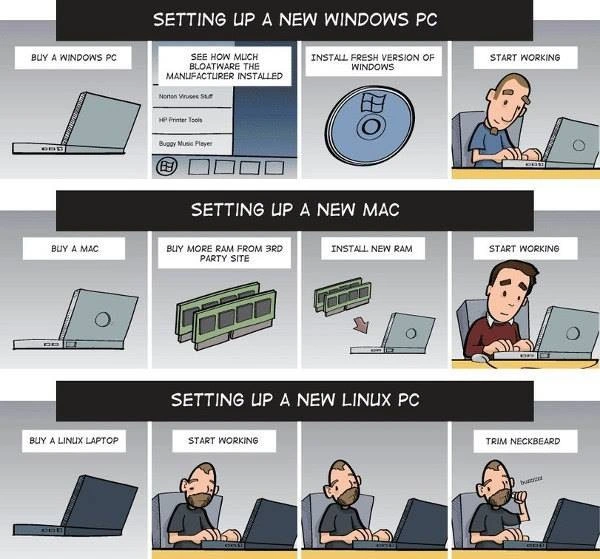
Windows Setup: The first row is labeled "Setting up a new Windows PC." When you buy a new Windows laptop from a typical manufacturer, it often comes with pre-installed programs that you didn’t ask for. These are collectively called bloatware. Bloatware might include things like free trial versions of antivirus software (e.g. Norton or McAfee), manufacturer-specific apps (like a branded photo gallery or printer utility), games, or toolbars. They are considered "bloat" because they occupy space and run in the background, potentially slowing down your system, without providing real value to most users (especially developers who prefer a clean system). In the comic’s second panel for Windows, you see a screen that literally lists examples: "Norton Virus Suite, HP Printer Tools, Buggy Music Player," and the Windows taskbar is cluttered with icons. This is exaggerating the feeling of "Ugh, look at all this junk!" that many developers get when they first boot up a new store-bought PC. It’s common for developers (or any power user) to spend the first hour or two uninstalling all this bloatware. In fact, there’s a common practice of performing a fresh Windows install using a clean copy of Windows from Microsoft, instead of using the manufacturer’s pre-loaded Windows installation. Panel three shows a Windows installation disk (the round DVD labeled with the Windows logo) with the caption "Install fresh version of Windows." That means wiping the machine and installing Windows anew, so you have a pristine system without any of the extra pre-loaded stuff. This step can save time in the long run and ensure there are no unwanted programs hiding in the background. Finally, the fourth panel for Windows shows the developer happily typing away with the caption "Start working." The idea is after going through the somewhat tedious processes of checking and cleaning the system (and possibly reinstalling Windows), the machine is now in a good state for actual development work. In summary, the Windows path humorously illustrates that before doing any coding, the developer has to do some housekeeping on the new PC. It’s like cleaning a new apartment before moving in your furniture — an extra chore that delays the fun part (coding) but is pretty much expected if you want a nice environment.
Mac Setup: The second row is "Setting up a new Mac." When you buy a new Mac (like a MacBook Pro or iMac), Apple typically doesn’t include any third-party bloatware. Since Apple controls both the hardware and the operating system (MacOS), the out-of-box software environment on a Mac is generally clean and consistent. You’ll find only Apple’s own applications (Safari, iTunes/Music, iMovie, etc.), which are usually well-behaved and not considered bloat in the same sense as the Windows case. So the meme doesn’t show any software cleanup for the Mac. Instead, it highlights a different common setup step: upgrading hardware, specifically adding more RAM. RAM stands for Random Access Memory; it’s the part of the computer that stores data for running applications (think of it as the computer’s short-term working memory). More RAM lets you run more programs at once or handle heavy tasks (like running a virtual machine, compiling large projects, or keeping many browser tabs open) without slowing down. Many Macs (especially those around 2020) came with a default amount of RAM (8 GB, for example) that might be borderline for a developer’s needs. While the Mac will run with that, developers often prefer 16 GB or more for smoother performance. However, buying a Mac with extra RAM from Apple can be very expensive (Apple has historically charged high prices for memory upgrades). So a popular cost-saving move is to buy third-party RAM (from a site like Crucial or OWC which sell compatible memory modules) and upgrade it yourself. The comic shows this in panels two and three of the Mac row: first, "Buy more RAM from 3rd party site", illustrated by two green RAM stick modules, and then "Install new RAM", showing the act of inserting the RAM into the laptop. This implies the developer literally unscrews the laptop’s back cover and adds the new memory sticks. Not all Macs allow this (many newer models have soldered RAM that can’t be changed), but several models, especially older MacBook Pros, iMacs, or the Mac Mini at the time, did allow RAM upgrades. This step is a bit of a hardware hack that technically inclined folks are comfortable doing to save money or get better specs. After the new RAM is installed, the fourth panel says "Start working," with the Mac user now happily coding. What does this all mean? The Mac path in the meme is saying: when setting up a new Mac for development, you might not have to remove any junk software (that part is easy), but you often find yourself immediately wanting to beef up the machine’s memory to handle serious dev workloads. It’s a playful take on the complaint that Apple doesn’t always ship enough RAM by default for power users, and buying it separately is part of the setup routine. For someone new to these terms: essentially, the Mac user had to perform a mini-upgrade to the machine before they felt it was ready for work. This is a different type of setup task compared to the Windows user’s software cleanup, but it similarly delays the moment they can actually start coding.
Linux Setup: The third row is "Setting up a new Linux PC." Linux is a bit different in that you typically don’t buy a laptop with Linux pre-installed from mainstream stores (most come with Windows or MacOS depending on brand). However, there are ways to get a "Linux laptop": some manufacturers (like Dell’s XPS Developer Edition or specialized companies like System76 or Tuxedo) do sell machines with a Linux distribution (like Ubuntu) pre-installed for customers who want that. Another very common scenario is developers will buy a regular PC (perhaps one that came with Windows) and then install a Linux OS on it themselves as the very first thing. In either case, the expectation is that once Linux is set up on the hardware, it’s a very clean, developer-friendly environment with minimal extra fluff. Linux distributions typically don’t include the kind of commercial bloatware that Windows PCs come with. Instead, you get a fairly minimal system plus whatever default user applications the distro normally provides (maybe a web browser, some basic utilities, and software center). For a developer, a Linux system often feels ready to use because tools like compilers (
gcc), scripting languages (Python, Bash), and package managers (for installing other software) are at your fingertips. In the comic’s Linux row, the setup appears almost trivially short: after "Buy a Linux laptop", the next panel is already "Start working", showing the bearded developer immediately at his desk coding away. This suggests that a new Linux machine requires virtually no setup delay — you can just jump right into coding since the OS environment is configured how you like it or comes with what you need. This is somewhat idealized, but it reflects how many developers feel about Linux: no license pains, no extraneous trial software, and lots of built-in tools for programming tasks. Now, the funny twist: the third panel of this row shows the same Linux user taking an electric trimmer to his beard with the caption "Trim neckbeard." The term neckbeard is a slang often affectionately (or jokingly) used in tech communities to describe a stereotypical hardcore geek or Linux enthusiast. The image of a "neckbeard" usually includes a literally unshaven neck and sometimes implies someone who spends so much time with computers that personal grooming might take a backseat. It’s a stereotype and not actually true of all Linux users, of course, but it’s a running joke. In the context of the meme, after the Linux guy starts working immediately (since his computer setup was so fast), he humorously has free time to groom his beard. This implies that Linux was so hassle-free for setup that the only "task" left was a silly, personal one. The meme is playing with the contrast: the other two users were busy dealing with their computers (cleaning software or installing hardware) whereas the Linux user’s computer didn’t demand any extra work, so he’s shown doing something comically unrelated (trimming his beard). This punchline also lightly teases Linux users by suggesting “Haha, you Linux folks are so fast with your setup, maybe use that extra time to trim that famous beard!” It’s all in good fun as part of tech humor.
In summary, each operating system in the meme has a distinct setup quirk that’s being highlighted:
- Windows: You often need to remove bloatware or even reinstall Windows to get a clean start. (Key terms: OEM – original equipment manufacturer, the company that made the PC, often responsible for the pre-installed apps; fresh install – installing the operating system from scratch).
- MacOS: The software side is clean, but you might need to upgrade the hardware (especially RAM) to get the performance you want for development. (Key concept: adding more RAM helps run heavy tasks more smoothly; Apple’s default configurations might not have enough for power users).
- Linux: If you start with a Linux system or install it yourself, it’s typically free of junk software and loaded with tools, so there’s minimal setup delay. The meme then jokes about the neckbeard stereotype to give the Linux scenario a funny twist. (Key term: neckbeard – a playful term for a dedicated, often nerdy tech guy with a beard, commonly associated with open-source enthusiasts).
The comic resonates with developers because setting up a dev environment is something we all do, and it varies a lot by OS. Newer developers might not have experienced all of these yet, but they will likely find elements of truth (and humor) in each scenario as they go through their own machine setups. The comparison also subtly teaches that different operating systems have different priorities and pain points: Windows might require more initial cleanup, Mac might require thinking about hardware upgrades, and Linux (for those comfortable with it) can offer a very streamlined, programmer-centric experience. Of course, these are generalizations played for laughs. In real life, one can encounter other challenges too (like on Linux you might have to install drivers or troubleshoot something, which the meme doesn’t show). But the core message is clear and easy to relate to, especially with a bit of knowledge about each system. The categories here are OperatingSystems and DeveloperExperience for good reason: the meme is all about how the operating system you choose impacts your experience as a developer setting up a new machine. It’s essentially comparing Windows vs. MacOS vs. Linux in a lighthearted, memorable way. Once you know the terms (bloatware, RAM, neckbeard) and context, the humor shines through: every path to "starting work" has a twist, and this comic exaggerates those twists perfectly.
Level 3: Rites of Setup
At a senior developer level, this comic highlights the unwritten rituals of provisioning a new development machine across different Operating Systems. The humor hits home because we've all been through these initiation rites in one form or another. It exaggerates the common experiences with setting up Windows, MacOS, and Linux machines, poking fun at the unique hurdles each platform throws in our way before we can actually be productive. This speaks to the core of developer experience (DX): how quickly can you go from unboxing hardware to writing code? Each row of the comic encapsulates a folklore scenario that seasoned developers know all too well:
Windows: The first row shows the Windows PC setup saga. Typically, when you "Buy a Windows PC" from a major OEM (like Dell, HP, etc.), it comes pre-loaded with a zoo of bloatware. Bloatware refers to the assortment of unnecessary pre-installed programs (free trials, toolbars, vendor utilities) that manufacturers bundle into the system. These often include things like trial antiviruses (e.g. Norton Virus Suite), OEM control panels (e.g. HP Printer Tools), games like Candy Crush, or a "helpful" buggy media player. None of this is essential for the OS to run; instead, they consume disk space, clutter the start menu, and can slow down the machine by autoloading at startup. It's practically a ritual for experienced devs to perform a bloatware cleanup on day one. In the comic, the second panel humorously shows a Windows taskbar overflowing with junk, implying the new machine is bogged down by manufacturer cruft. The senior perspective here is that this has been a long-running annoyance in the Windows world — historically, OEMs struck deals to include this software (it’s basically adware) in exchange for money or partnerships. The result? Developers have learned that the fastest way to get a clean, efficient dev environment on Windows is often to nuke and pave: skip trying to manually uninstall dozens of programs and just perform a fresh Windows install. The third panel with the Windows DVD (or nowadays a boot USB) labeled "Install fresh version of Windows" captures this step. It’s a tongue-in-cheek acknowledgment that many power users don’t trust the out-of-the-box state of a new Windows laptop. Only after this personal reinstall can the guy in the fourth panel finally "Start working" on a clean Windows machine. The joke here is that setting up a Windows PC feels like exorcising a bunch of demons (unwanted apps) before you can get to actual work. It’s funny because it’s true for so many of us — a sort of geek rite-of-passage to battle bloatware dragons on a new PC.
MacOS: The second row highlights a different, more hardware-flavored ritual for Mac users. Out of the box, a new Mac (especially around 2020) often came with minimal base specs — say 8GB of RAM — which might be okay for light use but can be limiting for heavier development tasks (think running multiple Docker containers, IDEs, browser instances, etc.). Apple is notorious for charging a premium for factory upgrades (their official RAM or storage upgrades can be significantly more expensive than market price). So what's the developer hack? Buy the base Mac to save money, then immediately buy more RAM from a 3rd party and install it yourself. The comic shows exactly this: after "Buy a Mac" (first panel), the second panel is "Buy more RAM from 3rd party site" with two green RAM sticks depicted. The third panel, "Install new RAM", shows the user physically upgrading the laptop's memory. This is a familiar upgrade step many experienced Mac owners have done — especially back when MacBook Pros or iMacs had user-upgradeable RAM slots. (It’s worth noting for the historically inclined: older Macs made this easy with accessible panels; newer models have soldered memory, so this meme also carries a bit of early-2020-era truth!). The humor here comes from the expectation that even a brand new high-end Apple machine isn’t truly ready for a power user until you perform surgery on it with a screwdriver. It exaggerates the idea that the first thing a dev does with a new Mac is open it up, which is ironic because Apple markets itself as “it just works”. In reality, for many Mac-based developers, the OS setup is pretty clean (no bloatware – Apple controls the software image and generally only includes their relatively polished apps). So software-wise, a Mac has a shorter setup time compared to Windows. But instead, the bottleneck becomes hardware: adding more memory or maybe swapping in a bigger SSD if you didn’t pay Apple’s steep upgrade prices. Once that RAM upgrade step is done, the fourth Mac panel "Start working" shows the developer happily coding. The senior dev insight here is that MacOS is largely loved in the dev community for its UNIX-like environment and usually hassle-free configuration (you get a terminal, developer tools are easy to install, no crapware). However, there’s a running gag that you always end up needing to spend more on upgrades — either upfront or via DIY — to meet development needs. So the Mac path in this comic is shorter than Windows (no reinstall needed), but you still have an extra hurdle (upgrading hardware) before you can be fully productive. This resonates with anyone who’s grimaced at Apple’s upgrade pricing or opened up an MacBook with a tiny screwdriver kit. It’s a different kind of ritual: less software exorcism, more hardware augmentation.
Linux: The third row flips the script and gives a nod to the holy grail of a ready-to-code machine — and then delivers a punchline on nerd culture. The panels go: "Buy a Linux laptop", then immediately "Start working". Wait, that’s it? No extended setup, no extra purchases? The joke is that a Linux environment, especially one pre-installed or configured by a knowledgeable user, can be ready to go out-of-the-box with all the developer tools and none of the junk. Many developers who prefer Linux will either buy laptops from vendors that ship with a clean Linux distro (some companies offer “Developer Edition” laptops with Ubuntu or you might get one from a Linux-focused manufacturer like System76), or they wipe whatever OS is on a new machine and install Linux themselves. In either case, the result is a pristine system with just the essentials. Linux distros typically don’t come with bloatware in the way Windows does (no trials of McAfee or clutterware games). Also, a dev-focused Linux distro will often include compilers, interpreters, package managers (like
apton Debian/Ubuntu ordnfon Fedora), and other tools readily available. So for an experienced user, setting up a dev environment on Linux can indeed be very swift – sometimes just a matter of installing a couple of preferred code editors or configuring dotfiles, and you’re off to the races. The comic emphasizes this speed by having essentially no delay between purchase and productivity: the Linux user is coding right away in panel two. Now, the punchline: by panel three our Linux guy has spare time on his hands, so he’s doing something completely non-technical — "Trim neckbeard". 😂 This is a playful jab at the well-worn Linux user stereotype. In tech culture, calling someone a “neckbeard” playfully implies they are an über-geek, often a Linux or open-source fanatic, who might sport an unkempt beard (the term evokes the image of a basement-dwelling hacker with a scraggly beard on his neck). It’s a tongue-in-cheek caricature, not meant to be mean-spirited here, but to amplify the humor: the Linux guy finished setup so quickly he’s got time to tidy up his (stereotypically bushy) beard. Essentially, the meme is saying Linux is so efficient for developers that the only setup needed is personal grooming 😅. From a senior perspective, there’s a bit of irony layered in this joke: historically, getting Linux working on a new laptop can be challenging for the uninitiated (finding the right drivers, dealing with compatibility issues, etc.). But the target audience (developers in the know) also remember the satisfaction of a finely-tuned Linux system or might be aware of specialized Linux laptop vendors that ensure things work out-of-box. So the comic plays on idealized scenarios. The experienced dev reading this recognizes the hyperbole and laughs because, ideology aside, we’ve all heard the Linux folks brag, “I was up and coding within minutes,” while others were still uninstalling bloatware or waiting for a memory upgrade delivery. It’s a friendly jab across the OS tribal lines.
Overall, this meme distills a lot of dev culture and operating system in-jokes into a simple comic. Each row highlights a different aspect of setting up a dev environment:
- Windows demands clean-up (because of industry practices around OEM software).
- Mac demands an upgrade (because of Apple’s design/market decisions around base specs and upgradability).
- Linux demands almost nothing from the machine... except perhaps something from the user (cue the beard joke, symbolizing the culture around Linux enthusiasts).
For seasoned engineers, it’s both humorous and cathartic. We see a reflection of our own past setups in these panels. It underscores why developer preferences for dev machines often spark lively debate: Windows vs MacOS vs Linux isn’t just about OS features, but about the whole experience from unboxing to that first line of code. Each has its pros and cons, and the meme exaggerates those initial friction points brilliantly. The shared laughter comes from knowing that, regardless of OS loyalty, every path to "Hello World" on a new machine has its own unique quirks – whether it’s purging unwanted programs, performing hardware tweaks, or, well, trimming one’s neckbeard. This is classic Tech Humor in the developer community: taking relatable setup frustrations and flipping them into a comic exaggeration that we can all chuckle about. In short, the meme resonates because it encapsulates the collective experience of setting up new dev machines and the subtle absurdities we’ve come to expect on each platform.
Description
A three-part comic that humorously compares the process of setting up a new computer for different operating systems. The first section, 'SETTING UP A NEW WINDOWS PC,' shows a four-step process: buying the PC, discovering a long list of pre-installed bloatware (like 'Norton Viruses Stuff' and 'HP Printer Tools'), installing a fresh version of Windows from a CD, and finally starting work. The second section, 'SETTING UP A NEW MAC,' involves buying the Mac, then immediately buying and installing third-party RAM before starting work. The final section, 'SETTING UP A NEW LINUX PC,' is the simplest technically: buying a Linux laptop and immediately starting to work. However, a final panel is added for comedic effect, showing the bearded user trimming his neckbeard with an electric razor, with a 'buzzzzz' sound effect. The comic satirizes common pain points and stereotypes associated with each OS: the pervasive bloatware on Windows machines, the expensive and often necessary hardware upgrades for Macs, and the stereotypical appearance of a dedicated Linux user

Comments
26Comment deleted
Windows setup is a lesson in subtraction, Mac setup is a lesson in economics, and Linux setup is a lesson in... well, apparently personal grooming is the final dependency to resolve
Modern onboarding pipeline: choco purge OEMware on Windows; submitPurchaseOrder | xargs install-32GB on macOS; git clone dotfiles && beardctl trim --auto on Linux - everything else was already idempotent
The real Linux setup process: spend 3 days configuring your dotfiles, 2 days arguing about systemd vs init, 1 day compiling your kernel, then realize you forgot to install a browser and have to wget everything through terminal while pretending it's a feature, not a bug
The real joke here is that the comic conveniently omits the Linux panel's hidden steps: spending three days configuring X11, another week wrestling with proprietary WiFi drivers, and finally achieving the perfect dotfiles setup that you'll spend the next decade evangelizing to anyone who'll listen. But hey, at least you didn't pay the Apple RAM tax or spend an afternoon running Ninite
Company onboarding KPI: time‑to‑first‑PR - Windows wipes OEM bloatware, macOS expenses third‑party RAM, and Linux ships a merge before the beard violates grooming policy
Windows: bloat installs itself. Mac: RAM costs your firstborn. Linux: trim beard while your custom kernel compiles - productivity achieved
Windows: nuke-and-pave; Mac: pay the RAM tax; Linux: yak‑shave dotfiles until it looks like work
Buy a mac. Look i have a brand new mac with REVOLUTIONARY m1 cpu. Wait for arm software ports. Start working Comment deleted
Раньше ебилдов ждали, а теперь порт на арм Comment deleted
Cover yourself in Rosetta 2 Comment deleted
Are you really just start work with linux ? How about tweaking gnome Or jange it to KDE or to some tilinug wm? How about compiling gentoo? You are not linux user))) Comment deleted
that's "trim neckbeard' Comment deleted
I bought a linux version of a laptop because it was cheaper (no windows license - makes sense) and yeah well. It was some kind of weird ubuntu with… a sunflower as the shutdown popup opener? Needless to say, I immediately installed ubuntu budgie on that thing, didn't even try working with that crap. Comment deleted
not everyone does tweaks Comment deleted
Линукс: Выбери диструбутив Создай ветку в лоре Установи убунту Удали убунту Собери и установи генту Удали генту Поставь арч Удали арч Поставь дебиан Поставь гном Удали гном Поставь кеды Удали кеды Поставь опенбокс Удали опенбокс Поставь i3wm Скинь на лоре скрины своего сетапа Начинай работать Comment deleted
а лор зачем Comment deleted
чтоб туда скрины скинуть и выслушать о том какой у тебя бесполезный билд 🤔 Comment deleted
r/unixporn Comment deleted
Sir, please, stop usage of Russian 🙏 Comment deleted
так и есть 😂 Comment deleted
“Upgrade Mac ram” is this image from 2000 Comment deleted
I bought dos pc Installed linux tho Comment deleted
The PC Decrapifier, no need to install Шindows Comment deleted
When you have any realistic work, you usually end up dualbooting windows Comment deleted
Buy cheap laptop Download kali.iso Boot from usb Hack Comment deleted
kali linux hack insta Comment deleted

