Ignoring Compiler Warnings for a Moment of Peace
Why is this CodeQuality meme funny?
Level 1: Everything is Fine
Imagine you’re playing your favorite video game, and the console or tablet shows a little warning light saying the battery is low. The game is still going, nothing’s crashed, so you just keep on playing and totally ignore that warning. Everything seems fine, right? In the meme’s terms, the game still running is like the “working code,” and the low-battery warning is like those code warnings. The funny idea here is that just like a kid might ignore 100 low-battery messages as long as the device hasn’t died yet, programmers sometimes ignore a bunch of warning messages as long as the program still works. It’s poking fun at that feeling of “Meh, it’s probably okay for now!” We all know ignoring too many warnings – whether it’s a flashing battery light or computer messages – can be a bit silly. But in the moment, if nothing bad is happening immediately, it’s easy to relax, lean back, and pretend everything is fine.
Level 2: If It Ain't Broke...
At this level, let’s break down what’s happening in simpler terms. The meme uses a funny poolside scene to compare working software to a relaxed person, and compiler warnings to an anxious person trying to get your attention. The developer basically says, “No worries, lie back down,” meaning “I’m going to ignore those warnings.” But what exactly are these “warnings” it’s talking about?
When you write code and run it through a compiler (a program that turns your code into something the computer can execute), the compiler checks your work. If there’s something outright wrong, it gives you an error and refuses to run until you fix it. But often the compiler finds things that aren’t strictly wrong enough to stop the show, yet seem suspicious or potentially problematic – these are compiler warnings. For example, maybe you created a variable or function that you ended up not using, or you called a function that’s marked “deprecated” (which means it’s old and scheduled to be removed in the future). The compiler will compile the program successfully (so your code runs), but it will also print out messages like:
warning: unused variable 'userName' [-Wunused-variable]
warning: 'oldFunction()' is deprecated
Each of those is basically the tool saying, “Hey, this might be a small issue or a future problem.” Now, one or two warnings are usually easy to notice and fix. But imagine seeing 100+ warnings every time you compile! That’s what the meme is joking about. At that volume, the warning messages become white noise. Developers might start thinking, “Well, the program still works, so who cares?” This attitude is captured by the phrase “if it works, don’t touch it.” It’s a very common mindset, especially when people are afraid that fixing a warning might introduce new bugs or just take too much time for too little benefit. After all, if the app is running and users aren’t screaming, it’s easy to justify ignoring those cautionary messages for now.
However, consistently ignoring warnings leads to a buildup of small issues in the code. This is often referred to as technical debt (or TechDebt). Picture technical debt like doing things the quick-and-easy way in your code today, and “borrowing” time, but you’ll have to pay that time back with interest later when those quick fixes cause complications. Each ignored warning is like a little IOU: “We’ll deal with this later.” Ten ignored warnings might be fine, but 100+ starts to become a big task to clean up. And just as interest on financial debt accumulates, the effort needed to fix a ton of warnings grows over time – especially if new warnings keep popping up with every update. This is why you’ll sometimes hear a junior dev ask, “Why do we have so many warnings?” and a senior dev respond with a weary sigh: it’s technical debt we’ve been putting off.
Let’s talk about code quality for a second. High code quality means the code is clean, understandable, and has fewer potential pitfalls. Warnings are often indicators of lower code quality or code smells – things that aren’t an immediate error but feel off. Maybe a piece of code is doing something in a roundabout way or relying on a risky behavior. For instance, a warning might flag that you’re converting a big number into a smaller type (say, converting a 64-bit number to a 32-bit number) which could chop off data accidentally. The program will still run, but you might have an unexpected result if that big number doesn’t fit. High-quality code tries to handle or eliminate these issues. When developers ignore warnings, they’re basically accepting that the code isn’t as clean or safe as it could be.
Warning fatigue is another concept relevant here. This is borrowed from fields like healthcare (“alarm fatigue” in hospitals) and it applies in programming: if you see too many warnings too frequently, you start tuning them out. The first few times you see “variable X is unused” you’ll go remove X. But if your project prints dozens of such messages every time, you eventually stop even seeing them. They blend into the background. This is dangerous because you might miss a new warning that’s actually important. It’s like hearing an alarm beep so often that when a really critical alarm goes off, you don’t react because “eh, it’s always beeping.” In a coding team, especially one with an ignore_warnings_culture, people will joke that the build is always yellow (some continuous integration systems mark builds with warnings as yellow, not green). They treat that yellow as just as good as green. It’s normal to them that the build log is a sea of yellow text.
The productivity angle (DeveloperProductivity) also comes in here: every warning is essentially the compiler giving you extra information that could help you improve the code. It’s like having a spell-checker underline things in an essay. Ignoring the underlines might let you finish faster now, but later someone will have to spend time fixing all the typos. In software, if you pile up many warnings, eventually when you do decide (or are forced) to clean them up, it’s a huge chore that can slow down the team for days or weeks. Or worse, one of those warnings turns out to be a real bug hiding in plain sight, and now you’re spending time debugging an issue in production that could have been prevented by addressing the warning earlier. In the meantime, real errors or important warnings get drowned out by the noise – it’s hard to be productive when you have to sift through a 100-line log to find the one line that actually matters. Some teams use tools or settings (like turning warnings into errors) to keep the codebase tidy, so that the build log is clean. But a lot of codebases – especially older ones – accumulate build log noise over years. New developers joining such teams are often shocked: “Why are there so many scary messages?!” and the answer is usually a shrug and “legacy code… it works, don’t worry about it.” Not exactly comforting, but all-too-common.
In summary (Junior Edition): The meme is funny and relatable because it exaggerates a real developer habit: ignoring all those caution messages since the program still runs. It highlights the tug-of-war between just getting things working now and keeping the code clean for the future. Newer developers might be told “relax, it’s fine” by veterans regarding warnings, but over time most learn that today’s ignored warning can be tomorrow’s big bug. The wise lesson hiding in the joke is: don’t let “it ain’t broke” be the only reason you never fix things. Eventually, not paying attention to those warnings can come back to haunt you – maybe when you least expect it.
Level 3: Green Light, Yellow Flags
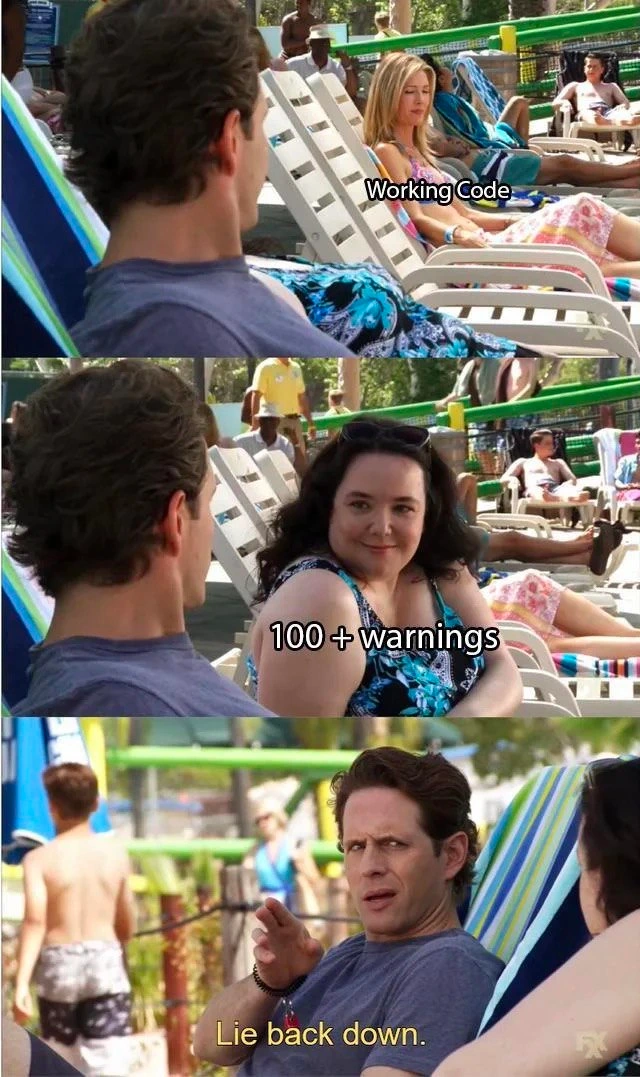
This meme nails a scenario every seasoned dev recognizes: code quality taking a back seat to “but it runs, so it’s fine.” In the first panel, Working Code is chilling by the pool, representing that comforting green light of a successful build or passing tests. In the next panel, 100+ warnings (the swarm of compiler or linter caution messages) sits up with concern. By the final panel, the developer (the guy motioning “nope”) basically tells those warnings, “Lie back down.” It’s the grimly comic reality of many codebases: as long as the software doesn’t crash, build log noise is swept under the rug.
Experienced engineers laugh (and cry a little) at this because they’ve seen how these warnings pile up into a Technical Debt snowball. Each ignored compiler warning is like a check-engine light in your car that you cover with tape – sure, you don’t see it anymore, but the underlying issue isn’t gone. Over time, these “harmless” messages can hide real problems. For example, a C++ compiler might warn, “control reaches end of non-void function”, hinting that a code path lacks a return statement. If you shrug it off, you’ve basically planted a landmine that might blow up when that function’s result is actually needed. Seasoned devs have countless war stories of production bugs that trace back to a warning everyone ignored (the classic “Oh, THAT’s what it was trying to tell us” revelation at 3 AM). The humor here is darkly spot-on: we treat warnings as background music – annoying, but not worth stopping the party – until the music turns into a blaring siren.
This culture of ignore it, it’s fine is an open secret in many teams. Tight deadlines and if_it_works_dont_touch_it mentality encourage developers to relax when they see working code, even if the build spews a wall of yellow text. Those 100+ warnings? Meh, they were there last release and nothing catastrophic happened, right? It’s a form of warning fatigue – when you see so many caution messages that you become desensitized. The first few times, a new developer might ask, “Should we fix these?” Only to hear a senior chuckle, “Focus on the critical stuff, those are just… warnings.” Eventually, everyone tunes them out. This meme brilliantly captures that blasé dismissal: the dev literally telling the warnings to chill out and stay unseen. It’s funny because it’s true – we’ve all silenced a nagging code warning with a quick cast, a // TODO fix later comment, or a @SuppressWarnings annotation and then pretended everything is okay. TechnicalDebt accrues interest; one day, paying it back will be a nightmare, but for now, hey, no red in the build, no failed tests, ship it.
From an architectural perspective, the meme also hints at the gap between ideal and reality. Best practices say a clean build (zero warnings) is as important as passing tests. Many sophisticated teams use compilers and linters in “zero-tolerance” mode – for instance, enabling -Werror to treat warnings as errors, forcing developers to deal with them. But the existence of this joke proves how often that ideal is ignored. Instead, warnings become the office background hum. Maybe the project is a decade old with legacy code that triggers tons of harmless warnings – turning them off would require touching fragile code, risking new bugs. Or maybe management doesn’t allocate time for refactoring to silence warnings because Developer Productivity is measured in features delivered, not compiler happiness. It’s a common trade-off: you prioritize new features (visible progress) over invisible cleanup. The result? A codebase that “works” but is one environment change or version update away from breaking. Seasoned devs chuckle here with a mix of been there, done that and a slight cringe, because they know CodeQuality problems have a way of biting you later. “Just relax and ignore them” is the tongue-in-cheek mantra – the humor comes from recognizing this as a code smell we’ve all indulged in, even though we know better.
TL;DR (Senior Edition): Ignoring 100+ compiler warnings is the software equivalent of sticking your fingers in your ears and humming because the app hasn’t caught fire yet. We laugh because it’s a coping mechanism – we’ve all been that poolside developer, blissfully sunbathing in the success of a deploy, while a tidal wave of warnings quietly looms on the horizon.
Description
A three-panel meme using the 'Lie Back Down' format from the TV show 'It's Always Sunny in Philadelphia'. In the first panel, the character Dennis Reynolds is looking admiringly at an attractive woman lounging by a pool, who is labeled 'Working Code'. In the second panel, another woman, depicted as less conventionally attractive, sits up to get his attention, and she is labeled '100+ warnings'. In the final panel, Dennis looks irritated and dismissively gestures with his hand, with the caption 'Lie back down.'. The meme humorously illustrates a common developer behavior: prioritizing functional code over code quality by deliberately ignoring a large number of compiler or linter warnings. For an experienced developer, this is a relatable, albeit risky, trade-off. While warnings don't stop execution, they often indicate underlying issues, potential bugs, or poor practices that accumulate as technical debt. The joke lies in personifying the warnings as an unwelcome distraction from the satisfaction of having a program that, at least on the surface, works perfectly
Comments
8Comment deleted
Treating warnings as errors is a sign of a good junior. Knowing which 100+ warnings you can safely ignore until the next sprint is the sign of a senior who's seen too much
Our CI cheerfully calls 167 compiler warnings “informational” - that’s Enterprise-speak for “future archaeologists, bring shovels.”
Those warnings are just the compiler's way of saying "I've seen your architectural decisions and I'm concerned" - but we both know that's tomorrow's problem when the junior who inherits this codebase files their first therapy claim
Warnings are just errors with imposter syndrome - and like all unaddressed issues, they're saving themselves for the production incident
Every senior engineer knows that '100+ warnings' is just the compiler's way of saying 'I have opinions about your life choices.' Sure, the code compiles and passes tests, but those warnings are like the Greek chorus foreshadowing your 3 AM production incident six months from now. The real tragedy is that we all know we should fix them now, but deadline pressure and the siren song of 'it works on my machine' make us rationalize that future-us will definitely have time to address this technical debt. Spoiler: future-us will be too busy dealing with the consequences of present-us's decisions while generating 100+ new warnings of their own
If your pipeline isn’t warnings-as-errors, you’re just refinancing tech debt at variable interest
If your CI doesn’t enforce -Werror or quality gates, “working code” will keep telling 100+ warnings to lie back down - until one of them pages you at 3am
100+ warnings? That's not debt, it's job security for the maintainer after you