Ignoring 100+ Compiler Warnings Because the Code 'Works'
Why is this CodeQuality meme funny?
Level 1: Ignoring the Check Engine Light
Imagine you’re driving a car and the dashboard lights up with a bunch of warning signals – the oil light, engine light, tire pressure, you name it. 😅 The car is still running okay, getting you from A to B, but clearly it’s trying to tell you something might need attention. Now, instead of checking those warnings or taking the car to a mechanic, you just keep driving day after day, saying, “The car moves fine, so I’ll pretend those lights aren’t there.” In fact, every time a warning light pops up on the dash, you gently push it back in (if only you could) and say, “Shh, lie back down,” and continue cruising. It sounds pretty silly, right? Sooner or later, you suspect, something in the car might break for real because those warnings were hinting at an issue (low oil, engine overheating, etc.).
This meme is just like that, but for computer code. The developer’s program is the car – it’s running, it works – and the compiler warnings are the dashboard warning lights. The developer basically says to those warnings, “Go back to sleep, I’m gonna act like everything’s fine.” It’s funny because we all know ignoring warning signs is asking for trouble, yet people do it anyway. The humor comes from recognizing this everyday kind of denial. We laugh because the developer in the meme is doing exactly what you shouldn’t do (ignoring the obvious alerts) in such an exaggerated, carefree way. It’s a lighthearted reminder that just because something seems okay now doesn’t mean there aren’t problems lurking that we’re choosing to overlook.
Level 2: Working Code vs Clean Code
Let’s break this down in simpler terms and explain the key ideas for those newer to coding. When programmers write code, they use tools called compilers (for languages like C, C++, Java, etc.) to translate their human-readable code into machine code that the computer can run. During this build or compile process, the compiler checks the code. If it finds something completely wrong (like a syntax error, for example missing a semicolon or using a variable that isn’t defined at all), it will throw an error. Think of an error as a red stop sign: the compiler says “I can’t create a runnable program until you fix this.” The build stops right there.
A warning, however, is more like a yellow caution sign. The compiler sees something in the code that isn’t wrong enough to halt everything, but it’s potentially problematic or at least odd. It will print a warning message to alert the developer, but it will still go ahead and produce the program. So after compiling, you might see messages like “Warning: variable ‘x’ set but not used” or “Warning: function ‘oldFunction()’ is deprecated.” The key point: you do get a running program at the end – the build succeeds – even though these yellow-flag messages came up. In the context of the meme, “100+ warnings” means the compiler gave over a hundred such cautionary notes, yet in the end it still said something equivalent to "Build successful!". The program runs fine for now despite all those concerns the compiler raised.
Now, what is Working Code versus Clean Code? “Working code” simply means code that does what it’s supposed to do (at least from what you can observe). If you run the program or feature, it produces the expected result. It’s like an appliance that turns on and seems to function. In the meme, the developer is happy with “Working Code” – represented by the relaxed sunbathing woman – because from his perspective, the job is done: the software works. “Clean code,” on the other hand, refers to code that is well-written, easy to maintain, and free of obvious issues. One sign of clean code is having zero warnings when you compile. Clean code means you haven't just made something that works, you've made it in a way that is sturdy and clear for future use. In our analogy, clean code would be like an appliance that not only works but has all its wires neatly organized and no weird noises – it’s in good shape internally, not just externally.
Let’s clarify with some common examples of what triggers compiler warnings (the things our developer is ignoring 100+ times):
- Unused variable: You declared a variable
let temp = 5;in your code but never actually usedtempanywhere. The compiler will warn, “Hey, you have this variable that doesn’t do anything.” The program will run, yes, but that variable is pointless (and maybe it signals you forgot to use it or you intended some logic that got omitted). - Deprecated function: Your code calls a function that the language or library maintainers have marked as outdated or unsafe, maybe something like
oldFunction(). The compiler will warn thatoldFunction()is deprecated and that you should usenewFunction()instead. The code still works today, but in a future update that old function might be removed or cause trouble. - Possible data loss in conversion: Say you’re assigning a big number from a 64-bit variable into a smaller 32-bit variable. The compiler might warn you about a potential overflow or data loss (e.g., converting a
longto anint). It’ll do it anyway (if you insist), and 99% of the time maybe the number fits and all is well. But the warning is telling you there’s a risk here that some values won’t fit and could cause errors. - Unchecked type cast: In languages like Java, if you’re doing something like casting an
Objectto aStringwithout checking its type, you’ll get a warning. The code compiles, and might run fine if indeed that object is a string at runtime, but the compiler is reminding you that if you guessed wrong about the type, it’ll crash later. - Missing
breakin a switch/case: In C or Java, forgetting abreakcan make execution “fall through” to the next case. Sometimes that’s intentional, sometimes it’s a bug. The compiler often warns to make sure you didn’t just forget it. Again, program runs, but possibly not with the logic you intended.
All these warnings are like the system tapping you on the shoulder saying, “You sure about that?” The program still runs in these cases – that’s the “Working Code” – but there’s a hint of potential issues under the hood.
Now, why would a developer ignore such warnings? Sometimes it’s because of tight deadlines or workload. Fixing warnings can be seen as cleanup work that doesn’t immediately produce new features or visible improvements for the user. If your boss or client is expecting a demo by 5 PM, and your app works but just has a messy build log, you might decide to leave the cleanup for later. This is how little problems start accumulating and become technical debt. Technical debt is a term used to describe what happens when developers take quick-and-dirty shortcuts that they’ll have to fix eventually (like borrowing time now and “paying interest” in extra work later). Each ignored warning is like adding a tiny item to a to-do list that no one might look at for a long time. Just like financial debt, if you ignore it, interest (in the form of bugs or harder-to-maintain code) can make it a bigger problem.
Another reason developers ignore warnings is that not all warnings are equally important. Some warnings might be about things you deliberately chose. For instance, you might know a variable is unused because you’re planning to use it in the next iteration, or you’re calling a deprecated function because you’re dealing with legacy code and can’t change it right now. Developers sometimes become a bit desensitized to warnings, especially if they’ve been working on a project that always prints a bunch of them. It’s similar to hearing a fire alarm’s low-battery chirp every so often — after a while, you just tune it out and think, “Yeah I’ll replace that battery later.” In coding, if you see “100 warnings” every single time you build, they start to feel like background noise unless someone makes it a priority to fix them.
The CodeQuality tag in this meme is all about this dichotomy: quality of code vs just working code. High code quality would mean addressing those warnings, writing cleaner solutions, and ensuring maintainability. The meme shows the opposite: a humorous acceptance of lower quality as long as it runs. Compilers (another category tag) are central here because they’re the ones generating these warnings. They did their job by informing the developer of potential issues. The developer, however, is choosing to use an ignore_warnings_flag in spirit if not in actual build settings. (There literally are flags/switches in compilers to ignore warnings; for example, javac -Xlint:none turns off lint warnings in Java, and some people sadly use such things!) The context tag compiler_warnings is exactly what this is about: those messages from the compiler that we’re supposed to pay attention to, but often don’t.
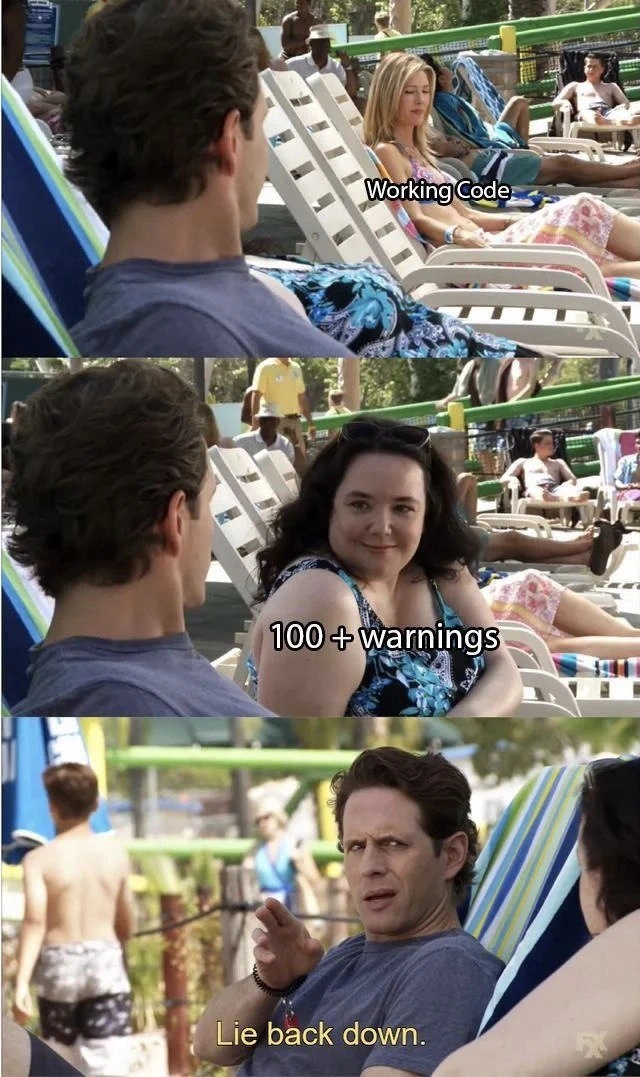
That “Lie back down” phrase is from the meme’s format, essentially meaning “go back to being unimportant.” The developer is saying this to the warnings. It’s a comedic way to show willful ignorance. In a more serious environment, you might hear a developer say, “Eh, just ignore those warnings, the app works.” Same energy, just less funny wording. Here it’s done with a poolside setting to exaggerate the chill attitude. The guy in the meme is literally lounging and waving off something that’s trying to get his attention – a perfect visual metaphor for ignoring compiler warnings while being relaxed because the program runs. The humor works even if you’ve never seen the show or format because the labels make it clear: one thing is trying to alert the dev (100+ warnings woman leaning in) and the dev prefers to continue chilling with the fact that the code runs (working code lady).
In basic terms, the meme is highlighting a common beginner vs. experienced concept: Just because your code runs (“yay, it works!”) doesn’t mean your code is healthy or correct beneath the surface. Beginners often celebrate when their program finally runs without errors – and rightly so, it’s an achievement! Warnings, however, are the next thing they learn about: “Your program runs, but there are things to improve or fix.” The meme dramatizes someone skipping that lesson, intentionally or out of necessity. It’s a reminder (in a tongue-in-cheek way) that ignoring warnings is a bad habit that can lead to code smells and bugs, even if everything seems fine at the moment. Clean code practice would encourage addressing those warnings sooner rather than later.
So, at this level, if you’re new to coding, take away this message: It’s great when your code compiles and runs – that’s working code – but don’t ignore the compiler’s warnings. They’re there to help you. The meme is funny because it shows a developer doing the opposite (basically telling the helpful warnings to shut up). It’s humor born from the fact that many people do that in real life, even though they shouldn’t. And now you understand both the joke and why those 100+ warnings actually matter!
Level 3: It Compiles, Ship It
This level examines the shared developer experience and industry culture that make the meme so relatable. Why do we chuckle (and maybe cringe) at “100+ warnings” being blatantly ignored? Because many of us have been there, or know someone who has. The meme’s scenario is practically an archetype in software development: working code being prioritized over clean code. It’s the classic trade-off of “Does it function?” winning out over “Is it well-written and maintainable?”
In the first panel, our developer is eyeing the sunbathing “Working Code” with satisfaction. That represents the feature or program functioning correctly – the immediate reward. In the second panel, “100+ warnings” (another person) leans in, symbolizing all those nagging messages the compiler produced during the build. They’re practically saying, “Hey, look at all these potential issues!” But then comes the punchline: the developer, with a dismissive hand, says “Lie back down.” That is him effectively telling those warnings to shut up and stay out of his way. The humor hits home because it caricatures a real attitude: “As long as the software runs and the users aren’t screaming, I don’t want to deal with those pesky warnings.”
Why is this funny to seasoned devs? On one hand, it’s absurd – ignoring a triple-digit count of warnings should be alarming, not relaxing. On the other hand, it’s painfully true that in many projects, especially rushed ones, this is exactly what happens. We’ve all seen builds where the console spits out pages of yellow text (WARNING: this, WARNING: that) and then happily reports “Build successful.” It’s like the build system saying, “I’ve got some concerns, but here’s your executable, good luck!” And the team lead or developer decides those concerns can wait because “we’ve got a deadline.” The meme nails this cognitive dissonance: the codebase is potentially a ticking time bomb of small issues, but hey, the app does launch and seems to work – so ship it!
This touches on the concept of technical debt. Every time we ignore warnings, we’re taking out a little loan against future development time. Maybe a warning is benign and nothing bad ever comes of it – that’s like finding out you don’t actually have to pay back one of those loans (lucky you!). But often, those warnings foreshadow real bugs or stability problems down the line. It might not bite today, or tomorrow, but give it a few months. For example, a warning about a deprecated function means the next library update could break your code. An unchecked type cast warning might be fine 99% of the time, until that 1% case causes a nasty runtime error. An "unused variable" warning might seem harmless, but it could hint that a piece of logic was mistakenly omitted. The developer in the meme is essentially saying, “Future me (or whoever inherits this code) will deal with it. Not my problem right now.” Seasoned engineers have learned (often the hard way) that “later” can come back as a monster. That’s why this image elicits knowing groans and laughter – it’s funny because it’s true, and also a bit like laughing at our own folly.
Let’s talk real-world scenarios. Imagine you pull an all-nighter coding a new feature. It’s 5 AM, coffee has replaced your blood, and you finally get the thing to compile and run. Boom, output looks correct. In that bleary state, seeing a barrage of warnings flash by, you likely think, “Ugh, whatever, it works. Good enough!” You push the code. This is especially common in crunch times when management pressures the team: “We need this release out by tomorrow.” In such an environment, code quality often takes a backseat. People start using mantras like “if it ain’t broke, don’t fix it” or “we’ll refactor later”. The meme’s developer saying “Lie back down” is basically that mantra in action. The 100+ warnings are things that are a bit broke (or at least smell funny), but since the software isn’t visibly crashing, the developer instructs them to stay hidden. It’s a comedic simplification of the decision to defer maintenance tasks in favor of immediate functionality.
Every experienced developer has witnessed projects where warnings accumulate like junk in a garage. On Day 1, maybe there were 5 minor warnings – nobody bothered to clean them up. A year later, thanks to copy-pasting that problematic code and adding more quick fixes, it’s 500 warnings. At that point, the team almost stops seeing them. It’s just noise during build. New devs join and are shocked: “Are we not going to address any of that?” Old-timers respond with a shrug: “Meh, they’ve always been there, the system still runs.” This normalization of deviance is exactly what the meme highlights. The “100+ warnings” lady has clearly been waiting for attention (she leaned forward after all), but our developer has long accepted her presence as something that should just “lie back down” and not disturb his focus on the “Working Code”.
From an organizational perspective, this reflects how priorities are set (or mis-set). If project managers and leads never allocate time for cleanup, developers are indirectly encouraged to ignore warnings. Many corporate codebases end up with // TODO: fix this warning later comments or a dedicated backlog item “Reduce compiler warnings” that never gets prioritized. The result? Warnings become part of the landscape. It’s funny in the meme because the developer literally treating warnings as a person to be silenced is not far from reality: we often personify tools and messages in frustration. (“Compiler, stop nagging, I know what I’m doing!”) In fact, many build scripts or IDEs have an “Ignore all warnings” setting – essentially the digital equivalent of telling them to lie back down. A senior dev will chuckle here because they recall that one colleague who discovered the -ignorewarnings flag or the @SuppressWarnings annotation and used it like a magic wand to make the output look clean without actually fixing anything. It’s like sweeping dirt under the rug.
Let’s not forget the compilers category here: different languages treat warnings differently. In C/C++, you might see messages about unused variables, signed/unsigned mismatches, or deprecated functions. The code still compiles to an executable. In Java or C#, you’ll get warnings about unchecked type casts or obsolete APIs, but a .jar or .exe is still produced. JavaScript (being interpreted) doesn’t have a compile step, but linters (like ESLint) will scream about bad patterns in a similar way – and yes, plenty of devs ignore linter warnings if the website “looks fine.” In large projects, there’s often the one guru who enables all the static analysis tools and tries to enforce code quality, and then the rest of the team that rolls their eyes when SonarQube or the linter flags 200 issues. It’s a kind of internal battle: clean code ideals vs. “just get it working” pragmatism. The meme sides with the pragmatic (if short-sighted) camp for humor’s sake.
Let’s illustrate how a warning can hint at a real problem. Consider this C snippet:
int main() {
int a = 10;
if (a = 5) { // Warning: using assignment (=) instead of comparison (==) in condition
printf("Hello\n");
}
return 0;
}
A compiler will likely emit a warning here: something like “warning: suggest parentheses around assignment used as truth value”. Why? Because doing if (a = 5) is probably a bug – it assigns 5 to a (so a is now 5) and then uses that value (5 is treated as “true” since it’s non-zero) to decide the if. The code will compile and run (printing “Hello” and exiting), so to an uninformed developer, everything seems fine: “It ran, didn’t it? No crash, output came out. What’s the issue?” The issue is that logically, they perhaps meant to write if (a == 5) to compare, not assign. The program’s behavior is now wrong (it prints “Hello” always, rather than only when some condition is met). The compiler warning was an attempt to alert the coder to this likely mistake. Ignoring that warning means a bug sneaks into production. This little example is a microcosm of what 100+ warnings might contain: among them could be genuine bugs waiting to happen. A senior engineer reading the meme is likely recalling a horror story of a production outage caused by exactly such a “harmless warning” that was ignored for too long.
The meme resonates because it exaggerates a truth: in the real world, teams often choose the path of least resistance. Fixing 100 warnings requires time, testing, and sometimes challenging old decisions. It’s much easier to say, “Lie back down”, keep those warnings under the poolside umbrella, and enjoy the sun of a seemingly working application. The consequence of this, though, is technical debt interest. Eventually, those warnings might force a day of reckoning – perhaps when updating a compiler (warnings might turn into errors in newer standards), or when debugging a weird issue that was forewarned by a warning. The experienced dev laughs at this meme with a mix of humor and unease: been there, done that, hoping not to do it again.
In summary, Level 3 exposes the gritty reality behind the joke. It’s highlighting the culture of “It works, ship it” in software development. The phrase “It compiles, ship it” (half-jokingly thrown around in dev teams) perfectly captures the meme’s sentiment. In a perfect agile world, we’d address warnings immediately as part of code quality sprints. In reality, they often get postponed indefinitely. So when we see a developer in a meme literally waving off warnings, we laugh in solidarity – it’s a snapshot of the ongoing battle (or peaceful standoff) between getting things done fast and doing things right. And as any cynical veteran coder will tell you: "Sure, ignore the warnings... what could possibly go wrong?" – said with a knowing smirk, because we all know the answer.
Level 4: A Warning to the Wise
At the deepest level, this meme pokes at how compilers handle questionable code. In compiler design, there's a clear divide between errors and warnings. An error means the code flat-out violates the language rules or logic so badly that the compiler refuses to produce an executable. A warning, on the other hand, is the compiler raising an eyebrow. The code is technically legal enough to compile, but something looks fishy. The compiler essentially says, "I can build this, but you might want to double-check it."
Why do compilers even allow code with 100+ warnings to run? It comes down to the limits of static analysis and the need for pragmatism. The compiler can't read the developer's mind or solve the program's behavior in all cases (that verges on the Halting Problem and undecidable territory). So instead, it uses heuristics and rules to catch likely issues. However, if compilers treated every potential issue as a show-stopping error, a lot of perfectly valid (if quirky) code would be rejected. To balance soundness vs. completeness, compilers adopt a gentler approach for suspicious constructs: they issue warnings. This design goes back to early languages like C, where the philosophy was "trust the programmer, but not too much". Back in the day, a separate tool called lint was used to flag sloppy C code that the compiler proper would gloss over. Modern compilers have become more opinionated over time (enabling flags like -Wall to warn about code smells), yet they still ultimately defer to the developer’s judgment on whether to heed those warnings.
From an advanced perspective, each warning is a non-fatal diagnostic. It marks code that isn’t strictly wrong according to the language grammar, but could lead to undefined or undesirable behavior. For example, consider C code with an uninitialized pointer or a dubious type cast – the compiler might emit a warning: "variable ‘p’ may be used uninitialized". The compiled program might run (since no rule was outright broken), but at runtime you’ve essentially entered the murky realm of undefined behavior. Formally, the program’s behavior isn't guaranteed by the C specification, which is a fancy way of saying "it might work by accident, or it might crash spectacularly." The compiler warned you as much, but ultimately left the choice in your hands. In languages with strict safety (like Rust or some formal verification frameworks), such ambiguous code would be outright rejected or require explicit acknowledgment (e.g. using unsafe blocks in Rust to tell the compiler "I know what I’m doing, trust me"). Mainstream languages, however, opt for flexibility — they compile and run with a warning, effectively saying "Proceed at your own risk."
There’s also a historical and performance angle to this leniency. Early compilers were built for speed and for hardware constraints – they didn’t spend time enforcing stylistic or cautious rules. They assumed a skilled programmer at the wheel. Over time, as projects grew and technical debt piled up from unnoticed bugs, the need for compilers to flag risky code became clear. Warnings evolved as that middle ground: the compiler as a polite advisor rather than a strict schoolteacher. They let legacy code compile (for backward compatibility) while still nudging developers towards cleaner, safer code. It’s a bit of a compromise driven by real-world needs: you don’t want a production build halted just because of a petty style issue, but you do want some heads-up if something truly odd is going on.
Interestingly, developers themselves have control over how seriously to treat warnings. Most toolchains offer a way to promote warnings to errors. For instance, using the -Werror flag in GCC/Clang treats all warnings as compilation errors, effectively saying "no warnings tolerated; fix them or the build fails". This is common in high-assurance software (think aviation or medical devices) where code quality is mission-critical. On the flip side, there are also ways to do the exact opposite – suppress warnings entirely. Using flags like -w (no warnings) or sprinkling the code with pragmas/annotations (e.g. #pragma GCC diagnostic ignored "-Wunused-variable" in C/C++ or @SuppressWarnings("all") in Java) is like telling the compiler, "Shh, don’t bother me with the details." This ability to turn the warning system on or off underscores that warnings are, by design, advisory. They rely on the developer’s discretion. In an ideal world, every warning would be either fixed or consciously suppressed with a good reason. But in reality, as this meme jokes, many devs treat the compiler’s advice like those lengthy terms-of-service: glance and ignore.
Deep down, the humor of the meme springs from this tension between formal correctness and practical convenience. Compilers embody a wealth of computer science theory – parsing code into ASTs, performing data-flow analysis, and applying decades of programming language research to detect potential problems. Yet after all that brainpower, the final decision to act on those 100+ blinking cautions lies with a human developer who might just shrug and say, "Ship it, it’s fine." It’s a scenario dripping with irony: the mighty compiler has done its best to warn you with all its analytical prowess, and the developer responds with “Lie back down”. In essence, the machine offered wisdom, but the human chose convenience. The meme exaggerates this dynamic, and at Level 4 we can appreciate the rich technical irony: all the compiler theory in the world can’t enforce good practices if the people involved decide to turn a blind eye.
Description
This is a three-panel meme from the TV show 'It's Always Sunny in Philadelphia'. In the first panel, a man is looking at an attractive woman on a lounge chair, who is labeled 'Working Code'. In the second panel, another woman, depicted as less conventionally attractive, sits up and gets his attention; she is labeled '100+ warnings'. In the final panel, the man, with a look of annoyance, dismisses her by saying, 'Lie back down.' The meme humorously illustrates a common developer behavior: willfully ignoring a large number of compiler or linter warnings as long as the code appears to function correctly. This is a relatable scenario for experienced developers who often have to make a pragmatic choice between shipping a feature and achieving a perfectly 'clean' build, effectively accumulating technical debt by silencing potential issues
Comments
8Comment deleted
Treating warnings as errors is a great policy for new projects. For legacy codebases, it's more of an aspirational life goal, like achieving inbox zero
Suppressing 120 warnings with -w is like hanging a “Lifeguard on Break” sign by the production pool - everyone keeps swimming until undefined behavior decides to cannonball
It's all fun and games until the junior dev discovers '--treat-warnings-as-errors' in the CI pipeline and suddenly your 'working' code becomes the reason for the 3am incident call when someone tries to deploy on Friday
Every senior engineer knows the sacred rule: if it compiles and passes tests, those 147 warnings are just the compiler's way of saying 'I have opinions.' We'll add fixing them to the backlog right next to 'refactor legacy authentication system' and 'update dependencies from 2019' - you know, the tickets that have been in 'To Do' since three sprints before the heat death of the universe
CI flags 100+ warnings; I whisper “lie back down” - “-Werror” is a Q4 OKR
Warnings are the compiler's passive-aggressive reminders that perfect code is the enemy of shipped software - lie back down and merge
Working code with 100+ warnings is just undefined behavior on layaway; every time I propose -Werror, the org says, 'lie back down.'
Warnings are good, don't sleep on them Comment deleted