Skip to content
DevMeme
2352 of 7435
This Alphabet Soup Requires Multi-Factor Authentication
Security Post #2615, on Jan 16, 2021 in TG

This Alphabet Soup Requires Multi-Factor Authentication

Why is this Security meme funny?

Level 1: Hide-and-Seek Soup

Imagine you have a bowl of yummy alphabet soup with little noodle letters floating around. Normally, you’d see letters like A, B, C in your spoon and maybe try to spell your name or funny words. But now pretend that this soup has a secret: it’s hiding all its letters! Every time a letter should show up, it turns into a tiny star instead. It’s like the soup is playing hide-and-seek with you. You know the letters are in there, but you can’t see them because they’re “secret”. Why would it do that? Well, it’s being silly – acting as if the soup is locked with a password, just like on a computer or phone when you type a password and see only dots or stars. It’s funny because soup isn’t something we lock up or hide, so it’s a goofy idea. The picture makes us laugh by showing a normally playful soup acting super serious and secretive, as if you’d need a magic code to read your noodles! In simple terms, the soup is keeping its letters a surprise, and that’s what makes the joke cute and amusing.

Level 2: Behind the Asterisks

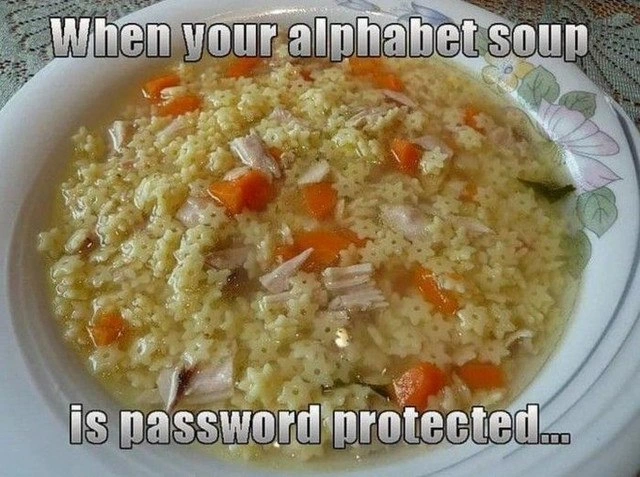
In this meme, a bowl of alphabet soup – the kind with little pasta shaped like letters – appears to have all its letters replaced with star-shaped pasta. The text says, “When your alphabet soup is password protected…”. This is a playful way to show what happens with password masking in computer applications. Password masking is when you type your password into a login field and, instead of seeing the letters you typed, you see placeholder symbols (often asterisks * or bullet dots ). So if you typed “HELLO”, it would show up as “*****” on the screen. In other words, the letters are hidden, just like the letters in this soup are “hidden” because they’ve all turned into little stars. The meme takes a familiar everyday thing (alphabet soup) and turns it into an analogy for a tech concept (hiding password characters). It’s a food meme making a point about software design in a funny, relatable way.

Let’s break down why this is both funny and relevant to developers. Password fields (for example, the box where you enter your password on a website or app) are usually designed to hide what you type. This is a basic security feature. The idea is that if someone is near you or peeking over your shoulder, they can’t read your password as you enter it. Only you, the person typing, know what you intended to type. The computer remembers the actual letters internally, but it won’t show them openly on the screen. This is what we call password masking or input masking for sensitive fields.

For example, imagine you’re logging in to your email. You click the password box and start typing P a s s w o r d. Usually, what you’ll see might look like ********, or perhaps •••••••• (depending on the style). Each letter you typed is represented by a symbol – often an asterisk (which literally looks like a little star “*”). Historically, a lot of systems used the * character for this, which is why the meme specifically uses star shapes in the soup. Nowadays many interfaces use round dots “•” for a cleaner look, but the concept is identical. You’ve probably noticed this whenever you log in to anything: no matter what characters you press, the field just shows a line of symbols.

Now, why do we do this? It comes down to Security vs Usability, a common theme in design. On the security side, masking passwords helps keep your authentication secret. “Authentication” is a big word that simply means verifying your identity (usually by checking something like a password that only you should know). If someone can easily read your password off your screen, that’s a security risk. For example, if you’re at a coffee shop and you type your password with someone sitting nearby, you wouldn’t want them casually glancing at your screen and reading “Passw0rd!”. By showing *** instead of the actual letters, the computer ensures that your secret stays secret. This helps prevent what we call shoulder surfing – that’s literally someone looking over your shoulder to see your information. It’s a simple but important way to protect users in public or semi-public spaces.

However, this security measure has a flip side: usability (how easy and convenient something is for the user). When your input is masked, you can’t easily verify if you made a typo. How many times have you entered a password, hit “Login”, and gotten an error saying the password was wrong? You think, “Hmm, maybe I mistyped it.” But since you couldn’t see what you were typing at the time, you have to try again from scratch. It can be frustrating, especially if your password is long or complex. This is a usability issue with password masking. It’s a bit like trying to write a sentence but covering your eyes – you might make mistakes and not know until later. Developers recognized this annoyance, which is why many login forms now have a little “Show Password” option (often an icon of an eye 👁️ you can click to reveal what you typed). That’s a direct response to the Security vs Usability challenge: it gives control back to the user. If you’re alone in a safe environment, you can choose to see the letters, but if you’re in public, you might keep them hidden.

The meme captures this challenge in a lighthearted way by using alphabet soup. Alphabet soup normally has all 26 letters floating around, and part of the fun (especially for kids) is to see what letters you got, maybe even spell little words on your spoon. It’s playful and user-friendly in that sense – the letters are meant to be seen and enjoyed. Now, by saying the soup is “password protected” and visually replacing letters with stars, it’s like the soup has suddenly decided to enforce a strict security policy! 😄 No more reading the noodles unless you know the secret code. This is funny because soup is something that absolutely doesn’t need security. It’s an exaggeration that makes us laugh and also immediately communicates the idea of “letters being hidden”. It’s tech humor taking a very non-technical scenario and injecting a bit of developer life into it.

For those newer to these terms, let’s clarify a few things in simpler terms:

  • Password (Authentication): A password is a secret word or phrase that you use to prove your identity when logging into an account. Authentication is the process of checking that password (or another factor) to make sure you are who you claim to be. Think of it like a key to a door: if the key fits, you’re allowed in.
  • Password Masking: This is the practice of hiding what you type in a password field. Each character you type might show up as * or . Only the computer knows the real letters while you type; on the screen it’s disguised. This is done for security reasons, mainly to keep others from seeing your secret key.
  • Asterisk Characters (*): The * symbol (we often say “star” or “asterisk”) is commonly used in computing to denote something hidden or as a wildcard. In the context of passwords, it became the go-to symbol to show a hidden character. In the meme, the star-shaped pasta represents these asterisks. Every letter noodle has essentially turned into a little star noodle. So the phrase “stars stand in for hidden letters” is quite literal here!
  • UX/UI: This stands for User Experience/User Interface. UI is what you see on the screen (buttons, text fields, checkboxes, etc.), and UX is the overall experience of using the product (is it intuitive? confusing? pleasant?). Masking password input is a UI decision that affects UX. It improves security but can hurt convenience, so designers have to balance these factors.
  • Security vs Usability: This is a common concept in tech. It means the more secure you make something, often the less convenient it becomes for the user, and vice versa. For example, requiring a super long complex password with symbols, numbers, and seven different cases might be very secure, but it’s a pain for a user to remember and type. Masking the password on screen is secure, but it’s less user-friendly. A balance is ideal so that users stay safe and happy.
  • Weak Passwords: A weak password is one that is easy to guess or crack. Examples are “password”, “123456”, your own name, or a common word like “letmein”. Even though the meme isn’t directly showing a specific password, the topic brings to mind the idea of password strength. If our alphabet soup letters spelled a very simple word (like “soup” or “food”), that would be a weak password in real life. No amount of masking on the screen will protect a truly weak password from attackers who use methods like guessing common words or using databases of leaked passwords. The meme implicitly nudges us to remember that while hiding the characters is useful against prying eyes, choosing a strong password is what protects you against prying hackers.

We can even illustrate how password masking works with a tiny coding example. Below is a short Python snippet that takes a password string and replaces each character with *:

password = "hello"               # the actual password
masked = "*" * len(password)     # create a string of '*' of the same length
print(masked)                    # Output: "*****"

In this code, if password was "hello", len(password) is 5 (because “hello” has 5 letters). "*" multiplied by 5 gives "*****". So masked becomes "*****". This is essentially what the computer does internally for display purposes: for every letter, show a *. If you had alphabet soup and you did this, every time you scoop a letter, you’d replace it with a star-shaped noodle. The soup would look just like the image in the meme! Of course, in the actual soup photo, they used star pasta from the start – it’s a visual gag. But it perfectly mimics the effect of an input field hiding the content.

To sum up this level: the meme uses a clever analogy to explain a tech concept. Alphabet soup is something fun and visual, and “password protecting” it by hiding the letters is instantly understandable if you’ve ever used a computer password. It’s funny because it’s unexpected (nobody needs to lock their soup with a password!), and it’s relatable to tech folks who deal with login screens and authentication systems regularly. The culinary metaphor makes the concept of password masking more approachable and memorable. After seeing this, you’ll probably never look at a bowl of alphabet soup the same way again – you might chuckle and think, “Hope I know the password to eat this!” 🍜

Level 3: Culinary Obfuscation

This meme mixes security design with a culinary metaphor in a way that makes seasoned developers smirk. It shows a bowl of alphabet soup where all the pasta letters are replaced by tiny star shapes, just like how password input fields display asterisk characters (the * symbol) instead of the actual letters you type. In other words, the soup’s letters have been obfuscated – hidden from view – as if the bowl itself were a login screen under lock and key. It’s an absurd visual pun on password masking that hits close to home for anyone who’s battled with authentication UX. The bold caption “When your alphabet soup is password protected…” spells out the joke: you can’t read the noodles because you haven’t entered the “secret”. For developers, this immediately evokes the classic tug-of-war of Security vs Usability in interface design.

On a serious note, the meme highlights a well-known design decision in authentication systems: masking password inputs. In a typical login form, when you set an HTML input to type="password", any text the user types is shown as •••• or **** instead of plain letters. The actual characters are still there in memory, and will be submitted for authentication, but the user interface hides them. Why? Mainly to prevent shoulder surfing – the risk that someone nearby might glance at your screen and steal your secret. It’s basic security hygiene. However, every developer knows this protective measure comes at a cost to user experience. We’ve all had that moment where we’re frantically trying to log in, only to realize (after multiple failures) that caps lock was on or a character was mistyped – a mistake we didn’t catch sooner because each character was masked by a star. This is the classic Security vs Usability trade-off: you gain privacy, but you lose immediate feedback. The meme exaggerates this trade-off by applying it to soup, of all things, which makes the whole scenario comically incongruous.

From a senior developer’s perspective, the humor also lies in recognizing industry patterns and history. The use of * to hide characters has been around for decades. Early terminal systems and legacy login prompts would often echo an asterisk for each letter in your password, or sometimes nothing at all, to avoid leaving any clues. The star * became an iconic symbol of hidden secrets in computing. It’s ingrained enough that even non-techy folks associate a line of *** with “password”. Seeing star-shaped pasta floating in broth is like the physical, edible incarnation of this concept. Developer humor often thrives on such literal visualizations of abstract tech ideas – it’s the kind of joke you chuckle at precisely because you understand the underlying mechanism so well.

Real-world experiences feed into the laughter here. Think of on-call war stories or daily QA work: maybe you deployed a new login page and the first feedback was users complaining they couldn’t tell if they typed their password right. Or the time Grandma called saying, “My password isn’t working, I keep typing it but only see dots!” – she didn’t realize those dots were just UI masking. (Yes, some users actually think the computer is turning their password into asterisks literally, leading them to wonder if their password is supposed to be “*******”!) As weary engineers, we’ve been there, patiently explaining: “No ma’am, the system hides what you type so no one can peek, but I promise it knows the real letters you entered.” This shared experience of authentication confusion is exactly why the meme lands so well. It’s poking fun at a feature we implement routinely and sometimes begrudgingly: we know why it’s there, we know it annoys people, and we’ve probably joked among ourselves about “password-protecting the coffee machine” or, indeed, soup.

The meme also touches on the idea that hiding information is not the same as securing it strongly – a nuance seasoned devs appreciate. Masking your input with stars only protects against someone casually looking at your screen; it doesn’t strengthen the password itself. A weak password (like "soup" or the infamous "password123") is still weak, even if you cover it with a dozen ⭐️ symbols. The soup analogy playfully reminds us of this: sure, you can’t see what the noodles spell, but if they spelled a common word, a determined “attacker” (imagine a hungry sibling peeking over your shoulder) could still guess it. In real systems, true security comes from things like strong password requirements, hashing and salting passwords in storage, rate limiting login attempts, and two-factor auth – not merely hiding the characters on screen. But none of those serious things are visible in the meme, and that’s part of the charm. Authentication has many layers, yet this joke zooms in on the most visible one (literally visible on the UI): those pesky stars.

The interplay between UX/UI and security is where senior developers will nod knowingly. Over the years, design conventions have evolved to ease the frustration without compromising safety. Many login forms now include a little “👁️” icon button that lets you toggle the password visibility (so you can double-check what you typed). Mobile OS keyboards briefly show the last character you entered before hiding it, so you have a split-second to confirm each letter. These are thoughtful improvements acknowledging that pure security (100% hiding) can collide with usability (humans make typos!). The meme’s scenario—alphabet soup you can’t read—feels absurd because in that context, usability is everything (soup is meant to be enjoyed, maybe by reading messages in the noodles), and security is laughably unnecessary. It’s this inversion that tickles developers: we recognize the absurdity of misapplying a serious security measure to a bowl of lunch. It’s a gentle jab at ourselves too: sometimes in tech we go overboard locking things down and forget the user’s perspective, akin to child-proofing something that didn’t need protection.

In sum, this meme is a delightful piece of tech humor. It encapsulates a tiny saga of software development (password input design) in a single image. By using a food meme format, it takes an everyday comfort food and gives it a geeky twist. For those in on the joke, it’s instantly “digestible” (pun intended 😋). We laugh because it’s relatable: we’ve all seen those ******** fields and perhaps cursed under our breath at them, and we’ve all eaten alphabet soup or at least know what it is. Combining the two paints a ridiculous mental image that ironically illuminates the very real security-vs-convenience balancing act. This kind of joke brings a bit of lightness to the often dry world of security engineering, reminding us that even something as serious as password protection can be served with a side of fun.

Description

This meme presents a simple yet clever visual pun. The image shows a close-up of a bowl of alphabet soup, but instead of letter-shaped pasta, the soup is filled entirely with small, asterisk-shaped pasta. The overlaid text reads, 'When your alphabet soup is password protected...'. The humor lies in the direct comparison of the asterisk pasta to the common practice of masking password entry fields in user interfaces with asterisks for security. It's a relatable joke for anyone who has ever typed a password online, but especially for developers and IT professionals who implement or frequently interact with these security features

Comments

10
Anonymous ★ Top Pick I bet the password is 'hunter2' but all I see is '*******'
  1. Anonymous ★ Top Pick

    I bet the password is 'hunter2' but all I see is '*******'

  2. Anonymous

    Our cafeteria’s alphabet soup now runs PBKDF2 - every letter hashes into star pasta and the carrots are just extra salt; UX is livid, the CISO says it’s finally seasoned right

  3. Anonymous

    After 20 years in tech, I've finally found the perfect password manager - Campbell's Chunky. It generates truly random strings, never stores them in plaintext, and the only vulnerability is when someone's hungry enough to perform a brute-force consumption attack

  4. Anonymous

    This is what your production database credentials look like after the security team mandates 64-character randomly generated passwords with special characters, but you still have to manually type them during that 3 AM incident because someone forgot to rotate the secrets manager key and now the automation is locked out. At least it's not 'Password123' anymore - though honestly, the alphabet soup might be easier to remember than the base64-encoded JWT token you're currently using as a temporary workaround

  5. Anonymous

    Enterprise password policies: enforcing perfect Shannon entropy, delivering Post-it note graveyards since '01

  6. Anonymous

    Like most password fields, this soup adds zero bits of entropy and 100% UX friction - classic misreading of NIST 800-63

  7. Anonymous

    Alphabet soup displaying ***** - security theater at its tastiest: UI masking while the actual password sits in plaintext in the logs

  8. @DetOfVice 5y

    Jewish soup

  9. @AnakinSkywalker09 5y

    I don't get it, can anyone explain?

    1. @Odinmylord 5y

      it's an alphabet soup but every character is an "*"

Use J and K for navigation