Skip to content
DevMeme
2546 of 7435
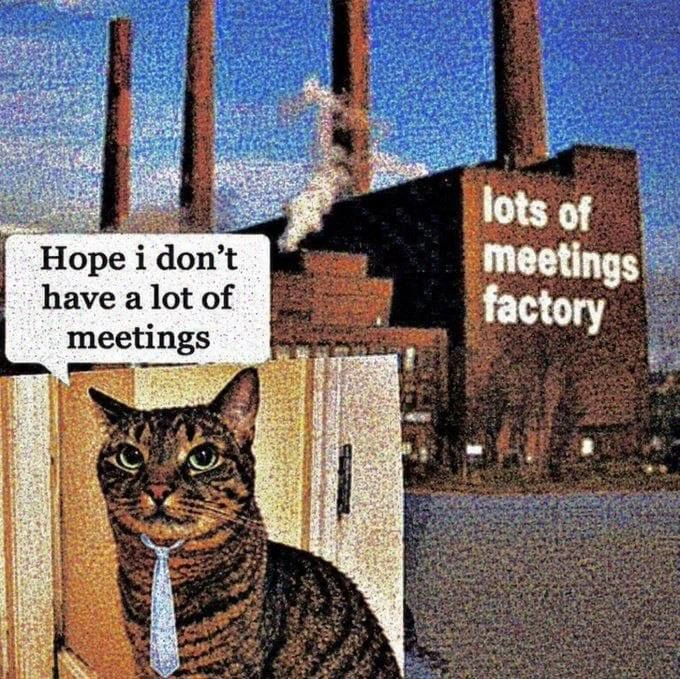
Drake meme: rating conversation over actual call quality in feedback popup
Communication Post #2821, on Mar 4, 2021 in TG

Drake meme: rating conversation over actual call quality in feedback popup

Why is this Communication meme funny?

Level 1: Clear Connection, Bad Conversation

Imagine you’re talking on the phone with a friend. The phone itself is working great – you can hear your friend perfectly, and they can hear you with no crackle, no delays, nothing wrong at all. That’s like a clear connection technically. But during this call, suppose your friend says something that makes you upset, or the two of you end up arguing. Now the call ends, and your phone pops up a question: “How was your call?” When you think about that question, you’re probably going to say it was a bad call — not because the sound was bad (the sound was actually fine), but because the conversation made you unhappy. In other words, the phone call’s technology was perfect, but what was said during the call was the problem. This meme jokes about that situation. The computer really wants to know if the phone or video worked alright (was the sound and video good?), but people often answer based on how they felt about the talk itself. It’s funny because the poor computer is trying to fix the connection, but all the person cares about is the conversation. So the meme shows that we humans will rate a call by our feelings and what happened in the chat, not just by whether the microphone and camera behaved. It’s like being asked about the movie theater’s sound quality, and instead you reply by saying the movie’s story was boring — a mix-up between the experience of the service and the content. The joke reminds us that in the end, if the talk was bad, we’ll say the call was bad, even if the line was crystal clear.

Level 2: Meeting Metrics 101

Let’s break down what’s happening in this meme in simpler terms. When we talk about rating a call from a technical point of view, we mean judging how well the technology worked during that call. Imagine you’re on a video call: did you hear the other person without delays? Was their video smooth or did it freeze up? Were there any weird robotic sounds or was the audio clear? All these factors are what engineers call call quality or Quality of Service (QoS). Here are a few key terms and what they mean for a call:

  • Latency: This is the time delay between you speaking and your friend hearing it on the call. Low latency is good – it’s like a normal in-person chat with no noticeable pause. High latency (even a delay of, say, half a second) can make conversations awkward: you end up talking over each other or constantly saying “...hello? you there?” because responses lag. It’s like when a TV satellite interview has that little pause; in a meeting it can cause awkward silences or people accidentally interrupting.
  • Jitter: In a perfect call, every packet of voice/video data arrives evenly spaced. Jitter means some packets arrive faster or slower than others. High jitter makes the call choppy. One second you hear the person fine, the next second a word gets garbled or cut short. It’s as if someone is randomly speeding up and slowing down the conversation. Good call software includes jitter buffers to smooth this out, but if you’ve ever heard only every other word someone said, jitter might be to blame.
  • Packet Loss: Your voice on a call gets chopped into tiny pieces of data called packets. Packet loss is when some of those pieces don’t make it to the other side of the call. When that happens, parts of the audio (or video) are missing. Ever hear someone’s voice turn robotic or suddenly drop out for a moment? That’s often packet loss. A small amount (like 1% of packets) might not be noticeable because apps use tricks to hide it, but higher loss makes conversation really difficult (“Sorry, you were cutting out, can you repeat that?”).
  • Bandwidth: This is the amount of data your connection can handle, usually measured in megabits per second (Mbps). If you have high bandwidth, you can get HD video and clear sound. If bandwidth is low, the call app might lower the video quality or the sound might get compressed more, making it less crisp. Think of bandwidth like a highway: more lanes (higher bandwidth) means more cars (data) can drive side by side without traffic jams. Low bandwidth is like a single-lane road – things get congested quickly.

These are some of the technical things the app cares about when asking “How was the call?” The feedback popup with the sad, neutral, and happy faces is an example of UX design trying to make it easy for users to rate their experience. It’s asking for your call_quality_feedback. After every video conference or voice call on many platforms, you’ll see a dialog just like in the meme. It usually wants to know if you faced any technical issues: could you hear and see everyone okay? Any delays or dropouts? This helps the developers and support team figure out if there are connectivity problems or bugs. For instance, if many users report bad call quality at the same time, it might indicate an outage or a server issue. Or if one user always rates calls poorly, maybe their network is slow or something’s wrong on their device.

However, here’s the funny part: users often don’t separate the call’s technical quality from the overall meeting quality. When that dialog pops up asking about your “call experience,” you might just think about how the meeting felt. In other words, you rate the conversation (was it enjoyable, productive, frustrating?) instead of just the connection. This is a classic case of Misaligned Expectations between users and the app’s designers. The app expects you to act like a mini quality inspector for network issues, but you’re just a person who had a meeting and you’ll give a thumbs up or down based on whether the meeting itself was good or bad for you.

For someone new to tech or early in their career, this is a relatable scenario. Remember your first long remote meeting during RemoteWork or an online class where everything worked technically, but the meeting was boring or stressful? If the app asked “How was the call?”, you might instinctively give it a low rating because you didn’t enjoy it — maybe your boss critiqued your project or the discussion went in circles. The audio and video could have been perfect, but that doesn’t matter to you as much as how the conversation went. Conversely, imagine a meeting where the audio had a few hiccups and the video was a bit grainy, but you got great news (like you nailed a presentation or received praise). You’d likely still give that call a happy face because you come away feeling good. In tech terms, your Quality of Experience was high even if the Quality of Service had some flaws.

This meme’s joke is really about that human tendency. It’s highlighting a bit of UX irony: the simple feedback tool in a communication app is trying to gather data to improve the service, but it’s getting overloaded with subjective input about things it can’t fix. A meeting app can patch software to reduce latency or packet loss, but it can’t patch the fact that maybe that meeting shouldn’t have happened or that someone’s microphone etiquette was poor. 😅 For junior developers or anyone learning about product design, it’s a funny reminder: when designing user feedback mechanisms, be specific if you want specific information. Otherwise, people will give answers that make sense to them, not necessarily what you’re looking for. In the world of meetings and calls, technical quality and conversational quality are two different things, and real users tend to merge them into one overall feeling. That’s why this meme resonates: it’s pointing out something we’ve all seen in online meetings, in a lighthearted way.

Level 3: Bandwidth vs Banter

At the highest level, this meme highlights the clash between technical call quality and human conversation quality. It's essentially pointing out a QoS vs QoE showdown – that's Quality of Service (network metrics) versus Quality of Experience (user satisfaction). The top half of the image shows a typical post-call feedback UI (common in remote communication tools like Zoom or Teams) asking “How’d the call go? Tell us about your call experience.” The engineering team behind that dialog is hoping the user will rate the call’s technical performance – things like audio clarity, latency, jitter, video freezing, etc. These are the hard metrics: Was there low latency (minimal delay between voices)? Was jitter (variation in timing of data packets) under control? Any packet loss causing robot voices or dropped words? Essentially, they’re after a report card on the network and software: did the meeting software do its job delivering voice and video smoothly?

But the Drake meme format brilliantly captures what often actually happens. In the first panel, Drake is rejecting “Evaluating the call from a technical point of view.” That’s the nerdy approach – rating the call by pure tech metrics. Most users don’t think like a network engineer, and Drake’s classic “nope” gesture nails that sentiment. In the second panel, Drake is all smiles, pointing to “Rating the conversation instead of the call itself.” That’s what users do: they give feedback based on the conversation’s vibe, not the connection’s quality. Did the meeting go well socially? Was it a pleasant chat or a frustrating argument? Drake happily approves this human-centric rating approach.

For seasoned developers and IT folks, the humor cuts deep because we’ve seen this mismatch in real life. You might have built a video conferencing feature that achieves 720p video at 60 FPS, crystal-clear audio, and rock-solid uptime – basically a technical success. Yet after the call, you see users hitting the sad-face 😞 on the feedback popup. Ouch! As a dev, your first thought is, “What went wrong? Was there hidden packet loss or a spike in latency we missed?” You dive into the logs and monitoring dashboards (maybe checking if voice_call_latency spiked or if the server had a hiccup). But all the stats show green. Meanwhile, the actual reason for the poor rating might be that the meeting itself was annoying or pointless. Perhaps it was yet another “this could have been an email” meeting, or a tough performance review call. In other words, the user is rating their meeting experience, not the network quality.

This is a classic MisalignedExpectations scenario in UX design. The app’s UX_UI team provided a generic prompt: “Tell us about your call experience.” From a UXDesign perspective, that wording is broad and user-friendly – it doesn’t bombard the user with technical jargon. But it backfires when you need specific data. Users interpret “call experience” their own way. The developer or product manager really wanted a technical QoS report (“Was the audio laggy? Any echo? Could you see screen-share okay?”). Instead, they get a customer satisfaction report about the meeting’s content (“My boss droned on for an hour – unhappy face!”). It’s TechHumor gold because it’s true: the metrics we collect can be totally unrelated to what we think they are. The meme draws a clear line: engineers care about the connection, users care about the conversation.

There’s an underlying irony familiar to anyone working on communication tools. In network engineering, you strive for five-nines reliability, low ping times, and high throughput. You might implement clever QoS algorithms to prioritize voice packets, use error correction to fix lost data, and optimize codecs for clarity. From a pure tech standpoint, you can achieve near perfection—a call with no drops, no lag. But even a flawless call can be “bad” in the user’s eyes if, say, it was a hard sales call that fell through. Conversely, a technically rough call (maybe a bit of lag, a blurry moment or two) could get a glowing happy-face 😃 if, for example, it was a fun chat with an old friend or a successful job interview. Quality of Service vs Quality of Experience: the battle rarely ends in a draw. The meme gets a laugh from developers because we recognize that even the best code and infrastructure can’t guarantee a good meeting. As one might jokingly say, packets don’t carry emotions. You can measure jitter, but you can’t measure how awkward that team stand-up was.

In summary, this Drake-format meme perfectly captures a piece of RemoteWork reality. The top (rejected) frame is the ideal world of engineers – judging a call by its technical merits. The bottom (approved) frame is the messy real world of communication – judging the call by human factors. It’s poking fun at the disconnect: our sophisticated communication systems gather tons of data on call quality, yet the feedback we get often reflects things far outside the system’s control. It’s a gentle reminder that in the realm of meetings and calls, people > packets, and user feedback will always be colored by the broader context of the conversation. For those of us designing these systems, it’s both a funny and humbling realization that no amount of code can program away a bad meeting.

Description

The meme combines a screenshot of a post-call feedback dialog and the classic two-panel Drake reaction format. The dialog (dark grey UI) shows the text "How'd the call go? Tell us about your call experience." followed by three emoji-style faces (sad, neutral, happy) and a checkbox labeled "Don't show me this again." Below, the first Drake panel (hand raised, rejecting) is captioned "Evaluating the call from a technical point of view" in bold black text; the second Drake panel (pointing approvingly) is captioned "Rating the conversation instead of the call itself." Visually, the message boxes and captions are contrasted against Drake’s yellow-tinted background. Technically, the joke highlights how user feedback UIs often collect QoS metrics but real users focus on subjective conversation quality, illustrating the gap between engineering metrics (latency, jitter, packet loss) and human-centric satisfaction signals in remote work communication tools
Comments

8
Anonymous ★ Top Pick We rolled out global TURN clusters, drove packet loss to 0%, and the post-call survey still says “Great audio, terrible meeting - Bob talked 40 minutes straight.” Guess the real outage was at layer 8
  1. Anonymous ★ Top Pick

    We rolled out global TURN clusters, drove packet loss to 0%, and the post-call survey still says “Great audio, terrible meeting - Bob talked 40 minutes straight.” Guess the real outage was at layer 8

  2. Anonymous

    After 15 years of building distributed systems, I've learned that users will always rate their manager's rambling monologue as a 'poor call quality' issue, while actual packet loss and 500ms jitter gets five stars because 'the meeting ended early.'

  3. Anonymous

    This is the engineering equivalent of asking 'How was your experience with our database?' after a query timeout - you're measuring user sentiment about the *result* when you desperately need telemetry on connection latency, packet loss, and codec performance. No amount of happy-face emojis will help you debug why WebRTC keeps dropping frames on Firefox 115, but your PM dashboard will show 95% satisfaction because people had good conversations despite the technical dumpster fire

  4. Anonymous

    Treating that emoji as MOS is how a brilliant 1:1 hides 300 ms jitter and 2% packet loss

  5. Anonymous

    Forgetting CAP theorem but nailing chit-chat partition tolerance

  6. Anonymous

    PM keeps plotting the post-call smiley against packet loss; I keep explaining that’s a survey of catharsis, not jitter - QoS didn’t improve, sales just got a yes

  7. @freeapp2014 5y

    But when you have a great conversation, doesn’t it automatically mean that technical details all worked well?

  8. @p4vook 5y

    Too bad saw on profunctor

Use J and K for navigation