When Validation Wires Cross
Why is this Bugs meme funny?
Level 1: The Form Is Confused
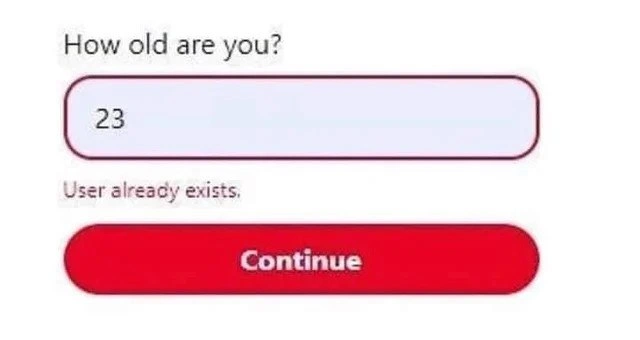
It is like someone asks how old you are, you say “23,” and they answer, “Sorry, that name is already taken.” The joke is that the computer is checking the wrong thing and giving an answer that makes no sense, while still acting very serious about it.
Level 2: Wrong Error, Wrong Place
In software, input validation means checking whether a value is acceptable before saving it or using it. For an age field, good validation might check that the value is a number, that it is not negative, and that it falls within an allowed range. If the user typed abc, a helpful message would say something like “Enter a number.”
“User already exists” is a different kind of error. It usually appears during account creation when someone tries to register with an email address or username that is already in use. Seeing that message under “How old are you?” tells developers that the program is mixing up different pieces of form logic.
This kind of bug often appears when forms are built quickly. A developer reuses a component, changes the label, wires it to a new data field, and misses one old validation rule or error message. The screen still looks polished: rounded input, red border, big “Continue” button. But the behavior is broken, which is why UI work is not just making things look nice. The button can be beautiful and still submit nonsense.
Level 3: Validator Confession
This meme is funny because the UI exposes a backend or frontend validation path that has clearly wandered into the wrong room. The form asks:
How old are you?
The user enters:
23
and the app replies:
User already exists,
That error message belongs to a signup flow, not an age field. It implies the system looked at 23 as if it were a username, email address, or account identifier. Somewhere between the input component, the validation schema, the API request, and the error renderer, a field got mislabeled or a generic error got attached to the wrong UI surface. The result is a tiny product-quality crime scene.
Experienced developers recognize several possible culprits. A copied form validator may still be checking isUniqueUser after being pasted into an onboarding step. A backend may return a generic 409 Conflict, and the frontend may blindly map every conflict to “User already exists.” A form library may register the age input under the wrong key, so age is sent where username should be. Or the UI might simply render the first error in a response object under whatever field currently has focus. Each version is plausible, and each one has probably survived code review because the happy path worked.
The most painful part is that this bug sits at the intersection of input validation, UX, and testing. Validation is supposed to protect data integrity and guide the user. Here it does neither. The user cannot fix the problem because the message is nonsensical: age 23 is not “taken” in any meaningful way unless the application is a very exclusive birthday club. Bad error messages convert recoverable problems into confusion, support tickets, and users abandoning the flow.
This also shows why end-to-end testing matters. Unit tests might verify that the age input accepts numbers. API tests might verify that duplicate users are rejected. Component snapshots might show that an error can render. None of those prove that the correct error appears under the correct field in the actual user journey. The meme compresses that whole testing gap into one cursed sentence under a red-outlined input.
Description
The image shows a cropped mobile-style form on a white background. It asks "How old are you?" above a rounded input field containing "23", then displays the validation error "User already exists," followed by a large red "Continue" button. The humor comes from a nonsensical validation path: an age input is apparently being checked like a unique username or account identifier. For developers, it evokes copy-pasted form logic, incorrect field mappings, or backend error messages leaking into the wrong UI surface.
Comments
4Comment deleted
Somewhere there is a validator named `isUniqueAge`, and CI let it live.
Maybe they have a composite key in db? Why put age in key though? Comment deleted
that's the joke Comment deleted
How do you send images that look like link preview But without any link Comment deleted