Skip to content
DevMeme
5251 of 7435
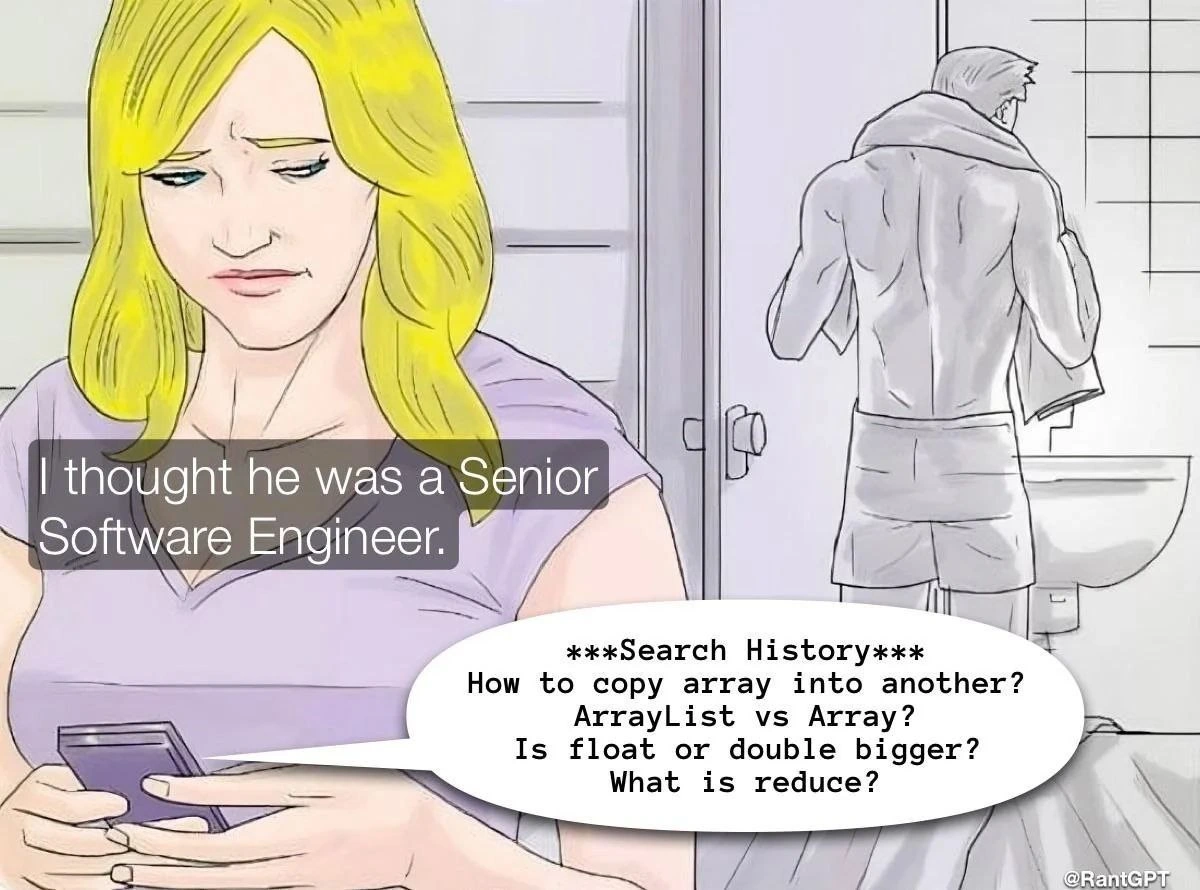
When His Search History Raises Red Flags
Juniors Post #5758, on Dec 18, 2023 in TG

When His Search History Raises Red Flags

Why is this Juniors meme funny?

Level 1: Nobody Knows Everything

Imagine your teacher at school – you might think they know every answer in the book. But have you ever seen them glance at the teacher’s guide or check an answer key? It’s not because they’re a bad teacher; it’s because even experts need reminders. This meme is saying the same thing about a software engineer. A “senior” developer is like a teacher of code, but that doesn’t mean they remember every little thing off the top of their head. Sometimes they quickly look up a solution or a definition, just like you might peek at the instructions while building a difficult LEGO set.

In the picture, a woman is surprised because she thought her boyfriend, the Senior Engineer, “knew it all.” She finds out he was searching very basic programming questions (like asking if a cup or a jug holds more water – that’s the float vs double question in simple terms!). It’s funny because usually people expect experts to never need help with the basics. But the truth is, nobody knows everything, and smart people aren’t afraid to ask or search for answers. Just like how even a master chef might double-check a recipe for the correct oven temperature, a master coder might double-check the right way to copy an array or what exactly a reduce function does.

The feeling behind the joke is comfort and surprise: it’s saying “Hey, even the big kids forget sometimes!” So if you ever feel shy about asking a simple question, remember this meme. Being good at something – whether it’s coding, cooking, or homework – often means knowing how to find the answer, not already having all the answers memorized. The senior engineer in this comic is still really good at his job, he just isn’t a walking encyclopedia. And that’s perfectly normal – even the pros have to learn and relearn along the way.

Level 2: Back to Basics

Let’s break down those seemingly simple concepts that our “senior” was searching. It turns out these are fundamental programming topics that even experienced devs revisit:

  • Array vs. ArrayList: An array is a basic data structure that holds a fixed number of items of the same type in a specific order. Think of it like a train with a set number of cars – once built, you can’t easily add or remove cars in the middle of a trip. Many languages (like Java, C, or Python) have arrays to store things like a list of numbers or strings. An ArrayList, on the other hand, is specific to Java (and similar to Python’s list or C#’s List<T>). It’s like a magical train that can attach new cars on the fly. In Java, ArrayList is a dynamic array implementation – it can grow or shrink as needed, and it comes with helpful methods (add, remove, contains, etc.). However, an ArrayList uses an underlying array behind the scenes. When a senior googles “ArrayList vs Array”, they might be refreshing their memory on differences like:

    • Syntax and usage (e.g., myList.get(i) vs myArray[i]).
    • Performance: arrays might be slightly faster and use less overhead, but ArrayLists are more flexible.
    • When to use which: maybe they’re advising a Junior colleague or writing documentation. Even experienced devs verify details to be absolutely sure they give the correct info.
  • How to copy an array into another: Copying an array isn’t always as straightforward as assigning one variable to another. In many languages, doing newArray = oldArray doesn’t duplicate the contents; it just makes newArray refer to the same array in memory (like giving a second name to the same train). To copy an array’s contents, you usually have to create a new array and then transfer each element. A senior might recall generally that “I need either a loop or some utility function,” but not remember the exact function name or parameters offhand. That’s why a quick search helps. For example, in Java you might do:

    int[] source = {1, 2, 3};
    int[] destination = java.util.Arrays.copyOf(source, source.length);
    // destination is now a new array [1, 2, 3], separate from source
    

    In Python, copying a list can be as simple as new_list = old_list[:] (using a slice) or using the copy module. In JavaScript, you might use array.slice() or spread syntax like newArray = [...oldArray]. There are multiple ways, and each language has its quirks – no wonder even pros google the best approach! This is a dataStructures fundamental: understanding how to duplicate containers without accidentally just copying references (which would link the two arrays). A senior knows doing it wrong can lead to nasty bugs (like unintentionally modifying the original array), so they double-check the correct method.

  • Is float or double bigger?: This question is about basic data types (often learned in introductory courses, which is why it appears “basic”). A float typically means a 32-bit floating-point number, and a double means a 64-bit floating-point number. The double has double the precision (hence the name) and can represent a much larger range of values as well as more decimal points accurately. In plain terms, if variables were containers: a float is like a cup and a double is like a big jug. Both hold water (numeric values), but the jug (double) holds more. Most modern languages (C, C++, Java, C#) follow this convention. So why would a senior search this? Possibly to confirm a detail while writing or reviewing code dealing with numeric limits or maybe writing an interview question explanation. It could also be that they momentarily swapped context between languages (e.g., in Python, you only have float which behaves more like a double internally, so memory size isn’t something you think about often). It’s easy to mix up terminology, so a quick check prevents any misinformation. This demonstrates a general truth: learningCurve in programming isn’t one-and-done; even core facts get revisited. No shame in verifying if float vs double size confusion strikes—better safe than sorry when precision is at stake!

  • What is reduce?: The term reduce refers to an operation often found in functional programming and in many modern programming language libraries. If you’re new to it: reduce takes a collection (list, array, etc.) and reduces it to one accumulated result by applying a function. Imagine you have a bunch of numbers and you want one answer – their sum. You can reduce the list of numbers into that sum by adding them up one by one. Many languages provide a reduce function so you don’t have to write the loop manually each time. For example, in JavaScript you can do:

    const numbers = [1, 2, 3, 4];
    const sum = numbers.reduce((acc, value) => acc + value, 0);
    console.log(sum); // 10
    // .reduce() combines array elements (here summing them) starting from an initial value 0.
    

    In this snippet, the .reduce() method takes a callback that tells it how to combine elements (acc + value adds each number to an accumulator). After running through the array [1,2,3,4], it produces 10. What is reduce? might be something a developer searches if they come across code using this pattern or need a refresher on the exact syntax/usage. A senior who hasn’t used functional style in a while, or is switching languages (say from Python to JavaScript or vice versa), might quickly confirm “how does reduce work in this language again?” It’s a concept simple in idea but diverse in implementation — in Python you’d import functools.reduce, in Java you’d use streams (stream.reduce(...)), etc. So it’s not that the engineer doesn’t understand reduce at all; they likely just want to avoid a mistake in how they implement it. This is normal DeveloperExperience_DX: knowing the concept but double-checking the details.

Now, seeing all these basic terms, you might wonder: shouldn’t a senior dev know these by heart? The reality is developers accumulate a vast amount of knowledge over time, but our brains are not compilers – we don’t store exact syntax or numeric limits in permanent recall. Instead, we remember concepts and how to problem-solve. The specifics can always be looked up. In fact, knowing how to quickly find an answer is a critical skill. As a junior developer, you might feel embarrassed about searching “easy” questions, but don’t! Even that buff Senior Engineer in the meme has a search history full of what a beginner might ask. It’s a friendly reminder that ImposterSyndrome feelings (“I bet everyone knows this except me”) are usually misleading. Chances are, many of your teammates are googling the same thing in another browser tab.

This “back to basics” habit is part of continuous learning. Technology stacks are broad: one day you’re writing low-level memory code in C, the next you’re using high-level Python for data processing. It’s impossible to keep every nuance loaded in your head. So seniors develop the wisdom to Google without guilt. They know that spending 30 seconds to confirm “is it Array.copy() or Arrays.copyOf()?” can save hours of debugging later. They also tend to have a mental index of trusted resources: documentation, Stack Overflow answers, maybe even their own notes or previous code. They leverage these instead of trying to reinvent knowledge from scratch.

In summary, each item in that search history represents a googling_basics moment that is entirely routine in a developer’s life. Rather than being a sign of incompetence, it’s a sign of professionalism – caring to get the details right. The meme uses exaggeration for comedic effect (the idea of sneaking a peek at someone’s search history is like peering into their brain’s “cache misses”), but it’s rooted in truth. If you’re a new developer, take heart: the LearningCurve never truly ends, and that’s okay. If you’re an experienced dev, you’re probably smiling because you’ve been that guy in the towel, secretly searching for something like “Linux find command syntax” or “Python sort list of dicts by value” while someone assumes you have all the answers. We’re all in this constant learning process together, and that’s what keeps the job interesting!

Level 3: Title vs Reality

Even a Senior Software Engineer with an impressive title isn’t an encyclopedic genius who magically recalls every detail of syntax and API from memory. This meme hilariously exposes the gap between perception and DeveloperReality. The foreground shows a woman texting “I thought he was a Senior Software Engineer.” as she discovers her supposedly expert partner’s search history full of beginner-style queries. It’s a classic impostor syndrome punchline: we imagine seniors effortlessly writing elegant code from memory, but reality is closer to StackOverflowDependence and daily “let me Google that real quick.”

In the background, the senior in question (the muscular man in a towel) is obliviously going about his day, while his phone betrays the truth: he’s been googling how to copy an array, the difference between an ArrayList vs Array, whether float or double is bigger, and “What is reduce?”. These are the kind of basic programming questions you’d expect a first-year CS student or a new Juniors developer to ask. The humor comes from the SeniorVsJuniorDevelopers role reversal – someone with a lofty title still asking “embarrassingly” basic things. It’s poking fun at the myth that senior devs have everything memorized, highlighting a core DeveloperExperience_DX: even veterans constantly revisit fundamentals.

Why is this so relatable? Because daily Google searches for basic facts are a cornerstone of modern coding. In an industry that evolves rapidly, even experienced engineers can’t keep every language quirk or API detail in active memory. Instead, they specialize in knowing how to find answers quickly. Have you ever blanked on how to iterate an array or the order of parameters for a function call you’ve used a thousand times? It happens to the best of us. Veteran developers often joke that their real skill is “knowing what to search for” – cultivating expert Google-fu. The meme nails this truth with the man’s search history on display: to outsiders it’s googling_basics like a newbie, but to insiders it’s just another Tuesday at work.

This reflects a bit of title_inflation reality too. In some companies, the “Senior” title might come after just a few years or through being the only dev in a startup – it doesn’t automatically grant omniscience. But even genuine long-time seniors face imposter moments. There’s pressure that you should know all the answers, which can lead to self-doubt when you inevitably have to look up something simple. The meme taps into that secret relief: “Phew, it’s not just me!” All developers, from fresh grads to 10-year veterans, sometimes need a refresher on core DataStructures or basic syntax.

Each search query in the meme also hints at real-world scenarios where professionals might need a quick refresher:

  • Copying an array: A very simple task that can trip you up if you forget the exact method or want to avoid a common bug (shallow vs deep copy, off-by-one errors, etc.). Many languages have their own idioms (System.arraycopy in Java, slicing in Python, etc.), and even seniors google the exact syntax to avoid mistakes.
  • ArrayList vs Array: This screams Java, where ArrayList is part of the Collections framework. A senior might be switching between languages or explaining to a junior why a regular array isn’t resizable. Double-checking differences (like performance trade-offs or methods available) is something even a seasoned Java dev might do before making a recommendation.
  • Float vs Double size: Perhaps our senior is writing some code dealing with float and double types (common in C, C++, Java, etc.) and had a brain freeze on which one has higher precision. It’s well-known that a double (64-bit) is bigger than a float (32-bit) in memory and range, but if you mostly use high-level languages or haven’t touched raw numeric types in a while, you might briefly second-guess it. Better to Google than introduce a subtle bug in a calculation!
  • What is reduce?: The term reduce refers to a functional programming operation (also seen in JavaScript arrays, Python’s functools.reduce, Java Streams, etc.) that takes a collection and reduces it to a single value by combining elements (e.g., summing a list of numbers). If this senior primarily wrote imperative code, he might not use .reduce() often, so he’s confirming how it works or the exact syntax in the language he’s using. It’s a reminder that modern languages keep adding new paradigms, so continuous Learning is part of the job.

The comedic tension here comes from the woman’s perspective: “I thought he was a Senior...” The implication is that a non-developer (or even a junior developer) might assume a Senior Engineer’s brain is an encyclopedia of coding knowledge. The reveal of his search history shatters that illusion in a humorous way. It’s DeveloperHumor that resonates because every developer has had that moment of frantically Googling “basic” stuff and hoping no one is watching. In reality, far from being a shameful secret, this LearningCurve on the job is completely normal. The DeveloperReality is that programming is as much about knowing how to research and troubleshoot as it is about writing code. In fact, senior developers are often better at using resources like documentation and Q&A sites effectively. They’ve just learned that actively seeking answers (rather than stubbornly guessing) is the smart and efficient move.

So the meme gives a warm laugh of recognition: the “muscular” Senior dev isn’t a fraud at all – he’s doing exactly what great engineers do: continuously filling gaps in knowledge, no ego attached. The search_history bubble is essentially a badge of humility that even experts rely on the collective memory of the internet. As the saying goes in coding communities, “One of the most powerful programming tools is Google.” This comic panel reminds us that behind every polished senior engineer, there’s a trail of Stack Overflow tabs and basic question searches. Title vs reality, indeed. 😅

Description

A meme in the style of a colored cartoon drawing, based on the 'I bet he's thinking about other women' format. In the foreground, a blonde woman is looking at her phone with a concerned and disappointed expression. A thought bubble above her reads, 'I thought he was a Senior Software Engineer.' In the background, a muscular man is seen from the back, drying himself with a towel in a bathroom. A large speech bubble emerges from the phone, revealing his search history. The text inside reads: '***Search History*** How to copy array into another? ArrayList vs Array? Is float or double bigger? What is reduce?'. The humor stems from the stark contrast between the prestigious title of 'Senior Software Engineer' and the extremely basic nature of the search queries. These questions cover fundamental programming concepts that are typically mastered at the very beginning of a developer's career, humorously suggesting that the man is either an imposter or is having a very, very bad day


Comments

36
Anonymous ★ Top Pick A real senior's search history isn't this clean; it's filled with things like 'how to gracefully exit vim,' 'regex for a string that contains a quote,' and 'deprecate feature without telling marketing.'
  1. Anonymous ★ Top Pick

    A real senior's search history isn't this clean; it's filled with things like 'how to gracefully exit vim,' 'regex for a string that contains a quote,' and 'deprecate feature without telling marketing.'

  2. Anonymous

    Seniority is when you still Google “copy array” daily but can also explain why doing it in the hot path will nuke your p99 and page the entire on-call rotation

  3. Anonymous

    After 15 years in the industry, you realize the difference between a senior and junior engineer isn't knowing these answers by heart - it's knowing exactly which Stack Overflow answer to trust and having bookmarked the MDN page for Array.prototype.reduce() since 2015

  4. Anonymous

    When their LinkedIn says '10+ years experience' but their browser history reads like a CS101 study guide - turns out 'Senior' was just the coffee size they ordered during the interview. At this rate, they're one 'how to exit vim' search away from a performance improvement plan

  5. Anonymous

    Seniority isn't memorizing reduce; it's knowing to google Arrays.copyOf vs System.arraycopy site:docs.oracle.com -blogspot at 140 WPM and acting like you always did

  6. Anonymous

    Senior title earned; ArrayList.toArray() knowledge? Still buffering in browser history

  7. Anonymous

    Seniority is knowing where to store state: architecture and invariants in L1, and “ArrayList vs Array” as a cold cache miss routed to Google’s CDN

  8. @danylo1554 2y

    The last question is so true 😂

    1. @CcxCZ 2y

      More like What is reduce called in this language. At least for me. Somehow can't remember foldl/foldr.

      1. @azizhakberdiev 2y

        Java had array implementations?

        1. @RiedleroD 2y

          not as a primitive type, objects bs only (afaik)

          1. @sylfn 2y

            int[] is an array as a primitive type

            1. @RiedleroD 2y

              fuck ok nvm

  9. @nllk11 2y

    He is

    1. @Sp1cyP3pp3r 2y

      That's junior's questions

      1. @trainzman 2y

        You would google things like these for the rest of your life

        1. @Sp1cyP3pp3r 2y

          OK true fr

      2. @nllk11 2y

        Nah. If you write in multiple languages you keep forgetting something. And there's always a better way to do something

        1. @RiedleroD 2y

          the endless wave of differen ways to append something to an array… push_back array_push .append … and I can never remember which one is where (except python because it actually makes sense)

          1. @nllk11 2y

            Well, in some cases it's not that simple. Firstly I think of C++, where there are bunch of ways to get a sum of two vectors. So I would look for the best way to do such thing. Of course I can just get a for loop and get the job done, but would it be done the best way? I don't think so

            1. @RiedleroD 2y

              that sounds more like premature optimization than anything. Do the for loop. then do proper performance profiling later

              1. @nllk11 2y

                there is no such thing as "later". You code it once and forget it before something fucks up. Other way - you code badly. IMO

                1. @RiedleroD 2y

                  if I don't forget my code I code badly? lmao, least experienced but opinionated dev

                  1. @nllk11 2y

                    Dude, you just proved me right when you forgot that int[] is primitive type, lol. With experience you just switch your focus to other things besides primitive constructions. That what I wanted to say.

                    1. @RiedleroD 2y

                      forgetting language features and what a piece of code does are very different things

                2. @RiedleroD 2y

                  besides, even if I were to forget my code, the profiler won't lie

          2. @sylfn 2y

            me when QVector has both push_back and append (same functions)

            1. @nllk11 2y

              i like qt for such things

            2. @CcxCZ 2y

              I'd say Qt is peak C++, but there is no peak C++, it gets more convoluted each year. :-]

  10. @trainzman 2y

    Because I would better lose a girlfriend than remember anything about Java

  11. @purplesyringa 2y

    "What is the order of arguments in reduce" — totally not me

    1. @sylfn 2y

      reduce(fn, cont) or iter.reduce(fn) or reduce(cont, fn)?

      1. @purplesyringa 2y

        no, reduce(lambda acc, item: ..., first) vs reduce(lambda item, acc: ..., first)

        1. @sylfn 2y

          second is cursed

        2. @hotsadboi 2y

          god this was such a pain in the ass during me getting my feet wet with functional programming it was the first time i had to work with lists without converting them to arrays or vectors under the hood, so to better understand them i used to write my own functions (ocaml99's first problems). i quickly found out what tail recursion is and how to use accumulators but some shitty example i used as a reference put acc as the last argument, which then turned into my habit some time later i went to using folds which required acc to go first and it clashed with my old mental model. i don't know why it was so bad but this was literally causing me headaches for a couple of days

  12. @CcxCZ 2y

    The real reason why you will not catch me searching for these is that I straight for "LanguageXY library reference". Why waste time on SO or tutorials with good SEO (aka explaining thing with as many words possible) when I can read what the author actually wrote. :]

Use J and K for navigation