Skip to content
DevMeme
5051 of 7435
The Cryptic Nature of C++ Compiler Errors
Languages Post #5530, on Sep 29, 2023 in TG

The Cryptic Nature of C++ Compiler Errors

Why is this Languages meme funny?

Level 1: Invisible Extra Lines

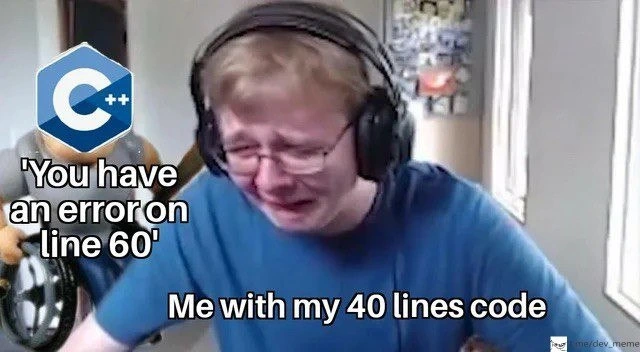
Imagine you wrote a short story that’s just 40 lines long. You’re really proud of it. But then, a mischievous friend sneaks in and adds a bunch of hidden lines from another story into your notebook without telling you. 😯 The next day, your teacher looks at your notebook and says, “There’s a mistake on line 60 of your story.” Now you’re completely confused – you only wrote 40 lines, so how can there be a line 60? It almost feels like the teacher is seeing something invisible or making up a mistake out of thin air. You might feel frustrated or think, “That’s not fair, I didn’t even write that part!”

This is just like what happens in the meme. The programmer wrote a small amount of code (40 lines), but the computer (like the teacher) is pointing out an error in a part that the programmer didn’t realize was there (line 60, added by those “invisible” extra pieces). It’s funny in a way because the situation is so absurd – being told there’s a problem in something you never thought you had. The poor developer in the picture is reacting just like you would if blamed for an error in an extra part of your story: “What?! That’s not even mine!” The joke highlights that sometimes in programming, extra “stuff” gets added behind the scenes, which can lead to confusing moments. In simple terms: the computer found a bug in the hidden extra lines, and the person is left scratching their head, much like you would be with that sneaky friend’s prank in your story.

Level 2: The Incredible Expanding Code

If you’re new to C++ (or programming in compiled languages in general), seeing an error message for “line 60” when your file only has 40 lines can be really confusing. 😕 How can there be a problem on a line that doesn’t exist? The key is understanding that when you compile code in C++, the code you wrote isn’t the whole story – the compiler is also bringing in other code behind the scenes.

C++ is one of the C-family languages, which means it inherited some old-school ways of doing things from the C language. One of those is the use of header files and the #include directive. A header file (often with a .h or .hpp extension) contains declarations and definitions (like functions, classes, etc.) that you want to reuse in multiple places. For example, when you write #include <iostream> at the top of your program, it’s not just a magic incantation – the compiler will literally replace that line with the entire contents of the iostream header file. It’s as if you opened up iostream (which is a file provided by C++ standard library) and copy-pasted all of its code into your file. So even though your file is, say, 40 lines long, after that include it’s as if your file suddenly has, say, 200 lines (because iostream brings in a lot of code). You don’t see those lines in your editor, but the compiler does. This is a fundamental part of how C and C++ work: it's a text substitution process.

To visualize it, imagine this simple code:

// main.cpp - a short C++ program
#include <iostream>  // brings in the code for std::cout, etc.
int main() {
    std::cout << "Hello!";
    return 0;
}

Your source file looks short. But when the compiler processes that #include <iostream>, it’s as if those lines expand. The content of <iostream> (which could be hundreds of lines of code defining std::cout and other things) is inserted right there. You won't actually see it in your file, but conceptually, the compiler is now dealing with maybe 100+ lines of code (40 of yours + 60 from the library, for instance).

C++ also has something called macros (the #define directives) as part of its preprocessor. Macros are like find-and-replace instructions that can also generate code. They can even span multiple lines. For example:

#define MAKE_TWO_VARS int a = 1; \
                      int b = 2;

int main() {
    MAKE_TWO_VARS  // this line turns into: int a = 1; int b = 2;
    std::cout << a + b << std::endl;
    return 0;
}

In this snippet, MAKE_TWO_VARS is a macro that expands to two separate statements (int a = 1; and int b = 2;). In the source file it looked like one line inside main(), but when the compiler preprocesses it, that one line becomes two real lines of code. If there were something wrong inside that macro (say we made a mistake in the macro definition), the compiler’s error might point to an issue in those expanded lines, not explicitly to the MAKE_TWO_VARS line. That can be confusing because you, looking at the original code, only see the macro call on one line.

Now, how does this lead to an error on a non-existent line 60? Here’s what happens: if there's a problem in the code that came from an #include or a macro, the compiler will report the error at the location in that code. Usually, the error message will mention the filename where it happened. For example, it might say something like “Error in MyLibrary.hpp:60” or “SomeHeader.h:60: error: ...”. That means it found something wrong at line 60 of MyLibrary.hpp (which could be a file you included). But if you’re a beginner, you might just see “line 60” and think it’s talking about your file. In reality, the compiler is referring to line 60 of another file that got pulled into your program. It’s a bit like a chain reaction: your code triggered an issue in that external code.

This can also happen if your code is missing something like a closing brace or semicolon. Sometimes the compiler doesn’t realize you made, say, a small typo until it goes into the next file or further down, and then it throws an error a few lines later than where your mistake actually is. That’s why the line number can appear “off”. It’s not intentionally misleading – it’s just showing where the issue finally became apparent to the compiler.

So, all of this contributes to debugging frustration for newcomers. The compiler is an unforgiving grammar-checker for code. When it says there’s a bug, it gives you a line number and file to look at. But in C/C++ this sometimes points to a location in an included file or in the middle of auto-generated code from a macro/template. It feels like the compiler is talking about some secret code you never wrote. You might even think “Did I break the compiler? Why is it pointing to line 60? I only have 40 lines…” Until someone explains the include mechanism, you could be genuinely puzzled.

To debug such an error, you often have to do a bit of digging: scroll up in the error output to see if it mentions a file name (e.g. "in file included from ... something.h..."). That’s a clue that line 60 belongs to that something.h file. Then you might open that file (which you might not have looked at before, especially if it’s a standard library header) to see what’s at that line. Alternatively, you look at what macros you used and double-check their definitions. This process can be a bit daunting at first, but it gets easier with practice once you know that the compiler isn't just making things up — it’s pointing to real code, just not code you typed by hand.

It’s worth noting that this confusion is fairly specific to languages like C and C++. In many newer languages (like Python or Java, etc.), if you get an error on “line 60”, it really means line 60 of your source file, since those languages handle code inclusion differently (or don’t have a preprocessor that does textual inclusion). But C++ gives you a lot of power to generate code at compile time, and with great power comes... well, sometimes confusing error messages! 😅

In summary, when the C++ compiler says “error on line 60” and your file has only 40 lines, it's because your program pulled in additional lines from elsewhere (headers, macros, templates). The small code you wrote turned into a much bigger program after the compiler’s initial steps. The error is in that bigger program, and the compiler is telling you about it using the larger program’s line count. Once you understand that, the message is less mysterious: it’s basically telling you “The problem is in the stuff around line 60 of the combined code.” To fix the bug, you might need to look at how you used an included library or whether you left something unclosed in your code that led to a weird continuation. It’s like discovering there’s a hidden extension to your code. And while it’s frustrating at first, it’s a fundamental part of how C++ (and C) work. Soon, you’ll get a feel for these messages and know that an “error past the end of my file” usually means “check the things I included or a missing bracket”. It’s a bit of a gotcha, but every C++ developer learns to recognize it — as the meme jokes, even a 40-line program can sometimes act like a much bigger one when the compiler gets involved!

Level 3: Hidden Code Hydra

For seasoned developers, this meme prompts a pained chuckle of recognition. It captures a small code, big error scenario that’s all too common in C++ development. The humor comes from the absurdity: you have a tiny 40-line program, yet the C++ compiler insists there's a bug on "line 60". How can line 60 even exist? From a veteran’s perspective, it's the classic hydra of hidden code – your little program has unknowingly sprouted extra “heads” (lines of code) through includes and templates. The meme's developer, shown practically crying in frustration, embodies our shared debugging trauma: you think you’ve written something simple, and the tool says, “Nope, there’s a problem in an invisible part of it.” It’s both funny and painfully relatable, because we've all been that person staring at an error message in disbelief. This kind of misleading line number is practically a rite of passage in C++ programming, a signature move of the language's toolchain.

Why is it so humorous (and frustrating)? Because it highlights the disconnect between what we see and what the computer sees. As experienced devs know, when you see an error referring to a line beyond your file’s end, the first thought is, “Ah, some hidden stuff must be at play.” It could be a side-effect of a header you included or a macro expansion gone wrong. Header inclusion side effects are notorious for this. We know that including a header is like saying, “bring in all that code here.” So if something fails in that brought-in code, the compiler points to that spot. But to the uninitiated, it absolutely looks like the compiler has lost its marbles. Seasoned C++ devs can almost hear the compiler snickering, “You thought you only had 40 lines? Think again!” There's an in-joke that C++ will gladly generate error messages longer than your original program. The bottom caption “Me with my 40 lines code” is basically us saying: I only wrote a little bit, why am I getting a novel in return? 😅

Let’s consider a real example that senior devs have seen: suppose you forget to close a brace { in your 40-line code. The compiler might not immediately realize it – instead, it reaches the end of your file expecting more code. Often, the error comes out as something like “error at end of file” or it spills into the next included file, complaining at some seemingly random line number there. Another scenario: you call a function or use a template incorrectly, and the error spews out inside a standard header file. You might see an error like:

In file included from main.cpp:1:
mylibrary.hpp:60: error: 'counter' was not declared in this scope
main.cpp:7: note: in expansion of macro 'USE_COUNTER'

The compiler is basically telling you, “The real issue is in mylibrary.hpp at its line 60, which got included because of something on line 7 of your code.” To a seasoned dev, this cryptic output is actually informative: it says a macro called USE_COUNTER that you invoked in main.cpp line 7 led to an error in the library’s code at line 60. But to someone not familiar with this format, it looks like nonsense — my file doesn't even have 60 lines! The meme exaggerates it to just say "You have an error on line 60", which is exactly how C++ compiler confusion feels in the moment: incomplete and puzzling.

Experienced developers have learned to tame this multi-headed beast. We know that when facing such an error, you often have to read between the lines (pun intended) of the error message. You might need to open that header file and see what's at that line, or double-check how you used a macro or template. There’s a pattern recognition aspect: misleading error line numbers like this often hint at certain kinds of mistakes. One common trick senior devs use: if an error points outside of the code you think you wrote, check for a missing brace or semicolon just above that point, or inspect your includes. It's practically a reflex at this point. We’ve all had that senior colleague who, upon seeing an error at an impossible line, immediately says, “Bet you missed a } somewhere.” Nine times out of ten, they're right. That kind of intuition comes from having been burned enough times by these quirks.

The meme is also poking fun at how overwhelming C++ error messages can be. The guy in the image is on the verge of tears – and honestly, encountering a chain of 10 errors cascading through std::vector and iostream internals because you passed something wrong can make even a grown programmer want to cry. It’s funny after the fact, when you solve it, but in the moment it's pure debugging frustration. We share these stories like war vets: “Remember that template error that was four pages long when I forgot one typename? Yikes.” The humor is a coping mechanism. We’ve turned a source of pain into a light-hearted meme, so we can all laugh and say “oh C++, never change!” (while secretly wishing it would).

On an industry level, every experienced C++ dev is aware that this is a systemic issue. It’s not that we write bad compilers; it’s that C++ is incredibly complex and still carries design decisions from 40+ years ago (the preprocessor model). Efforts like modules are trying to address it, and compilers have gotten better at pointing to the root cause (sometimes even underline the exact code in your source that triggered the problem). But we’re not fully there yet. Therefore, we’ve developed cultural workarounds: writing style guides to avoid insane macros, using static analysis tools to catch simple mistakes before the compiler has a meltdown, and importantly, mentoring juniors on how to read error messages. Yes, reading C++ errors is a learned skill! It’s almost an literacy of its own. When a newbie comes and says, “The compiler says error on line 60 but my file ends at 40, what is happening?”, a senior might grin and explain, “Let me introduce you to the wonderful world of C++ compilation…,” likely referencing exactly what's depicted in this meme. It’s a shared understanding that behind that confusing message is a logical explanation (usually an include or macro issue). We’ve all been the confused person, and then later the knowledgeable one reassuring others. That cycle is part of the community’s bonding.

In summary, this meme tickles experienced developers because it dramatizes a common C++ predicament. The cplusplus_compiler_confusion on the compiler’s side meets the human confusion on the programmer’s side. We laugh because we’ve survived it. It’s the “inside joke” type of humor: if you know, you know. A simple 40-line program causing an error on line 60? Yup, that’s C++ for you, hiding hydra heads of code where you least expect it. And as much as we gripe, we also wear it as a badge of honor: “Haha, I remember when that first happened to me.” Now we can laugh at the next generation going through the same rite of passage, even as we lend a hand to pull them out of the maze.

Level 4: Preprocessor Magic & Phantom Lines

Under the hood, a C++ compiler does a lot of work even before it starts looking at your logic. It runs a preprocessor that pulls in code from header files and expands macros. In practical terms, a one-line directive like #include <iostream> can effectively copy-paste hundreds or even thousands of lines of library code into your source file. So your 40 lines of code can metamorphose into a much larger chunk of code by the time the compiler proper begins its analysis. The compiler uses special markers (like #line directives) to remember which original file and line each piece of code came from – this is the mechanism of compiler line mapping. But when errors happen deep inside this tangle of expanded code, the diagnostics can seem bizarre, almost like the compiler is reporting errors in lines that don’t exist in your original file.

Consider that C++ compilation happens in multiple stages. After preprocessing, your code (plus all included headers and macro expansions) forms a single combined source, often called a translation unit. The compiler then parses this huge text and builds an internal Abstract Syntax Tree (AST). If something goes wrong – say a syntax error or a type mismatch – the compiler pinpoints the location in that combined code. Thanks to line mapping, it usually tries to report the filename and line of the original source. But if the error occurs in a template instantiation or a macro expansion, things get tricky. You might see an error pointing at a line number that makes no sense relative to your tiny file. That line might actually belong to a header file or to some code generated by a macro. These are the “phantom lines” – lines that weren’t literally in your .cpp file but exist in the compiler’s expanded view of it.

A classic case is template instantiation. C++ templates are powerful: they let the compiler generate new code for you based on a pattern. The templates are often defined in headers (for example, the entire std::vector class is defined in a header). If you misuse a template, the compiler can spit out an error pointing inside the template’s definition. To you, it looks like “error on line 60 in some file I never wrote”. Internally, the compiler is saying: “When I tried to create a std::vector<int> (or whatever) for you, I ran into a problem at line 60 of the <vector> header file.” The error is real – it’s just not in the part of the code you typed. The same can happen with macros. A macro in C++ (#define) might span multiple lines or produce code that introduces an error. For example, a macro might expand into a block of code with an extra brace or missing semicolon; the compiler will report the error at the line of the expanded code (which doesn’t correspond neatly to a line in your original source). This is why misleading error line numbers can occur: the human sees only the original file, but the compiler sees the post-expansion file.

Academically, this highlights a tension in language design. C++ inherits its textual inclusion model from the early C preprocessor (dating back to the 1970s). It’s incredibly flexible (letting you do things like platform-specific compile-time logic, generate code with macros, etc.), but it comes at the cost of header inclusion side effects like confusing error messages. The compiler is not trying to confuse you; it’s faithfully reporting where it detected the issue in the overall code it was given. In fact, compilers often give additional context in complex cases: you might see a whole cascade of messages like “In instantiation of X from here…” or “In expansion of macro Y…”. These are breadcrumbs through the maze of expansions. Yet, reading them feels like decoding an ancient script because you must reconcile it with your much shorter source. There’s even a notorious template metaprogramming acronym, SFINAE (“Substitution Failure Is Not An Error”), which can cause the compiler to silently discard some generated code and choose another – when it finally errors out, the trail of what failed can be extremely convoluted. It’s both fascinating and headache-inducing – the language gives you these powerful abstraction tools, and the flip side is what we see in the meme: the compiler seemingly talking about ghost lines.

The industry has been pushing to improve this. Modern C++ compilers like Clang have made huge strides in user-friendly error messages (even ASCII diagrams pointing to template parameters, etc.), and the C++20 standard introduced modules to avoid so many textual includes. Modules compile separately and could help reduce the “giant blob of code” effect by creating clearer boundaries (so maybe one day, the compiler won’t have to say there’s an error on an absurd line number in your file). But until such features are universally adopted, C++ devs live with a bit of cognitive dissonance: the code you write isn’t always the code the compiler actually sees. That “Me with my 40 lines code” vs. “error on line 60” discrepancy is a direct consequence of this reality. In short, those phantom lines aren’t really phantom to the compiler – they’re just hidden from you, appearing thanks to C++’s compile-time magic. It’s a quirky part of C++’s power, and also a reason why debugging C++ can sometimes feel like chasing shadows in a hall of mirrors.

Description

The image is a meme format featuring a young man with blonde hair, glasses, and a gaming headset, who is visibly crying and distressed. This is the popular 'Crying CallMeCarson' meme. In the background, a separate character is shown with the official C++ language logo covering its face. A caption from the C++ character reads, 'You have an error on line 60'. Below the crying man, a caption says, 'Me with my 40 lines code'. The meme humorously captures the deeply frustrating experience of debugging C++ code. Due to complex features like templates, header inclusion, and macros, C++ compilers can generate error messages that point to line numbers within library or generated files, far beyond the actual length of the developer's source code. This makes finding the root cause of the error notoriously difficult, a shared pain point that any seasoned C++ developer immediately recognizes
Comments

11
Anonymous ★ Top Pick It's not that the C++ compiler is wrong; the error *is* on line 60. It's just line 60 of a 2000-line templated header file you included on line 5, which is, of course, your fault for not telepathically knowing its internal state
  1. Anonymous ★ Top Pick

    It's not that the C++ compiler is wrong; the error *is* on line 60. It's just line 60 of a 2000-line templated header file you included on line 5, which is, of course, your fault for not telepathically knowing its internal state

  2. Anonymous

    C++: “error in <type_traits>:7328.” - funny how a missing semicolon in my 40-line main.cpp still warrants a guided tour of the entire STL header galaxy

  3. Anonymous

    After 20 years in this industry, I've learned that C++ error messages are like GPS directions from the 90s - they'll confidently tell you to turn left into a lake. The real skill isn't debugging, it's developing a sixth sense for which template instantiation 47 levels deep is actually causing your 'line 60' to manifest in the quantum realm of your 40-line file

  4. Anonymous

    Ah yes, the classic C++ experience: write 40 lines of elegant code, include <iostream>, and suddenly the compiler is yelling about line 60 in some STL header you've never heard of. It's not a bug, it's a feature - the compiler is just testing your ability to debug code you didn't write, in files you can't find, with error messages that read like Lovecraftian incantations. Template metaprogramming: where your 3-line function signature expands into 10,000 lines of compiler diagnostics, and the actual error is always 'missing semicolon on line 12.'

  5. Anonymous

    C++: "error on line 60" - translation: after #include and template instantiation, your 40 lines became a 12k-line header-only novel

  6. Anonymous

    C++: Where your 40 lines summon errors from the preprocessor's shadow realm

  7. Anonymous

    When the C++ compiler says line 60 for a 40-line file, it’s counting the preprocessed TU - one #include and a macro turned your snippet into a header-only novella

  8. @callofvoid0 2y

    yeah I remember this one

  9. @H8cker71 2y

    lol

  10. @TheRamenDutchman 1y

    Okay but FE development unironically

    1. @callofvoid0 1y

      Fucked-up Edition is it ?

Use J and K for navigation