
The Shared Panic of a Force Push to Master
Why is this VersionControl meme funny?
Level 1: The Big Oops
Imagine you and your friends are all working on a giant sandcastle together at the beach. The “master branch” is like the main part of the sandcastle that everyone is contributing to. Now, one friend (let’s call them Alex) is also making a small practice sandcastle off to the side for fun. At some point, Alex decides to flatten their practice castle (maybe to rebuild it differently). No big deal if it’s just their own little castle, right? But uh-oh – Alex got confused about which castle was which and accidentally jumps on the big castle (the one everyone’s been working on) instead of the small one!
All your hard work on the big sandcastle just got squashed flat. 😱 Alex immediately realizes the mistake and says, “Oops, sorry, wrong sandcastle!” But the damage is already done. Every other friend working on the project freezes in horror, with a look that says, “What are you doing?! You destroyed our main castle!” There’s a moment of stunned silence as everyone processes that a lot of effort just got wiped out in an instant.
In this analogy, flattening the big sandcastle by mistake is like force-pushing to the main branch. It’s a big oops that instantly makes everyone upset and scrambling to fix the mess. Maybe you can all quickly try to rebuild the castle (like restoring the code from backups or other copies), but for a moment everyone’s just shocked that it happened at all. The meme is funny because it captures that feeling – the mix of disbelief and panic when someone accidentally messes up something everyone relies on. It’s a joke we can all laugh at, especially if we’ve been in that situation, thinking, “Oh no, I can’t believe that just happened!”
Level 2: Wrong Window Woes
Let’s dial it down a notch and explain what’s happening in simpler terms. Git is a popular version control system that developers use to keep track of code changes. Think of it as a timeline of a project’s code, where each commit is like a saved snapshot. In Git, the master branch (now often called “main”) is usually the primary line of code – the official project history that everyone works off. When developers finish some work, they push their commits to a shared remote repository (often nicknamed origin). This is like uploading your changes to a common code hub so that others can see and pull (download) them.
Now, a normal push to origin/master will only work if your commits neatly follow what’s already on master. Git expects that your changes come after the latest commit on the remote. If someone else pushed changes while you were working, you’re supposed to pull those first and merge them, so history stays one continuous line. If you try to push and your history doesn’t line up (say you and a teammate made different changes to the same branch), Git will reject the push to prevent confusion. It will throw an error about the push being “non-fast-forward”, meaning “you need to update your local code before pushing, because the remote has stuff you don’t.”
For example, normally if your branch is behind, you might see:
$ git push origin master
! [rejected] master -> master (non-fast-forward)
error: failed to push some refs to 'origin'
hint: Updates were rejected because the remote contains work that you do
not have locally. Integrate the remote changes before pushing.
That is Git’s way of saying “Hold on! There’s newer code on the server, you can’t just overwrite it. Fetch those changes first.” This safety check prevents you from accidentally wiping out other people’s work.
However, Git has a force push option (--force) that overrides those safety checks. When you run git push origin master --force, you are telling Git: “I know this push is not a simple add-on to the existing history. Do it anyway, overwrite whatever is there with my version of history.” It’s like saying “I insist.” Git will comply and update the remote master branch to exactly match your local commits, even if it means replacing or deleting commits that were previously on the remote. The result of a successful force push might look like:
$ git push origin master --force
+ master -> master (forced update)
The + and message indicate a forced update happened (i.e., a rewrite of history).
So why would anyone use --force? Usually, you might need it if you cleaned up your local commit history (for example by rebasing or editing commits) and now want to push those changes. Git sees that as rewriting history, so a normal push would be rejected — thus you use --force to say “Replace the old history with this new tidy one.” But critically, you’re only supposed to do that on branches where you’re working alone, or when you’ve coordinated with your team. On a shared branch like master, it’s almost always a mistake to force push, because it can erase other people’s work or confuse the history everyone shares.
In the meme, the developer says “Sorry, wrong window,” indicating this was an accident. This likely means they had multiple command prompt windows or Git projects open, and they ran the dangerous command in the wrong context. For instance, maybe they intended to force-push their personal fork or a feature branch (which might have been relatively harmless), but they accidentally executed it on the team’s main repository window. It’s the coding equivalent of sending a private message to the entire company by mistake. 😬 It’s a wrong context mix-up, and with a command as powerful as --force, the consequences are immediate and far-reaching.
When that command went through, every other developer’s reaction was pure shock. The meme shows “Every other developer in the chat channel:” followed by a stunned face asking “...what are you doing?” This captures the panic and confusion that junior and senior devs alike would feel. Imagine you’re casually working, and suddenly the main branch’s history is different – commits you were relying on might disappear. You’d probably see a message from the guilty developer pop up in Slack or Teams saying something like: “Guys, I screwed up and force-pushed master. Don’t pull!” Immediately, everyone knows this is a big deal. People might start scrambling to save copies of the code, or figure out which commits got deleted, etc. It’s essentially a mini-crisis in your day.
To put it plainly, this scenario is one of the biggest developer pain points in using Git: the accidental force-push to the shared repo. Even if you’re new to Git, you can understand why rewriting the main history is bad – it’s like replacing the foundation of a building while people are still living in it! There are safeguards teams put in place: for example, many projects enable branch protection on main/master, which disallows force pushes or requires review for changes. But if those protections aren’t in effect (or someone with override permissions does it), an accidental --force can still happen.
This meme is a form of version control humor that every coder eventually “gets” as they gain experience. For a junior dev, the takeaway is: be very careful with powerful commands. Git is an amazing tool, but commands like git push --force are sharp knives. In the right hands, they’re useful for specific situations, but one slip and you can cut up the whole project. Always double-check which repository and branch your terminal is pointed at, especially before using commands that can alter shared history. As a common saying goes in programming circles, “measure twice, cut once,” which in Git terms means “check twice, push once (and maybe avoid --force)”. If you absolutely must force-push, consider using --force-with-lease (a slightly safer variant that won’t overwrite others’ new commits if you don’t have them – kind of a last-minute sanity check). And if you ever do make this mistake, communicate quickly and get help – just like the dev in the meme immediately owned up with “Sorry, wrong window,” you’d want to alert your team ASAP.
In short, Level 2 has demystified the situation: A developer inadvertently used a Git command in the wrong place, causing a lot of extra work and stress for everyone. It’s both a lesson in using version control carefully and a bit of shared comic relief — we laugh afterwards because most of us have had our own “Oh no, what have I done?” moments with code. This meme turns that stomach-dropping feeling into something we can nod and chuckle at (once the repository is back to normal, of course).
Level 3: Master Branch Mayhem
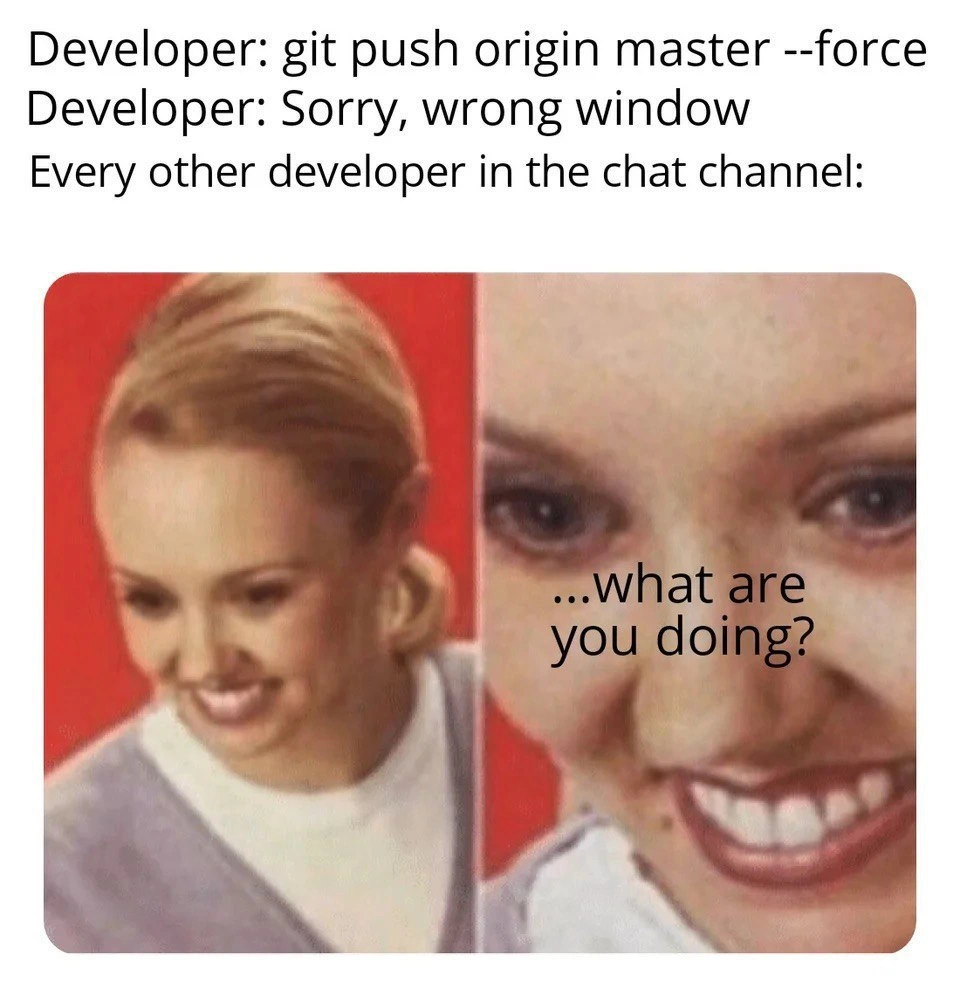
At the highest technical level, this meme highlights a version control nightmare that senior devs know all too well: an accidental git push --force to the master branch (the main code line). In the meme’s text, a developer runs the command git push origin master --force in the wrong terminal window, then immediately apologizes with “Sorry, wrong window.” That one-liner is basically the Git equivalent of hitting a big red “DO NOT PRESS” button by mistake. The image below the text shows a blond person’s face shifting from a slight smile to wide-eyed shock with the caption “…what are you doing?” – which hilariously captures every other developer’s reaction. It’s instant team-wide horror: you can practically hear the record scratch and collective gasp as everyone realizes the master branch history might have just been rewritten.
So, why is this so horrifying? Because git push --force on a shared branch is the nuclear option of version control. It tells Git to overwrite the remote history with your local history no matter what. This bypasses the usual safety checks that prevent you from deleting or diverging commits that others rely on. In a normal push, Git protects you with an error if your update isn’t a fast-forward (meaning your work doesn’t build cleanly upon the latest remote commit). By using --force, the developer essentially said "I know what I’m doing, apply my changes anyway". But here it’s clear they didn’t: they pushed to the wrong place, blowing away whatever was on origin/master before.
Let’s break down the mayhem unleashed by this Git command:
- Remote history rewritten: The
masterbranch on the central repo (often calledorigin) now points to a new commit, discarding the old commits that were there. It’s like erasing part of the project’s timeline. - Others’ clones diverge: Every other developer’s local repository still has the old history. Their copies of
masternow have commits that the remotemasterdoesn’t (because those were wiped out). This desynchronization is what causes panic. - Push/Pull chaos: The next time another dev tries to
git pullorgit push, Git will scream about “non-fast-forward updates” or even refuse to push because their history and the remote’s history don’t line up. Nobody can safely commit new code until this is resolved. - Merge conflicts & lost work: To fix the situation, everyone must coordinate. They might have to forcibly pull the new history or manually reintroduce the lost commits. This often leads to nasty merge conflicts or, worst-case scenario, permanently lost code if someone’s work isn’t recovered from their local copy.
- Trust and trauma: It’s a huge DeveloperPainPoint – the kind of event that gets burned into team memory. Even if you can recover everything, it breaks the flow and shatters confidence in the workflow. Senior devs might start locking down branch permissions after this (e.g. requiring protections so not just anyone can force-push to master).
The humor of the meme comes from how everyone instantly recognizes the gravity of the mistake. The developer’s “Sorry, wrong window” is an almost absurdly inadequate apology for a potentially catastrophic command. It’s like saying “oops” after hitting the self-destruct button. In a team chat, you’d see exactly this reaction: stunned messages of “What just happened?!” and “What are you doing?!” flooding in. The image’s exaggerated frozen smile is a comedic exaggeration of that moment when your brain short-circuits from shock: every developer is outwardly calm for a split second, then internally screaming “Nooooo!”.
Seasoned developers have a mix of horror and dark humor about this scenario because many have witnessed (or committed) a similar blunder. It’s a classic bit of DeveloperHumor born from real pain. We laugh at this meme because it’s better to laugh than cry when remembering the time someone wiped out half the commit history on Friday at 5 PM. It also highlights the importance of careful context switching – i.e., double-checking which terminal or repo you’re in before running dangerous GitCommands. The “wrong window” excuse implies the person might have meant to force-push a harmless personal branch or a different project, but ended up targeting the team’s primary branch by accident. This kind of mistake is easier than it sounds when you have multiple terminals open – a slip of focus can turn a routine command into a repository-wide calamity.
In summary, Level 3 exposes the full mayhem: Git’s distributed design means a force-push to master is like tearing a few pages out of the shared code history. It’s a known anti-pattern that effectively says “my reality now overwrites our shared reality.” That’s why it’s met with immediate shock and gallows humor among developers. Everyone is thinking, “We are in for a world of pain to fix this.” As the meme title suggests, an accidental git push --force to master sparks instant team-wide horror – and whether you’re an old Git pro or a new dev, that feeling of dread is universal.
Description
A meme depicting a relatable developer horror story. The top text describes a scenario in a chat channel: 'Developer: git push origin master --force', followed by 'Developer: Sorry, wrong window', and then 'Every other developer in the chat channel:'. Below this text is a two-panel image of a smiling woman. In the first panel, she has a pleasant, normal smile. In the second panel, the image is a highly zoomed-in, distorted close-up of her face, showing an unnervingly wide, toothy grin and intense eyes, with the text '...what are you doing?' superimposed. This meme format, often called 'What are you doing?', is used to express alarm and creepy suspicion. The joke lands perfectly with any developer who understands that a force push to the main branch ('master' or 'main') is a destructive action that can overwrite the project's history, potentially wiping out teammates' work. The feigned apology 'Sorry, wrong window' does nothing to calm the terror, and the reaction image captures the collective, silent panic of the entire team

Comments
8Comment deleted
The fastest way to get every senior engineer to simultaneously stop typing and slowly turn their heads towards you isn't to yell 'free lunch,' it's to whisper 'git push --force'
One accidental `git push --force` to main and - boom - our monorepo just adopted “eventual consistency” as an architectural pattern
The only thing worse than force-pushing to master is doing it right after the new junior dev just spent 3 hours carefully crafting their first PR... and you realize the branch protection rules were disabled during last week's 'emergency hotfix'
The '--force' flag: Git's way of asking 'Are you absolutely sure you want to ruin everyone's day?' and developers responding 'I thought this was my personal branch terminal.' It's the digital equivalent of yelling 'WATCH THIS' right before a catastrophic failure, except your entire team gets to watch their commit history get obliterated in real-time through Slack notifications
Nothing reveals missing branch protection faster than a tmux typo; git push --force is unscheduled chaos engineering unless you aliased it to --force-with-lease
‘git push --force origin master’ followed by ‘sorry, wrong window’ - the moment you learn whether branch protection at your company is a slide deck or a pre-receive hook
Force-pushing to master in chat: because nothing says 'team player' like nuking everyone's rebases in public
It's just squash + rebase. Comment deleted

