The Futility of a Vague Bug Report
Why is this Bugs meme funny?
Level 1: Broken Toy Mystery
Think of it like this: imagine your friend hands you a toy and says, “It’s broken, and I need you to fix it,” but they won’t tell you anything about what’s wrong. You look at the toy and it looks fine on the outside. Now, you have to guess: Is a wheel missing? Did the battery die? Did a piece fall off inside? You’d probably feel pretty confused and a bit frustrated, because “it’s broken” doesn’t tell you much. You might have to examine every little part of the toy to figure out why it’s not working.
That’s exactly how a programmer feels in this meme. The user just said, “Your code doesn’t work,” but didn’t explain anything else. It’s like giving the programmer a broken gadget with no hints. The green skeleton character in the picture is basically the programmer throwing up their hands and saying, “That clue doesn’t help at all!” It’s funny in the same way it would be funny (and frustrating) if your friend expected you to fix their toy without telling you what’s wrong with it. The joke is that you’d want to ask, “Well, can you at least tell me what part is broken?” — just like the programmer in the meme wants to ask the user, “Can you tell me what exactly isn’t working?” The humor comes from that totally relatable feeling: you can’t fix something when all you’re told is “It’s not working” – that hardly narrows it down at all!
Level 2: Where Do I Even Start?
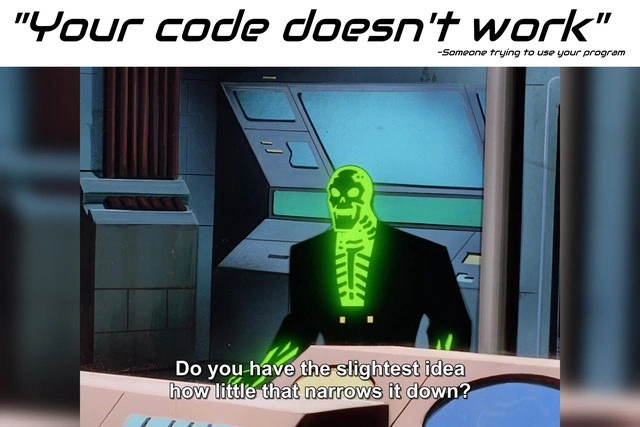
Imagine a user tells a programmer, “Your program doesn’t work.” That’s it — no other details. In the meme, the top text shows exactly that phrase, and the bottom image has a glowing green skeleton-like character (from a cartoon) looking frustrated in front of a computer. The subtitle on the image says, “Do you have the slightest idea how little that narrows it down?” In simpler terms, the programmer is saying: “That doesn’t help me at all! I still have no clue what the problem is.” This meme is about the frustration of getting a super vague problem report.
Let’s break down why this is a big deal in software. In coding, a bug is a mistake or error in the program that makes it behave incorrectly. Debugging is the process of finding and fixing that error. Now, when someone says “your code doesn’t work,” it’s incredibly unspecific. A program is made of many parts, so which part isn’t working? What exactly is it doing wrong? Without more info, the developer is stuck. It’s like being told “There’s something wrong in your 100-page essay” but not being told which page or what the mistake is.
Usually, when a program fails or has a bug, it produces some clues we can use. Often it will show an error message or do something noticeable. For example, if you try to open a file that isn’t there, the program might say “Error: File not found.” Or if a program runs out of memory, it might throw an error like “OutOfMemoryError”. These messages are gold for debugging because they tell the developer what kind of problem occurred or even where in the code it happened.
If a user just says “It doesn’t work” and doesn’t share any of those details, the developer has no starting point. Think of a large app with many features: does “doesn’t work” refer to the login screen not responding? A button that crashes the app? Perhaps the entire app doesn’t launch at all? The developer has to guess at all these possibilities.
This is what we call a communication gap. The person using the software knows something is wrong, but they aren’t communicating it in a useful way to the person who can fix it. The user might not realize the programmer needs specific information. They might be frustrated themselves and just blurt out “it’s broken!” But from the developer’s side, it’s frustrating because they genuinely want to fix the issue, yet they’ve been given almost no information to work with.
As a new developer (or even as someone asking for tech help), this is a good lesson in how to report a bug or problem. Simply saying “it broke” will usually lead to follow-up questions. If you’ve ever asked a question on a forum like Stack Overflow or Reddit with “My code is not working, please help”, you might have seen people reply with comments like “Can you provide more details? What did you try? Are there any error messages?” They’re not trying to be difficult – they literally cannot help without those details. I remember early in my coding journey telling a mentor, “My program crashed, I don’t know why,” and the first thing he asked was, “What error did it give you?” I had to run it again and write down that error message, because that was the key to figuring out the problem.
The meme’s scenario is essentially a bug report with almost no info. To highlight the difference, here’s a comparison between a vague report and a helpful one:
| Vague Bug Report | Helpful Bug Report |
|---|---|
| “It doesn't work.” | *“On version 3.0 of the app, on my Android phone, it crashes every time I tap the Login button. The app just closes and says 'App stopped unexpectedly.'”* |
In the vague report, “It doesn’t work” could mean anything. The developer is left thinking, “What exactly doesn’t work? What were you doing? Where do I even begin?” There’s no mention of what the user was trying to do, what platform they’re on, or any error message. It’s like a blank puzzle.
In the helpful report, notice how many useful details are given in just one sentence: we know the version of the app (3.0), the platform (Android phone), the specific action (tapping the Login button), and what happened (“the app crashes and closes”) including an error text the phone showed ("App stopped unexpectedly"). With that information, a programmer reading it can immediately start forming theories: “Aha, it crashes on login on Android. Maybe there’s a bug in the login code when running on Android devices.” The developer can go straight to the login feature in the code and also try to reproduce the crash on an Android phone. They have a much narrower problem to focus on. In other words, the helpful report narrows down the issue to a specific area, whereas “it doesn’t work” does not narrow down anything.
To put it simply, the meme is funny to developers because it exaggerates a real feeling. A user’s one-line complaint “Your code doesn’t work” leaves the developer feeling clueless. The glowing green skeleton character yelling “Do you have any idea how little that narrows it down?” is a humorous way to say “I still have no idea what the problem is!” Every developer, even juniors, quickly learns that good communication is key to fixing problems. Without it, you end up trying random things in hopes of stumbling upon the bug – a very frustrating and time-consuming approach.
So if you’re new to coding (or even just using software), take this meme as a gentle tip: whenever something breaks, try to note what exactly happened. Did you click a certain button? Did an error message pop up saying something like “Unable to save file” or “Null pointer exception”? What were you expecting to happen, and what happened instead? The more details you can give to the developer, the faster they can pinpoint the bug. It’s a win-win: you get a solution quicker, and the developer doesn’t have to play detective with no clues. The humor of this meme comes from those situations where the developer has zero hints and can only chuckle at how impossible the task feels – because we’ve all experienced that at least once.
Level 3: Telepathic Debugging
There's nothing like a good vague bug report to brighten a developer's day. The top text "Your code doesn’t work" – attributed to “someone trying to use your program” – sets the stage for this all-too-familiar scenario. In the image below, a neon-green skeleton-esque villain stands amidst retro computer consoles, exclaiming, “Do you have the slightest idea how little that narrows it down?” This dramatic cartoon villain perfectly embodies the developer’s internal scream of frustration. Being told “your code doesn’t work” is software developer horror: it’s so broad that it could mean almost anything.
For a developer, hearing “It doesn’t work” is like being handed a 1000-page book and told that somewhere in it, there’s a typo. Debugging & Troubleshooting is all about narrowing down problems – gathering clues, replicating the issue, eliminating possibilities. But here, the user’s one-line complaint provides exactly zero clues. It doesn’t point to a specific feature, an error code, or any context at all. It’s the purest form of the communication gap between users and developers. In a codebase with thousands of lines, “it doesn’t work” is so useless you might as well try:
$ grep -R "doesn't work" .
# => no matches found
Of course, nothing in the actual code literally says "doesn't work." It’s not a real error message we can search for. We need actual error messages, log entries, or steps to reproduce – not just a paraphrase of frustration.
A senior developer sees the dark humor here because we’ve all been there. It’s practically a trope in Coding Humor. The user expects a quick fix, as though the dev can wave a magic wand to instantly make everything better. If only it were that simple. In reality, we’re left playing detective. Did the program crash with an exception? Is there a hidden bug in one of the features? Did the user do something unexpected we never anticipated – like using an emoji in a filename, entering a weird character, or running the software on a 20-year-old operating system? With nothing to go on, every possibility is still on the table. Do you have the slightest idea how little that narrows it down? Indeed – it barely narrows it down at all.
This scenario is a classic case of Debugging Frustration. The gap between what the user says and what the developer needs is enormous. Internally, every experienced dev has a checklist pop into their head when they see “doesn’t work”:
- What exactly were you doing? (Which feature or action led to the problem?)
- What did you expect vs. what happened? (Was it a crash, wrong output, nothing at all?)
- Were there any error messages or codes? (“Blank screen” vs. an actual Error 500 makes a big difference.)
- What environment are you using? (Which app version, operating system, browser, etc.?)
Without answers to these, we’re debugging in the dark. The first thing a dev often has to do is politely ask for more details: “Could you tell me what you did before it broke? Did you see any error message?” That’s a diplomatic way of saying, “Your report is too vague. I need clues – I can’t read your mind.”
Any seasoned engineer reading this meme is probably nodding (or facepalming) in solidarity. We all have war stories. Perhaps you’ve been woken up at 3 AM by a pager alert or a Slack message that simply says: “The system is down, please fix ASAP.” 😩 No indication which system or what “down” means. You scramble out of bed and frantically comb through dashboards and log files, essentially playing digital sleuth with a blindfold on. Nine times out of ten, the issue could be solved so much faster if the initial report had even a shred of detail. Maybe the user was on an outdated app version. Maybe they entered a value of 0 somewhere which caused a divide-by-zero error. But discovering that from scratch is like finding a needle in a haystack.
In developer slang, we jokingly call this “psychic debugging” – being expected to diagnose issues with sheer intuition because the bug report sure isn’t helping. It’s a close cousin to the infamous “Works on My Machine!” phenomenon. Often when someone says “your code doesn’t work,” the developer fires up the same program on their own machine and… everything works fine. Without more info, the dev is left scratching their head, thinking “Well, it works for me… what on earth is different for them?” The meme captures this ridiculous expectation that programmers can magically divine the cause of any problem without specifics.
In practice, good communication is critical to fixing bugs in software. That’s why many teams have bug report templates or forms that force the reporter to include key details (steps to reproduce, expected vs. actual result, environment info). It’s an attempt to avoid the “it doesn’t work” scenario. Seasoned devs also invest in tools for better observability: comprehensive logging, monitoring, and error tracking platforms that automatically capture things like stack traces and context when a crash happens. If a user only offers “doesn’t work,” a well-instrumented system might still tell the developer, for example, “NullPointerException in CheckoutService.java line 124.” Armed with that, the developer actually has something to go on. But absent those safety nets, a complaint like “doesn’t work” leaves the developer essentially blind.
So why is this meme so spot-on in Developer Humor circles? Because it highlights a universal truth in programming: telling a dev “something is wrong” without saying what or where is almost comically unhelpful. It’s like pointing at a giant codebase and declaring, “Somewhere in there, you messed up.” Well, thanks. Debugging with zero info is the exact opposite of a quick fix – it’s often hours of guesswork. In other words, “Your code doesn’t work” is the troubleshooting equivalent of looking for a needle in a haystack with a blindfold on.
The glowing green skeleton in the meme might be an over-the-top cartoon villain, but every programmer who’s faced a barren bug report relates to that exasperation. The humor works because it’s a shared frustration turned into a joke. It’s cathartic — we’re laughing so we don’t cry. After all, as the meme’s punchline perfectly conveys, the complaint “it doesn’t work” does nothing to narrow down the problem. And the developer’s dramatic retort, “Do you have the slightest idea how little that narrows it down?” is just a colorful way of saying: this bug report is no help at all.
Description
A two-part meme. The top section has white text on a black bar that reads, "'Your code doesn't work'". Below this, in a smaller font, it says, "-Someone trying to use your program". The bottom section is a screenshot from the animated TV show Batman Beyond. The character Blight, who appears as a glowing green skeleton in a black business suit, is shown in a dimly lit, futuristic room. He is looking dismissively at someone off-screen. Subtitles at the bottom of the image capture his dialogue: "Do you have the slightest idea how little that narrows it down?". This meme perfectly captures the frustration developers experience when receiving poorly detailed bug reports. The phrase "it doesn't work" is famously unhelpful as it lacks any specific information needed for troubleshooting, such as error messages, steps to reproduce the issue, the environment it occurred in, or what the expected outcome was. The meme humorously equates this common, exasperating scenario to a supervillain-level of annoyance. For experienced engineers, it's a timeless joke that underscores the critical importance of clear communication and proper bug reporting in the software development lifecycle
Comments
8Comment deleted
The only thing less specific than 'it doesn't work' is a Jira ticket with the title 'Bug', no description, and priority set to Blocker
“Your code doesn’t work.” “Awesome, that narrows it down to the feature flag I flipped at 2 AM, one of 400 microservices behind seven proxies, the datastore that’s ‘eventually’ consistent, or the 2009 cronjob nobody admits exists - easy.”
After 20 years in tech, I've learned that 'it doesn't work' is actually a highly sophisticated error report - it contains exactly as much useful information as our monitoring dashboards during an outage when someone forgot to configure the log aggregation pipeline
Ah yes, the classic "it doesn't work" bug report - right up there with "it's slow" and "can you make it more intuitive?" in the hall of fame of spectacularly unhelpful feedback. After 15 years, you learn that this phrase could mean anything from a null pointer exception to the user clicking the wrong button, to their internet being down, to them literally looking at a completely different application. The real skill isn't fixing the bug - it's the archaeological detective work of extracting enough context from the user to even begin reproducing it. Pro tip: your incident response runbook should include a template that forces users to answer "What did you expect to happen?" and "What actually happened?" because apparently that's not intuitive even to stakeholders with engineering degrees
'It doesn't work' is the dev's event horizon: infinite possibilities collapsing into zero information density
“Doesn’t work” is the lossy codec that compresses stack traces, env vars, API contracts, and Grafana alerts into exactly zero actionable bytes
“Your code doesn’t work” is the zero-parameter bug‑report API; complexity becomes O(microservices × environments × feature_flags) until someone ships logs and repro steps
bruh Comment deleted