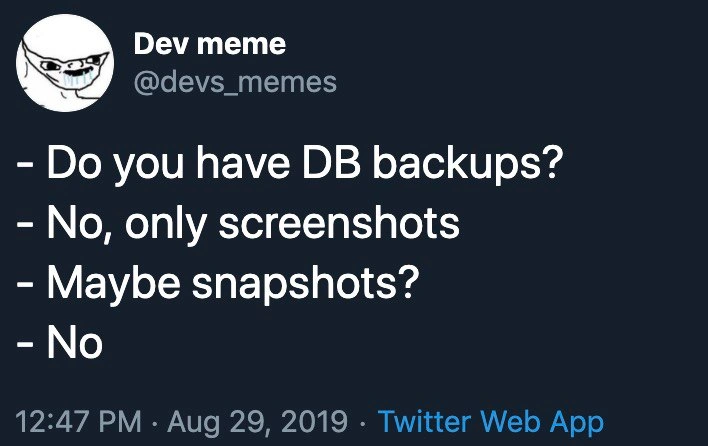
When your only backup lives on the server that just crashed
Why is this OnCall ProductionIssues meme funny?
Level 1: All Eggs in One Basket
Imagine you have a very special toy that you love. You’re worried something might happen to it, so you make a copy of that toy as a backup. Now, common sense says you should keep the backup toy somewhere safe, maybe at Grandma’s house or at least in a different room, right? But instead, you put the backup toy in the exact same box as the original toy. Not smart! One day, you accidentally drop the box in a puddle, and splash – both your favorite toy and the backup toy get soaked and ruined together. You’re left with nothing. That’s exactly the situation in this meme.
It’s funny (and sad) because the people in the story thought they were being safe by having a backup, but they made a silly mistake by keeping it in the same place as the original. It’s like putting all your eggs in one basket and then dropping the basket. When the text says “Server has crashed, where is backup? … On the server,” it’s basically saying they lost something important and the only spare they had was lost in the same accident. The look on the man’s face in the picture (Leonardo DiCaprio making a very annoyed, disbelieving face) is how anyone would feel in that moment – a mix of shock and “oh no, we totally messed up.” Even if you’re not into computers, you can get the joke: always keep your backup separate, or else it’s not really a backup at all.
Level 2: Backup 101 Blunder
Let’s break down what’s happening in simpler terms. We have a server (a computer that runs important applications or websites) that crashed – meaning it suddenly stopped working, possibly due to a hardware failure or a serious error. Now, when a server crash happens in a company, the first question operations folks ask is, “Do we have a backup?” A backup is just a copy of important data, kept separately so that if the original data is lost or the server breaks, you can restore everything from that copy. Think of it like saving your school project on a USB drive in case your laptop dies.
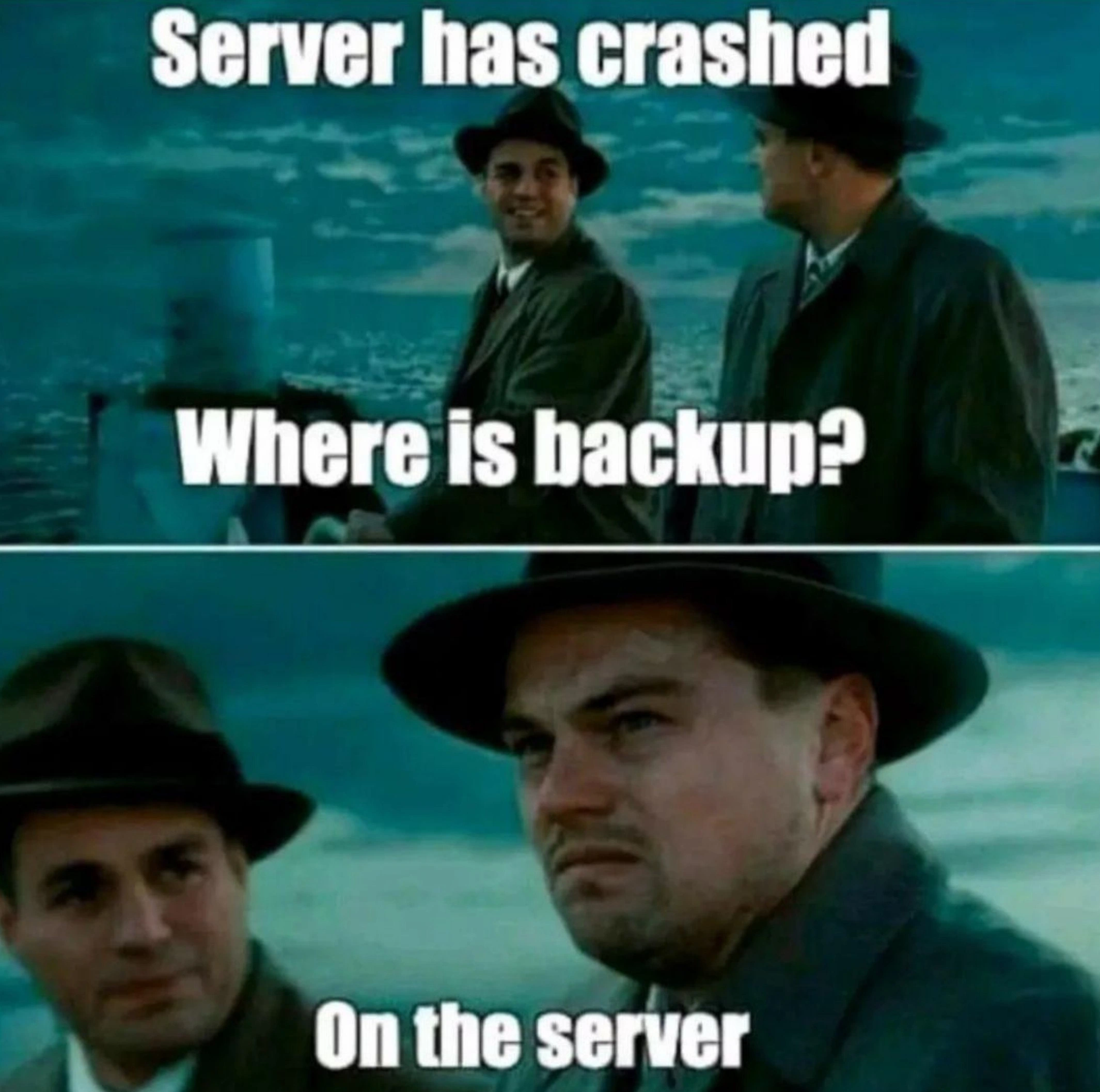
In this meme, the text in Panel 1 says: “Server has crashed. Where is backup?” This implies someone (likely an on-call systems administrator or engineer) is urgently asking for the backup copy to recover the system. Panel 2 then reveals the cringe-worthy answer: “On the server.” In other words, the only backup copy was stored on the exact same server that just went down. The photo shows Leonardo DiCaprio’s character looking incredulous (almost disgusted), which perfectly represents how an IT person would feel upon hearing that answer. It’s essentially the worst-case scenario for anyone in OnCallDuty: the thing that was supposed to save you is also gone.
Why is this such a big blunder? Because of a concept called a single point of failure. That term means there’s one critical piece (in this case, the server) that, if it fails, causes the whole system to fail. Good BackupStrategy and system design try hard to eliminate single points of failure. Usually, that means storing backups in a different place – maybe on a separate backup server, an external hard drive, or a cloud storage service like AWS S3. The idea is to have the backup isolated from the original. If one goes down in flames, the other is still safe.
Storing a backup on the same server that it’s backing up is a rookie mistake – basically a beginner’s error in Systems Administration. It’s like keeping the spare house key under the same doormat that got burned in a fire; it doesn’t do you any good when disaster strikes. In IT terms, this approach is sometimes jokingly called “backup-on-the-same-server syndrome,” and it’s an anti-pattern (a fancy word for a common but bad solution). When that server crashed, any data on it became inaccessible – including that “backup” file. So the team responsible can’t restore the system quickly, leading to extended downtime (the period the service is unavailable). Meanwhile, users might be seeing error pages, and the on-call engineer is sweating bullets because their ProductionIncident just went from bad to worse.
This meme is making fun of that exact scenario. It’s a kind of dark humor among IT folks – we laugh because it’s painful. The categories like OnCall_ProductionIssues and tags like ProductionFirefighting and Downtime point to the situation: an on-call engineer dealing with a production outage. BackupAndRecovery is the practice that should save the day, but here it failed because of a backup_on_same_server situation. It highlights the importance of proper Backup Strategy: always have your backups in a different location or system. Many of us learned this the hard way. Maybe in a first job or a college project, we confidently proclaimed, “Don’t worry, I have a backup!” only to realize that backup was on the same hard drive that just died. Cue that Leonardo DiCaprio face of utter disappointment. The meme, using a still from Shutter Island (hence the trench coats and old-fashioned vibe), underscores the shock and disbelief one experiences at that moment. Essentially, it’s a cautionary tale wrapped in a joke: if your backup isn’t truly separate, do you really have a backup at all?
Level 3: Murphy’s Backup Law
This meme hits experienced engineers right in the gut because it’s portraying a rookie mistake we’ve either seen or (ouch) committed early in our careers. The first panel sets up the classic on-call nightmare: “Server has crashed”. PagerDuty is blaring at 3 AM, the website is down, and everyone’s asking how quickly we can restore. The second panel delivers the punchline in a deadpan fashion: “Where is backup?” / “On the server.” Cue the collective groan. Leonardo DiCaprio’s skeptical, pained expression (from Shutter Island, fittingly) perfectly captures that you’ve got to be kidding me moment. It’s the face of an on-call engineer realizing the only backup was stored on the very machine that just died. This is the essence of Murphy’s Law of Backups: anything that can go wrong with your backup will go wrong, especially if you’ve made it a single point of failure.
From a systems administration standpoint, this is a glaring BackupStrategy failure. Best practices in Backup and Recovery dictate the 3-2-1 rule: keep 3 copies of data, on 2 different storage types, with at least 1 off-site. Here they didn’t even achieve 2 copies on different media – they apparently just dumped a backup file on the same server’s disk. Perhaps there was a nightly cron job like:
# Example of a poor backup approach:
mysqldump -u root production_db > /srv/backups/prod_db.sql
# (Backed up to the same server's /srv/backups directory – oops!)
When that server crashed (hardware fried, file system corrupted, cloud instance terminated – pick your poison), both the primary data and the so-called “backup” went down together. It’s a single_point_of_failure incarnate: one lightning strike or kernel panic and poof, everything is gone. The very purpose of a backup is to provide a safety net during ProductionIncidents like crashes. But if your safety net is attached to the same flimsy scaffold that just collapsed, it’s game over.
In real-world DevOps war stories, this situation is more common than you’d think. Perhaps a company’s junior admin thought saving backups to /backup/ on the same server was sufficient, or a database snapshot was kept on the local RAID array (assuming a RAID is enough – spoiler: if the whole server is lost, RAID won’t save you). It’s a rookie_mistake born often from either ignorance or corner-cutting under pressure. And it leads to the exact scenario captured in the meme’s text: extended downtime and frantic ProductionFirefighting. The on-call team scrambles: maybe an older offsite backup exists? Maybe the disk can be physically salvaged? It’s pure adrenaline and dread, knowing the OnCallDuty just turned into an all-nighter with possibly no happy ending.
The humor here is equal parts schadenfreude and commiseration. Seasoned engineers laugh (perhaps bitterly) because we’ve all learned this lesson: a backup that isn’t truly independent isn’t a backup at all. The meme’s format (using that noir ferry scene) sets up a dramatic interrogation-like mood: “Server crashed… where’s the backup?” The answer “On the server” is delivered with that perfect facepalm expression. It’s an understated punchline that invokes memories of past ProductionBugs and post-mortems where someone had to sheepishly admit the backups went down with the ship. In essence, this satirizes bad BackupStrategy as an operational sin. It highlights how crucial storage planning is — you must anticipate failures. If not, you’ll end up like our friend in the trench coat, staring into the abyss (or ocean), realizing you have no lifeboat because it was tethered to the sinking ship.
Level 4: Common-Mode Failure
In reliability engineering terms, this setup is a textbook common-mode failure scenario. By keeping the only backup on the same physical server, the system violated the fundamental principle of fault tolerance: eliminate single failure domains. Normally, redundancy works by distributing risk—independent failure paths mean the backup stays safe even if the primary dies. For example, if the probability of the server crashing is p, an independent backup would make the probability of both failing roughly p × p (much smaller). But here the backup isn’t independent at all; it’s 100% correlated with the server’s fate. The math is tragically simple:
$$
P(\text{data loss}) = P(\text{server fails AND backup fails}) = P(\text{server fails}) = p.
$$
No reduction in risk, no improvement in uptime. Redundancy = 0. It’s as if the backup doesn’t exist, from a theoretical standpoint. When that server went down, it took out all copies of the data in one go. This single point of failure approach produces a system reliability graph that’s just one node — remove it, and everything is gone. Distributed systems theory and best practices (like the CAP theorem trade-offs or multi-AZ deployments) are all about avoiding exactly this: a catastrophic collapse when one component fails. By design, a backup should reside in a separate failure domain (another disk, machine, data center, or cloud region) to ensure independence of failure. In this meme’s case, the backup shared every vulnerability of the main server — power supply, disk, OS, even the same ferry ride to doom. The result is an availability fiasco: the recovery plan had a Recovery Point Objective (RPO) of “we’ll save everything,” but delivered an RPO of zero (all data lost since the last external backup, if any existed). Essentially, the backup strategy here didn’t just have a flaw; it was a failure state masquerading as protection. The humor has a grim, entropic truth behind it: if your backup lives in the same fate-bound environment, Murphy’s Law virtually guarantees both will fail together. This is the dark underbelly of BackupStrategy gone wrong — an object lesson taught in downtime and data loss.
Description
Two-panel meme using a scene from a noir-style movie set on a ferry deck. Panel 1 shows two men in trench coats and fedoras facing the sea; white text at the top reads "Server has crashed", and centered text below them asks "Where is backup?". Panel 2 zooms in on one man’s skeptical face; the overlaid text answers "On the server". The joke highlights a disastrous backup strategy where the backup is stored on the same machine that failed, a common operations anti-pattern that leads to extended downtime and frantic on-call firefighting
Comments
11Comment deleted
Ops said we had a 3-2-1 backup strategy; nobody asked if the “2” referred to two folders on the same ext4 partition
The same engineer who convinced management that RAID 1 counts as a backup strategy just discovered why "geographically distributed" doesn't mean different racks in the same data center
Schrödinger's backup: every backup is simultaneously valid and useless until you attempt a restore - colocating it with prod just collapses the wavefunction early
Ah yes, the classic 'backup stored on the same RAID array' architecture - because why have a disaster recovery plan when you can have a disaster *discovery* plan? This is the infrastructure equivalent of keeping your spare tire inside the car that's currently on fire. Any architect who's been through a 3am data center outage knows that moment of existential dread when you realize your backup strategy was 'hope and pray' disguised as 'rsync to /mnt/backup'. The real kicker? This usually gets discovered during the RCA when someone asks 'but we had backups, right?' and you watch the color drain from the senior engineer's face as they realize the S3 bucket was in the same region that just went down
HA cluster of one: resilient until the kernel panics
Nothing says enterprise maturity like a DR runbook that points to /mnt/backup on the box that just kernel-panicked - RPO: yesterday, RTO: never
We nailed 3‑2‑1 backups: 3 copies, 2 directories, 1 power supply
Lmao Comment deleted
AWS down But can't get notification because it was hosted on AWS Comment deleted
wanted to check status of server, but status page is hosted on the server Comment deleted
Its normal Comment deleted