Skip to content
DevMeme
1427 of 7435
Google Translate for Programmers: Python to C++
Languages Post #1600, on May 17, 2020 in TG

Google Translate for Programmers: Python to C++

Why is this Languages meme funny?

Level 1: A Long Way to Say Hello

Imagine you want to say hello to someone. One way, you just wave and say, “Hi!” – quick and easy. Another way, you decide to write a full letter: “Dear World, I am writing to greet you warmly. Sincerely, Me.” Both ways deliver the same message – hello – but the second way is a much longer process for no big reason. This meme is funny for a similar reason. In one “language” you say hello with a single short word (that’s like the one-line Python version). In the other “language,” you end up with a whole paragraph just to say the exact same hello (that’s the many-line C++ version). It’s joking about how something very simple can become super complicated when you do it in a different way. The silliness of using Google Translate makes it even funnier, because it’s like asking a translation robot to help you say “Hi” and it responds with a huge formal speech. The core joke: both versions mean “Hello World,” but one is just taking the long, overly formal way to say it, and that contrast is what makes us laugh.

Level 2: Hello World Two Ways

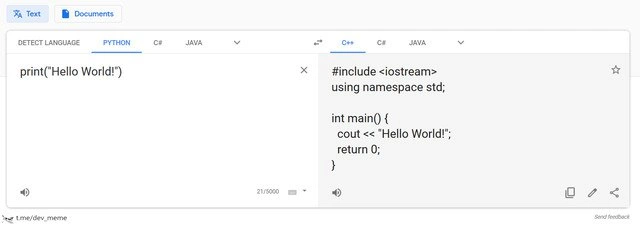
Let’s break down what’s happening. On the left, we have a Python snippet. On the right, we see its equivalent in C++. The meme shows the Google Translate interface as if it’s converting text from one language to another – except the “languages” here are programming languages! It’s an unusual use of Google Translate (normally used for human languages like English or Spanish), which makes it instantly funny to developers. They set the source to “Python” and the target to “C++.” In the source box, there’s just this one line of Python code:

print("Hello World!")

This is about the simplest Python program possible. In Python, print() is a built-in function that outputs text to the screen. Writing print("Hello World!") will display the message Hello World!. You don’t need anything else — no special setup or structure around it. Python executes this line directly when you run the script. That’s one reason new programmers find Python approachable: you can do something visible (like printing a message) with just a single line of code.

Now look at the right side, labeled as C++. Google Translate produced a C++ version of the same functionality:

#include <iostream>
using namespace std;

int main() {
    cout << "Hello World!";
    return 0;
}

This C++ code, when compiled and run, also prints Hello World! to the console. It’s doing the same job as the one-line Python script, but it’s much longer. Each part of this C++ program has a purpose:

  • #include <iostream> – This line includes the standard Input/Output library. In C++, functions and objects for things like printing to the screen are not always available by default. <iostream> is a header file that lets us use std::cout (the console output stream). It’s similar to importing a library or module in other languages. Without this, the compiler wouldn’t recognize cout.
  • using namespace std; – This line is a convenience that allows the code to use names from the std (standard) namespace directly. C++ groups its standard library features in a namespace called std. By using this line, the code can just write cout instead of std::cout. It’s generally considered better practice in large programs to avoid using namespace std; and write std::cout explicitly, but for a tiny example or quick and dirty code, you’ll often see this to save typing.
  • int main() { ... } – Here we define the main function. In C++, (and in C), main is the entry point of the program – the place where execution starts. The int before main means this function returns an integer. Every well-formed C++ program needs a main function. You can’t just have free-floating code like in a script; the compiler expects a structured program. Inside the curly braces { } is the code that will run when the program starts.
  • cout << "Hello World!"; – This is the actual command to print to the screen. cout (pronounced “see-out”) stands for “character output.” It’s an object that represents the standard output stream (usually the console). The << operator is used to send data into this output stream. So cout << "Hello World!"; writes the text Hello World! to the console. In Python, we call a function to print; in C++, we send a string to the cout stream. Both achieve the same result.
  • return 0; – This ends the main function and returns the value 0 to the operating system. In many C++ programs, returning 0 from main means the program executed successfully. It’s a way of indicating everything went OK. If you omitted this in a simple program, some compilers might automatically add it, but it’s good practice to include it. Python, by contrast, doesn’t require you to indicate success or failure this way for scripts – when the Python script finishes, it just ends.

So, why does the C++ version need all that? It’s because C++ is a different kind of language. It’s compiled and statically typed, which means everything must be explicitly stated and structured before the program runs. The computer needs to know exactly what to set up (like including the i/o library) and where to start execution (main). Python is an interpreted language: it executes code line by line on the fly, and it’s dynamically typed, meaning it figures things out at runtime. This is why for Python, just writing print("Hello World!") at the top level is enough – the Python interpreter is ready to execute that as soon as it sees it. No main function or includes needed; it’s handled behind the scenes.

The Google Translate screenshot humorously treats code as if it’s just another language to be translated. Of course, normally you wouldn’t use Google Translate for code! Programmers use compilers (for languages like C++), which translate source code into machine code that computers run. For converting one programming language to another (say, Python to C++), there’s no magical one-click tool in real life. You either manually rewrite the code, or use a specialized program known as a transpiler if one exists for those languages. A transpiler (source-to-source compiler) understands the syntax of both languages and attempts to produce equivalent code in the target language. However, Python and C++ are so different that an automated translator would struggle except for very simple cases. That’s why this meme is funny — Google’s general-purpose translator managed to spit out a correct C++ “Hello World” from Python, but try it on something more complex and it would likely fail spectacularly (or just translate word-by-word without understanding). It’s a quirky code_translation_fail scenario – using the wrong tool for the job just for laughs.

For a junior developer or someone learning to code, this meme also showcases LanguageComparison in a very visual way. You can literally see how much more text C++ needs to do what Python does in one line. This doesn’t necessarily mean Python is “better” than C++ — they have different goals. Python emphasizes ease of use (great DeveloperExperience_DX for quick scripting, automation, and gluing things together). C++ emphasizes control and performance (you can manage memory and hardware details, which is why there’s more setup). The result is that the hello_world_example in C++ looks bigger and more ceremonial. It’s like a quick lesson in LanguageQuirks: each language has its own rules and typical patterns. If you learned programming with Python first, seeing #include <iostream> and int main() might feel like extra fuss just to print text. If you started with C or C++, you might be used to writing those every time and think nothing of it. In fact, many C++ programmers remember typing out this exact program as their first introduction to the language. It’s practically a rite of passage to write a C++ “Hello World” and realize, whoa, that’s a lot more code than my previous language!

Finally, the CodingHumor aspect: this meme isn’t advising anyone to actually use Google Translate for code 😅. It’s a joke that piggybacks on how Google’s interface looks and the novelty of it recognizing programming languages at all. It captures that universal developer experience of comparing languages side-by-side. By using a familiar tool (Google Translate) in an off-label way, it makes the comparison very explicit and very funny. In short, Python vs C++ for “Hello World” is a dramatic example of verbosity_comparison, and framing it as a bogus “translation” just adds a layer of silliness that programmers find amusing.

Level 3: Brevity vs Boilerplate

Seasoned developers immediately smirk at this Python vs C++ sight gag. It highlights a classic LanguageComparison of verbosity: a single-line Python command exploding into a multi-line C++ program. The humor kicks in because every experienced coder knows "Hello World!" is the simplest example in any language — and yet here, the developer experience (DX) couldn’t be more different. Python’s print("Hello World!") is minimalistic and straightforward. By contrast, C++ demands ritual: #include directives, namespace declarations, a main function, and a return 0. This meme exaggerates that contrast by using a tool in a totally unintended way: Google Translate. Instead of a proper code converter or transpiler, it uses a natural-language translator to perform a code_translation_fail, amplifying how absurd the difference looks.

Under the hood, this plays on real LanguageQuirks. Python is an interpreted language with a philosophy of simplicity and readability. It lets you run one-off statements at the top level — no ceremony needed. Just write print(), and Python’s runtime handles all the setup invisibly (loading libraries, managing execution flow). On the other side, C++ is a compiled language designed for low-level control and performance. The trade-off is that C++ insists on explicit structure and types. Even for a trivial hello_world_example, you must declare a function int main() as the program’s entry point, include the iostream library for std::cout, and terminate with an integer status. All that boilerplate is part of C++’s contract with the operating system and the developer — it’s what gives C++ its power, but it sure feels like overkill for printing one line of text! The meme perfectly captures this verbosity_comparison: Python’s brevity versus C++’s verbosity. Seasoned programmers laugh because they’ve lived this. They’ve demoed new languages by writing Hello World and thought, “Wow, in X it’s only one line, but in Y I wrote a whole essay.”

The choice of Google Translate as the conversion tool is the tongue-in-cheek twist. It’s a prime example of ToolMisuse for comedic effect. In reality, you wouldn’t use a natural language translator to port code between languages — that’s what compilers, interpreters, or specialized transpilers are for. But the meme asks, “What if we did?” and the result is unexpectedly spot-on for this simple case. It’s as if the translator treated programming languages like Spanish and French, mapping Python code to C++ code. (Of course, it likely only works because “Hello World” is a universal phrase that appears in many code examples online. The translator probably matched the pattern from its training data.) For senior devs, this raises a chuckle and an eyebrow: imagine if real code translation were that easy! In practice, automatically converting non-trivial Python code to C++ is enormously complex – their semantics and ecosystems differ wildly. But here, Google’s general translation engine managed a cute party trick. It’s a harmless bit of CodingHumor that also reminds us of the vast gulf between language paradigms.

There’s also a subtext about LanguageWars and developer pride. Each language community loves to show off how their favorite handles “Hello World.” Pythonistas boast it in one elegant line; C++ devs might roll their eyes and retort that all those extra lines reflect important context (types, headers, an explicit main). The meme’s scenario exaggerates this rivalry in a lighthearted way. It’s poking fun at how ceremonious C/C++ can seem, and how Python’s simplicity can feel almost like cheating. The DeveloperExperience_DX angle is front and center: one language optimizes for human convenience, the other for machine efficiency, and that’s why saying hello takes 1 line vs 7. Every experienced programmer has at some point groaned or grinned at boilerplate in a verbose language, thinking “do I really need all this just to print something?” Here, that common gripe is visualized brilliantly by a translation app spitting out a full C++ program from a trivial Python snippet. It’s absurd, it’s relatable, and it’s why this meme resonates with anyone who’s ever switched between a high-level scripting language and a lower-level compiled one.

Description

A screenshot of a web interface resembling Google Translate, repurposed to 'translate' between programming languages. The interface is split into two panels. The left panel has the source language set to 'PYTHON' and contains a single line of code: 'print("Hello World!")'. The right panel shows the 'translation' into 'C++', which is the significantly more verbose and complete C++ boilerplate code for the same task, including '#include <iostream>', 'using namespace std;', the 'main()' function, and 'cout << "Hello World!";'. A small watermark 't.me/dev_meme' is visible in the bottom left corner. The meme humorously highlights the stark contrast in verbosity and required ceremony between Python and C++, satirizing language design philosophies by framing the difference as a simple translation


Comments

7
Anonymous ★ Top Pick The C++ translation forgot to include a newline character, so now your 'Hello World!' will ruin the shell prompt. It's not just verbose; it's actively hostile to your terminal
  1. Anonymous ★ Top Pick

    The C++ translation forgot to include a newline character, so now your 'Hello World!' will ruin the shell prompt. It's not just verbose; it's actively hostile to your terminal

  2. Anonymous

    Google Translate nailed Python → C++; now if it could also write the 900-line CMakeLists.txt and convince Clang to locate <iostream>, we might actually ship “Hello World” before lunch

  3. Anonymous

    After 20 years in the industry, I've realized 'using namespace std;' in production code is like deploying on Friday afternoon - technically possible, but you're just asking for namespace collision incidents at 3 AM when std::distance suddenly isn't what you think it is

  4. Anonymous

    After 30 years of C++ evolution, we've finally achieved what Python developers call 'Tuesday morning' - though to be fair, C++ gives you the satisfaction of manually managing that return 0, just in case the universe needs explicit confirmation that printing a string succeeded

  5. Anonymous

    Google Translate for code: Python’s print becomes C++’s ritual of #include, using namespace std, and return 0 - proof that rewrites mostly convert developer velocity into an undefined behavior budget

  6. Anonymous

    Google Translate nailed Hello World; now only the other two million lines of async I/O, memory semantics, build scripts, and undefined behavior remain to auto-translate

  7. Anonymous

    C++ Hello World: five lines to print eleven characters, because even greetings need namespace diplomacy and explicit success signaling - like every vendor contract we've signed

Use J and K for navigation