The Mathematical Truth Behind Instagram Filters
Why is this Mathematics meme funny?
Level 1: Recipe for Gray
Imagine you’re mixing paints to get a certain color. If you want to make gray, you might mix some red paint, a lot of green paint, and a little blue paint in specific proportions until it looks gray. There’s no magic in the process – you’re just following a recipe with measured amounts. This meme is saying that an Instagram filter (like making a photo black-and-white) works the same way: it follows a recipe. The “ingredients” are the red, green, and blue parts of the picture, and the filter recipe says “take a bit of red, a bigger scoop of green, and a small dash of blue, mix them together, and you get a grayscale image.”
When we’re younger or new to technology, we might think these photo filters are some kind of mysterious art or high-tech wizardry. The joke here is that growing up (or becoming experienced) means realizing it’s actually just basic math behind the scenes. It’s like finding out a magic trick’s secret – at first it seems extraordinary, but once you learn how it’s done, you see it’s just a clever but simple method. In this case, the “cool” Instagram effect is really just adding up numbers in the right way. The meme makes us smile because it’s pointing out in a simple way: even the coolest-looking trick in a photo app is basically following a formula, just like a cooking recipe.
Level 2: Weighing Colors
Let’s break down what’s going on in simpler terms. Computers represent images using color channels: typically Red, Green, and Blue (that's the familiar RGB model). Each pixel in a color image has three numbers associated with it: how much red, how much green, and how much blue it contains. Now, a grayscale conversion (making an image black-and-white) means we want one number per pixel instead of three, representing the brightness or shade of gray. But how do we get one brightness value from three color values? By calculating a weighted sum — basically a smart average that “weighs” each color’s contribution differently.
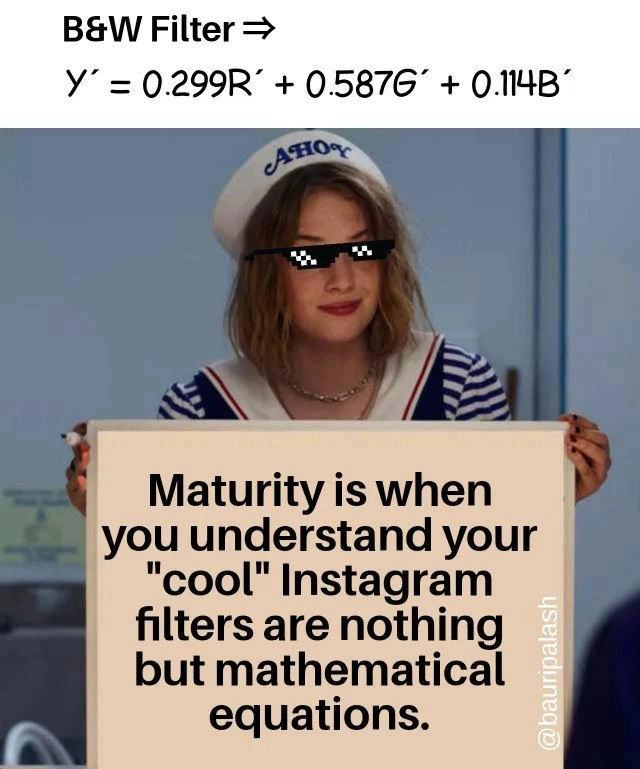
The formula shown in the meme, (Y' = 0.299R' + 0.587G' + 0.114B'), is exactly that weighted RGB sum. It’s telling us: take 30% of the red value, 59% of the green value, and 11% of the blue value, then add them up. The result (Y') is the brightness (luminance) of that pixel in the black-and-white image. We give green the highest weight (0.587, about 59%) because human eyes see green very well – it influences brightness a lot. Blue gets the smallest weight (0.114, about 11%) because we're not as sensitive to blue. Red is in between at ~30%. These specific percentages come from studies of human vision, which is why they’re used in this luminance_formula rather than a simple 33/33/33 average. Using these weights ensures that, say, a bright green leaf (which our eyes perceive as very bright) still looks bright in grayscale, more so than a dark blue object might. It preserves the realism in the black-and-white image.
For a new developer or anyone learning about image processing math, seeing this formula for the first time can be an eye-opener. It's like discovering the “secret recipe” behind a feature. You might have thought an Instagram filter involves complex magic, but in reality, the app is just doing this kind of calculation for every pixel. In code, it’s straightforward. If r, g, b are the red, green, and blue components of a pixel (each usually in the range 0-255), a grayscale conversion could be coded as:
# Example: converting one pixel (r,g,b) to grayscale using weighted average
r, g, b = pixel # each of r, g, b is say 0-255
Y = 0.299 * r + 0.587 * g + 0.114 * b
gray_value = int(Y) # round to nearest integer if needed
# Now use gray_value for all color channels to make the pixel gray
gray_pixel = (gray_value, gray_value, gray_value)
Here gray_value will range from 0 (black) to 255 (white). We set each of the R, G, B channels to that same gray number, so the pixel becomes a shade of gray. This is basically what a B&W Instagram filter does internally: it goes through all the pixels of your photo and applies this equation. No fancy AI, no mysterious artistic intuition – just number crunching.
Let’s clarify some terms too. The word luminance (or luma, denoted by (Y')) refers to the brightness of a pixel as perceived by our eyes. The filter is computing the luminance from the red, green, and blue color_channels. A weighted sum means each part (R, G, B) is multiplied by a coefficient (0.299, 0.587, 0.114 are the weights) before adding. It’s like saying “brightness = 0.299 * red + 0.587 * green + 0.114 * blue”. These weights sum to 1 (approximately), which makes it effectively a weighted average. Because green contributes more to how bright we think something is, its coefficient is the largest. Blue’s influence is smallest, so it gets the smallest coefficient.
For someone early in their coding journey, this might be your first encounter with imageProcessingAlgorithms or ColorTheory in practice. It’s actually a great example of how math and programming work together to do something visual. The meme is emphasizing that even the coolest visual effects rely on formulas like this. So, the next time you use a filter, remember: under the hood it’s just doing some arithmetic on pixel values. And once you grasp that, you’ve reached a new level of understanding (or maturity, as the meme jokes) as a developer. You start to see that a lot of what software does with images, audio, or any media often boils down to straightforward math operations repeated many times. In short, the “black and white” filter isn’t magic at all – it’s pure math applied in a clever way.
Level 3: Coefficients of Cool
For experienced developers and graphics programmers, the punchline of this meme hits close to home: all those “cool” Instagram filters we admired are really just image_processing_math under the hood. The meme’s sign spells it out – that Black & White (B&W) filter is literally the formula Y' = 0.299R' + 0.587G' + 0.114B'. Seasoned engineers recognize this as the standard grayscale_conversion equation. In other words, the app is calculating a weighted RGB sum for each pixel to determine its gray level. The humor here is a kind of nerdy coming-of-age realization: "Maturity is when you understand your fancy visual effects are nothing but simple equations." We’ve gone from thinking there’s some artsy, mysterious process behind a filter to understanding it’s just plain math—useful math that every graphics library from OpenCV to PIL implements in a few lines of code.
Why these specific coefficients? A senior developer likely remembers or quickly recognizes that it’s based on ColorTheory and human vision. We don’t treat each color channel equally because the human eye doesn’t: green light contributes the most to perceived brightness, blue the least. So the formula gives green the biggest weight (~59%), red a moderate weight (~30%), and blue a small weight (~11%). That’s why an equal average of (R+G+B)/3 would look off – it wouldn’t match how bright the original color appeared. By using this luminance_formula, the grayscale image retains the correct relative brightness of things as we would expect. Every graphics programmer eventually learns this, often in a first lesson on ImageProcessingAlgorithms for converting color to grayscale. It’s a classic example of engineering grounded in human perceptual science.
The meme format (a character from Stranger Things holding a sign) delivers this truth bomb with a straight face: “Maturity is when you realize your ‘cool’ Instagram filters are nothing but mathematical equations.” For developers, it’s amusing because we’ve all been that wide-eyed user impressed by a filter’s result, and later became the programmer implementing it via a formula. It’s akin to peeking behind the curtain and finding an algebraic wizard rather than a magical one. DeveloperHumor often pokes fun at this exact scenario: the moment when a flashy feature loses its mystique once you grok the code behind it.
In real projects, you might have had that moment while debugging or writing a filter function. For example, if you ever use a library function to desaturate an image or you write a shader to do grayscale, you’ll see these weight values pop up. They’re hard-coded in many frameworks because this formula is universal. Here’s a snippet a seasoned dev wouldn’t find surprising at all:
# Simple grayscale filter (per pixel) using the standard weighted formula
r, g, b = pixel # Red, Green, Blue components of a color pixel
Y = 0.299 * r + 0.587 * g + 0.114 * b # weighted sum to get luminance
gray_pixel = (Y, Y, Y) # make a gray pixel with equal R,G,B = Y
To a veteran, this one-liner filter is old news – maybe even a nostalgic callback to college assignments or early jobs working with Photoshop clones. There’s a sly satisfaction in realizing that Instagram, a platform seen as trend-setting, is internally using a decades-old formula from broadcast television engineering. The TechHumor here comes from that contrast: what’s marketed as a hip “filter” effect is in reality a neat, tidy math equation developers have known and used for ages. It’s not dismissing the creativity of filters (after all, combining math with artistic intent is powerful), but it’s winking at the fact that under all the gloss, it’s implementation details and graphics programming know-how doing the heavy lifting. As they say in engineering circles, “no magic, only algorithms.” This meme basically hands us the red pill: showing that behind the Instagram glamour is just GPU shader code crunching numbers. And as any jaded senior dev will tell you with a chuckle, that moment of clarity is a sign of true developer maturity.
Level 4: Luminance Linear Algebra
At the deepest level, this meme is referencing a fundamental color-space transformation. The formula shown, (Y' = 0.299,R' + 0.587,G' + 0.114,B'), is the classic luminance formula from the ITU-R BT.601 standard (originally used in analog TV). In linear algebra terms, converting an RGB color to grayscale is a projection of the color vector onto a single brightness axis. Essentially, it's a dot product:
$$ Y' ;=; [,0.299 ;; 0.587 ;; 0.114,] \begin{bmatrix}R' \[6pt] G' \[6pt] B'\end{bmatrix}, $$
where ([R', G', B']) is the vector of gamma-corrected red, green, blue values for a pixel. This equation computes the perceived luminance (Y') by taking a weighted sum of the color channels. Those specific coefficients (0.299, 0.587, 0.114) aren’t random—they come from color theory and the physiology of human vision. Our eyes are most sensitive to green light (hence the hefty 0.587 weight for G), less sensitive to red (0.299 for R), and far less sensitive to blue (only 0.114 for B). This weighting aligns the grayscale intensity with how bright the original color looks to us.
The prime notation (R′, G′, B′ and Y′) hints that these values are in a gamma-compressed color space (like the sRGB or NTSC video signal domain). In other words, the formula assumes the color values have been adjusted for the nonlinear way monitors and cameras handle brightness. If you convert using linear light intensities, the weights shift slightly (for example, Rec.709 uses ~0.2126, 0.7152, 0.0722 for linear R, G, B). But the concept remains: a linear combination of RGB yields the grayscale luminance.
From a matrix perspective, a grayscale filter applies the same linear transformation to every pixel in the image. Modern GPUs and image processors take advantage of this by implementing it as a single matrix multiply per pixel or using SIMD instructions to apply the equation in bulk. It’s elegant how something as visually striking as a black-and-white filter boils down to a single 1x3 matrix acting on the color vector of each pixel. The meme humorously unmasks this “magic” as just straightforward linear algebra and signal processing. In fact, this weighted RGB sum formula has been around for decades—initially devised so that color TV signals could carry a luminance channel compatible with black-and-white TVs. The exact same math that preserved image brightness in 1960s television is now running inside your phone to make artsy Instagram posts. Everything old is new again, only now the computation happens in milliseconds on a GPU instead of in analog circuits!
Description
A meme featuring the character Robin from the TV show 'Stranger Things' in her 'Scoops Ahoy' sailor uniform, wearing pixelated 'Thug Life' sunglasses. At the top of the image, above her, is the text 'B&W Filter ⇒' followed by the luma formula 'Y′ = 0.299R′ + 0.587G′ + 0.114B′'. Robin is holding a whiteboard with the message: 'Maturity is when you understand your "cool" Instagram filters are nothing but mathematical equations.' A watermark for '@bauripalash' is visible on the right. This meme demystifies a common technology for a technical audience. It points out that the seemingly magical effects of social media filters are simply the result of applying mathematical algorithms, like the provided weighted average formula for converting an RGB image to grayscale, to the pixel data of an image. The joke resonates with the developer's journey from being a user of technology to understanding its underlying implementation
Comments
7Comment deleted
The difference between a junior and a senior developer is that the junior applies a `.sepia()` filter, while the senior implements a 3x3 color matrix transformation because the designer wanted the brown tones 'a little more earthy'
When marketing calls the B&W filter “AI-powered,” I remember it’s a three-term dot product and wonder if we should start pitching bubble sort as quantum computing
The real maturity is when you realize you've been manually implementing Instagram filters in production code for years, but your CV says 'computer vision expert' instead of 'glorified pixel pusher who memorized the ITU-R BT.601 coefficients.'
Ah yes, the moment you realize that Instagram's 'Nashville' filter is just a glorified matrix multiplication away from being a CS101 homework assignment. Senior devs know: every 'magical' UI effect is three coefficients and a for-loop wearing a trench coat. The real maturity? Understanding why green gets 0.587 while blue only gets 0.114 - turns out our eyes are just biased hardware with terrible documentation
Most ‘new filter’ requests are just renaming the same 3×3 color matrix - flip 601 to 709, sprinkle a LUT, and marketing calls it Noir Pro
Spec says “AI black-and-white”; implementation is dot(R,G,B,[0.299,0.587,0.114]). V2 swaps to Rec.709 and we call it “cinematic.”
Dev maturity: 'Cool B&W filter' → 'Cringing at those legacy BT.601 luma weights while normies chase vibes'