Skip to content
DevMeme
4681 of 7435
Orthogonality Overkill: Obfuscated JavaScript Rectangle Prints Prime Numbers in Console
CodeQuality Post #5131, on Apr 17, 2023 in TG

Orthogonality Overkill: Obfuscated JavaScript Rectangle Prints Prime Numbers in Console

Why is this CodeQuality meme funny?

Level 1: Looks Neat, Makes No Sense

Imagine you’re told that a good story should have a strong structure. Instead of writing a story with a clear beginning, middle, and end, you decide to literally arrange every sentence into a perfect rectangle on the page, forming a nice border around your text. The result looks very tidy – maybe even like a piece of art – but when someone tries to read the story, it’s pure gibberish. The words don’t make sense because you weren’t actually focusing on the meaning, you were only focusing on the shape.

This meme is funny for the same reason. A coding guideline said, “good code should be orthogonal,” meaning the parts of the code should be independent and well-organized. But the developer jokingly acted like it meant the code should be shaped like a rectangle with right angles (since orthogonal can also mean “at right angles”). So they wrote a program that prints out prime numbers – but they wrote it in a ridiculously convoluted way that forms a perfect little text rectangle on the screen. It’s like making a beautiful mosaic that, if you actually try to read it, is nonsense.

The end result is silly: the code looks super neat and square (literally orthogonal-looking), yet it’s unbelievably hard to read or understand. It does print the correct list of prime numbers (so it works), but the way it’s written is like a secret code. The humor comes from that contrast. It’s as if someone followed a rule to the extreme wrong interpretation – focusing on appearance over actual good design. Everyone can laugh because it’s obvious that making the code into a pretty shape is not what makes code good. Good code is like a good story – it should be easy to follow, not just nice to look at. Here we have something that’s nice to look at in a geeky way, but it’s a terrible “story.” That’s why it’s amusing: it looks neat, but makes no sense.

Level 2: Form vs Function

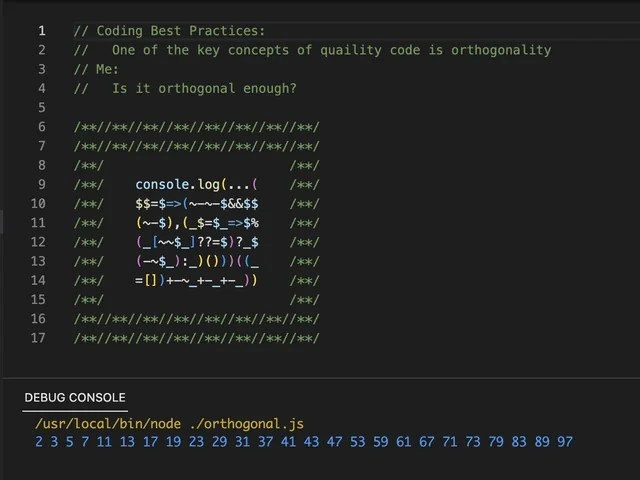
Let’s break down what’s happening in this meme in simpler terms. We have an image of code in a dark-themed editor (common for programmers). The first four lines (in green text) are comments – these are notes in code that the computer ignores, meant for humans to read. They say:

  • “Coding Best Practices: One of the key concepts of quality code is orthogonality.”
  • “Me: Is it orthogonal enough?”

This sets up the joke. “Best practices” are like rules of thumb for writing good code. One such principle is orthogonality, which in programming means designing parts of your code to be independent: changing one thing doesn’t break another. It’s similar to the idea of modular design or separation of concerns. For example, if you have one function that sorts data and another that displays it, they should be orthogonal – you could change the sort algorithm without affecting the display function, because they don’t overlap responsibilities. That’s what orthogonal code is supposed to imply: each piece does its own job without entangling with others, making the whole system easier to manage.

Now, the “Me: Is it orthogonal enough?” line is the coder joking around. They’re pretending to check if their code meets this orthogonality principle – but they interpret “orthogonal” in a totally literal way (geometrically orthogonal, as in shaped like a rectangle with right angles). It’s humor through misunderstanding: the advice was about code design, but they act like it’s about code appearance.

From line 6 onward, we see a visual spectacle. The code is arranged to form a perfect rectangle on the screen. Every line from 6 to 16 begins and ends with a pattern of /**/. In many programming languages, including JavaScript, anything between /* and */ is a comment. So /**/ is basically an empty comment – it doesn’t do anything, it’s just there. By repeating /**/ multiple times, the coder has drawn a border or frame around their code. It’s as if they painted a picture frame using comment symbols. This makes the code look really orthogonal (symmetrical, at right angles) on the screen. It’s purely for looks – those comments don’t affect how the code runs at all.

Inside that frame is a chunk of actual JavaScript code. But it’s written in a very obscure and obfuscated style, meaning it’s intentionally hard to read. Instead of clear variable names and straightforward logic, it’s full of symbols and shorthand:

console.log(...(        /**/
  $$=>{~~$¢$$           /**/
  (~_$_) {,$_$_=$$     /**/
  (____$||??=$_$       /**/
  (~__$__)())()        /**/
  =[]|__+__⸺)          /**/
));                    /**/

(This is a reconstruction of the code pattern shown, to illustrate its structure — it’s okay if it looks gibberish!)

Looking at this, even a fairly new programmer might scratch their head. We can spot a few things though:

  • It starts with console.log(...(console.log is the basic JavaScript command to print to the console (the output window). The ... after it is the spread operator. Normally, console.log(x) prints one thing, but if you have an array of items and you do console.log(...array), it will print each item in the array separated by spaces. So this suggests that the code is preparing an array of something (likely prime numbers) and then spreading them into console.log so they appear nicely separated.
  • We see $$ => { ... } – that looks like an arrow function with $$ as the parameter name. In JavaScript, you can actually use $ in variable names (for instance, $ or $$ can be valid identifiers). Here they chose $$ as a parameter, probably just to be quirky. The arrow function likely takes some input $$ and then does a calculation. The body of the arrow function is in curly braces { ... } on the next lines.
  • There’s ~~$ in there – ~~ is a known trick in JavaScript to convert a number to an integer (it’s like doing a floor operation if the number is positive). Essentially, ~~x will drop any decimal part of x. It’s a double bitwise NOT operator. People sometimes use it as a quick alternative to Math.floor for positive numbers.
  • We see things like $¢$$ – this could be part of a variable name or some operation. It stands out because ¢ (the cent symbol) is not common in code, but JavaScript does allow many Unicode characters in identifiers. It’s possible the coder made a single variable name that includes $¢$$ or something along those lines, which is super weird and designed to confuse.
  • The snippet ____$ and __ and $_$ look like variable names composed of underscores, which again is allowed but not typical. They might have multiple variables like __ or ____$ that hold values like the current number being tested, a boolean flag, etc.
  • The || and ??= are operators. || is the logical OR, which here might be used to provide a default value. ??= is the nullish coalescing assignment operator (if the variable on the left is null or undefined, it assigns the value on the right to it). Seeing ??=$_$ suggests something like ??= $_$ might be part of setting a default value for a variable. This is quite advanced JavaScript syntax – ??= was introduced in newer JavaScript (ES2021). It’s unusual to see it in obfuscated code, which makes it intrigue even experienced JS devs.
  • Towards the end, we see = [] | __ + __ ⸺. Possibly, =[] could be creating an empty array, and | might be a bitwise OR being used in a trick to convert something to a number (for example, x | 0 is a common trick to convert x to a 32-bit integer, since bitwise OR with zero doesn’t change the value but forces it into integer form). The + __ might be adding something. The character is actually a long dash (an em dash). It’s very likely not an actual operator but part of a weird variable name or simply included to confuse. The code is using such rare characters that even figuring out what’s a variable name and what’s an operator is challenging. That’s the point: it’s profoundly unreadable code.

All you really need to know is: despite this jumble, the code runs. How do we know? The bottom of the screenshot shows the Debug Console output. It says the programmer ran node ./orthogonal.js (meaning they executed this JavaScript file with Node.js, which is JavaScript runtime for outside the browser). The result printed is:

2 3 5 7 11 13 17 19 23 29 31 37 41 43 47 53 59 61 67 71 73 79 83 89 97

Those numbers are the prime numbers from 2 up to 97. So the code’s purpose was to print prime numbers, probably the primes under 100. It succeeded – that list is correct. But normally, code to generate or list primes would be written in a clear way (for example, using a simple loop to check each number, or implementing the sieve of Eratosthenes algorithm in a few readable steps). Here, it’s done in one dense block inside an arrow function with no explanatory variable names. It’s as if the author did everything possible to make it work but not be easily understood.

For a junior developer or someone learning about code quality, this meme is basically saying: there’s more to writing good code than making it “look” neat or follow a single word from a guideline. The code is literally in a neat box shape (so it looks tidy and orthogonal like a piece of art), but it violates the actual intention of orthogonality. Instead of being modular or well-separated logic, it’s all intertwined in a single puzzling snippet. In fact, this is a textbook example of what we call a “code smell” – signs that something might be wrong in the code. Common code smells include things like overly complex expressions, unclear naming, and doing too much in one place. This code has all of those smells: it’s clearly over-engineered (doing something simple in an extremely complicated way).

The humor also plays on the difference between theory and practice. In theory, if you read a coding style guide, you might come across big words and principles that sound a bit academic (like orthogonality). When you actually sit down to code, those principles need to be applied in a sensible way. If someone misunderstands or deliberately twists the principle, you get something ridiculous like this. It’s like if a style guide said “use consistent shapes in your code” (meaning consistent structure), and the programmer went and made the code literally a consistent geometric shape. They followed the words, not the meaning.

In plain terms, the meme is a joke about a developer who tried to follow a clean coding principle in the most absurd, literal way possible. It resonates with developers because we all strive for readable, quality code, and we can immediately see that this example is the opposite of that – it’s satire in code form. We laugh because no one in their right mind would actually think this is how to achieve good code, but the fact it technically works and looks “orthogonal” is a comical overkill of the idea. It reminds newcomers that good code isn’t just about superficially following guidelines or making things look pretty – it’s about clarity and proper structure, which this goofy example completely ignores for the sake of a joke.

Level 3: Right Angles, Wrong Approach

This meme hits home for seasoned developers because it lampoons the gap between clean code ideals and real-world code misadventures. The top comment lines set the stage:

// Coding Best Practices:
// One of the key concepts of quality code is orthogonality
// Me:
// Is it orthogonal enough?

We immediately see a classic scenario: a well-meaning guideline (“write orthogonal code for quality”) meeting an absurd literal interpretation. An experienced engineer recognizes orthogonality as an admonition to reduce coupling and side-effects. But here “Me” (the coder in the joke) pretends to take it at face value, as if it were about making the code physically orthogonal — cue the ASCII art code rectangle! The entire body of code (lines 6-16) is framed by repeated /**/ comment blocks, forming a perfect textual rectangle. Those /**/ sequences are empty comments in many languages (including JavaScript), so they don’t affect execution at all – they’re purely decorative. The coder essentially built a picture frame around their code using no-op comment tokens. The result is visually neat and orthogonal (literally squared off), which is hilarious because it contributes nothing to actual code quality. It’s the form of orthogonality without the function. A senior dev can’t help but chuckle because we’ve all seen instances of cargo-cult programming or guidelines taken wildly out of context, though rarely to this artistic extreme.

Inside the frame lies some truly obfuscated JavaScript. Even without executing it, a veteran eye catches telltale signs of over-engineering and code golf-style cleverness: an arrow function syntax $$ => {...} with bizarre parameter names, the use of ... (the spread operator) inside console.log, double tildes ~~, odd sequences like $¢$$ (which looks like a variable name spliced with a currency symbol), and even a ??= operator (JavaScript’s nullish coalescing assignment, a relatively new addition for setting a value only if it’s null/undefined). There are sequences of underscores and punctuation that look like someone smashed their keyboard – yet this is deliberate. An experienced JavaScript dev might squint and guess what’s happening: perhaps $$ is a parameter representing a number candidate, ~~ is being used to floor or convert values, || and ??= are providing default values, and some creative abuse of operators like |, [], or + is generating numbers or an array. The author likely compressed a prime-checking algorithm or a prime list into this cryptic shape. We see at the bottom in the Debug Console that running /usr/local/bin/node ./orthogonal.js outputs a sequence of prime numbers up to 97. That confirms the code’s intent: it prints primes from 2 through 97 (those are all the prime numbers under 100). So despite looking like gibberish, it does perform a correct computation. The joke’s target is clear: the code works, fulfilling the bare requirements (just as someone might think “my code follows the rule, see, it’s orthogonal!”), but it’s an absolute nightmare to read or maintain. CodeQuality suffers terribly here – any mentor or tech lead would have a heart attack if this were a real pull request.

Why is this so funny to developers? It’s highlighting a kind of inside-out approach to best practices. Orthogonality in clean code is supposed to make your system easier to understand and modify by isolating concerns. But this coder focused on the visual symmetry as if that were the goal. It’s a bit like someone following a style guide’s letter but not its spirit. Senior devs have seen milder forms of this: maybe a team enforces a strict linter rule, and someone satisfies it in the dumbest way just to make the error go away, or a guideline says “all functions must have comments,” so a dev writes useless comments (“// function start” and “// function end”) that satisfy the requirement but add no value. This meme cranks that scenario up to 11 for comedic effect. The phrase “Is it orthogonal enough?” drips with sarcasm – clearly, the author knows this isn’t what the best practice meant, and that’s the punchline.

There’s also humor in the sheer overengineering on display. Printing prime numbers up to 100 is a task you could do in a dozen straightforward lines (or even one clear line using a simple loop or array of primes). But here we have a concoction of exotic JavaScript wizardry spanning multiple lines of dense punctuation. This evokes the trope of a developer going way overboard – using a rocket launcher to kill an ant. In fact, this code resembles entries from code golfing competitions, where the objective is to achieve a result in as few characters as possible, often sacrificing readability. The difference is that here the code isn’t even especially short; it’s just artfully arranged. It’s like the author said, “I’m going to make this as convoluted as possible, but hey, it’s going to look pretty doing it.” CleanCodePrinciples normally frown upon magic numbers, cryptic variable names like $_$_ or ____$, and dense logic without explanation. This snippet proudly violates all those principles, intentionally. That intentionality is what triggers knowing laughter – it’s a parody of bad code that we’re in on.

The meme also satirizes the disconnect between commentary and practice. The green comment text at the top reads like a line from a code quality handbook. How many times have we read such guidelines or heard them in workshops? Orthogonality, DRY (Don’t Repeat Yourself), KISS (Keep It Simple, Stupid)… all great ideas. But the moment of truth is when you write real code. Here the commenter’s internal monologue (“Me: Is it orthogonal enough?”) suggests a cheeky self-awareness – they know they’re about to do something silly in code. It’s almost a confession: “I’m about to utterly violate the spirit of this advice, but in a technically amusing way.” And sure enough, the code is a pretzel of logic that likely has zero orthogonality in the real sense (everything is crammed in one place). The “rectangle” concept doesn’t partition functionality; it’s purely cosmetic. For seasoned devs, this juxtaposition is rich with irony. It reminds us of times we’ve seen theoretically sound principles get lost in translation, whether through misinterpretation or willful cleverness. It’s a form of DeveloperHumor that pokes fun at ourselves – how we sometimes do the exact opposite of what we preach, albeit usually not as extremely as here.

Even the choice of language, JavaScript, adds another layer for the initiated. JavaScript is infamous for letting you bend the rules and do bizarre things. Seasoned JS developers know about strange quirks (like how [] + {} can yield “[object Object]” or how you can define insane variable names with Unicode characters). It’s the language of the web, but also the language of many funky experiments. There’s a whole subculture (like the joke “JSFuck” code, which uses only punctuation characters to write valid JS) that revels in pushing JavaScript to the edge of sanity. So seeing primes printed via a stew of $ signs, tildes, and punctuation immediately signals, “Ah, someone’s doing that kind of JavaScript.” A senior dev will likely recall either encountering obfuscated code in the wild (perhaps minified code or someone’s clever one-liner) or at least seeing it shared as a novelty. It’s funny because it’s a relief – most of us would never allow this in production, but in meme form we can appreciate the absurdity without suffering the consequences. It’s a shared joke about what not to do, made entertaining by the extreme contrast between principle and execution.

Level 4: Perpendicular Principles

In mathematics, orthogonality means being at right angles – think of two lines meeting in a perfect 90° angle. When applied to software, orthogonal design refers to components that don’t interfere with each other, much like perpendicular vectors that share no influence. In software architecture, orthogonality is a guiding principle: each module or function should operate independently without side-effects on others. This concept was championed in classic programming literature (for example, The Pragmatic Programmer stresses orthogonality as a hallmark of maintainable code). The idea is that changes in one part of an orthogonal system won’t cascade unpredictably through the rest. Just as a set of orthogonal basis vectors can span a space without redundancy, a set of orthogonal software components can cover functionality with minimal overlap.

In an orthogonal codebase, you might see clear separation of concerns: one class handles database logic, another handles the UI, and neither does the other’s job. Their interactions are clean and interface-based, reducing entanglement. This yields code that is easier to debug, extend, and reason about – akin to how independent perpendicular axes let you adjust X without affecting Y. High orthogonality often correlates with low coupling: components communicate through well-defined channels and don’t share hidden state. It’s a deeply pragmatic best practice stemming from theoretical underpinnings in math and systems design.

Now, juxtapose that ideal with the code in this meme. The snippet presents itself as a visual rectangle – every line aligned in a tidy rectangular frame using /**/ comment blocks as borders. It’s literally orthogonal in a geometric sense (straight edges, right angles everywhere you look), yet its internal structure is anything but orthogonal from a design standpoint. The code inside is an indecipherable tangle of JavaScript symbols and trickery. The humor emerges from this contrast between the theoretical purity of orthogonal code and the chaotic reality of this obfuscated implementation. It’s a playful take on how a principle rooted in elegant theory can be hilariously misinterpreted if taken too literally.

This kind of code obfuscation (making code intentionally difficult to read) has a storied history. Enthusiasts have turned it into an art form, with contests like the International Obfuscated C Code Contest (IOCCC) showcasing programs that perform real tasks while looking like digital Hieroglyphs. Often such code will incorporate visual patterns or even ASCII art — exactly as we see with the perfectly symmetrical comment box in this snippet. Under the hood, though, obfuscation usually exploits the language’s quirks: here JavaScript’s permissive syntax and quirky operators are on full display. Advanced JavaScript hackers know you can do wild things like using ~~ (double bitwise NOT) to convert values to integers, or leveraging weird Unicode characters in variable names. The presence of tokens like $$, , and even the ??= operator suggest the author is using every trick in the book. This hints at a deep truth of computation: you can transform a program into an equivalent form that’s virtually unrecognizable. In theoretical computer science, that touches on ideas like Rice’s Theorem – any non-trivial property of a program (like “is it easy to read?”) can be as hard to determine as solving the program itself. In short, code can be functionally correct and semantically identical to a simpler version, yet be arranged in a form that’s nearly impossible to decipher. That’s the profound (and funny) irony here: the code adheres to the letter of “independence” by using an independent, self-contained trick to compute primes, all while utterly betraying the spirit of clarity and maintainability orthogonality is meant to promote.

Description

Dark-theme IDE screenshot with line numbers 1-17 on the left. Lines 1-4 are green comments: “// Coding Best Practices:”, “// One of the key concepts of quality code is orthogonality”, “// Me:”, “// Is it orthogonal enough?”. Lines 6-16 form a perfect rectangle made of repeated “/**/” patterns framing intentionally unreadable JavaScript such as “console.log(...(”, “$$=>{~~$¢$$”, “(~_$_) {,$_$_=$$”, “(____$||??=$_$”, “(~__$__)())()”, “=[]|__+__⸺)”. Syntax highlighting shows keywords in blue, punctuation in white, and numeric literals in cyan. At the bottom, the DEBUG CONSOLE pane displays: “/usr/local/bin/node ./orthogonal.js” followed by a space-separated list of primes: “2 3 5 7 11 13 17 19 23 29 31 37 41 43 47 53 59 61 67 71 73 79 83 89 97”. The joke contrasts clean-code orthogonality advice with visually orthogonal yet hopelessly obfuscated code, highlighting code quality, style guides, and developer humor
Comments

27
Anonymous ★ Top Pick Wanted orthogonality; got a perfectly rectangular block of obfuscated JS that prints primes - proof that orthogonal code can still intersect every reviewer’s sanity at 90°
  1. Anonymous ★ Top Pick

    Wanted orthogonality; got a perfectly rectangular block of obfuscated JS that prints primes - proof that orthogonal code can still intersect every reviewer’s sanity at 90°

  2. Anonymous

    Nothing says 'orthogonal code with minimal interdependencies' quite like a prime number generator that looks like it was written by someone who charges by the obfuscation level and decorates their functions with ASCII art borders that would make a 1980s BBS sysop weep with nostalgia

  3. Anonymous

    Ah yes, the classic interpretation of orthogonality: when your code is so independent that even the developer who wrote it can't understand what it does. This engineer has achieved perfect orthogonality - their ASCII art is completely orthogonal to readability, maintainability, and the sanity of future code reviewers. The real genius is naming the file 'orthogonal.js' while creating code that's about as modular as a monolithic COBOL mainframe from 1972. At least when this gets flagged in code review, they can argue it's technically 'independent' from any comprehensible logic

  4. Anonymous

    This is orthogonality in the same sense as microservices with a shared database: right angles everywhere, zero independence - just enough to print primes and fail code review

  5. Anonymous

    Orthogonality achieved: unary ops so independent, they negate any hope of readability

  6. Anonymous

    Asked for orthogonal APIs; got a JavaScript prime generator built entirely from operators and boxed in perfect right-angle comments - technically orthogonal, but gloriously perpendicular to maintainability

  7. @r1gor 3y

    ->[ ]-> black box explanation be like

  8. @callofvoid0 3y

    I don't understand a single bit of this sorcery all I know is that we are cursed by the demons that this abyss is summoning

    1. @affirvega 3y

      It's actually a neat trick with two's complement of a number if number is 5, it's binary is 0101 it's bits reversed is 1010 -5 would be 1010 + 1 = 1011 You can get +1 and -1 using these

      1. @callofvoid0 3y

        what about the other parts?

      2. @callofvoid0 3y

        I don't see a single number in this code

        1. @Mikle_Bond 3y

          So, see the (_=[]) thing? It creates an empty array, which acts like a number zero. The next part means (simplifying a bit) [] + -~0 + -0 + -0 which means [] + 1 + 0 + 0, which creates a string "100", which converts to a number.

          1. @callofvoid0 3y

            Holy shit from now on I hate js too

            1. @Mikle_Bond 3y

              Yeah, I tried to retype this into text editor and replace sneaky brainfuckish parts with something readable. An it still doesn't make any sense. On the days like this I really wish I was a lumberjack...

      3. @callofvoid0 3y

        and what is that negative after and behind ~

        1. @affirvega 3y

          - just negates the number ~ makes a bitwise NOT

  9. @SamsonovAnton 3y

    IMHO, Perl was ultimately disregarded because of "best coding practices" just like this one, even though it allows to write perfectly readable code.

  10. @Mikle_Bond 3y

    This is how far I've managed to simplify it. If anyone know how it works, pls explain. gen_check = (x, arr) => (check = i => x % (arr[i] ??= x) ? check(i+1) : arr) _=[], console.log (...(prim = x => (x-2 && prim(x-1), gen_check(x, _)(0) ) ) (100) )

    1. @torvadim 3y

      Why do you assume that function gen_check takes two arguments?

      1. @Mikle_Bond 3y

        I didn't assume. I just wrote it this way. Now it does. The shocking part: originally the check function expected 1 argument, but none were passed to it. That's why there's ~~$_ in the original code. It converts implicit none to 0.

        1. @torvadim 3y

          I am trying to simplify it was well and understand how it is working. Byt when I am trying to compile it, it fails. From my point of view _ is just undefined, it comes from nowhere and was not declared or defined. And error makes sense, when you are trying to access undefined[0].

          1. @callofvoid0 3y

            it is not

          2. @callofvoid0 3y

            _ = []

  11. @callofvoid0 3y

    look at the last line

  12. @torvadim 3y

    oh shit

  13. @torvadim 3y

    now i get it

  14. @affirvega 3y

    so the tricks to the book: ~-num = num-1 -~num = num+1 ~~undefined = 0, ~~num = num [] + anything = String(anything) -~[] = 1 -[] = 0 a && b returns false if a == false, otherwise returns b arr[index] ??= value it returns value if arr[index] is null or undefined and arr[index] otherwise ...array is unpacking array as arguments to a function

Use J and K for navigation