
Skip to content
DevMeme
4682 of 7435
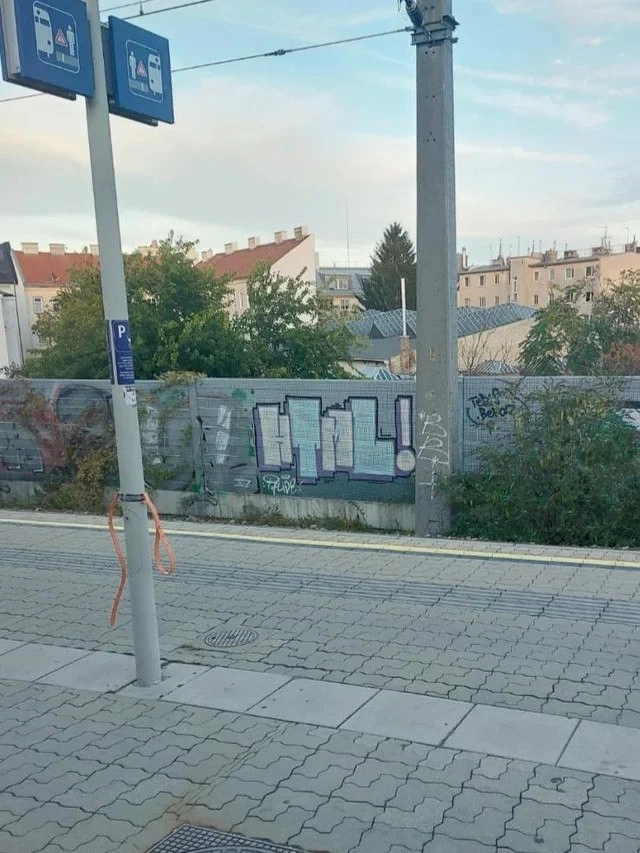
Graffiti IRL: Street artist tags the ubiquitous developer CTRL key!
IDEs Editors Post #5132, on Apr 17, 2023 in TG

Graffiti IRL: Street artist tags the ubiquitous developer CTRL key!

Why is this IDEs Editors meme funny?

Level 1: Magic Button on the Wall

Imagine you have a special button that makes your chores or homework super easy – like a magic button that can copy, paste, or save things instantly. For people who write code, the “Ctrl” key on a keyboard is a bit like that magic helper. They press “Ctrl” with other keys to do things quickly, like copying text or saving work, without clicking around. Now, seeing the word “CTRL” painted huge on a wall is a fun surprise, kind of like spotting your favorite cartoon character in a mural on your street. It makes a coder feel happy and understood, because it’s something from their computer world showing up in real life. It’s as if someone said, “Hey, I know that secret tool you love!” in big bright letters. Even if you don’t code, you can sense the playful idea: a boring train station got a splash of geeky fun. It’s a big friendly wink – turning an everyday keyboard key into street art – and it instantly makes tech folks smile, the same way you’d smile finding a little piece of your own world suddenly painted out in the open for everyone to see.

Level 2: Keyboard Shortcuts IRL

For those newer to coding, let’s break down why a big “CTRL!” graffiti on a train platform wall is geeky fun. Ctrl is the “Control” key on your keyboard – typically found at the bottom corners. By itself it does nothing, but when you hold it down and press another key, it activates all sorts of keyboard shortcuts. In everyday computer use, you might know Ctrl+C for copy and Ctrl+V for paste. In programming, we use shortcuts like these constantly. For example, in a code editor or IDE (Integrated Development Environment) like VS Code or IntelliJ, pressing Ctrl+S saves your code changes, Ctrl+F finds text, and Ctrl+Z undoes a mistake. These key combos are huge time savers. Instead of clicking through menus, developers prefer hitting a quick shortcut so we can stay “in the flow” while coding. It’s a major part of good Developer Experience – the easier it is to do things in your tools, the happier (and faster) you code.

Now imagine you’re waiting for the train and you see the word “CTRL!” spray-painted in large, blocky letters on the wall. It looks just like the label on the Control key of a keyboard, even drawn in a pixelated, retro style. To a random passerby, it’s just a curious word. But to a developer – especially one coming home from a day of coding – it immediately screams “keyboard shortcut!”. It’s like stumbling on a little inside joke or a developer easter egg outside of the computer screen. You might chuckle because it reminds you of all those hours in front of your editor using that key a thousand times a day. It’s a bit of CodingCulture popping up in real life.

The setting makes it even better: a public transport station, a place totally unrelated to computers, now has a touch of programmer humor. It’s as if someone from the tech world left a friendly tag for fellow coders: “Hey, if you know, you know.” This kind of TechHumor shows how common programming and computers have become – enough that even street art references them. The graffiti itself is styled like pixel art, which recalls old computer graphics and video games, another thing many programmers love. All these details — the pixel style, the word “CTRL”, the exclamation mark — tell us the artist knew about MemeCulture and geeky references. It’s a fun cross-over between the virtual tools we use and the real world we live in.

In short, for a junior developer (or anyone who uses computers), seeing the Ctrl key painted on a wall is a cool surprise. It connects to the first things you learn in coding: mastering your environment. One of the first pro tips you hear is “learn your shortcuts!” — it makes you a more efficient coder. So this artwork literally highlights that tip on a city wall. It’s saying, in a humorous way, that the things you practice at your desk (like those Ctrl combinations) are recognizable and important enough to be celebrated as art. And that feels pretty awesome when you get the joke.

Level 3: Out of CTRL

Stepping onto a calm tram platform and spotting “CTRL!” sprayed in bold pixelated lettering feels like stumbling upon a secret coder handshake in the wild. For a seasoned developer, this graffiti is more than just random text – it’s a delightfully nerdy Easter egg hiding in plain sight. The Ctrl key is ubiquitous in our daily workflow; it’s practically an extension of our hand. We use it for everything in an IDE, from copy-pasting code (Ctrl+C / Ctrl+V) and saving files (Ctrl+S) to undoing mistakes with the life-saving Ctrl+Z. Seeing “CTRL!” on a city wall is like the universe acknowledging our daily hustle in IDE life.

This mashup of street art and keyboard culture tickles any developer’s sense of humor. It’s a nod to our coding culture where keyboard shortcuts reign supreme. In an age of mouse-free workflows and Vim-vs-Emacs battles, the Ctrl key is the great unifier – the one key every coder from junior to senior pounds relentlessly. The graffiti’s blocky, pixel-art style even resembles an old-school 8-bit game or a retro text editor, a stylistic wink at tech nostalgia. And there’s delicious irony here: graffiti is the art of rebellion, out of control by nature, yet this tag literally shouts “Control!”. It’s as if the street artist is playfully poking at the idea that even in chaos, developers try to keep things under control (or maybe lose control at 3 AM deploys).

Every senior dev has muscle memory built around shortcuts. We’ve all had that moment of reflexively hitting Ctrl+S in a web browser or Ctrl+F to find a word in a printed document, only to realize real life doesn’t have those features. This mural taps into that mindset. It merges our on-screen world with the off-screen world, turning a mundane commute into a moment of TechHumor. You might catch a grizzled programmer at the station smirking, thinking: “If only I could press that giant Ctrl on the wall and instantly refactor my code or teleport to the office.” It’s DeveloperHumor incarnate – that blend of “only we get this” pride and a reminder that our tools and inside jokes have seeped into mainstream art.

In terms of DeveloperExperience (DX), keyboard shortcuts are king. A well-timed Ctrl combination means fewer context switches and faster flow. This street_art_for_devs celebrates that keyboard-driven efficiency. It’s like a public pat on the back for those of us who live in text editors and IDEs: “We see you, and we know Ctrl is your power move.” The inclusion of the exclamation mark “CTRL!” even gives it the vibe of a command or hotkey being pressed enthusiastically. (Press Ctrl+!, what would that even do? 😄) One can’t help but wonder if the artist mentally hit Ctrl+S to “save” their creation after finishing it. And heaven forbid someone comes along with a giant Ctrl+Z to undo this masterpiece!

So here we have it: a piece of urban art perfectly tuned to developer sensibilities. It highlights how deeply keyboard shortcuts are ingrained in us, to the point that a concrete wall bearing a five-letter tech reference can make our day. In the drab routine of a commute, a bright pixel_block_letters “CTRL!” jolts us awake better than a double espresso – reminding even the most jaded coder that the world outside the screen can speak our language too.

Description

The photo shows a quiet tram or train platform paved with interlocking stone tiles. A concrete pole with overhead electrical wires and mounted blue transit signs stands in the foreground. Behind a low mesh-covered wall, large bubble-style graffiti spells “CTRL!” in blocky, pixel-grid lettering filled with light aqua cross-hatching and outlined in black and lavender, mimicking the look of a keyboard key. Surrounding the platform are shrubs, residential rooftops, and a pale evening sky. For developers, the CONTROL key powers shortcuts like Ctrl-C, Ctrl-V, and Ctrl-S, so spotting it as street art feels like an unexpected in-the-wild nod to IDE life and keyboard-driven workflows

Comments

15
Anonymous ★ Top Pick Someone tagged the release-train platform with “CTRL!” - finally, a physical key for when prod derails and the only sane incident playbook step is company-wide Ctrl-C
  1. Anonymous ★ Top Pick

    Someone tagged the release-train platform with “CTRL!” - finally, a physical key for when prod derails and the only sane incident playbook step is company-wide Ctrl-C

  2. Anonymous

    After 20 years in the industry, I've finally found it - the source of all our null pointer exceptions. It's been hiding at a European bus stop this whole time, probably waiting for a garbage collector that will never come

  3. Anonymous

    This graffiti perfectly captures the exact moment a senior engineer discovers that the 'temporary' workaround from 2015 is now load-bearing infrastructure, the database migration they thought was idempotent definitely wasn't, and the new intern just force-pushed to main. It's not just street art - it's a distributed system's natural state visualized in urban form

  4. Anonymous

    Deployed EV infra to prod, but the stack traces were already etched in concrete - no hotfix spray can

  5. Anonymous

    Graffiti says CTRL! at the tram stop - back when it was a monolith, that was enough: Ctrl-C. In microservice land you need a runbook and twelve kill -9s before anything moves

  6. Anonymous

    Nice - an outdoor CTRL key; finally a public SIGINT for the commute, though schema migrations still refuse to honor Ctrl+Z

  7. @LineDiscipline 3y

    Best programming language ever

    1. @callofvoid0 3y

      the dog in your pfp is gonna tell everybody what you did

  8. @RiedleroD 3y

    that looks a lot like austria…

    1. @ZgGPuo8dZef58K6hxxGVj3Z2 3y

      Can confirm. Maybe Handelskai S-Bahn?

      1. @RiedleroD 3y

        no, this looks more rural. Probably outer vienna I'd say

        1. @ZgGPuo8dZef58K6hxxGVj3Z2 3y

          True

  9. @FirokOtaku 3y

    programming language of the year: HTML

  10. @SHAdaVinci 3y

    Still not centered correctly...

  11. @rubelem 3y

    position: absolute; top: 50%; left: 50%; transform: translate(-50%, -50%);

Use J and K for navigation


