Skip to content
DevMeme
3184 of 7435
When your “HTML/CSS project” turns out to be 98.9 % JavaScript
Frontend Post #3505, on Aug 5, 2021 in TG

When your “HTML/CSS project” turns out to be 98.9 % JavaScript

Why is this Frontend meme funny?

Level 1: Cake With Too Much Icing

Imagine you ask for a cake because you love the cake and a bit of frosting on top. Your mom says, “No need to buy one, we have cake at home.” But when you see the cake at home, it’s 98.9% frosting and only 1.1% actual cake! 😲 It’s basically a giant lump of icing with just a few crumbs of cake inside. You’d probably be surprised and a little disappointed, right? Because what you wanted was mostly cake with some icing – not the other way around. This meme is joking in the same way: someone wanted a project that was mostly the basic stuff (HTML and CSS, like the cake) with a little bit of extra scripting (JavaScript, like the icing). But the project they have “at home” turned out to be almost all icing (JavaScript) and hardly any cake (the HTML/CSS). It’s a funny way to say the project isn’t what they expected at all. The humor comes from that over-the-top mismatch – just like a cake that’s nearly all frosting, an “HTML/CSS project” that is nearly all JavaScript is silly and not what you’d hope for!

Level 2: Wait, It's All JavaScript?

For a newer developer or someone just learning Frontend basics, let’s break down why this meme is funny. The conversation in the meme goes:

Me: “Mom, can we buy [an] HTML/CSS project?”
Mom: “No, we already have [an] HTML/CSS project at home.”
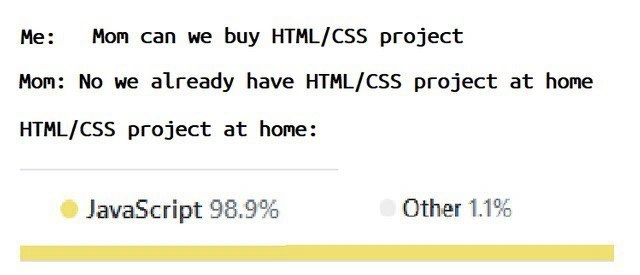
HTML/CSS project at home: *[shows a pie chart: JavaScript 98.9%, Other 1.1%]*

In plainer terms, someone (the “Me” in the meme) is asking for a project that’s mainly HTML and CSS. But the parent (mom) says “we have that at home,” and then the thing at home turns out to be almost entirely JavaScript. This is a punchline because it defies the expectation: if you say a project is an “HTML/CSS” project, you’d think most of its code would indeed be HTML and CSS. Those are the languages used to build the structure and style of web pages. HTML (HyperText Markup Language) is like the skeleton of a webpage – it defines headings, paragraphs, images, links, etc., basically the content and layout. CSS (Cascading Style Sheets) is like the skin and clothes – it makes the page look pretty, controlling colors, fonts, spacing, and overall visual design. If someone tells you, “This project is about HTML/CSS,” you expect to be working mostly on those things: laying out elements and styling them.

JavaScript, on the other hand, is the programming language that brings web pages to life by adding interactivity and logic. JavaScript can respond to user clicks, fetch data from servers, create dynamic effects, and much more. In a traditional simple webpage, JavaScript might be a small portion of the code – just enough to add a little interactivity (like a form validation or a menu toggle). So normally, HTML+CSS project implies mostly static content with maybe a little scripting. That’s why in the meme the child (or developer) is asking for an HTML/CSS project – perhaps expecting a relatively straightforward, design-focused task.

The joke reveals that the project “at home” (i.e., the one you already have or end up with) is 98.9% JavaScript. The pie chart or bar visualization with yellow for JavaScript and a tiny grey slice for “Other 1.1%” is basically saying: almost all of the code is JavaScript, with only a tiny fraction left for everything else (which would include HTML, CSS, and possibly other minor bits). This is funny to developers because it’s a common situation in modern WebDevelopment: even projects that sound simple often end up relying heavily on JavaScript libraries and code. In other words, the HTML/CSS part of the project becomes just a thin veneer, and JavaScript does all the heavy lifting.

Imagine a junior developer excited to craft a beautiful webpage layout (HTML) and make it look nice (CSS). They join a project expecting to play with <div>s and color schemes. Then they open the project and find hundreds of .js files, a complex build setup, and hardly any .html or .css files to edit. It can be bewildering: “Where’s the HTML and CSS? It’s all JavaScript!?” That bewilderment is exactly captured by the meme’s punchline: “HTML/CSS project at home” turned out to be basically a JavaScript project in disguise. The line “Wait, it’s all JavaScript?” sums up that surprise (which is a nod to another meme as well, the astronaut “Always has been” meme).

Let’s clarify why this happens in real projects. Modern frontend frameworks and tools (like React, Angular, or Vue, as well as build tools like Webpack or Parcel) encourage a style of development where JavaScript is front-and-center. Instead of writing a lot of HTML by hand, developers using these tools often generate HTML elements using JavaScript. For example, in React you write components in JavaScript (or TypeScript) that produce HTML dynamically. The styling might be done with CSS, but often even the CSS is managed through JavaScript, for instance by injecting styles or using styled-components (a technique where you write CSS in your JS files). As a result, the codebase ends up being predominantly JavaScript files, with maybe one main index.html file that mounts the app, and a few CSS files or style definitions. It’s not uncommon to check a project’s repository and see something like “JavaScript 90%, CSS 5%, HTML 5%” in the stats. The meme takes it to an extreme with 98.9% to really emphasize the point — basically saying “almost nothing in this ‘HTML/CSS’ project is actually HTML or CSS!”

Now, why do developers do this? Is it OverEngineering? Sometimes, yes — people might use a big fancy framework for a simple site out of habit or trend, which can be overkill. Other times, it might be justified: maybe the project started simple but grew in complexity, so more JavaScript was added to handle interactive features. Or a team chose a standard stack (say, a React app) even for a small project for consistency’s sake. In any case, the outcome can be a bit humorous: the label “HTML/CSS project” no longer seems accurate when the JavaScript has essentially eaten everything else. This is a common Frontend humor trope: complaining (in a joking way) that front-end development has become too JavaScript-heavy. Developers might say things like “JavaScript is taking over the world” or jest about how even a toaster or a fridge might soon run JavaScript. Here it’s specifically that even tasks that used to be mostly about HTML/CSS now involve tons of JS.

The “Mom, we have X at home” meme format is used to compare your expectation vs reality. In everyday meme terms: a kid wants something high-quality or specific, and the parent’s “at home” version is a disappointing substitute. Translating that to coding: the developer wanted a straightforward HTML/CSS experience (maybe something easy or nostalgic), but the “one at home” (the project they actually have to work on) is a let-down in that sense – it’s complex and not what they envisioned. The humor has an edge of relatability: if you’ve ever felt overwhelmed by a tech stack when you expected simplicity, this meme hits home. It’s basically a joke many in the dev community nod and chuckle at, because we’ve seen a simple idea turn into a labyrinth of JavaScript.

So, to recap in simpler terms: this meme jokes about a web project that was supposed to focus on HTML/CSS (the basics of webpage structure and style) but in reality is almost entirely JavaScript code. It’s making fun of how modern web projects can become overly complicated (over-engineered) with tons of JavaScript, even when you might not expect them to. And that scenario is a well-known pain point in frontend development – hence it’s a source of DeveloperHumor that both newbies and veterans in web development can shake their heads and laugh at. If you’re new to this, don’t worry: it’s a phase of learning to realize how much the web world now runs on JavaScript. As the meme implies, sometimes it feels like no matter what you ask for, you get JavaScript in the end!


Level 3: Script Over Style

At first glance, this meme uses the classic “Mom, we have X at home” format to lampoon modern frontend development. The dialogue mimics a child asking for a pure HTML/CSS project, only to be told there's one “at home.” The punchline is that the project at home – supposedly an HTML/CSS project – is revealed to be 98.9% JavaScript. In the image, a tiny pie-chart or bar indicates JavaScript 98.9% (in bright yellow), with a sliver of Other 1.1% (in grey). This visual gag is instantly recognizable to developers who use platforms like GitHub, where repository language stats are shown in colored bars (yellow happens to be the color for JavaScript). Essentially, the meme is saying: “You wanted to work on a simple web page with mostly HTML and CSS, but surprise! It’s basically all JavaScript under the hood.”

Why is this funny (or painfully true) to experienced devs? It highlights a prevalent FrontendPainPoints scenario: many so-called “simple” static web projects are over-engineered into JavaScript-heavy applications. In modern WebDevelopment, you might start with the intention to build a basic site (just some HTML for structure and CSS for styling). Yet you often end up pulling in a ton of JavaScript: frameworks, build tools, and dependencies that practically eclipse the actual HTML/CSS. The humor stems from that overkill: it’s like using a 10,000-piece toolkit to tighten a simple screw. Seasoned devs recognize this pattern of OverEngineering — for instance, using a full-blown React/Angular framework (and thousands of lines of JS) to create what could have been a plain static webpage. The meme exaggerates it to 98.9% to drive the joke home, but it’s only a slight exaggeration for some real projects!

This also nods to the evolution (or misadventures) of frontend architecture. There’s an implied history here. In the early days, a web “HTML/CSS project” meant you’d hand-write HTML for content and layout, sprinkle in CSS for design, and maybe add a dash of JavaScript for interactive flair. That was a balanced diet of the web’s core triad: content, presentation, behavior. But fast-forward to the era of Single Page Applications (SPAs) and component-based frameworks, and the balance shifts dramatically. Frameworks like React, Angular, or Vue encourage developers to generate HTML elements dynamically via JavaScript, manage all state and interactions in JavaScript, and even style components using JS (think CSS-in-JS or style objects). The result? The HTML file often becomes a hollow container – perhaps a single <div id="app"></div> – and the CSS might be just a reset file or a few global styles. Everything else is one giant .js bundle. Here’s a tongue-in-cheek illustration:

<!-- "HTML/CSS project" at home (simplified) -->
<!DOCTYPE html>
<html>
  <head>
    <title>My App</title>
    <style> body { margin: 0; } </style>  <!-- Minimal CSS -->
  </head>
  <body>
    <div id="root"></div>                  <!-- HTML is just one empty div -->
    <script src="app.bundle.js"></script>  <!-- Massive JavaScript bundle -->
  </body>
</html>

In the snippet above, the HTML is basically an empty shell (<div id="root"> is where the app injects content), the CSS is a one-liner, and the real work happens in app.bundle.js (which could be megabytes of JavaScript). This is a common setup for SPA frameworks: you load a blank page and let JavaScript do 98.9% of the job building the UI and controlling everything. The meme’s yellow usage bar chart drives that point visually: the JavaScript portion dwarfs the “Other” (which would include HTML, CSS, maybe a tiny bit of config or templating).

From a senior developer’s perspective, the humor also reflects a bit of exasperation: we’ve all seen a tiny task balloon in complexity once modern tooling comes in. That “HTML/CSS project at home” could be a corporate codebase or some inherited project where someone promised “Don’t worry, it’s just a static site,” but opening the folder reveals a gigantic node_modules directory and build scripts — tens of thousands of lines of JavaScript for what was supposed to be a simple webpage. It’s funny because it’s true: the “Other 1.1%” might literally just be the index.html and a couple of .css files, while the rest is JavaScript libraries, polyfills, and framework code. Frontend engineers share a collective chuckle (and cringe) at this because it satirizes real life: the trade-offs of using powerful frameworks. Sure, you get a dynamic, app-like user experience, but your HTML and CSS files have practically disappeared under a mountain of JS logic.

Importantly, this meme also pokes fun at the unwitting kid (or junior dev) in us all, versus the pragmatic mom (the reality check). The “Mom, can we get X? – We have X at home” structure usually implies that the thing at home is a lousy knock-off or not what you hoped for. Here the kid (developer) just wants a straightforward HTML/CSS project (maybe to practice some design skills or build something lightweight). The mom (perhaps a manager or the project itself) says you don’t need a new one — use what’s at home (the existing project). And that existing codebase is the disappointing surprise: it’s labeled “HTML/CSS” but is essentially a JavaScript monster. The DeveloperHumor hits hard because it captures that feeling of bait-and-switch. You think you’ll be tweaking some simple styles, but end up wrestling with webpack.config.js or debugging asynchronous callback hell.

On a systems level, it’s also highlighting the collapse of clear separation between structure, style, and behavior in many modern setups. The old-school principle of separation of concerns said HTML handles structure/content, CSS handles styling, and JS handles interactivity. In an ideal “HTML/CSS project”, those first two concerns dominate. But now, with component-driven development, these lines blur: JavaScript often manages the structure (generating HTML) and sometimes even the style (via dynamic styles or CSS-in-JS). So JavaScript isn’t just the “behavior” layer anymore – it’s the whole factory, with HTML/CSS as mere output or afterthought. This meme humorously quantifies that shift: 98.9% JS is basically JavaScript eating everyone else’s lunch at the table. It’s a cheeky way of saying “JavaScript took over the world (or at least this project).”

In summary, at the senior/architect level, this meme is pointing out the absurdity (and inevitability) of the JavaScript-heavy stack in frontend projects. It resonates because it’s a shared industry experience: the tension between wanting a lean, focused solution and ending up with an everything-and-the-kitchen-sink approach. We laugh (perhaps a bit bitterly) because we’ve maintained that “HTML/CSS” project that ironically requires knowing a front-end framework, a state management library, a build toolchain, and barely involves writing plain HTML or CSS. The meme’s sarcasm encapsulates a real trend in web dev: even our “simple” projects often hide a complex, JavaScript-centric reality.


Description

The meme is presented on a white background with monospaced black text mimicking a classic dialogue format: “Me: Mom can we buy HTML/CSS project” followed by “Mom: No we already have HTML/CSS project at home.” A new line reads “HTML/CSS project at home:” Underneath, a simple legend shows a yellow circle labeled “JavaScript 98.9 %” and a faint grey circle labeled “Other 1.1 %”. Beneath the legend, a long horizontal yellow bar visually represents the 98.9 % share. The humor highlights how supposedly simple static-site tasks balloon into JavaScript-heavy codebases, poking fun at modern frontend over-engineering and dependency bloat

Comments

8
Anonymous ★ Top Pick We wanted a static landing page; now it’s a Kubernetes-hosted Next.js app shipping 5 MB of hydrated JavaScript so the CTA can pulse on hover - 98.9 % JS, 1.1 % shame
  1. Anonymous ★ Top Pick

    We wanted a static landing page; now it’s a Kubernetes-hosted Next.js app shipping 5 MB of hydrated JavaScript so the CTA can pulse on hover - 98.9 % JS, 1.1 % shame

  2. Anonymous

    Remember when we could ship a website with just index.html and style.css? Now our 'simple landing page' has 47 build steps, a 2GB node_modules folder, and requires a PhD in webpack configuration just to change the font color

  3. Anonymous

    Ah yes, the classic 'HTML/CSS project' - where you start with semantic markup and a few style rules, but somehow end up with 98.9% JavaScript because you needed 'just a tiny bit of interactivity,' then added a state management library 'for scalability,' bundled it with Webpack 'for optimization,' transpiled it with Babel 'for compatibility,' and now you're debugging async rendering issues at 2 AM while the original two-file static site mockup sits abandoned in your downloads folder

  4. Anonymous

    Nothing screams 'HTML/CSS' like a 98.9% JavaScript SPA with CSS-in-JS and a webpack config larger than index.html - GitHub Linguist is the only reviewer brave enough to say so

  5. Anonymous

    Every 'static HTML/CSS site' in prod: 1% scaffold, 98% JS 'just in case' features that cascade into bundle bloat

  6. Anonymous

    HTML/CSS project at home: 98.9% JavaScript - HTML via JSX, CSS via JS objects, and the remaining 1.1% is index.html apologizing for the hydration pipeline

  7. @nuntikov 4y

    Nothing out of the ordinary

    1. @azizhakberdiev 4y

      node_modules project

Use J and K for navigation