Installing Airbnb ESLint config: suddenly every possible code pattern is forbidden
Why is this CodeQuality meme funny?
Level 1: No Fun Allowed
Imagine you walk into a playground, all excited to play, and you see a huge list of "NO" signs: No running, No shouting, No ice cream, no this, no that. You’d probably think, "Gee, is there anything I can do here?" It’s a funny and frustrating feeling, right? That’s exactly the feeling this meme is pointing to, but with coding. Turning on the Airbnb style rules in a project is like having a very strict teacher or parent suddenly say: "You can’t do that, you can’t do that either, and oh – put that down, it’s not allowed." It might be for good reasons (to keep things tidy and safe), but in the moment it just feels like no fun allowed. The meme makes us laugh because we’ve all been that kid in the rule-filled playground, thinking "Wow, so many rules!"
Level 2: No Dogs, No var
Let’s break down what’s going on here in more straightforward terms. ESLint is a popular linting tool for JavaScript (and Node.js) that checks your code for issues, enforcing rules so your code stays neat and bug-free. Think of it as a robot proofreader for your code. When you npm install a package like eslint-config-airbnb, you are adding Airbnb’s set of predefined LintingRules to that tool. Airbnb’s style guide is a well-known list of rules about how JavaScript code should be written – Airbnb the company open-sourced their preferences, and many developers use them as a guideline for writing clean code. These rules cover everything from how to name variables, where to put commas and brackets, whether to use single quotes or double quotes, etc. It’s very comprehensive!
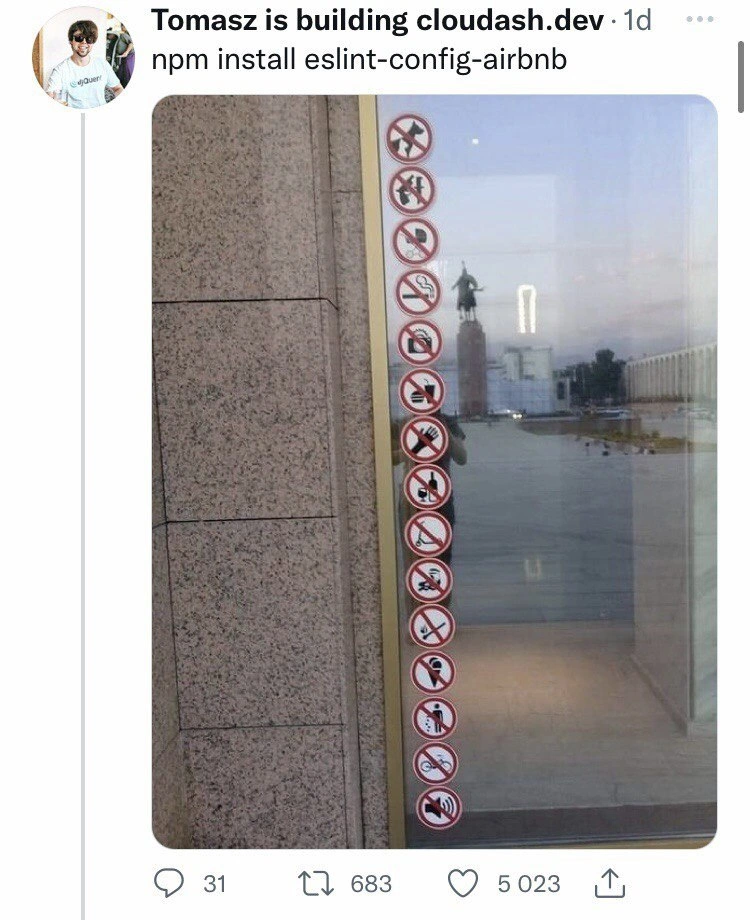
Now, the meme shows a door with a whole column of "no ____ allowed" signs (no dogs 🐕, no smoking, no drinks, no cameras 📷, no scooters, no ice-cream…). This visual gag stands in for the long list of things you’re “not allowed” to do in code once the Airbnb ESLint config is in place. Each red "🚫" sign is like another rule saying “you can’t do that in your code.” If you’ve never configured a linter before, here’s what happens: as soon as you enable those rules, ESLint will scan your code and mark anything that breaks a rule. You’ll start seeing errors or warnings for every rule violation. A few typical examples of what Airbnb’s config forbids or requires:
- No
vardeclarations (no-varrule): You must use modernletorconstinstead of the oldvar. For example, writingvar count = 5;would trigger a lint error – the rule wantslet count = 5;(orconstif you never reassign it). - No using
console.logfor debug prints (no-consolerule): If you leave aconsole.log("Debug info")in your code, the linter will complain. The idea is that printing to console is fine during development, but should be avoided or handled in a controlled way in production code. - Use
===instead of==(eqeqeqrule for strict equality): For instance, if you wroteif (x == 5) { … }, ESLint would warn you to use===(if (x === 5) { … }) because==can sometimes cause tricky bugs by automatically converting types. - Enforce trailing commas in multiline lists (
comma-danglerule): Airbnb’s style wants a comma at the end of the last item in an object or array if the list spans multiple lines. So if you have an array like:
you’d need to add a comma afterconst fruits = [ 'apple', 'banana' // <- ESLint error: missing trailing comma ];'banana'to satisfy the rule. It may seem trivial, but it makes version-control diffs cleaner when new items are added to the list.
These are just a few of many rules in the config. Some other rules check for things like unused variables, proper indentation, spaces around operators, not leaving debugging statements or unused imports in the code, and so on. For a newcomer or a developer who hasn’t used such strict rules before, the first run can be overwhelming. One moment your code looked fine, and the next moment you have perhaps dozens or hundreds of red underlines or terminal errors telling you to change all sorts of little things. It can feel like you just walked through a door with a sign saying “Welcome to the project – by the way, here’s 100 things you were doing wrong.”
So, in simpler terms: the developer in the meme installed the Airbnb ESLint configuration, and was met with a barrage of rule violations. The door covered in "no ___ allowed" signs is a funny visualization of that barrage. Every symbol on that door = one more pattern or practice that the linter prohibits for the sake of cleaner code. It’s a dramatic way to say: “Wow, this config has a rule against everything!”. The humor is that developers often feel a mix of frustration and amusement when confronted with so many picky rules at once. Over time you learn them and your coding habits adjust, but that first encounter can be a shock.
Level 3: Lintpocalypse Now
When a developer types npm install eslint-config-airbnb and adds the Airbnb ESLint config to a project, it can feel like unleashing a linter apocalypse on their codebase. Suddenly your editor or CI is screaming with a wall of red error markers, as if an army of CodeStyleGuide enforcers descended upon your files. The meme’s image nails this feeling: a glass door plastered top-to-bottom with red-circle prohibition signs, each banning some activity. This perfectly parallels how the Airbnb ESLint rules seemingly forbid every possible code pattern that doesn’t fit a very specific JavaScript style. It's a humorous exaggeration of a real developer experience: one moment your code was running fine, the next moment ESLint is seemingly yelling "🚫 No, you can’t do that!" for almost everything.
Why is this so funny (and painful) to experienced devs? Because we’ve been there: adopting a strict linting configuration like Airbnb’s is a double-edged sword. On the one hand, it’s the gold standard of CodeQuality tooling for JavaScript/Node.js — enforcing consistent spacing, quotes, semicolons, arrow functions, you name it. On the other hand, the first time you apply it to an existing codebase, you get ToolingFrustration overload. Seasoned developers recognize this as a form of ToolingOverload: the tool is technically helping you write cleaner code, but initially it feels like a bureaucratic code police academy. The tweet in the meme condenses this irony brilliantly. By simply captioning the photo with npm install eslint-config-airbnb, the author implies that running that single command transformed their previously acceptable code into a forbidden minefield of lint errors. Every red “no ___ allowed” sign on that door represents one more thing the linter just complained about – No unused vars! No implicit any! No console logs! No dangling commas! No fun!
Under the hood, what’s happening is that Airbnb’s config introduces hundreds of linting rules. Experienced developers know Airbnb’s JavaScript style guide is famously comprehensive (some might say nitpicky). It’s not just one or two new rules; it’s an encyclopedia of how your code should look. Many of these rules are great best practices – for example, disallowing == in favor of === to avoid type coercion bugs, or forbidding the old var keyword to encourage block-scoped let and const. But in aggregate, it’s a lot to swallow at once. The humor here comes from relatable shock value: “What do you mean I can’t even use a plain for-in loop without an eslint comment?!” It’s the kind of exasperated joke a developer makes after watching their build fail because of a missing newline or a differently ordered import. The DeveloperExperience (DX) suddenly dips because you spend the afternoon appeasing the linter gods – adding semicolons, removing extra spaces, renaming variables – instead of writing new features. Every senior engineer has stories of a gigantic commit that was just fixing style issues. So seeing a door covered in “no XYZ” signs hits home – that’s exactly what an overzealous linter feels like.
There’s also an implied commentary on Tooling culture. Modern JavaScript projects often have elaborate setups, and adding the Airbnb ESLint config is often part of the standard playbook for quality. It’s effective, but at first it can read like a strict "Code Police" checkpoint: halt, your code violates 37 rules before it can pass! The meme exaggerates this to hilarious effect. Those red-circle symbols on the door are the same color as error icons, reinforcing the visual of an IDE margin filled with red. Each prohibited pictogram (no dogs, no cameras, no ice cream 🍦…) maps to a coding don’t-do-that: no extraneous console.log debugging, no sloppy naming, no unused imports, no misordered requires – basically no nonsense in your code. Seasoned devs laugh (or groan) because they know these rules by heart and have fought through them. It’s a shared memory: remember the first time you set up linting and got 500 errors? Good times.
In the end, beyond the laughter, there’s a real insight: a strict linter like this is trying to enforce discipline that large teams (like Airbnb’s engineers) decided was necessary to keep code clean and consistent. The meme simply shines a light on how overwhelming that discipline can feel at first. It’s the classic developer humor of exaggeration — turning the quite useful (CodeQuality-boosting) practice of linting into a comical “NO EVERYTHING” signpost. And as any battle-scarred dev will tell you with a chuckle, sometimes it really does feel like “every possible code pattern is forbidden” when you crank the lint rules up to eleven.
Description
Screenshot of a tweet in light-mode Twitter UI. The tweet header reads "Tomasz is building cloudash.dev · 1d" with a blurred avatar, and the tweet body says "npm install eslint-config-airbnb". Attached is a photo of a glass door whose frame is lined with a tall column of identical red-circle "no" symbols, each over a different pictogram (no dogs, no smoking, no drinks, no cameras, no scooters, no ice-cream, etc.), visually implying an exhaustive list of prohibitions. Below the image, the tweet shows interaction counts: reply icon "31", retweet icon "683", and heart icon "5 023". The meme humorously equates the strict, lengthy rule-set of the Airbnb ESLint configuration with a doorway plastered with forbidding signs, capturing the developer experience of adding opinionated linting rules to a JavaScript/Node project

Comments
22Comment deleted
Installing eslint-config-airbnb on our 2009 codebase felt like inviting a city zoning board to inspect a hack-week shed: zero lines merged, 482 ordinances issued
After 15 years in the industry, you realize eslint-config-airbnb is just Stockholm syndrome marketed as 'best practices' - we've convinced ourselves that 200+ opinionated rules about semicolons and spacing will somehow prevent the next production outage
Airbnb's lint config: 800 rules about how to write JavaScript from the company that taught us never to trust house rules
Installing eslint-config-airbnb is like hiring a code reviewer who's never heard of 'good enough' - suddenly your perfectly functional JavaScript is flagged for 247 violations including 'excessive breathing near semicolons' and 'unauthorized use of var in a past life.' It's the only linter that makes you question whether you're writing code or applying for a permit to exist in the same directory as a .js file
eslint-config-airbnb: The npm package that turns 'good enough' codebases into HOA-regulated suburbs overnight
Airbnb’s ESLint is linter-as-WAF: deny-all by default, spend Q3 writing allowlists
Installing eslint-config-airbnb is like hiring a nightclub bouncer for your repo: no var, no ++ (unless it’s in a for-loop afterthought), no console - CI won’t let your PR past the velvet rope
What do these two mean? Comment deleted
no open flame and no scooters Comment deleted
crack pipe is more realistic. How long have you been using matches? Comment deleted
no crack and no scooters ig Comment deleted
crack pipe or a lit match? Comment deleted
"No match function!" (Use strcmp.) "No wheel group for sudo!" (Use sudo group.) Comment deleted
I fucked your mom Comment deleted
Thanks! She was kinda sad last months Comment deleted
Tr: Come on, prove to me that these are not *bad word*, but normal people.(racict meme) Comment deleted
Thx :) Comment deleted
What do you think, do arabian mans know the meaning of this * bad word* 🙂 Comment deleted
I don't use this word in my speech, but I know it has a bad meaning ¯\_(ツ)_/¯ Comment deleted
Arabs hardly know the meaning of this word, but there are many Russians in this chat Comment deleted
Sadness (пичалити) 🙂 Comment deleted
I'm not sure u have that kind of expertise. Btw, u may wish to try Grammarly) Comment deleted