Skip to content
DevMeme
3844 of 7435
When 7110 fails equality but 7120 passes: floating-point nightmare in the console
Languages Post #4187, on Feb 9, 2022 in TG

When 7110 fails equality but 7120 passes: floating-point nightmare in the console

Why is this Languages meme funny?

Level 1: The Missing Crumb

Imagine you have a big cookie, and you want to share it with friends. You break the cookie into 10 pieces so everyone can have a share, and later you try to put all the pieces back together to form the original cookie. But uh-oh – after reassembling, you notice the cookie isn’t exactly the same size as before. There’s a tiny crumb missing (maybe it fell on the floor or stuck to someone’s hand)! Now, if you compare your reassembled cookie to a brand new whole cookie, you see it’s just a teeny bit smaller – not enough to notice at first, but enough that it’s technically not a perfect match.

In the meme’s scenario, the number 7110 is like our cookie. Dividing by 100 was like breaking it into pieces (in this case, making 71.10, which is like 71 and a tiny .10 piece). Multiplying by 100 was like trying to put the pieces back together. But the computer’s arithmetic “lost a crumb” in the process – a tiny fragment of the number disappeared due to how it handled the division. So when we ask “Is our rebuilt number exactly the same as 7110?” the computer says false (like “Nope, it’s slightly smaller!”). For 7120, imagine a cookie that, when broken and reassembled, ended up exactly the same with no crumbs lost – so the computer says true (“Yes, it’s a perfect match!”).

The humor here is a bit like watching someone pour water from one cup to another and back, and somehow ending up with a drop less water — you’d scratch your head and laugh, “Where’d that drop go?!” In computing, we expect computers to be super precise and infallible at math, so it feels silly and surprising when they say 7110 isn’t equal to 7110 after a simple calculation. It’s funny in the way a magic trick is funny: a kind of “gotcha!” moment. The missing crumb is that tiny difference that makes the computer seem like it got the math wrong, even though it’s just a quirk of how the numbers are handled behind the scenes. So essentially, the meme is joking that even when you do something that should change nothing, the computer can still mess it up just a little – and that little “crumb” of difference turns an expected true into a baffling false.

Level 2: Point Not Taken

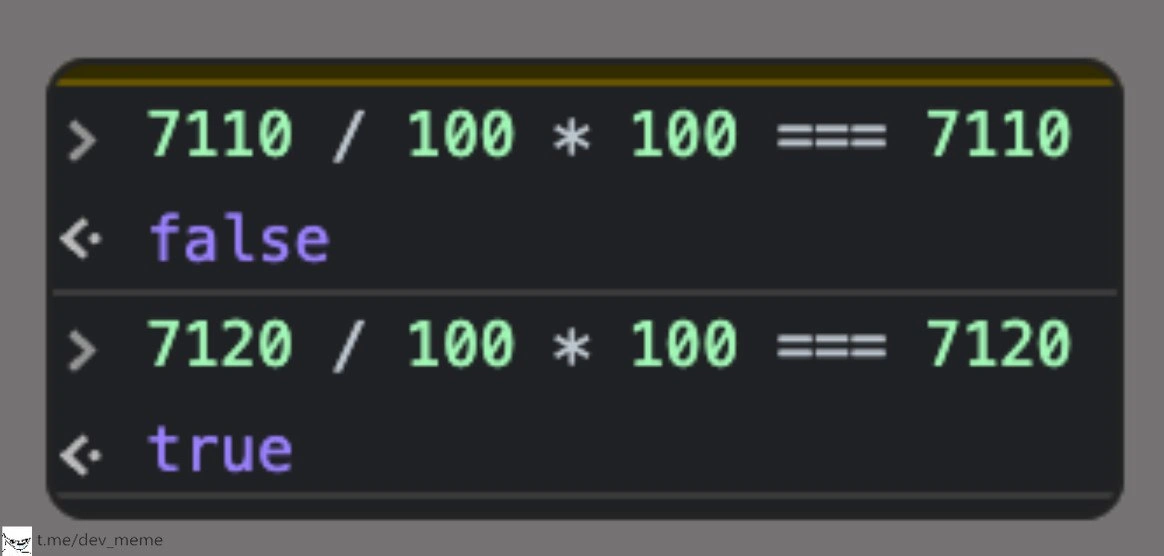
Let’s break down what’s happening in that console, in plain terms. We have two expressions being evaluated:

7110 / 100 * 100 === 7110  // This resulted in false
7120 / 100 * 100 === 7120  // This resulted in true

Each of those is asking the computer: “If I divide this number by 100, then multiply it by 100, do I get the original number back exactly?” It’s like undoing an operation — in normal math, you’d expect the answer to be yes every time. After all, dividing and then multiplying by the same number should bring you full circle. But the console outputs tell a different story: the first calculation comes out false (meaning it did not get the original number back exactly), while the second comes out true (it did get the original number back). This looks super strange! Did the math break? Not exactly — it’s the computer’s way of doing math that’s the culprit.

In programming, floating-point arithmetic is how computers handle numbers that aren’t whole integers (like 71.1, or 0.5, or 3.14159). Floating-point means the decimal “point” can “float” around — these numbers are stored in a form of scientific notation in binary. They’re incredibly useful because they can represent very large and very small numbers. But they have a limited precision (think of it like having only so many digits of accuracy). A consequence of this is floating_point_precision issues: sometimes the number you get is an almost-but-not-quite exact value.

Here, 7110 / 100 is essentially asking the computer to compute 71.10 (since 7110 divided by 100 is 71.10). But 71.10 is not a number the computer can represent with perfect accuracy in its binary form. The computer uses binary (base-2) fractions, which are like using halves, quarters, eighths, etc. Many simple decimals (like 0.1 or 0.2 in base-10) turn into messy, endless fractions in base-2. It’s similar to how $\frac{1}{3}$ is 0.3333... in base-10 — you can’t write it with a finite number of decimal places. Here, $\frac{1}{10}$ (which is 0.1) is one of those “messy” fractions in binary. So when the console computes 71.1, it’s actually ending up with something like 71.09999999999999 (a tiny bit less, because that’s the closest it can get with the bits it has). If we then multiply that by 100, we get 7109.999999999999, which is just a hair under 7110. Close, but not equal. That’s why 7110 / 100 * 100 === 7110 turned out false – the left side was almost 7110, but not exactly.

Now, let’s look at 7120 / 100 * 100. That’s asking for 71.20 internally. 71.2 also can’t be perfectly represented (since 0.2 is $\frac{1}{5}$, another one that becomes infinite in binary), but the tiny rounding quirk went in the other direction here. The computer’s representation of 71.2 might have been 71.20000000000001 (perhaps a smidge over 71.2). Multiply that by 100, and you get 7120.000000000001. Here’s the fun part: the computer has a rule to round the result to the nearest number it can represent, and 7120 (exactly) is representable (it’s just an integer, which floating-points can do exactly up to a huge range). So that 7120.000000000001 gets rounded to 7120 exactly. End result: the left side of 7120 / 100 * 100 is exactly 7120, so the comparison === 7120 returns true. Essentially, the tiny error vanished in this case, but it didn’t in the 7110 case. This little difference between being just under vs. just over made one comparison fail and the other succeed.

Let’s clarify some terms and why this is considered a bug or a quirk:

  • Floating-point precision: This refers to the fact that a floating-point number (like JavaScript’s Number type) has limited digits of precision. JavaScript uses 64-bit floating-point (binary64), which gives about 15–17 decimal digits of precision. That’s a lot, but not infinite. When we say a language has a floating point precision issue, we mean it can’t represent certain numbers exactly due to these limits.

  • Binary fraction error: This is exactly what we encountered. Some fractions (like 71.1 which is 711/10) can’t be written exactly in binary form, so a little error sneaks in. We got an example of a binary fraction error when 71.1 turned into 71.09999999999999 internally. It’s a tiny error, but it matters in exact comparisons.

  • floating_point_equality: Comparing two floating-point numbers for equality can be dangerous because of these tiny errors. The meme is a textbook case: we compared the result of a calculation to an “exact” number, and due to a minuscule discrepancy, they weren’t equal. Programmers will often avoid direct equality checks with floats; instead, they’ll check if numbers are “close enough” within a small tolerance. For example, rather than a === b, one might do Math.abs(a - b) < 1e-9 (for some very small number) to bypass the tiny differences.

  • JavaScript quirks: In JavaScript specifically, all numbers (except BigInt) are floating-point under the hood. That’s a known LanguageQuirk. So even if you wrote 71.1 in your code, that’s treated the same way as a floating number. Other languages sometimes let you choose a decimal type or use integers for money, but JS sticks to binary floating math for everything. The === operator in JS checks for strict equality, meaning both value and type match exactly. Here both sides are the same type (Number), so it’s just checking the value bit-by-bit. Thus, === false is telling us those bits differ somewhere.

  • True/False in the console: The console is just showing the boolean result of the comparison. There’s no trickery like type conversion happening (which is sometimes referred to by truthiness in JS when non-booleans are used in conditions). In this context, js_console_truthiness isn’t the issue — it’s not that 7109.999… is being treated as truthy or falsy (that concept applies when you use a number in an if statement, for example). Here, we explicitly got a false boolean because the equality check failed. And true when it passed. So the console is directly telling us whether the equality is exact or not.

To a newer developer (or anyone who hasn’t dug into how floating-point works), seeing false for that first case is baffling. It really feels like “the computer did math wrong.” In math class, you learn that if you do x/100 and then *100, you get x back. The computer almost did that, but lost a tiny piece along the way. It’s a classic edge_case_math situation that can introduce bugs. Imagine writing a function to check a calculation, and instead of returning 7110, it returns 7109.999999999999. If your code is checking for equality with 7110, it will fail, possibly causing a bug (“Why isn’t my if condition running when it should?”).

A common simple example is:

console.log(0.1 + 0.2);            // 0.30000000000000004
console.log(0.1 + 0.2 === 0.3);    // false

This often blows peoples’ minds the first time. The meme is essentially the same phenomenon, just with different numbers and an extra multiplication/division step. It underscores a fundamental CS_Fundamentals lesson: computers don’t do decimal math like we do by hand; they use binary, and that has its own quirks. It’s not that the language is stupid or broken – it’s performing exactly as designed. This is why many tutorials and programming courses warn about FloatingPointArithmetic issues, especially for financial calculations. If you need perfect precision with decimals (like money), you often use integers (cents instead of dollars) or special decimal classes to avoid these rounding problems.

For a junior dev or someone learning, the takeaway is: don’t trust equality with floats blindly. The meme’s scenario is a humorous illustration of that rule. It’s both funny and educational – once you know what’s happening, you can laugh and say “oh, the computer lost track of a tiny bit of the number!”. It’s a small bug that teaches a big concept. So the next time you see something like if((a/b)*b == a) misbehaving, you’ll remember this floating-point bug vs feature and know it’s time to think about rounding errors.

Level 3: Double-Crossed by Doubles

Every seasoned developer has been double-crossed by doubles (floating-point numbers) at some point. The meme captures that moment of “Wait, what?! My simple math just failed.” In the first console line, we see a perfect illustration of a classic gotcha: 7110 / 100 * 100 === 7110 evaluates to false. It’s a head-scratcher until you realize it’s not math betraying you, it’s the representation. The humor (and horror) comes from the expectation that dividing and then multiplying by 100 should cancel out – a basic algebraic truth – yet the computer boldly returns false. This feels like arithmetic heresy, and that shock is exactly what tickles developers’ funny bones (usually after they’ve solved the bug, of course!).

The side-by-side comparison in the image – one case failing, the other succeeding – is key to the comedy. Why does 7110 trip up while 7120 sails through? It appears totally arbitrary, almost like the language is playing a prank. Seasoned devs recognize this pattern immediately: it’s the infamous floatingPointPrecision bug that’s neither new nor specific to one language. In fact, it’s a rite of passage in programming to discover that 0.1 + 0.2 !== 0.3 in JavaScript (and Python, Java, C, you name it). Here, 71.10 and 71.20 are just larger players in the same drama. The meme is essentially saying “Look, another sneaky instance of that same old floating-point demon!” and we nod knowingly (perhaps with a pained chuckle).

It specifically calls out a LanguageQuirk of JavaScript: all numeric values in JS are, by default, 64-bit floating-point numbers (per the IEEE-754 standard). There’s no distinct integer type for 7110 in that expression – it’s treated with the same floating-point rules. So the moment we do / 100, we invite those floating-point imps to the party. By the time we multiply by 100 again, the damage (that tiny rounding error) is done. The strict comparison === then just honestly reports “Nope, these aren’t exactly equal”, and prints false. Notably, the meme uses === (JavaScript’s strict equality) to ensure we’re comparing without any type coercion shenanigans – this isn’t about truthy vs falsy conversion (no js_console_truthiness trickery), it’s pure raw numeric comparison. The false result is 100% due to the numeric discrepancy, nothing else. This clarity makes the joke land harder: you can’t even blame JavaScript’s usual “== vs ===” confusion or some weird type casting bug; it’s literally math (or so it seems) betraying us.

This scenario is painfully familiar in real-world software development. Think about financial calculations dealing with currency: if you used floating-point for dollars and cents, you might find that $71.10 ends up as $71.099999… due to binary quirks. If a junior dev naively writes if (price == 71.10) { /* offer discount */ }, that discount might never trigger because price is actually 71.09999999 under the hood. 🫠 BugVsFeature? It’s a bit of both. It’s certainly an unexpected bug from the developer’s perspective, but it’s also an intentional feature (or limitation) of how floating-point math works in our machines. Veterans have learned to never compare floats for equality directly. Instead, they either round the numbers to a certain decimal place or check if they’re “close enough” within a tiny tolerance (a technique to account for these microscopic errors).

What makes the meme funny (in a facepalm way) is that it exposes a gap between CS_fundamentals we learned and programming reality. On paper 7110 = 71.1*100 exactly. In code, surprise! Not always. The experienced devs laugh because they’ve all been burned by this at least once. It’s the kind of bug that has you staring at a printout of two values that both look like 7110, yet the program insists they’re not equal. It’s practically a rite of initiation to realize that floatingPointArithmetic introduces these surreal situations.

There’s also an element of “I’ve seen this movie before.” The fact that changing the number from 7110 to 7120 flips false to true reminds seniors of countless debugging sessions where the root cause turned out to be an innocent-looking float. It highlights an industry truth: edge_case_math issues like this are sneaky. They don’t happen for every number, only those unlucky enough to hit a representational glitch. So one day everything works (like 7120), and the next day a seemingly minor change breaks logic (like 7110). It’s a shared chuckle that so much chaos can stem from the way computers handle fractions.

Historically, we’ve known about these issues for decades (the IEEE-754 standard dates back to 1985). Yet, here we are in 2022 (and beyond), still stepping on the same rake. Some might recall famous incidents: for example, a Patriot missile software bug in 1991 was traced back to a tiny floating-point timing error — an error accumulating over time because 0.1 seconds couldn’t be represented exactly. That’s a dramatic example of floating_point_equality gone awry in a critical system. In everyday development, the stakes are usually lower, but the annoyance is universal. We’ve learned pragmatically to treat floats with care. As the tongue-in-cheek saying goes: “Floating-point math: 99.99% correct – and that last 0.01% will get you every time.”

So the meme’s console snippet is both a joke and a gentle warning from the senior crowd: when you see a weird false like this, binary_fraction_error is the prime suspect. It’s the “ghost in the machine” that makes 7110 not equal to 7110. Seasoned devs grin (or groan) because they remember the first time they were baffled by such a bug. The next time a newbie asks “Is the computer broken? Why is this false?!”, the old hands get to explain, with a mix of sympathy and amusement, the tale of the sneaky floating-point and its missing fraction. In short: never fully trust floating-point equality, and always remember that even straightforward math can play tricks in code — a lesson as old as modern computing, still making its way into meme humor today.

Level 4: Mantissa Misadventures

At the heart of this meme is the IEEE-754 double-precision floating-point format quietly doing its thing. In this format, numbers are represented in binary using an exponent and a mantissa (fractional part). The catch? Not every decimal fraction can be represented exactly in binary. In fact, 71.1 in base-10 is one of those unruly numbers. In base-10, $71.1 = 71 + \frac{1}{10}$. But in base-2, $\frac{1}{10}$ turns into an infinite repeating fraction:

$$0.1_{10} = 0.0001100110011\ldots_2$$

No matter how many binary digits (bits) you use, you can’t get a perfect 0.1 — there’s always a tiny remainder. A double-precision float reserves 52 bits for the mantissa (significand), so it stores a close approximation of 71.1, but not the exact value. Internally, the stored value of 71.1 might be something like 71.09999999999999 (just a hair under 71.1). On the other hand, 71.2 is also inexact in binary (since $\frac{2}{10}$ is similarly repeating), but its stored value might be 71.200000000000002 (perhaps a hair over 71.2). These tiny differences (on the order of 1e-16 of the value) are called round-off errors or a binary_fraction_error.

When you evaluate 7110 / 100 * 100 using double precision, the math doesn’t stay “clean.” First, 7110 / 100 produces the inexact binary for 71.1. Multiplying that by 100 should mathematically bring us back to 7110, but because of the earlier rounding, the result is actually 7109.999999999999 (slightly less than 7110). By contrast, 7120 / 100 produces the inexact binary for 71.2, and multiplying by 100 ends up 7120.000000000000 something — so close that it rounds to exactly 7120 in the 64-bit representation. The key is that 7120 (being an integer well within the range of 52-bit precision) can be represented exactly by a double, and the tiny binary error from 71.2 *100 got rounded away to zero. But 7110 didn’t get so lucky: its tiny error left it just below 7110, making the stored result a different number than the literal 7110. In IEEE-754, arithmetic results are rounded to the nearest representable value (with ties to even). So one operation ended up rounding down slightly (7110 became a tiny bit less), and the other effectively rounded up (7120 landed exactly on 7120).

The result? The binary representations differ by a few bits in the mantissa, and strict equality compares those bits one-for-one. 7110 / 100 * 100 yields a value that, at the bit level, isn’t the same as the bit pattern for the literal 7110. Meanwhile 7120 / 100 * 100 did manage to produce the exact bit pattern of literal 7120. In code, the comparison uses all 53 bits of precision (including the implicit leading 1) to check equality. If even one bit is off – and for 7110 it is – the comparison returns false. The floating_point_equality check fails for the first case because of that minute difference deep in the binary representation.

It’s a bit of binary sorcery: under the hood, our seemingly simple decimal numbers are engaged in a covert war of rounding errors! We’re seeing the mantissa misadventure here – one number’s binary approximation fell just short of the target, the other hit it on the nose. The machine epsilon for double precision (the smallest difference at ~1.0) is about $2.22\times10^{-16}$. At a magnitude around 7e3, this translates to differences on the order of $7e3 \times 2.22e-16 \approx 1.5\times10^{-12}$. So a tiny edge_case_math deviation like 0.000001 (1e-6) is huge in comparison – more than enough to flip a boolean result. In short, the floating-point arithmetic here isn’t “wrong” – it’s doing exactly what IEEE-754 binary floats have always done: preserving about 15 decimal digits of precision and inevitably trimming off infinitesimal leftovers. This deep technical reality is why something as straightforward as multiplying back by 100 can produce a surprise false.

Description

The image shows a dark-themed developer console with two REPL evaluations rendered in monospaced light-green text against a charcoal background. First line: “7110 / 100 * 100 == 7110”, followed by the console output “false” in lavender, implying the expression unexpectedly fails. A horizontal divider separates the second snippet: “7120 / 100 * 100 == 7120”, whose output is “true” in the same lavender hue, indicating the comparison succeeds. The meme highlights the classic floating-point precision pitfall - binary representation of 71.1 leads to 7109.999… so strict equality fails, while 71.2 happens to round back to 7120. It pokes fun at language quirks (particularly JavaScript but applicable elsewhere) and the subtle bugs that arise when developers naïvely compare non-integer calculations for exact equality

Comments

43
Anonymous ★ Top Pick 7110 ≠ 7110 but 7120 == 7120 - turns out IEEE-754 is Schrödinger’s accountant: your cents exist only until you ask for an audit
  1. Anonymous ★ Top Pick

    7110 ≠ 7110 but 7120 == 7120 - turns out IEEE-754 is Schrödinger’s accountant: your cents exist only until you ask for an audit

  2. Anonymous

    After 20 years in the industry, you'd think I'd remember that 0.1 + 0.2 !== 0.3, but here I am debugging why our financial calculations are off by fractions of pennies, realizing someone used regular floats for currency and now we owe the rounding errors a yacht

  3. Anonymous

    Floats: where x/100*100 === x is true with probability that itself can't be represented exactly

  4. Anonymous

    Ah yes, the classic '7110 problem' - where your code is mathematically correct but IEEE 754 decides to gaslight you. It's the programming equivalent of asking 'does (x/100)*100 equal x?' and having the universe respond 'well, that depends on what your definition of x is.' Senior engineers know this is why we have epsilon comparisons and why junior devs learn the hard way that === is a lie when floats are involved. The real kicker? 7120 works fine, making this the perfect Heisenbug to leave in production and watch your team debug at 3 AM

  5. Anonymous

    IEEE 754: algebra with feature flags - 7110/100*100 !== 7110, 7120/100*100 === 7120. This is why money lives in ints, not hope

  6. Anonymous

    Floats' roundtrip diet: 710 divides, multiplies back 10 units lighter - exact revenge for using them in prod math

  7. Anonymous

    Comparing floats with === is how you unit-test IEEE-754 instead of your code

  8. @Baksy93 4y

    rounding

  9. @ShiningFlames 4y

    Js shits

    1. Deleted Account 4y

      that's not js fault

      1. @UQuark 4y

        Well it's JS that has no int type

        1. Deleted Account 4y

          It has BigInt

          1. @UQuark 4y

            As a primitive type bruh

  10. Deleted Account 4y

    WE'VE GOT YOU SURROUNDED COME GET YOUR 0.1+0.2 0.30000000000000004ED

  11. @Araalith 4y

    Everyone who compares floats by exact match - should be sterilized.

    1. @elonmasc_official 4y

      Oh, really?

      1. @dugeru42 4y

        yea, give me your hands, they are unclean after that code

    2. @SinnerK0N 4y

      ong

    3. @dsmagikswsa 4y

      What is the right way to do then?

      1. @bemberstadt 4y

        |float1 - float2| < precision

        1. @dugeru42 4y

          yup

        2. @dsmagikswsa 4y

          I see. Then you don’t even need to round it to integer.

    4. @RiedleroD 4y

      that's not the problem, the problem is people calculating with floats and then not rounding to integers afterwards and/or just calculating with ints from the beginning.

    5. @paul_thunder 4y

      Compared two numbers. A float and an integer. What is wrong here?

      1. @beton_kruglosu_totchno 4y

        are you trolling or something?

  12. @ShiningFlames 4y

    Reeep

  13. @ShiningFlames 4y

    Ah that rounding errors reep

  14. @zlodes 4y

    Jokes about float numbers in 2022? Rly?

  15. @neizvestnyi 4y

    waaait, idk js, but isn't === comparing obj IDs

    1. @RiedleroD 4y

      that's… a good question, actually. Imma try it out

      1. @RiedleroD 4y

        nope, dunno what the difference between == and === is

        1. @SamsonovAnton 4y

          Isn't === supposed to not only compare expression values like == does, but also their types (in loosely-typed languages)?

          1. @RiedleroD 4y

            seems like it

          2. @sashakity 4y

            yeah

  16. dev_meme 4y

    Just JS things

    1. @asm3r 4y

      *CPU things

      1. @RiedleroD 4y

        *IEEE 754 things

    2. @chupasaurus 4y

      There's Python3 example ITT. Just float things

  17. @ZgGPuo8dZef58K6hxxGVj3Z2 4y

    Hehhe float

  18. @UQuark 4y

    JSON won't parse into BigInt

    1. Deleted Account 4y

      Write parser which parses into BigInt

      1. @UQuark 4y

        Thanks, will do it as soon as never

        1. Deleted Account 4y

          https://www.npmjs.com/package/json-bigint here you go

Use J and K for navigation