Skip to content
DevMeme
3505 of 7435
Recursive Error Reporting Failure
Bugs Post #3841, on Oct 20, 2021 in TG

Recursive Error Reporting Failure

Why is this Bugs meme funny?

Level 1: When the Helper Needs Help

Imagine your toy robot breaks, so you ask your older brother to come help fix it. But then, while trying to fix your robot, your brother’s tool breaks or he accidentally hurts himself. Now he needs help too! You might then call mom to help your brother, who was originally helping you. That’s pretty silly, right? The person who came to fix the problem had a problem themselves.

This meme is funny in that same way. It’s like if a tow truck came to rescue a broken-down car, but on the way the tow truck broke down as well and needed another tow truck! 😄 The whole joke is that the very thing meant to solve the issue ended up having the same issue. It’s an endless chain of “Oops, I tried to help but I also need help now.” For a kid, it’s like a friend who tries to help you clean up a spill but slips and makes an even bigger mess – then another friend has to come help with that new mess. It’s both funny and a little frustrating. We laugh because it’s such a goofy, out-of-control situation. Even the “helper” needed a helper! The meme shows a computer error message saying it will report an error about reporting an error – in simple terms, the computer is as confused as a person who keeps trying to fix a mistake with another mistake. It reminds us of a cartoon where each attempt to fix things just creates a new problem. The core feeling is “Oh no, not again!” but it’s so absurd you can’t help but giggle.

Level 2: Error Reporting Loop

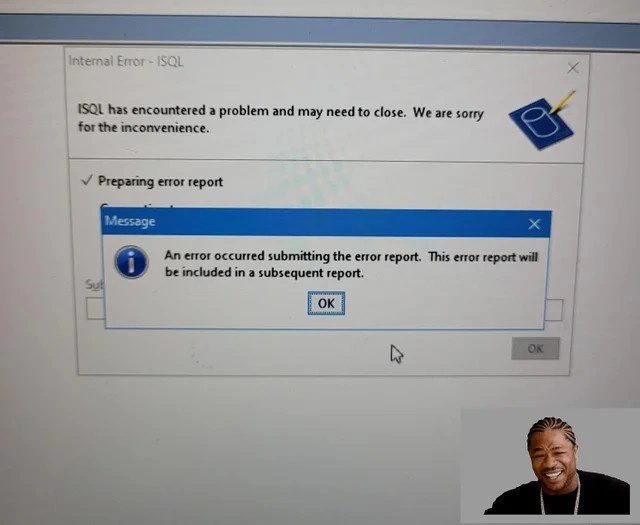
Let’s break down what’s happening in that screenshot, in simpler terms. We’re looking at a Windows desktop with two dialog boxes stacked on each other. The one in the background titled “Internal Error – ISQL” is basically the program ISQL saying: “Uh-oh, I crashed and need to close. We’re sorry!” It even shows a progress detail "Preparing error report," which means the program is trying to gather information about the crash (like logs or data about what went wrong) to send to the developers or to Microsoft – that’s what an error report is. This is standard error handling practice: when something goes wrong, the software attempts to handle it gracefully, often by logging the error or sending out a report so it can be fixed later.

Now, the funny (or frustrating) part is the front dialog box – the one labeled “Message” with the “i” info icon. This popped up on top of the first error message. It says: “An error occurred submitting the error report. This error report will be included in a subsequent report.” In plain English: the error reporter itself encountered an error while doing its job. The program tried to send out the crash report and that attempt failed, triggering another error message about the failure! It’s an error-in-error situation. The message then promises, “we’ll include this new error in the next error report.” That’s tongue-in-cheek because if it tries again and fails again, you could imagine it would keep stacking new error reports — an error reporting loop. Essentially, the software is saying it’ll report the failure of the error report in another report… see how that could go on forever? It’s like a bureaucratic nightmare in software form. 🙃

For a newer developer or someone learning about debugging, this is a prime example of why error handling is tricky. The code that handles errors is usually a safety net. But here the safety net had a hole in it! Instead of catching the fall, it caused another fall. This kind of bug occurs if the developers didn’t account for something going wrong during the error reporting process itself. Perhaps the program ISQL lost internet connectivity or access rights while sending the report, or maybe the error data was too big or oddly formatted and caused a second crash. Robust programs try to handle such cases gracefully (maybe by writing to a local log file if sending fails). But less robust ones… do what we see here: pop up another error box. This is why testing error paths is important – not just testing when things go right, but also when things go wrong and then go wrong again.

Let’s identify some pieces here:

  • ISQL: This is likely an application’s name (possibly Interactive SQL client, a tool to run SQL database queries). It crashed. Think of it as the main actor of our story who tripped and fell.
  • Internal Error: That’s the program telling us something went fundamentally wrong inside it (an unexpected bug).
  • Error report: A bundle of technical info (like error logs, memory dumps, what operation caused the crash) that the program prepares so developers can debug the issue later. On Windows, you might have seen dialogs offering to “Send an error report to Microsoft” – same idea.
  • Submitting the error report: This means sending that bundle of info out (maybe over the internet or to a file). The program attempted this step and it failed too.
  • Subsequent report: This implies “next error report.” So the dialog humorously says it will include the details about this failure in the next attempt. Essentially, “we’ll try again later, and we’ll also report that we failed this time.”

You might be wondering if it really could loop infinitely. In practice, developers usually put in some safeguard (like “only try once” or “don’t report the same error twice”) to avoid an infinite loop of pop-ups. It’s likely that by “subsequent report,” they mean if you run the program and it crashes again later, it’ll include the fact that the last report attempt failed. Still, the wording is so ironic that it feels like an endless cycle. It tickles programmers’ funny bone because it’s a self-referential problem – the kind of thing that feels like looking into two mirrors facing each other. It’s also a bit of a facepalm moment: the software tried to be helpful by reporting a bug, but the helper itself bugged out.

There’s even a tiny image of a grinning man in the meme (bottom right corner). That’s the rapper Xzibit, who is part of a classic meme template often used when something is layered inside itself. The catchphrase from that meme is: “Yo dawg, I heard you like X, so I put an X in your X so you can Y while you Y.” For example, “Yo dawg, I heard you like music, so I put a speaker in your car so you can listen while you drive.” It became an internet joke for any inception-style or recursive scenario. In this case, the meme creator is riffing: “Yo dawg, I heard you like error reports, so I put an error in your error reporter so you can error while you error.” 😅 It’s a humorous way to frame the situation. If you didn’t catch that reference, now you know why that guy’s face is there – it’s symbolizing the meta nature of an error report failing and needing another report. It’s the software equivalent of pointing at itself in a mirror.

For a junior developer, the takeaway is: even error-handling code can have bugs. It feels paradoxical, but it happens. Writing resilient software means thinking about how your recovery systems might fail. This meme is a lighthearted reminder of that lesson. It’s funny to see on a screenshot, but imagine encountering this in real life – you’d probably be both annoyed and amused. Annoyed because you’re not getting the info you need about the original crash, and amused because it’s just so ridiculous to get an error about an error. In debugging and troubleshooting, sometimes the tools fail and you end up going manually to logs or other means. And when it’s a Microsoft product or any big software, you can bet such bugs lead to plenty of jokes internally. Bugs in software have levels of irony, and this one is a prime example: a bug in the bug-reporting mechanism.

Level 3: Crashception in Action

In this meme we witness an error-handling paradox that only seasoned developers truly appreciate. The program ISQL (likely an Interactive SQL database tool on Windows) has crashed, and its built-in error reporter tried to do its job – but that reporter itself failed. In other words, the code meant to handle a crash crashed too, resulting in a comedic infinite loop potential: an error about an error report. This self-referential failure is the stuff of developer nightmares (and dark humor). It’s reminiscent of a double fault in CPU terms – when an exception occurs while already handling an exception, you get a system panic. Here, instead of a blue screen or core dump, we get a snarky dialog: “An error occurred submitting the error report. This error report will be included in a subsequent report.” This line practically winks at us with absurdity. It’s as if the software is saying: “I screwed up while reporting a screw-up. Don’t worry, I’ll let them know… next time.”

From a senior dev perspective, this meme nails a common failure pattern: cascading errors in a system with insufficient fail-safes. We’ve got an error-reporting loop – a kind of recursive bug where the fix procedure triggers the same problem again. Every experienced engineer knows that sinking feeling when the very tool meant to help you debug goes belly-up. It’s equal parts frustrating and hilarious after the fact. Why does this happen? Often because error-handling code paths are rarely exercised or tested as thoroughly as the main features. They’re the seatbelts of software: you only notice them when things go wrong, and if they were poorly made… well, then things go really wrong. In corporate software, especially in older Windows applications, crash reporters were bolted on to send data to developers or Microsoft. But if that reporter wasn’t robust – say it assumed network connectivity, or had its own unhandled exceptions – you’d get exactly this: dialog boxes stacked like a house of cards, each apologizing for the last one.

This scenario also hints at legacy Windows design. The phrasing “ISQL has encountered a problem and may need to close. We are sorry for the inconvenience” screams early-2000s Windows Error Reporting (the classic Dr. Watson or later WerFault.exe dialogs). Those dialogs would pop up whenever an app crashed, offering to send a report to Microsoft. Here, it appears ISQL might have a custom or integrated reporter that tried and failed – perhaps due to a missing internet connection, a corrupted state, or ironically a bug in the error-submission code. The result? A modal message box telling you it failed to send the last message box’s info. Seasoned devs have seen similar irony: like the infamous BIOS error "Keyboard not detected, press F1 to continue" – a catch-22 situation. This meme is a modern software equivalent: the crash handler crashed. Of course it did. Murphy’s Law of programming says that anything that can fail will fail – and apparently that includes your failure-notification system!

Let’s talk code for a second. You can imagine the code path that led here:

try {
    // Main operation that can throw
    runISQL();
} catch (Exception ex) {
    try {
        SubmitErrorReport(ex);  // attempt to report the crash
    } catch (Exception reportEx) {
        // Oops, error reporting failed
        Console.WriteLine("Reporting failed, will include in next report.");
        QueueNextReport(reportEx);  // schedule the error of error-report for later
    }
}

In a robust system, that inner catch should be rarely hit. But if it is, ideally it would degrade gracefully – maybe log to a local file and stop. Instead, here it throws up another GUI dialog, which is the software equivalent of panicking. The code prints "will be included in a subsequent report" like that’s going to help next time. A senior dev can immediately see the problem: if the environment or state caused the first crash, and also breaks the reporter, nothing’s really getting fixed by queuing another report. You’re just kicking the can down the road – or more likely, into an infinite loop of apologies. It’s a hallmark of brittle design: the error handler wasn’t isolated from the main program’s failures. Robust systems often use an external process or minimal code for error reporting (so it’s less likely to crash in sympathy). Here, though, everything’s tangled: a crash in the app drags the reporter down with it, which tries to get back up, only to fall again. It’s like watching a clown car wreck where even the tow truck crashes. 🤦‍♂️

For veteran engineers, this image triggers a mix of PTSD and a chuckle. It’s a real debugging_frustration moment. You can’t even rely on the crash report to diagnose the original bug, because that report never made it out. It’s Windows dialog hell: multiple modal pop-ups vying for your click on “OK”. And each dialog is essentially saying “sorry, something went wrong… again.” The meme even nods to the classic “Yo dawg” Xzibit meme with that little picture of the rapper laughing in the corner. It’s as if Xzibit is telling us: “Yo dawg, I heard you like error reports, so I put an error in your error reporter so you can crash while you crash.” This meta-humor perfectly encapsulates the absurdity. We laugh because otherwise we’d cry – every senior dev has been there, when a simple bug spirals into a Russian nesting doll of failures. The lesson hiding behind the laughter? Always consider what happens when your last line of defense fails. And maybe, just maybe, don’t schedule an error report for the error reporter’s error… unless you enjoy a good Ouroboros of bugs eating their own tail.

Description

The image displays a screenshot of a desktop showing a classic Windows-style error message window. The main window is titled 'Internal Error - ISQL' and states, 'ISQL has encountered a problem and may need to close. We are sorry for the inconvenience.' A smaller, modal dialog box is overlaid on top, titled 'Message,' which reads, 'An error occurred submitting the error report. This error report will be included in a subsequent report.' This creates a visual hierarchy of errors. In the bottom-right corner of the image, there is a cutout of the rapper Xzibit laughing, which is the key element of the 'Yo Dawg' meme format, used to signify recursion. The technical humor stems from the cascading and recursive failure of the system. Not only has the primary application (ISQL) crashed, but the very mechanism designed to report the error has also failed. The system's solution - to include the report about the failed report in a future report - is a perfect example of a failure loop that experienced engineers find both horrifying and hilarious, as it often signifies deep, systemic issues in legacy or poorly designed systems

Comments

9
Anonymous ★ Top Pick This is what happens when your try...catch block's catch block needs its own try...catch block
  1. Anonymous ★ Top Pick

    This is what happens when your try...catch block's catch block needs its own try...catch block

  2. Anonymous

    We call it “recursive observability” - every time the crash reporter crashes it spawns another report, until both the call stack and the Splunk budget overflow

  3. Anonymous

    Somewhere a senior engineer is explaining to management why the error reporting service needs its own error reporting service, and why that one also needs monitoring, creating an infinite regress of observability tools that eventually consumes the entire IT budget

  4. Anonymous

    Ah yes, the classic error-ception scenario: when your error reporting telemetry service needs its own error reporting telemetry service. This is what happens when you implement crash analytics before implementing crash analytics for your crash analytics. It's the software equivalent of 'Who watches the Watchmen?' - except the answer is 'nobody, they all segfaulted.' Any architect who's dealt with enterprise database tooling knows this pain: you're three layers deep in error dialogs, each one apologizing for the previous one's inability to apologize properly, and somewhere a DBA is wondering why their monitoring dashboard shows the monitoring system is down. The real kicker? That 'subsequent report' promise is basically a distributed systems IOU that'll never get collected - it's error handling eventual consistency with infinite timeout

  5. Anonymous

    Classic: the crash handler calls the same flaky service as prod - no outbox, no circuit breaker - congrats, you’ve implemented recursive observability with no base case

  6. Anonymous

    Error reporter crashed and said it’ll report itself later - observability implemented as infinite recursion; base case unimplemented

  7. Anonymous

    Deadlocks hurt, but when the error reporter deadlocks on submission, it's DBA recursion hell

  8. @azizhakberdiev 4y

    a moment before total crash

  9. Deleted Account 4y

    😂

Use J and K for navigation