Invalid First Name: Please Enter a String (and no heirs to Mars)
Why is this WebDev meme funny?
Level 1: Computer Says No
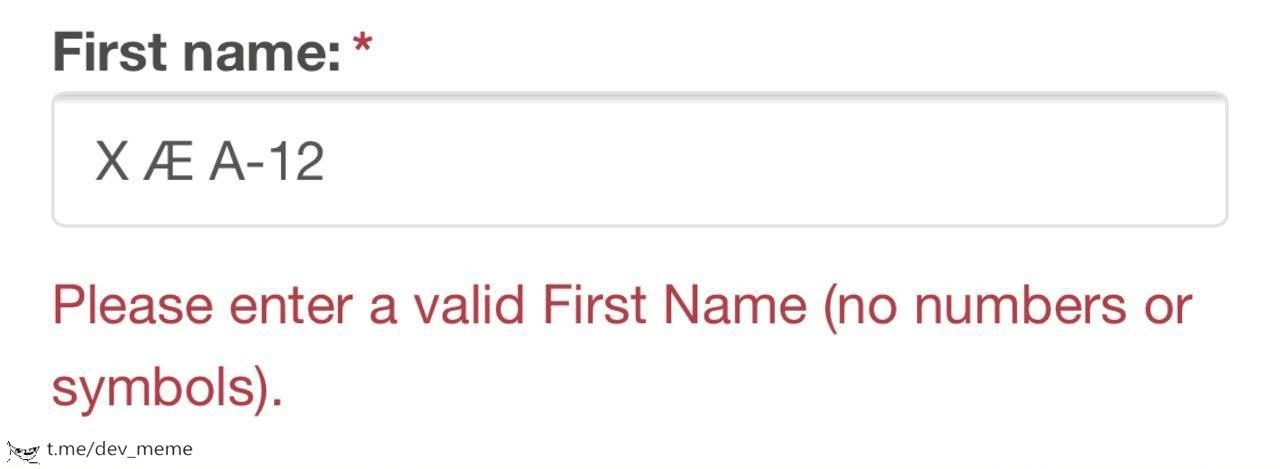
Imagine you’re signing up for a new club at school, and you have a really unusual name. Let’s say your name is "X Æ A-12" – kind of funny and different, right? Now, you go to type your name into the signup form, but the computer refuses to accept it. An error message in bright red pops up, saying “Please enter a valid name.” In simpler words, the computer is basically telling you, “Hey, that can’t be your name. Try again.” But you know it is your name! How would that feel? Probably pretty upsetting or confusing.
This is what’s happening in the meme: the computer says no to a perfectly fine name just because it’s not a plain, ordinary name it expected. It’s like if a robot had a rule that names can only have regular letters and nothing else. So if your name has a special character (like an æ or a hyphen “-” or even a number), the robot guard at the gate goes, “Halt! That’s not a name I know!” It’s a bit silly, right? It would be like a very strict teacher who one day decides that nobody’s allowed to have the letter “X” in their name, so Xavier and Alex can’t enter the classroom until they change their names.
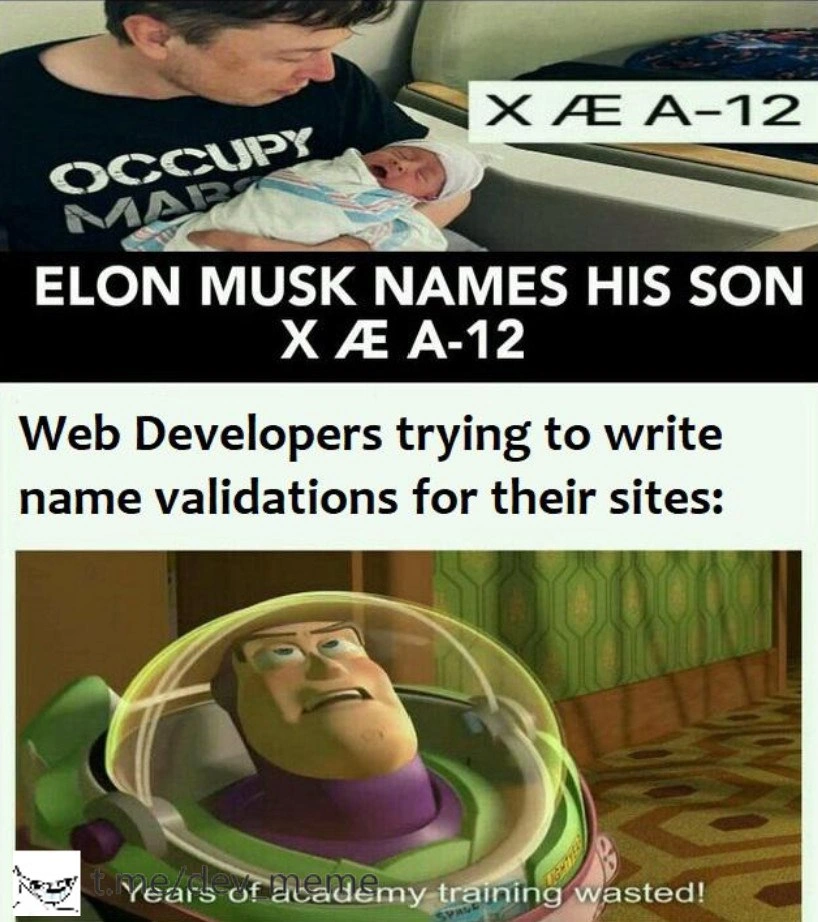
The funny part of this picture is that we (the readers) know X Æ A-12 is actually someone’s real name – a baby’s name chosen by some famous parents. The form on the website doesn’t know that; it’s just blindly following a strict rule. It’s treating a normal thing (a first name that happens to be unusual) as a mistake. This makes us laugh because the computer is being too strict and kind of dumb here. It’s a reminder that sometimes computers and programs need to be a bit more flexible, because real life is full of wonderful weird exceptions. In simple terms, the meme is funny and frustrating at the same time: the poor person just wants to sign up, and the computer is acting like a stubborn robot saying “I don’t believe your name is real!” It’s a playful way to show why it’s important for designers and programmers to remember real people when they set up rules for forms.
Level 2: What's in a Name?
Let's break down the technical terms and concepts for a newer developer. This is about form validation on the web – specifically, a signup form asking for a "First name" and then rejecting a certain input as invalid. The key player here is a regular expression (regex for short). A regex is basically a pattern used to match text. Developers use regex patterns in forms to define what characters are allowed or disallowed. For example, a very simple regex for names might be ^[A-Za-z]+$. This pattern means: "from start (^) to end ($) of the input, allow only letters A through Z (upper or lower case) and at least one of them (+)." If you type anything that has a character outside A-Z, that regex will not match, and the form can throw an error.
Now, why would someone add a rule like "no numbers or symbols" for a name field? Usually, it’s done under the assumption that names are composed only of alphabetic letters. It’s a DataValidationRule meant to catch obvious fake names or mistakes – like someone mashing the keyboard "@@@!!!" or entering "12345" as their name. The intention is good: improve data quality and ensure the user didn’t accidentally include a typo or an extra character. In UXDesign, giving immediate feedback (like that red error text) on an incorrect input is considered a good practice for improving user experience. This is known as client-side validation (happening in the browser, instantly) as opposed to server-side (happening after you submit, on the server). The combination of client-side checks and server-side checks constitutes robust InputValidation.
However, the problem arises when the validation rules are too simplistic or strict. Real people's names sometimes do include what a computer might consider "strange" characters:
- Some have hyphens (e.g., Mary-Jane, Jean-Luc).
- Some have apostrophes (e.g., O'Neil, D'Angelo).
- Some have spaces (e.g., Mary Ann as a first name could be two words).
- Many use letters with diacritics or accents (e.g., José, Zoë, Renée) which are letters beyond plain
A-Z. - In many languages, names include characters not in the English alphabet at all (like Åsa in Swedish, Łukasz in Polish, or 李 in Chinese).
- A few even incorporate other symbols or punctuation. For example, some cultures might have a name like Núñez (with a tilde ~), or a family name like Nguyen which many validation patterns mistakenly flag due to the accent mark in some spellings. There are also rare cases like "Mary Jane-Smith" (combining space and hyphen) or "Jo'ann" (including a special character).
So a rule that says "no symbols" ends up blocking a lot of legitimate input. Edge_case_names are basically those less common but valid names that don't meet naive rules. In our meme, X Æ A-12 is an extreme edge-case name: it contains a space, a special character "Æ", and a hyphen followed by numbers. It's actually the name of a real baby (Elon Musk's son, born around the time of this meme), but it looks like something that would definitely trip a poorly-written validator. The form’s error message in the image – "Please enter a valid First Name (no numbers or symbols)" – indicates the site only expects letters. If you think about it, the message itself is a bit insulting from a user perspective: it’s basically saying "your entry doesn’t look like a name to me." This is a UXFailure because the user might indeed be entering their real first name and the site is telling them it's invalid. That’s frustrating and could even deter them from using the site.
For a junior frontend developer, the takeaway is: always be careful with user_input_edge_cases when writing validation logic. A frontend_regex or any input check should allow for legitimate variants. One strategy is to allow a broad range of characters that are known to appear in names (letters from all alphabets, common punctuation like hyphen, apostrophe, spaces). For example, a more inclusive regex might use Unicode character classes instead of just A-Z, or simply allow a preset list of safe punctuation. Another strategy is to not rely solely on regex for validation of names at all – you might just check that the field isn’t empty or super long, and leave it at that, since almost anything could be a real name. After all, if someone tried to enter a clearly fake name like "asdf@@@123", they’re only hurting their own account; the system doesn’t necessarily need to nanny every character.
The meme is labeled with UX/UI and Frontend because it's about the user interface and experience on a website’s front-end. It’s also tagged as Bugs because this kind of issue is essentially a software bug – the program (the signup form) isn’t behaving correctly for all valid inputs. The humor in the meme also carries an implicit lesson: if you are building a form and you think "surely no real name has numbers or special chars," think again! People have surprisingly diverse names. As a developer, you’ll eventually encounter these userExpectations vs developer assumptions scenarios. Good UXDesign is about meeting users where they are – including accepting their names as-is (and just handling them safely behind the scenes).
In summary, InputValidation is important to catch errors and malicious input, but when validating names, be cautious. The meme’s situation is a funny demonstration of what happens if you don’t account for the variety of human names. A strict regex made one very unique name look "illegal," and we’re left with a form that refuses registration to someone who actually exists. For a junior dev, it’s a reminder: always consider the real-world data and users, not just the ideal or most common cases, when writing code.
Level 3: Regex vs Reality
This meme pits a simplistic input validation against the messy reality of human names. The crux is a front-end regex (regular expression) that was probably written as something like ^[A-Za-z]+$ – meaning "only allow letters A to Z." It’s a name_field_constraint intended to block "invalid" characters, but it's way too strict. The visual punchline is using the infamous name X Æ A-12 (the one Elon Musk and Grimes gave their baby in 2020) as the input. The form screams in red: "Please enter a valid First Name (no numbers or symbols)." Here the frontend is effectively telling a real person "your name is not a valid name" just because it contains uncommon characters. Seasoned developers immediately recognize this as a classic UX/UI mistake: overly rigid DataValidationRules that don’t account for real-world edge_case_names.
Why is this FrontendHumor so relatable? Because many of us have dealt with bug reports or user complaints where an ascii_only_constraint in a form turned into a PR fiasco. Think of users with hyphenated last names, or names like O’Connor (with an apostrophe), Renée (with an accent), or 李 (in Chinese). A naive validation regex will reject those, treating perfectly normal names as "errors." The humor has an element of pain: it's a UXFailure and a developer oversight. We've all either written or had to fix such a form_validation_error. It happens when someone on the team says, "Names should be letters only, right?" and then encodes that assumption into code without considering internationalization (i18n) or even famous exceptions. In fact, there’s a well-known list of falsehoods programmers believe about names (for example: “people’s names don’t contain numbers or special characters”). This meme is basically that list in action. The user_expectations are simple: "Just let me type my name." But the software’s expectations were narrower: "Name must match my preconceived pattern."
From a senior dev perspective, the meme cleverly highlights how a simple regex — meant to prevent obviously invalid input — can backfire spectacularly. The choice of "X Æ A-12" is tongue-in-cheek: it was trending news and it literally contains a hyphen, a weird ligature character Æ, and numbers. It’s like a nightmare test case for a hardcoded validation rule. The senior folks chuckle (or groan) because we see the layers: InputValidation is essential (you don’t want users calling themselves "; DROP TABLE;"), but you must balance it with real data needs. Overly strict rules become Bugs. There’s also a hint of dark humor: even Elon Musk’s kid would get a “Name not valid” error on many websites – talk about a user_input_edge_cases lesson!
Historically, these issues stem from both practical and historical reasons. Early systems often only accepted ASCII letters for names — partly due to technical limitations like character encoding and partly due to shortsighted design. Even today, many databases or APIs have legacy constraints (e.g., a column defined as VARCHAR(50) with a limited character set, or older libraries without Unicode support) that encourage developers to strip names to a basic alphabet. A senior engineer reading this might recall war stories: maybe a production incident where a single user named “Zoë” (with an ë) broke the signup flow, or the time an executive’s double-barreled last name caused the system to crash an email validator. There’s also the classic tale of "Little Bobby Tables" from XKCD—where not sanitizing input caused an SQL injection. Ironically, some devs overcompensated by forbidding symbols like ' entirely, rather than properly escaping them. UXDesign best practices tell us: validate carefully, but don’t unjustly reject. Yet here we are: a frontend_regex intended to protect the system ended up excluding real people.
The meme’s humor has a bite because it’s too real in the industry. We strive to be inclusive and global in our apps, but then someone rolls out a fix that basically says "no fancy characters in names, please," and no one notices until it embarrasses the company. It’s a subtle nod to how UserExpectations clash with lazy coding. Each element – the red error text, the infamous example name, the phrasing “valid First Name” – is a wink to developers: we know this is wrong, but we’ve seen it happen. An experienced dev might laugh and then immediately feel guilty, thinking, "Did I remember to allow hyphens in our signup form?" The meme thus succeeds as a joke and a gentle prod towards better validation logic.
Description
A close-up screenshot of a web form's input field. The field is labeled 'First name:*' in bold, dark grey text. Inside the input box, which has a light grey border, the name 'X Æ A-12' is typed in a standard sans-serif font. Below the input field, a validation error message is displayed in red text: 'Please enter a valid First Name (no numbers or symbols).' A small watermark for 't.me/dev_meme' is visible in the bottom left corner. This image is a direct, practical punchline to the meme about Elon Musk's son's name. It visualizes the exact moment a developer's carefully crafted validation rules fail when confronted with a real-world edge case. The humor lies in the system's rigid, programmatic definition of a 'valid' name clashing with a high-profile, unconventional reality, a scenario that every developer who has ever handled user data can instantly recognize and appreciate
Comments
7Comment deleted
We spend sprints debating the perfect validation regex, only for a billionaire's kid to invalidate our entire identity model. It's the ultimate production bug report
We engineered a multi-region, five-nines identity service, then product snuck in /^[A-Za-z]+$/ on the name field - now the platform scales globally for “Bob” and 404s the rest of Unicode
Twenty years of writing regex patterns for name validation, and some billionaire's kid just invalidated our entire test suite - time to update the requirements doc from "supports international names" to "supports interplanetary names."
Ah yes, the classic 'no numbers or symbols' validation - because clearly no one in the history of humanity has ever had Æ in their name, and we definitely shouldn't accommodate the 0.1% edge case of billionaires naming their children after aircraft designations. This is what happens when your regex was written in 1995 and your QA team never heard of internationalization. Bonus points: this validation probably allows 'Robert'); DROP TABLE users;--' but rejects perfectly legitimate Unicode. The real kicker? Somewhere in the codebase, there's a comment that says 'prevents SQL injection' next to a regex that wouldn't stop a determined toddler
Strict name validation: Blocks SQL injection like a champ, ghosts Elon's kid entirely
Every time product says 'letters only,' someone ships ^[A-Za-z]+$, and a global sign‑up drop becomes an i18n postmortem
Using ^[A-Za-z]+$ for “First Name” is how you ship a global product that rejects diacritics, hyphens, and occasionally a Musk