Skip to content
DevMeme
5229 of 7435
When Documentation Requires a Geometry Degree
Documentation Post #5734, on Dec 12, 2023 in TG

When Documentation Requires a Geometry Degree

Why is this Documentation meme funny?

Level 1: Recipe for Confusion

Imagine your friend told you to bake a cake, and the instruction says: “Put the cake in the oven at 120 degrees.” You might scratch your head and ask, “120 degrees... what do they mean?” If you took it the wrong way, you could think they want the cake tilted at a 120° angle in the oven! That’s exactly what this funny picture shows. The cake is propped up diagonally inside the oven using a protractor (a tool that measures angles, like you use in math class). It looks really silly, right? Of course, what the instruction really meant was “heat the oven to 120 degrees Celsius” (which is a cooking temperature). But because it wasn’t clearly written, the poor junior person misunderstood. They tried to follow the directions literally and ended up doing something absurd.

This is funny because it’s a big mix-up caused by confusing instructions. It’s like if a teacher said, “Draw a bat” thinking of the animal, and a student drew a baseball bat instead. The fault isn’t really with the student — they did what they thought they were asked — it’s with the instruction being unclear. In the same way, the junior in the meme isn’t doing something crazy for no reason; they’re trying to do exactly what they read, but the directions were so unclear that they unknowingly did it all wrong. The emotional core here is a mix of frustration and innocence: the junior is confused and earnest, and the result is hilariously wrong. We laugh because we’ve all been confused by bad instructions at some point, even outside programming. It shows why giving clear instructions (like saying “120°C oven temperature” instead of just “120 degrees”) is super important. Otherwise, you get outcomes that are as goofy as a cake baked at an angle!

Level 2: Ambiguous Instructions

Let’s break this down in simpler terms. Documentation in software is like a recipe or instruction manual written by developers for users or other devs. It should tell you clearly how to use a tool or perform a task. A junior developer is someone who’s still new to the field and may not have a lot of experience or context yet. When they read docs, they tend to follow them exactly as written (because how else would you do it if you don’t already know the ropes?). This meme shows what happens when the documentation isn’t clear enough and leaves room for a big miscommunication.

The key confusion here is over the phrase “120 degrees.” In everyday cooking terms, saying “120 degrees” usually refers to 120 degrees Celsius – a temperature setting for an oven (which in Fahrenheit is about 248°F). Recipes often shorthand this as “120°” assuming the reader knows they mean oven temperature. But in a different context, “degrees” can mean degrees of angle (like the degrees you learn in geometry class). The meme imagines a junior developer (or in the picture, a clueless baker) who doesn’t realize the instruction meant heat. They literally interpret “put my cake in the oven at 120 degrees” as an angle instruction. So what do they do? They grab a plastic protractor (that half-moon ruler for measuring angles) and prop the poor cake block at a 120° angle inside the oven! It’s completely the wrong interpretation — you’re supposed to heat the oven to 120°C, not tilt the cake — but the wording was so ambiguous that the junior is still confused. This is basically a junior_misinterpretation of an unclear guide.

In software development, ambiguous instructions like this can cause a lot of trouble. For example, imagine a tutorial says “create a key with length 256.” If it doesn’t explain further, a junior might be puzzled: 256 what? Bits? Characters? Some might guess wrong and use 256 characters (way too long for, say, an AES encryption key which should be 256 bits, i.e. 32 characters). Or think about a setup guide that says “turn on the server in debug mode” without telling how to do that. A newbie might go clicking around all over or edit the wrong file trying to fulfill that instruction. These are real-life DocumentationWoes that come from a lack of detail. The meme uses a funny baking scenario to make this point in a relatable way. It’s essentially saying, “If you don’t write clear docs, someone will take your words literally and do something silly.”

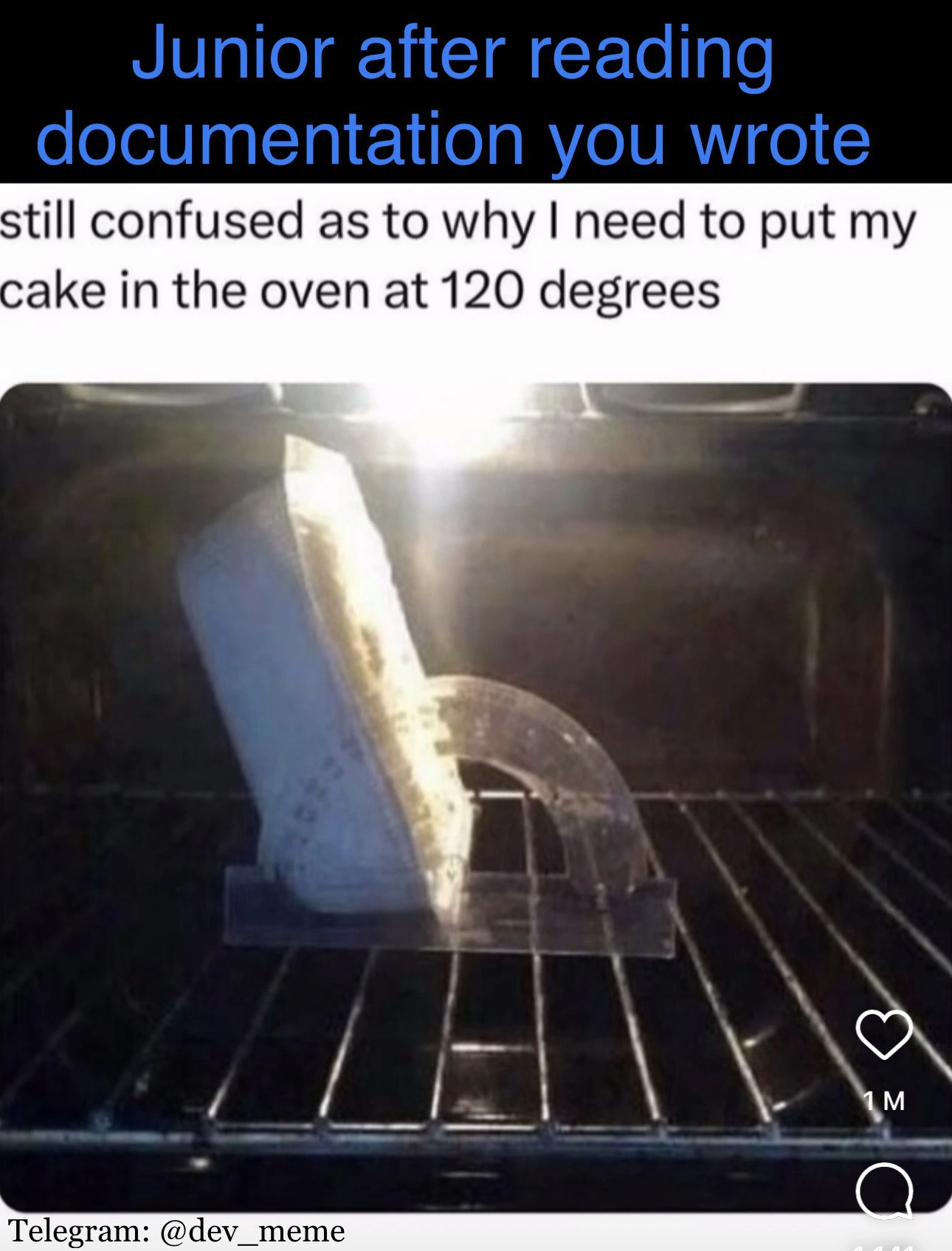
Let’s look closely at the meme’s visual: We see the inside of an oven with an upright slab of cake leaning against a protractor. A protractor is a tool used to measure angles (with markings from 0° to 180°). It has no business being in an oven—ovens have thermometers, not protractors! 😄 The junior in this meme presumably thought “120 degrees” meant an angle, so they set the cake at a 120° angle relative to the oven rack (maybe thinking the cake needs to be oriented diagonally?). It’s a completely wrong action if the goal was to bake at 120°C temperature, but it happened because the documentation (or instruction) was ambiguous. The text above the image – “Junior after reading documentation you wrote” – makes it clear that this is an example of a newbie being led astray by a senior’s poorly worded docs. In other words, there’s a communication gap between what the senior meant and what the junior understood.

In simpler dev terms, this scenario is highlighting documentation clarity (or the lack of it). When writing instructions, especially for people just learning, you have to be very precise. If you mean temperature, say “120°C” or “250°F”. If you mean an angle, say “120° angle”. If you mean a time duration, specify “120 seconds” vs “120 ms”. Little details like units, explicit steps, and examples help ensure the reader interprets it correctly. Juniors often don’t have the experience to fill in gaps or read between the lines. They take words at face value. That’s why a senior might immediately know “120 degrees in an oven = heat” (because they’ve seen that phrasing in recipes or docs countless times), but a junior might hesitate or, as a joke, do something bizarre like the meme shows.

This meme is extremely relatable humor for developers because so many of us have felt that confusion early in our careers. Maybe you read an official guide that said “initialize the module with the appropriate flags” and you’re left wondering which flags are those? what’s appropriate?. Or you follow some steps and think you did it right, only to realize you interpreted a step incorrectly because it wasn’t clearly explained. In tech, these misunderstandings can lead to errors in our code or hours of frustration. In the meme’s playful baking world, it leads to a cake being placed at a crazy angle in the oven. The stakes are lower (just a weird cake) but the feeling is the same: “I did what the instructions said... why isn’t this right? I’m confused!” It’s pointing out how crucial it is for the person who wrote the instructions (the senior or document author) to communicate better. In short: if you don’t want your junior engineers measuring temperature with a geometry tool (metaphorically speaking), write clearer docs!

Level 3: Degrees of Confusion

At first glance, this meme looks like pure DocumentationHumor, but beneath the laughter is a painfully familiar software scenario. We have a classic miscommunication between a senior’s vague instructions and a junior’s literal interpretation. The top caption sets the stage: "Junior after reading documentation you wrote." In other words, your ambiguous docs led to this! The junior followed the words exactly, and the result is absurd: trying to measure oven heat with a protractor. In dev terms, this is ambiguous_documentation incarnate – a trivial instruction gone wrong because of missing context. It’s an angle_vs_temperature mix-up that highlights a serious documentation clarity issue. Anyone who’s dealt with DocumentationWoes or a CommunicationGap on their team will cringe and chuckle at the same time.

Why is this so funny to experienced devs? Because we’ve all seen (or done) something similar in our careers. 😅 One stray phrase in an API guide or a README can send a newbie down a completely wrong path. In the meme, the phrase "put my cake in the oven at 120 degrees" was meant as a temperature setting (120°C, a moderate baking heat). But the junior, lacking context, interpreted "120 degrees" geometrically – hence the cake is propped at a 120° angle inside the oven. It’s a perfect visual gag for a CommunicationGap: the documentation writer assumed “120 degrees” would be read as oven temperature, but they forgot to specify units. This kind of mistake is more common in code than you’d think. For example, if an API doc says “set the timeout to 1000” without saying if that’s in milliseconds or seconds, a junior might pick the wrong one. A 1000-second timeout vs. 1000-ms timeout is the difference between ~16 minutes and 1 second! That’s a huge junior_misinterpretation waiting to happen. Similarly, a graphics library might require an angle in radians but the docs just say “rotate 90 degrees” – a newbie might literally pass 90 (degrees) instead of 1.57 (radians), leading to a wildly mis-rotated image. These real examples echo the meme’s 120_degrees_confusion joke: it’s all about missing context and unspecified assumptions.

The humor lands especially well with senior engineers because it satirizes RelatablePain from real projects. Poor documentation is a universal developer pain point. We’ve seen juniors do things nearly as bizarre as baking with a protractor because some guide or comment was misleading. Perhaps a deployment guide said “run this command on your server” and a newbie literalist ran it on the wrong server 😬. Or a setup doc said “set the configuration to DEBUG mode” without explaining where or how, leading the newcomer to sprinkle DEBUG=true in random config files. The absurdity in the meme is cranked up (nobody in their right mind actually uses a protractor to bake a cake), but it mirrors the real frustration of unclear docs. It’s DeveloperHumor with an edge: we laugh, but only to keep from crying about how often documentation fails us. The meme even shows a heart icon with “1 M” likes – a tongue-in-cheek detail implying that a million developers liked this. In reality, if an online post about confusing docs got 1M upvotes, it means RelatableHumor: countless devs have been in that junior’s shoes, scratching their heads at baffling instructions.

So why do these documentation slip-ups keep happening? From a senior’s perspective, it often boils down to communication breakdowns and false assumptions. The person writing the doc knows what they meant (in their mind, “120 degrees” obviously meant temperature). But they failed to consider the reader’s perspective – a rookie might not have the same context or domain knowledge. It’s an easy trap: as experts, we unconsciously assume certain things are “common sense” or universally understood. In reality, what’s obvious to a senior can be utterly puzzling to a junior. This meme exaggerates that disconnect to hilarious effect. It basically shouts, “Hey, senior devs, look what happens when you don’t spell things out!” The JuniorVsSenior dynamic here is strong: the senior writes a skimpy doc, the junior obediently (if naively) does exactly what it literally says. The result: a fiasco that’s equal parts funny and facepalm-inducing.

Beyond the humor, there’s a genuine lesson about documentation_clarity. Good documentation is like a recipe: you have to explicitly list ingredients and steps, in the right order, with the right measurements. If you write “Bake at 120 degrees” but don’t specify °C vs °F (or clarify it’s temperature at all), you’re leaving things up to interpretation. In coding, failing to specify units, formats, or context is asking for trouble. One infamous real-world example: NASA’s Mars Climate Orbiter was lost because one engineering team used imperial units while another used metric, and the documentation/spec didn’t make the units explicit. Talk about costly Miscommunication! In our daily DevOps or programming life, the stakes might not be interplanetary, but the principle is the same. Ambiguity in docs or specs can lead to systems being misconfigured, features misused, or at minimum, developers wasting hours. We often tag these tales as DeveloperPainPoints for a reason.

Let’s break down a few DocumentationWoes that this meme brings to mind for seasoned devs:

  • Unspecified Units or Formats: Just like the oven temperature lacking “°C”, you’ll see config files or API docs saying “set length = 100” without units. Is that 100 bytes, 100 characters, 100 pixels? Without clarity, a junior might guess wrong.
  • Assumed Knowledge: Documentation sometimes skips “obvious” steps. For instance, “After installing, just connect to the database.” A junior might be left asking “Wait, how do I connect to the database? What credentials? What host?” The doc assumed they knew.
  • Overloaded Terminology: In tech we reuse words. If a doc says “token”, do they mean an auth token? A cryptocurrency token? A punctuation token in a parser? If context isn’t given, a newcomer can grab the wrong meaning.
  • Outdated or Inconsistent Info: Ever read docs that refer to an old UI or commands that no longer exist? Juniors reading legacy or copy-pasted docs can end up doing the wrong thing, then wonder why nothing works.

All of these issues boil down to the same root cause: lack of clarity and context in documentation. The meme’s scenario is a lighthearted extreme, but it underscores something every senior engineer knows: writing good docs is hard! It requires empathy for the reader and meticulous attention to detail—things we might neglect when we’re in a hurry or we assume “everyone knows this.” The result? Confused juniors and flabbergasted seniors when they realize the misunderstanding.

In the meme, the oven_meme_visual_gag of a cake propped at a perfect 120° angle (with an actual clear plastic protractor, the kind from math class, melting away in the heat) is the punchline. It’s visual nonsense that makes you laugh out loud. But it’s also a bit of a humble pie for the doc writer. It’s saying: If you tell someone to do something and they don’t understand you, the fault might be in how you told it. For senior developers, it’s a gentle roast (pun intended) of our sometimes sloppy documentation habits. We can imagine that junior posting on social media, frustrated: “still confused as to why I need to put my cake in the oven at 120 degrees.” The senior who wrote that instruction would instantly realize, “Oops, I meant 120°C, not, uh, literally 120° tilt!” Cue a forehead slap.

In sum, this meme resonates on multiple levels for a tech audience. It’s a DeveloperHumor snapshot of the JuniorVsSenior learning curve. The junior isn’t dumb – they’re doing exactly what they were told. The instructions were just bad. Seasoned devs laugh because we remember being that junior, or we dread being the doc writer responsible for confusing someone like that. It highlights a communication gap that is all too real in software teams. And importantly, it reminds us that clear writing is as much a part of engineering as clear code. After all, if your documentation isn’t precise, someone might end up “measuring temperature with a protractor” – metaphorically or literally – and you’ll have a mess (or a melted protractor) to clean up. So, next time you write “just set it to 120 degrees,” think twice: do you mean °C, °F, or… a 120° angle? 🎂🔧

Description

A meme illustrating a junior developer's confusion after reading documentation. The top text reads "Junior after reading documentation you wrote". Below, a user comment says, "still confused as to why I need to put my cake in the oven at 120 degrees". The image shows the inside of an oven where a slice of cake (or a similar object) is propped up on the metal rack by a clear plastic protractor, tilting it to a 120-degree angle. The humor comes from the literal, absurd misinterpretation of "degrees" as a geometric angle rather than a temperature, a relatable scenario for any senior developer who has written documentation and seen it misunderstood in creative ways. It underscores the importance of writing clear, unambiguous instructions, especially for junior team members who may lack the context to resolve such ambiguities. The watermark "Telegram: @dev_meme" is visible at the bottom

Comments

12
Anonymous ★ Top Pick This is why our config files now specify units with `temp: '120c'`. We learned our lesson after the last junior tried to deploy the frontend at a 45-degree angle for 'better visibility'
  1. Anonymous ★ Top Pick

    This is why our config files now specify units with `temp: '120c'`. We learned our lesson after the last junior tried to deploy the frontend at a 45-degree angle for 'better visibility'

  2. Anonymous

    Every time a junior bakes the cake at 120° angle instead of 120 °C, an architect adds a Units<T> generic to the codebase and product wonders why velocity just halved

  3. Anonymous

    This is exactly how it feels when the senior architect's 'self-documenting' code assumes you already know which of the three deprecated authentication flows to use, why the service mesh needs a specific sidecar configuration, and that 'just deploy it' means first migrating the legacy database schema that nobody mentioned exists

  4. Anonymous

    This perfectly captures the documentation paradox: you write 'preheat to 120°' assuming everyone knows you mean Celsius for the build environment, but forget to mention that production runs at 350°F. The junior follows your docs literally, and suddenly your entire deployment pipeline is melting like that cake pan. The real kicker? Your README probably has a 47-step prerequisites section about installing Node, but somehow forgot to mention the fundamental context that would prevent catastrophic failure. Classic case of the curse of knowledge - you've been baking production code for so long, you forgot that 'obvious' temperature units aren't in the stdlib

  5. Anonymous

    Senior docs: 'Set to 120°.' Junior commit: 'Rotated Kubernetes cluster by 120 degrees for optimal load balancing.'

  6. Anonymous

    Bake at 120 degrees and the junior brings a protractor - when your docs are weakly typed, runtime includes trigonometry

  7. Anonymous

    Your docs said "preheat to 120°" - no units - so the junior implemented it as an angle; QA just filed a bug titled "Cake rotates to 2*pi/3, please add Unit<T>."

  8. @Denfox48 2y

    Bro its 119💀💀💀

  9. @Araalith 2y

    It works.

  10. @Vanilla_Danette 2y

    That 60 degrees, you should rotate it 60 more (yes it will pour out) and then it will start to work

  11. @felixbade 2y

    What kind of a recipe needs an oven at 120°C let alone 120°F (49°C) 👀

    1. @ZgGPuo8dZef58K6hxxGVj3Z2 2y

      120 is above boiling point so could be useful

Use J and K for navigation