Skip to content
DevMeme
3805 of 7435
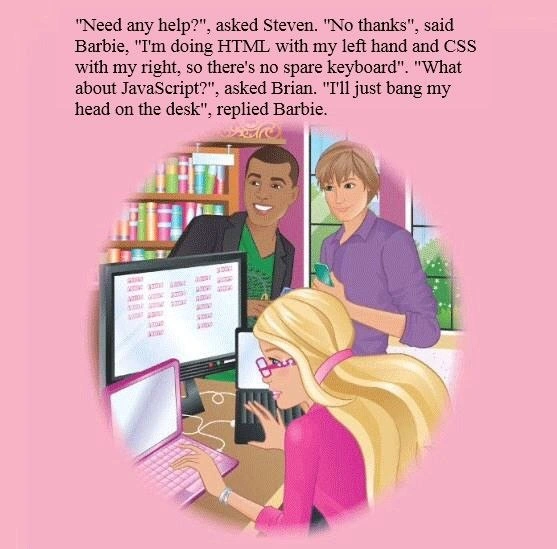
Barbie's Realistic Take on the Web Dev Trio
Frontend Post #4147, on Feb 1, 2022 in TG

Barbie's Realistic Take on the Web Dev Trio

Why is this Frontend meme funny?

Level 1: It’s Always JavaScript

Imagine you’re building a fancy dollhouse. First, you snap together all the plastic walls and rooms – that’s the easy part, like the HTML structure of a webpage. Next, you paint the house pink and add beautiful decorations and stickers – that’s like CSS, making everything look just the way you want. So far, so good, right? Now, you decide to add a cool magic feature: say, lights that turn on with a button, or an elevator that actually moves between floors. That part is a lot harder – kind of like JavaScript, which makes a webpage do things. In our dollhouse analogy, this is where things start going wrong: the lights won’t turn on, the elevator keeps getting stuck… you try and try, and it’s super frustrating. You get so annoyed that you feel like banging your head on the desk, just like Barbie joked!

The meme is funny because it shows even someone as confident and capable as Barbie getting stressed by the hard part. Building the house and decorating it (HTML and CSS) was so easy she could do both at once. But the moment she has to tackle the tricky electrical work (JavaScript), she’s joking that all she can do is bonk her head in frustration. It’s a silly way to say: sometimes the final step of a project is the one that makes you want to scream! Whether it’s a dollhouse or a website, the basic structure and design might be straightforward, but adding the fancy interactive bit can turn into a real headache. And what do we do when we’re frustrated? We might sigh, facepalm, or pretend to knock our head against the table – and then we laugh, because hey, we’ve all been there. That shared “ugh, this is hard!” feeling is exactly why this joke makes developers smile. In simple terms: HTML and CSS are like playtime, and JavaScript is the homework that makes you go “ouch!”

Level 2: Dual-Wielding Markup

Let’s break down the joke for those newer to the Frontend world. Web pages are built with three core technologies (often called the frontend stack): HTML, CSS, and JavaScript. Each has a special job:

  • HTML (HyperText Markup Language) defines the structure and content of a webpage. It’s like the skeleton or the building blocks. For example, you write HTML to create headings, paragraphs, buttons, images, etc. An HTML snippet might look like:

    <!-- HTML defines the content structure -->
    <h1>Hello, World!</h1>
    <p>This is a Barbie-coded webpage.</p>
    

    In Barbie’s case, she’s typing the HTML with her left hand on one keyboard. That suggests she finds laying out the basic structure so manageable that she can do it one-handed!

  • CSS (Cascading Style Sheets) is all about styling that HTML content. CSS lets you add colors, layouts, fonts, and make the page look pretty (yes, even Barbie’s favorite pink 🌸). It “cascades” meaning multiple style rules can apply and there’s an order of priority. A simple CSS example to style the HTML above might be:

    /* CSS adds presentation to the structure */
    h1 {
      color: hotpink;      /* make the header text pink */
      text-align: center;  /* center the header on the page */
    }
    p {
      font-family: sans-serif;
      font-size: 18px;
    }
    

    In the meme, Barbie codes CSS with her right hand on the second keyboard, in parallel with HTML. Of course, in reality you’d typically alternate between writing HTML and CSS, but the image jokes that she’s so skilled she can literally do both at once. Two hands, two keyboards, two languages – ambidextrous coding!

  • JavaScript is the programming language that adds interactivity and logic to the page (the brains or motor of the website). With JavaScript (often abbreviated JS), the page can respond to clicks, change dynamically, load new data, and so on. For instance, if you want a button to pop up an alert message when clicked, you’d use JS like:

    // JavaScript makes the page interactive
    document.querySelector('button').addEventListener('click', () => {
      alert("You clicked the button! 🎉");
    });
    

    JavaScript code executes in the browser; it can manipulate the HTML/CSS (via the DOM) and handle events. It’s powerful, but also can be challenging. Unlike HTML/CSS which are more declarative (you state what you want to display or how it should look), JavaScript is actual logic with conditions, loops, and sometimes weird errors if you’re not careful.

Now, the meme’s text highlights that Barbie has no “spare keyboard” for JavaScript. That’s a goofy way to say she’s fully occupied with HTML and CSS – but it’s also sneaking in the idea that tackling JavaScript isn’t as simple as just adding another keyboard. When Brian asks about JavaScript, Barbie humorously replies, “I’ll just bang my head on the desk.” This is a classic expression in DeveloperHumor for being stumped or frustrated by a tough programming problem. Instead of typing JS, she’s implying that writing JavaScript is so painful that it might as well be done by repeatedly hitting her head and hoping something works! It’s an exaggeration, of course. But if you’re new to web development, here’s the relatable truth behind the joke: writing HTML and CSS can feel straightforward – you see immediate visual results and errors are usually easy to fix (a missing tag or a typo in a color code is usually obvious). In contrast, when writing JavaScript, especially as a beginner, things often don’t work on the first try. You might click the button and nothing happens, or you get a cryptic error in the console. It can be frustrating like nothing is going right, hence the feeling of wanting to face-plant on your desk.

The front-end stacking order mentioned (HTML → CSS → JS) is basically the order in which a webpage is built and loaded. HTML comes first (browser loads the content structure), then CSS (browser applies styles to make it look nice), and finally JavaScript (browser runs scripts to add interactivity). Each layer builds on the previous. The meme plays on this stack order: Barbie has the first two layers under control with each hand, but when it’s time for that third layer (JS), all she has left is… her head! It’s a lighthearted way to say “I can handle the easy parts simultaneously, but the hard part will consume all my sanity.” Every dev, junior or senior, has had a moment where coding JavaScript felt like hitting a wall. So if you’ve been there, know that you’re not alone — even Barbie jokes about DeveloperFrustration with JS!

Level 3: Cascading into Chaos

At first glance, this meme is pink, playful, and perfectly on point for frontend developers. It humorously captures the layered nature of web development: HTML for structure, CSS for style, and JavaScript for behavior. Barbie is shown confidently dual-wielding keyboards – literally coding HTML with one hand and CSS with the other. Seasoned devs chuckle at this exaggeration: it’s like she’s running two threads in parallel, tackling markup and styling simultaneously. In reality, a web page’s HTML and CSS do work together closely: HTML lays out the DOM (Document Object Model) and CSS’s cascading rules decorate that structure. An experienced developer might indeed switch rapidly between HTML and CSS files (though maybe not with separate keyboards!) when building a UI. The sight of Barbie effortlessly multitasking these tasks hints that, compared to what’s coming, this part is easy.

The real punchline lands when her colleague Brian asks, “What about JavaScript?” and Barbie quips, “I’ll just bang my head on the desk.” 💥 Every senior developer knows this feeling. Writing HTML is straightforward (you declare elements), styling with CSS can get tricky but is still mostly adjusting visuals; but JavaScript — oh boy, that’s where headaches often begin. The meme perfectly exaggerates the DeveloperExperience_DX: HTML and CSS might frustrate you occasionally (centering in CSS, anyone?), yet JavaScript is on another level, infamous for its quirks and complexity. It’s the part of the frontend stack where real programming happens: logic, state, user interactions, asynchronous calls, browser APIs, etc. Even veteran frontend engineers with battle scars from countless browser bugs and undefined is not a function errors will smirk at Barbie’s “head-desk” strategy. It’s an acknowledgment that no matter your expertise, JavaScript has a way of making you feel utterly defeated at times. The choice to “use her head as the third input device” is satirical: after juggling HTML and CSS, tackling JS is like reverting to brute force or sheer will (we’ve all resorted to lengthy debugging sessions that felt like repeatedly hitting our heads 😅).

This scenario also pokes fun at developer humor around multitasking and frustration. The two bewildered male colleagues in the background (Steven and Brian) offer help, echoing a well-known Barbie coding story in tech folklore. In that controversial Barbie_meme backstory, Barbie was portrayed as needing the guys’ help to actually code. Here she proudly declines assistance – handling markup and styles solo – and only “struggles” with JavaScript in the same way all developers do. It’s a playful reversal that senior devs appreciate: Barbie isn’t the one who can’t code; it’s JavaScript that’s the great equalizer, turning even confident devs into head_desk_javascript practitioners occasionally. The image of two_handed_coding on a pink_dev_setup with a cheerful aesthetic juxtaposes against the impending JS doom – a contrast any UI engineer finds hilarious. Ultimately, the meme’s dark truth masked in candy colors is something a seasoned coder might say with a smirk: “HTML and CSS? Piece of cake. But JavaScript? That’s where I earn my Advil.”

Description

This meme features an illustration from a Barbie book, set against a pink background, with an edited caption at the top. The image depicts Barbie, wearing pink glasses and a pink top, diligently working on her pink laptop. Behind her, two male friends, Steven and Brian, look on. The overlayed text narrates a short, humorous dialogue: '"Need any help?", asked Steven. "No thanks", said Barbie, "I'm doing HTML with my left hand and CSS with my right, so there's no spare keyboard". "What about JavaScript?", asked Brian. "I'll just bang my head on the desk", replied Barbie.' The joke leverages the common developer sentiment that while HTML (structure) and CSS (styling) are relatively manageable, JavaScript (interactivity and logic) can be a major source of frustration and complexity. It humorously subverts the simple, perfect image of Barbie by placing her in a highly relatable scenario for any web developer who has struggled with the quirks of JavaScript
Comments

10
Anonymous ★ Top Pick HTML and CSS are declarative; you tell the browser what you want and it mostly listens. JavaScript is imperative; you tell it what to do, and it does what it wants before asking 'are you not entertained?'
  1. Anonymous ★ Top Pick

    HTML and CSS are declarative; you tell the browser what you want and it mostly listens. JavaScript is imperative; you tell it what to do, and it does what it wants before asking 'are you not entertained?'

  2. Anonymous

    Barbie’s workflow: left hand on HTML, right on CSS, forehead on JavaScript - because after the 200 MB node_modules and three transpiler stages, percussive debugging is the only API that never deprecates

  3. Anonymous

    Twenty years in and I still code frontend like Barbie - HTML and CSS flowing naturally from muscle memory while JavaScript remains the eternal head-desk moment, except now it's TypeScript and I'm banging my head about build configs, bundler migrations, and why useState caused another infinite render loop

  4. Anonymous

    Head-on-desk is a legitimate JavaScript IDE: the output still type-coerces to something truthy in production

  5. Anonymous

    Ah yes, the classic frontend developer's journey: HTML and CSS are like riding a bike with training wheels - you might wobble, but you'll get there. Then JavaScript shows up and suddenly you're debugging async/await promises while fighting 'this' binding in a callback hell, wondering why your closure captured the wrong variable in a loop. The real joke? After mastering vanilla JS, someone will inevitably suggest you learn React, Vue, AND Angular 'just to stay relevant.' Barbie's head-desk approach is actually a well-documented debugging technique - right up there with rubber duck debugging and crying in the shower

  6. Anonymous

    HTML left, CSS right; JavaScript goes to the forehead - reconciling the event loop, implicit coercion, and five layers of tooling is the only task that benefits from idempotent head‑banging

  7. Anonymous

    After three transpilers, two bundlers, and one hydration mismatch, forehead‑driven development remains the only zero‑dependency JavaScript runtime

  8. Anonymous

    HTML: left-hand casual. CSS: right-hand skirmish. JS: forehead-first into the event loop abyss

  9. @LionElJonson 4y

    Good one

  10. @f0cu53d 4y

    Literally me

Use J and K for navigation