Skip to content
DevMeme
3473 of 7435
On Ignoring Critical Code Comments
Documentation Post #3808, on Oct 12, 2021 in TG

On Ignoring Critical Code Comments

Why is this Documentation meme funny?

Level 1: Sign? What Sign?

Imagine there’s a big sign on a door that says “Do Not Enter – Danger Inside.” Now picture a little kid who doesn’t know how to read yet. The kid sees the closed door, gets curious, and thinks, “Hmm, I want to see what’s inside!” The warning sign means nothing to them, so they just push the door open and stroll in.

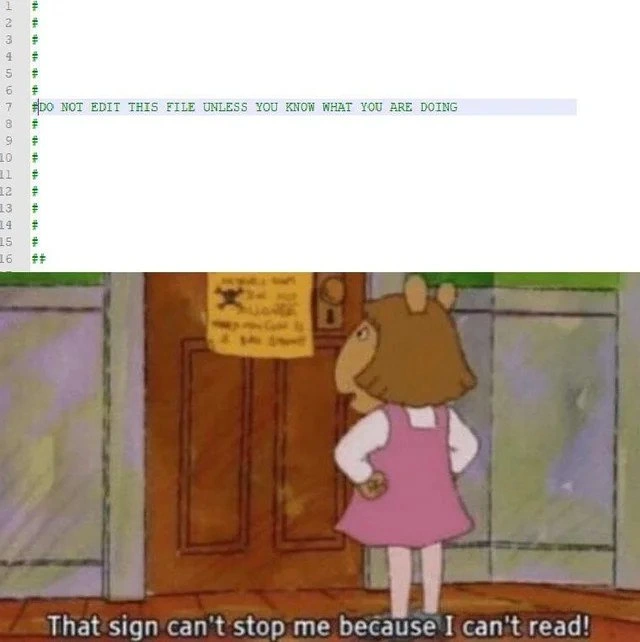
This meme is joking that a developer can be like that little kid. In the computer file (at the top part of the meme), there’s basically a big “Do Not Enter” sign written in text: “DO NOT EDIT THIS FILE UNLESS YOU KNOW WHAT YOU ARE DOING.” That’s like an adult waving their arms saying, “No no, don’t touch this!” But the developer ignores it, kind of like the kid who can’t read the door sign. The bottom picture of the cartoon character (D.W.) with the caption “That sign can’t stop me because I can’t read!” is a funny way of saying: the developer didn’t follow the warning because either they didn’t understand it or just chose not to pay attention.

Why is this funny? It’s the contrast between the very clear warning and the person completely ignoring it. It’s like a slapstick scene where someone walks on wet paint despite a “Wet Paint” sign, or opens the “Keep Out” door and immediately sets off an alarm. We laugh because it’s obviously a bad idea to ignore the warning, but the person doing it doesn’t realize that until it’s too late. It’s a joke many of us can relate to: sometimes we act first and read the instructions later. In the world of developers, that can lead to some messy (and humorous, in hindsight) situations. Here, the humor comes from the developer’s bold “I’ll do it anyway!” attitude – just like a kid who doesn’t know better charging straight past a big warning sign.

Level 2: Warning Signs 101

Let’s break down what’s happening here. The top of the meme shows a configuration file open in a code editor. A configuration file is basically a settings file; it’s where applications store important parameters like ports, feature toggles, or database URLs. Instead of hard-coding those values in the program, developers put them in a separate file so they’re easier to change. For example, a config file might look like this:

# This file was auto-generated by the Setup Wizard.
# DO NOT EDIT THIS FILE UNLESS YOU KNOW WHAT YOU ARE DOING
# Changes might be overwritten on restart.
port = 8080
enableFeatureX = false

Notice the lines starting with #. In many languages and config formats (like .ini or shell scripts), # indicates a comment. Comments are lines meant for humans to read, not computers – the program will ignore anything after a # on a line. Here, the comments are essentially yelling a warning: “DO NOT EDIT THIS FILE… unless you really know the consequences.” It’s the file’s way of saying, “Seriously, hands off.” Often, this means the file is auto-generated (created by the system or a tool). There might be a master configuration elsewhere or an admin interface that you’re supposed to use to make changes, rather than editing this file directly. The comment is trying to save you from yourself (and from breaking the system)!

Now, the bottom image is a scene from the children’s cartoon Arthur. The character D.W. stands defiantly in front of a door with a warning sign. In the scene, there’s literally a sign on the door telling her not to enter. But D.W., being a cheeky little kid, says: “That sign can’t stop me because I can’t read!” – and presumably goes right through the door. This has become a popular joke format for anyone ignoring a warning out of ignorance.

In our developer meme, the connection is clear: The developer is basically D.W. The DO NOT EDIT comment in the config file is like the warning sign on the door. But the developer ignores it. Maybe they literally didn’t read it (skimming through the file too fast), or they ignore_comments routinely, or they read it and thought, “Nah, I’ll be fine.” It’s a classic case of a RelatableHumor in tech – many of us have been tempted to quickly fix something by editing a file that we weren’t supposed to touch. It might be because we’re in a hurry to squash a bug, or we don’t know the proper way to do it. We think, “I’ll just tweak this one value; what’s the worst that could happen?”

What can happen, unfortunately, are bugs and headaches. For instance, if that file is generated by a program (say, an installer or a build process), any manual change you make could:

  • Get overridden later (your change disappears and the problem comes back).
  • Break compatibility with the program that uses it (if you put something unexpected, the app might crash or misbehave).
  • Cause confusion for other developers (who may not realize you edited it, and they rely on the original source of truth to update settings).

In the world of software, there’s even an acronym “RTFM” which stands for “Read The Fine Manual” (polite version of the F-word there 😉). It’s a reminder to always read instructions or comments before doing something drastic. The meme’s joke is basically showing someone not RTFM-ing at all. The developer either doesn’t see the “DO NOT EDIT” sign or thinks it doesn’t apply to them – just like D.W. ignoring the door sign.

From a learning perspective: if you encounter a big scary comment like that, it’s a clue that changes to this file are meant to be done in a safer way. Perhaps there’s another config file you’re supposed to edit, or a command-line tool, or a UI that updates this one. The comment “unless you know what you are doing” is suggesting “this is advanced, proceed with extreme caution (or not at all).” In many cases, only very senior developers or the original authors truly “know what they’re doing” in that part of the system. So, as a junior dev, it’s usually better to ask or double-check documentation instead of blindly editing.

The reason fellow developers find this meme so funny is because it exaggerates a real mistake in a lighthearted way. We’ve all had moments of relatable developer experience where we did something we were told not to (or knew we shouldn’t) and then learned why the hard way. Seeing D.W.’s naive confidence is like seeing our younger developer self – charging in without reading the sign, and everybody knows it’s a bad idea except the person doing it. The humor has a bit of “I’ve been that person” and “I can’t believe they did that” at the same time.

Level 3: Can't Stop, Won't Read

At first glance, any experienced developer recognizes the classic file header warning blazing at the top of that config:

# DO NOT EDIT THIS FILE UNLESS YOU KNOW WHAT YOU ARE DOING

Yes, in all-caps — practically screaming from the code editor. This kind of comment usually sits at the top of auto-generated configuration files, the ones maintained by build scripts or config management tools. It's there to ward off any misguided manual edits. Why? Because these files are often overwritten or delicately balanced; one rogue change can knock an entire system out of whack. It’s a pillar of ConfigurationManagement best practices: if a machine or framework generated app_config.cfg for you, hands off unless you truly grok the whole system.

Enter the bottom half of the meme: D.W., the cartoon character from Arthur, defiantly facing a door with a huge warning sign, proclaiming “That sign can’t stop me because I can’t read!” This image (famous in meme circles as the dw_that_sign_cant_stop_me scene) is the perfect metaphor for a developer barreling past a do_not_edit_comment. In the developer’s case, it’s not literal illiteracy – it’s willful ignorance or overconfidence. The meme nails a shared industry joke: someone will always ignore comments or documentation and edit the forbidden file, convinced "I know what I’m doing" (often right before all hell breaks loose).

The humor cuts deep because it’s RelatableDeveloperExperience. Seasoned engineers have all witnessed (or committed) this DW-style rebellion. The comment says “unless you know what you are doing” – a challenge that some developers interpret as “pssh, I totally do”. It’s like a red flag to a bull. We’ve seen code from auto-generators (think GUI designers, ORM classes, build system output) with big warnings, and still somebody goes in and tweaks a line. Maybe they’re debugging a production issue at 3 AM and desperation kicks in, or perhaps they’re just cocky. And inevitably, the result is a new bug or a config state that mysteriously drifts from what the rest of the team expects.

From a CodeQuality standpoint, ignoring that comment is a cardinal sin. Those warnings exist to prevent exactly the kind of unpredictable behavior and technical debt that keeps on-call engineers up at night. Veteran devs write such comments almost as a dare – “I bet you can't resist editing this, but don't say I didn't warn you.” When that dare is taken, you get scenarios like:

  • Overwritten Changes: The next deployment or auto-config run obliterates the manual edit. The dev is baffled: “Why did my fix disappear?!”
  • Inconsistent Environments: One server has the "quick fix" in its config, others don’t. Cue bizarre “it works on Server A but not B” incidents that are nightmare to debug.
  • Parse Errors: The courageous editor adds or removes something without fully understanding the format. The app then fails to start because the config parser choked on a stray character. Surprise!
  • Hidden Time Bombs: The hack works for now, but nobody updated the ConfigurationFile template or source-of-truth. A future update or installer innocently reverts to defaults, reintroducing the issue, and everyone scrambles, asking, “Who on earth edited this file by hand!?”

This meme resonates in engineering circles because it exaggerates a truth: People often charge ahead without reading the fine print (or the big bold comment). It’s a form of hubris that senior devs know too well. We chuckle (or facepalm) because we’ve cleaned up after that person who ignored the bright neon "DO NOT EDIT" sign. In the end, the sign couldn’t stop them, and as a result, someone (probably a cynical veteran like me) had to diff through configs and commit histories to figure out why the system is misbehaving. The meme’s dark punchline: “That sign can’t stop me because I can’t read!” perfectly captures the mix of ignorance and arrogance that leads to these self-inflicted wounds in software projects. It’s funny because it’s true – and painfully common.

Description

A two-panel meme juxtaposing a code warning with a defiant cartoon character. The top panel displays a screenshot of a code file, likely a configuration or script, with a prominent comment highlighted: '# DO NOT EDIT THIS FILE UNLESS YOU KNOW WHAT YOU ARE DOING'. The bottom panel features the well-known meme of D.W. from the children's show 'Arthur', standing stubbornly before a sign and declaring, 'That sign can't stop me because I can't read!'. The humor comes from applying D.W.'s childish defiance to a high-stakes software development scenario. It perfectly captures the moment a developer, whether junior and naive or senior and arrogant, decides to ignore a critical warning left by previous developers. For experienced engineers, it's a painfully relatable image that evokes memories of production incidents caused by someone who failed to appreciate the complexity and fragility of a core system component
Comments

7
Anonymous ★ Top Pick This is the default state of a new hire in a legacy codebase right before they cause a P1 incident and discover the 'blame' command in git
  1. Anonymous ★ Top Pick

    This is the default state of a new hire in a legacy codebase right before they cause a P1 incident and discover the 'blame' command in git

  2. Anonymous

    “# DO NOT EDIT THIS FILE” is the config’s way of double-dog-daring you: crack it open in Vim, flip one flag, invalidate the whole declarative source of truth, then watch GitOps fight your 2 a.m. ego for ownership of prod

  3. Anonymous

    After 20 years in the industry, you realize the scariest developers aren't the ones who can't read the warnings - they're the ones who read them, understand them perfectly, and still convince themselves that 'this time will be different' because they've 'fixed this before' at 3 AM on a Friday

  4. Anonymous

    Every senior engineer has been that Arthur at 2 AM, staring at a production config file with a DO NOT EDIT warning, thinking 'I'll just change this one environment variable - what could possibly go wrong?' Spoiler: Everything. The sign exists because someone before you also couldn't read, and now their cautionary tale lives in the git blame history and the incident postmortem titled 'How We Took Down Production on a Friday.'

  5. Anonymous

    “DO NOT EDIT THIS FILE” - our RBAC strategy; the 3am on-call edits it, learns comments aren’t access controls, and GitOps rolls it back in 30 seconds

  6. Anonymous

    Config warnings: heeded by all until the original author retires and George grabs the editor

  7. Anonymous

    Nothing teaches configuration drift faster than vim-ing the '# DO NOT EDIT' file in prod - Ansible/Puppet/K8s will reconcile it back before git can record your confession

Use J and K for navigation