Skip to content
DevMeme
2970 of 7435
The 'Normal Screen Size' Project Scope
Stakeholders Clients Post #3280, on Jun 18, 2021 in TG

The 'Normal Screen Size' Project Scope

Why is this Stakeholders Clients meme funny?

Level 1: One Size Fits All

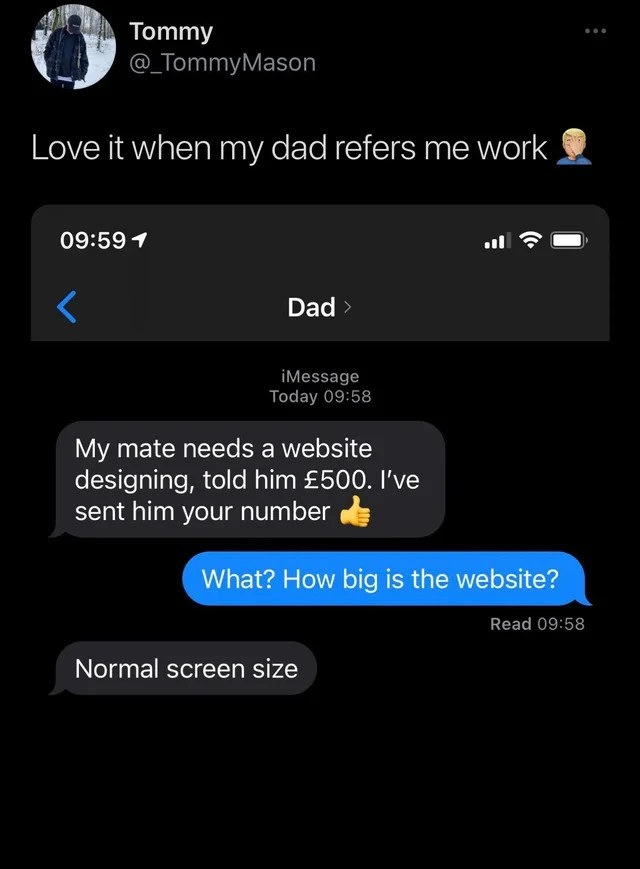
Imagine your dad tells a friend that you will build them a LEGO castle for $5. You didn’t hear this promise until afterwards. Now, you ask your dad, “How big of a castle do they want?” and he just answers, “Oh, just a normal castle size, you know, like it fits on a table.” 😕

You can see the problem: normal size doesn’t really tell you anything about how many LEGO pieces or how much time you’ll need! Maybe your dad’s friend actually wanted a giant castle with towers and a moat, which would take days and hundreds of pieces – but your dad assumed it’s something small and simple. He already told his friend “$5 will cover it” without checking with you. Now you’re stuck either building an enormous castle for just a little money (which isn’t fair to you) or going back to explain that $5 only covers a tiny, basic castle.

This is funny in a head-shaking way because Dad meant well – he was trying to help you get a little job – but he didn’t understand what he was promising. He thought all castles (or websites) are the same “one size fits all.” It’s like he promised you’d bake a “normal cake” without asking if the friend wanted a birthday cake for 3 people or a wedding cake for 100 people. You’d be frustrated, right? You might laugh because it’s silly, but you’d also have to explain to Dad, “That’s not how it works!”

So the meme is basically showing that feeling: the mix of surprise and oh no… when someone who doesn’t really know the work decides details for you. It’s funny to developers because we’ve all had moments when a well-meaning person makes promises like that, and we end up doing a lot more work than they realized. In simple terms, Dad treated making a website like it was just printing a picture – any regular size will do – but in reality, building a website is more like planning and building a whole LEGO castle. And there’s no such thing as a “normal” castle size, just like there’s no one “normal” size for a website. 🎢

Level 2: Normal Screen Size

At this level, let’s break down what’s happening in simpler terms and clarify the tech concepts involved. The meme revolves around a miscommunication about building a website. The key misunderstanding here is what “How big is the website?” means versus the answer “Normal screen size.”

  • “How big is the website?” – When the developer (Tommy) asks this, he’s trying to figure out the scope of work. In web development, size isn’t about physical dimensions, but about how much needs to be done. Is it a one-page brochure site or a 50-page online store? Does it have complex features like user accounts, a shopping cart, a blog, image galleries, etc.? The more pages and features, the bigger (more complex) the website in terms of development effort. This question is basically “What are the requirements for the website?”

  • “Normal screen size.” – Tommy’s dad misunderstands the question completely. He hears “How big?” and thinks in literal physical terms: the size of the screen or display. His answer suggests he thinks a website’s size is like a piece of paper – saying normal screen size is like saying “just regular, not too big, not too small.” It’s clear he doesn’t realize that websites aren’t measured in inches or centimeters of screen, but in the amount of content and functionality. This phrase has become a bit of an inside joke among developers now to mean a client has no idea what they’re asking for. It indicates requirements ambiguity – the client (via Dad) isn’t describing the project in the way developers can actually use.

Now, why is promising a website for £500 potentially a problem? To a non-technical person (like Dad), £500 might sound like plenty for “a website.” But in professional web development, the cost of a project depends on its scope and complexity. Here are some fundamental concepts and why Dad’s promise is shaky:

  • Scope and Requirements: These define what the website must include. For example, a scope could be “5 pages (Home, About, Services, Gallery, Contact) with a contact form and mobile-friendly design.” Clear requirements help estimate the effort. If Dad hasn’t gotten any details and just says “my mate needs a website,” the scope is unknown. It could be those 5 simple pages or it could be an entire online shop with user logins. Without clarifying, the developer has no idea what he’s agreeing to do for that £500. This is called requirements ambiguity or lack of scope definition. It’s a major risk for any project because you can’t tell if £500 is fair or not without knowing what’s needed.

  • Client Expectations vs Reality: Dad, acting on behalf of his friend (the client), set an expectation: that the developer will do the job for £500. The friend now expects a complete website for that price. If later the developer discovers the friend wants something complex (say an interactive site with databases), explaining why it can’t be done for that price will be awkward. The client might say, “But your dad said £500 would cover it!” This is a common scenario tagged as ClientExpectations and StakeholderExpectations issues. Miscommunication early on leads to mismatch between what the client expects and what’s actually possible for that budget.

  • WebDevelopment Basics – It’s not just one screen: Modern websites are viewed on all sorts of devices. Responsive Web Design is the practice of building websites that automatically adapt to different screen sizes and orientations (portrait phone vs. landscape monitor). There’s no single “normal” size – the website has to look good on an iPhone, an iPad, a laptop, a large desktop, etc. So, any web developer, even a junior, knows to ask: will the site be mobile-friendly? (Spoiler: it should be!). When Dad says “normal screen size,” it shows he’s not aware of responsiveness. It’s like a client saying “just make it for a regular computer screen” without thinking about mobile users. Early in your dev career you learn that assuming everyone uses the same screen is wrong – a responsive layout or at least multiple layouts are needed. Developers often use CSS media queries or frameworks so one website works on many devices. So, Dad’s answer is humorously naive in that regard.

  • Budget (£500) and Work Involved: For context, £500 (around $600-700 USD as of 2021) might be reasonable for a very small site that maybe uses a template or is mostly static content. For example, a simple personal portfolio site or a basic informational site for a local business (with a few static pages) could potentially fit in that budget if done by a solo freelancer. However, if the friend imagines a larger site (lots of pages, custom design, interactive features), £500 is quite low. Freelance developers often have to educate clients that “you get what you pay for.” At an hourly rate, £500 might represent only a few days of work (depending on rates). A full custom website can be easily a few thousand pounds or more in professional settings. So Dad might have just set a price that’s too low for anything but the simplest project.

  • Communication is Key: This meme underscores why communication matters in tech projects. The Dad and his friend (the client) needed to have a clear conversation about what the friend actually wants (maybe the friend doesn’t know how to articulate it either!). Then the developer (Tommy) should have been brought in to discuss feasibility and cost before any price commitment. Skipping these steps is how you end up with miscommunication and potentially a project from hell. For a junior developer, it’s a cautionary tale: always clarify the project details with the client. Don’t just rely on what someone else (even if it’s your enthusiastic dad) says. You might have to ask things like: “Do you have a logo or do I make one? Who will provide text and images? Do you need any special functionality like a contact form or user login? Do you have a deadline?” These are basic requirement gathering questions. Clearly, none were asked here.

  • Family Referrals & Freelance Woes: There’s another layer that makes this meme hit home, especially for those starting out – the family_referral. Many developers get their first projects from friends or family acquaintances. It sounds great (built-in client!), but as seen here it can be tricky. Family members might not understand the work involved and can promise things on your behalf innocently. There’s also the aspect of doing work for someone your family knows; it can blur professional boundaries. If scope or payment issues arise, it can become awkward not just professionally but personally. Tommy’s exasperated tweet “Love it when my dad refers me work” indicates this isn’t his first rodeo in that situation. It’s both a thankful feeling for the opportunity and a dread for the headaches it brings. Everyone loves a bit of TechHumor about dealing with relatives in tech: like fixing parents’ computers, or in this case, being roped into cheap web projects.

In summary for this level: normal_screen_size_requirement is not a real thing in web development – it’s a misunderstanding. The meme is highlighting the importance of proper communication with clients, especially around requirements and budget. If you’re a newer developer (or even a student), the takeaway is: always clarify what needs to be done before agreeing on a price or timeline. And if someone ever tells you a requirement like “just make it normal screen size,” you now know that’s a big red flag (and also a pretty funny story to share with other devs, because they’ll all relate!).

Level 3: Budget Before Specs

This meme spotlights a classic WebDev nightmare: committing to a project budget and scope sight unseen. Here we have Dad acting as an impromptu project manager (or rather, a rogue sales rep) who promises a full website for £500 without gathering a single requirement. The punchline? When asked about the website’s size or complexity, he confidently replies it should be “normal screen size.” Facepalm.

This scenario is painfully familiar to seasoned developers. It distills an entire spectrum of Stakeholder_Clients missteps into one text exchange. Why is it funny? Because it compresses layers of client expectations failures and requirements ambiguity into a single absurd phrase. Experienced devs know that “How big is the website?” is shorthand for How many pages? What features? E-commerce? Blog? Contact forms? CMS? — basically, what’s the scope of the project. But Dad interprets “big” in the most literal, non-technical way, replying with a physical measurement concept (“normal screen size”) as if websites are like pieces of paper that come in A4 or A5. This is satire of the miscommunication that happens when non-technical stakeholders (in this case a well-meaning non_technical_parent) wade into technical waters without a clue. It’s a perfect storm of RequirementsAmbiguity meeting unrealistic_budget.

From an industry perspective, this is an age-old tale of price_without_scope. Negotiating project scope after quoting a price is a recipe for disaster. In project management terms, Dad just fixed the “Iron Triangle” (cost, scope, time) without knowing two of those variables. What could go wrong? Well, everything:

  • Scope Creep: Once the friend realizes he’s getting a whole site for £500, he might start with “just a homepage” and then keep adding pages (“Oh, can we also have an online store? And a login system?”). With no clear agreement on scope, the developer is on the hook for potentially endless features — all included in that flat £500 fee.
  • Unrealistic Timeline: Dad didn’t discuss when this needs to be done. Often, folks who don’t build websites think it’s a quick job (“surely you can whip it up over a weekend?”). If the friend expects a finished product next week, the dev could be staring down some all-nighters because Dad casually said “Yeah, my kid can handle it” without discussing timelines.
  • Underestimating Complexity:Normal screen size” betrays a total ignorance of modern web design. In 2021 (and today), there is no single normal screen size — websites must be responsive to work on varied devices: from small phone screens to large desktop monitors. What Dad calls normal might be a 15-inch laptop, but the friend’s customers might be viewing the site on 6-inch smartphone displays or 27-inch 4K monitors. Designing a site that looks good on all of those isn’t a one-size-fits-all deal; it requires careful planning with CSS media queries, flexible layouts, maybe using a framework like Bootstrap or a modern CSS grid. Dad’s oblivious comment ignores that critical complexity, giving any experienced dev flashbacks to clients who say things like “Make it look the same on mobile, you can just shrink it, right?” 🙄
  • Hidden Work: A website isn’t just a front-end UI on a screen. There’s hosting, domain names, possibly setting up a backend or at least configuring a contact form to send emails, SEO considerations, browser compatibility testing (does it work on Internet Explorer… I mean, hopefully no one’s asking that in 2021, but you never know with Dad’s mates!). None of these were discussed, yet presumably all expected. The Dad’s friend might assume £500 covers everything, because Dad certainly didn’t clarify otherwise.

In short, the humor lands because any developer who’s done freelance or dealt with clueless stakeholders can see the train wreck coming from a mile away. It’s that mix of horror and comedy: the freelance_web_project referred by family, the non_technical_parent cheerfully negotiating a deal with zero understanding, and the hapless dev (Tommy) now caught in the middle. Tommy’s tweeted reaction “Love it when my dad refers me work 🤦‍♂️” is drenched in sarcasm because he’s likely been burned before by these “favor” projects. Seasoned devs reading it nod knowingly (and maybe nervously laugh), because they’ve been in Tommy’s shoes — left explaining to a client why £500 for a “normal” website might only cover a very basic webpage, or renegotiating terms that someone else unwisely set on their behalf.

To put it in context, this meme is essentially the web-dev equivalent of a sales-engineering disconnect. In tech companies, there’s a notorious pattern where a sales person promises a client a new feature or custom solution (“Yes, absolutely, we can do that”) for a fixed price or delivery date without consulting the engineering team. The engineers then find themselves scrambling to deliver something that was sold unrealistically — exactly what’s happening here, except Dad is the over-eager salesman and his developer child is the engineering team. The Dad even tosses in a 👍 emoji, like he’s done a great deed, utterly unaware of the possible scope creep and late nights he just dealt out.

Let’s break down the perspectives here in a little comparison, because it highlights why “normal screen size” is such a facepalm moment:

Dad’s Naïve View Developer’s Reality Check
Website is one static thing of a fixed size, like a digital poster on a screen. (normal_screen_size) Websites must adapt to many screen sizes (phone, tablet, desktop). Responsive design is needed, meaning the layout changes for different devices. There is no single “normal” size.
£500 sounds like a generous one-time payment for a “quick website.” £500 might barely cover a simple site’s labor. Complex sites (multi-page, interactive features, database) typically cost much more due to the hours of development and design involved.
Scope = “Needs a website.” (That’s it.) Scope = Detailed requirements: how many pages, what content, design preferences, features (contact forms, user accounts, etc.). Without this, the project can balloon unexpectedly.
The developer (his kid) can handle it easily because “you’re good with computers.” Web development involves multiple skills: graphic design, HTML/CSS/JS coding, possibly writing copy, performance tuning, and deployment. It’s not magic; it’s skilled labor that takes time.
Communication done: client got dev’s number and a price upfront. 👍 Communication just started: now the dev has to play catch-up, do a proper requirements gathering, and possibly renegotiate expectations that were mis-set. A thumbs-up doesn’t cover missing details!

This table underscores the crux of the joke: Dad unknowingly set up a miscommunication disaster. The left column is basically Dad’s thought bubble — a StakeholderExpectations fairy tale — while the right column is the reality the developer now has to explain. The humor comes from how stark the contrast is. It’s a laugh-or-cry moment every developer recognizes: when someone trivializes your work down to “just make it normal size, you know, the usual.”

Technically speaking, there’s an irony in the phrase “normal screen size” for web design. Back in the early days of the web (think late 90s, early 2000s), designers did often target a common screen resolution (like 1024x768 pixels) as the base for layouts. They’d use fixed-width

In summary (of this deep dive level): the meme’s joke operates on the disparity between technical reality and layman perception. It’s funny and painful because a well-meaning outsider, lacking knowledge of WebDevelopment intricacies, made a promise that the insider (the developer) knows is completely off-base. That disconnect – between “normal screen size” and the actual multidimensional scope of a web project – is the kind of thing that keeps cynics in tech saying things like “Weeks of coding can save you hours of planning, right?” with a sarcastic grin. Here, Dad skipped the hours of planning, and now Tommy might be in for weeks of coding (for just £500!).

layouts or later CSS fixed widths, assuming most users had similar monitors. But those days are long gone; now we have to consider a myriad of screen sizes and build fluid layouts. So the Dad’s mindset is not only non-technical, it’s also antiquated — like someone asking for a “website that fits in Internet Explorer’s window on a Dell desktop” in the era of smartphones and tablets. It’s inadvertently a dig at outdated approaches.

Description

A screenshot of a tweet from user Tommy (@_TommyMason) that reads, 'Love it when my dad refers me work,' accompanied by a facepalm emoji. Below the tweet is a screenshot of an iMessage conversation in dark mode with 'Dad'. The dad's message says, 'My mate needs a website designing, told him £500. I've sent him your number 👍'. The son replies in a blue bubble, 'What? How big is the website?'. The dad's final, hilariously out-of-touch response is, 'Normal screen size'. This meme perfectly captures the communication chasm between technical professionals and non-technical clients or family members. The humor lies in the dad's complete misunderstanding of the question; while the developer is asking about the scope and complexity of the project (number of pages, features, etc.), the dad interprets 'how big' in a literal, physical sense. For any experienced developer or freelancer, this is a painfully relatable scenario of having work arranged and priced without any understanding of the requirements, leading to impossible expectations

Comments

13
Anonymous ★ Top Pick 'Normal screen size' is the responsive design equivalent of a client saying 'just make it pop' - a vague requirement that guarantees at least three complete redesigns
  1. Anonymous ★ Top Pick

    'Normal screen size' is the responsive design equivalent of a client saying 'just make it pop' - a vague requirement that guarantees at least three complete redesigns

  2. Anonymous

    “Normal screen size”? Great - I’ll ship a single 1024×768 PNG renamed to index.html. Fits the spec, hits the £500 budget, and every additional breakpoint becomes a change-request revenue stream

  3. Anonymous

    Ah yes, 'normal screen size' - the universal unit of measurement for project complexity, right up there with 'make it pop' and 'just like Facebook but different.' At least he didn't promise it would be done by Monday

  4. Anonymous

    Ah yes, the classic 'normal screen size' specification - right up there with 'make it pop' and 'can you just quickly...' in the pantheon of requirements gathering nightmares. Dad's operating on a fixed-bid waterfall model while completely missing that 'how big' in web dev terms means 'are we talking a landing page or the next AWS console?' This is why we have discovery phases, folks. Though I appreciate the confidence in quoting £500 sight unseen - that's either covering a static HTML page or about 2 hours of actual development time depending on which decade's rates we're using

  5. Anonymous

    £500 for 'normal screen size': the fixed-width relic that makes every senior dev flashback to 2005 table layouts

  6. Anonymous

    Nothing says enterprise-grade SOW like a £500 fixed bid negotiated by your dad with a spec of ‘normal screen size’ - aka support every viewport from fridge displays to 5K iMacs; welcome to scope creep-as-a-service with a family SLA

  7. Anonymous

    Ah yes, "normal screen size" - aka every breakpoint from 320px to 4K, plus CMS, SEO, and a11y, delivered under a £500 fixed bid with infinite scope

  8. @azizhakberdiev 5y

    Clone of {any big company's website}

  9. @VlP_AI_TG 5y

    It's big brain time

  10. @lord_nani 5y

    500$ is a pretty good price

    1. @Artemus_2 5y

      £500 is $700.

      1. @lord_nani 5y

        Thats three times the normal start-level freelance market

  11. @lord_nani 5y

    For a landing page type website

Use J and K for navigation