Skip to content
DevMeme
3192 of 7435
When Security Best Practices Hit Too Close to Home
Security Post #3513, on Aug 7, 2021 in TG

When Security Best Practices Hit Too Close to Home

Why is this Security meme funny?

Level 1: Key Under the Mat

Imagine all your friends are talking about the best ways to keep their houses safe – like using strong locks and never leaving spare keys where strangers can find them. Meanwhile, you remember that you actually left your house key under the welcome mat because it was easier for you. You’d probably start feeling pretty guilty and nervous, right? You’d be giving that side-eye glance, hoping no one realizes what you did. That’s exactly the feeling this picture is going for: everyone else is doing the right thing, and you just realized you took a shortcut that could be really dangerous. It’s funny (and embarrassing) because hiding your key under the mat – or in computer terms, putting a password in a cookie – is obviously a bad idea, and now you know it.

In web development, a cookie is a small piece of data that a website stores on your browser. Cookies are usually used for things like keeping you logged in via a session ID or remembering your site preferences. They are not meant to hold sensitive secrets like your actual password. Storing a password in a cookie is a huge no-no in web security because it means the password is sitting in a place (your browser) that others could potentially access or see.

OWASP stands for Open Web Application Security Project. It’s an organization that publishes a “Top 10” list of the most critical web security mistakes to avoid. One big rule on that list is: never store sensitive information (like login credentials) on the client side (the user’s browser) in plain form. What this developer did – putting the password in a cookie (essentially in plain text) – would definitely show up as an example of what not to do in those guidelines.

Why is this so bad? A few reasons:

  • Easy to steal: If the password is saved in a cookie in plain text, a malicious script on the page or another person using the computer could grab it. It’s like leaving your secret written out with no disguise at all.
  • Travels with requests: Cookies get sent along with every request to the website. If someone is eavesdropping on the network and the site isn’t using HTTPS, they can literally see the password being transmitted.
  • All-access pass: If an attacker gets hold of that cookie, they now have the user’s password and can log in as them. And because many people reuse passwords (a common bad habit), the attacker might try that same password on other sites too.

In proper authentication design, the server should never need to send your actual password to your browser at all. Instead, when you log in, the server creates a special session ID (a random token) and sends that to your browser as a cookie. That session ID is like a temporary pass that says “this user is logged in” without revealing the real password. The password itself stays safely on the server (usually stored in a hashed form, not plain text even on the server). This way, even if someone steals your session cookie, you can invalidate it and your actual password isn’t exposed.

This meme is basically a lesson in basic security: don’t store passwords or other sensitive data on the user’s side in plain view. It’s an example of convenience gone wrong, exactly the kind of mistake security guides warn developers to avoid.

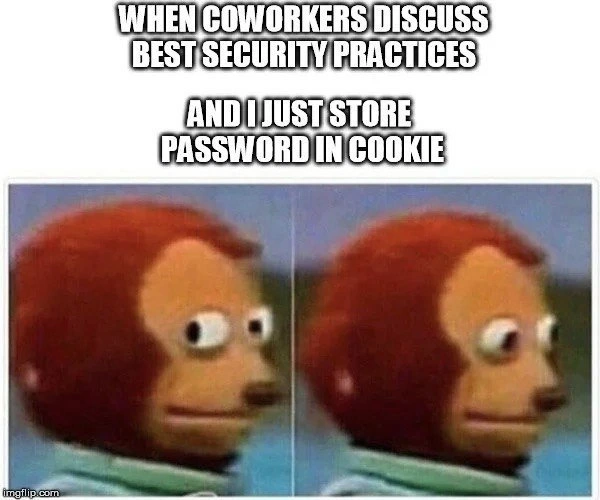
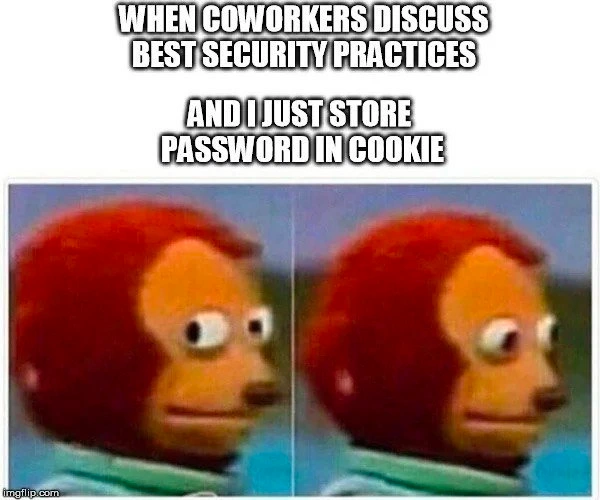
Picture a dev team meeting where Security Best Practices (à la OWASP guidelines) are treated like holy scripture. Everyone’s discussing proper authentication flows, hashed passwords, and secure tokens… and then there’s one developer silently breaking into a sweat. Why? Because in that person’s code, they casually stored a user’s password in a browser cookie. The famous side-eye puppet meme perfectly captures that uh-oh moment – it’s the face of someone realizing they’ve committed a serious security sin and hoping nobody finds out.

Storing a password in a cookie basically ticks one of the classic boxes on the security vulnerabilities list. It flagrantly violates multiple OWASP Top 10 rules, from Sensitive Data Exposure to Broken Authentication. (The OWASP Top 10 is essentially a “please don’t do this” list of web security mistakes, and keeping credentials on the client side is high on that list.) In other words, by ignoring that guidance, our guilty developer created an insecure cookie storage situation. While coworkers are emphasizing locking down secrets and proper session management, this poor soul’s implementation is the exact bad practice they’re warning against.

To put it bluntly, storing a plaintext password in a cookie is like handing out the keys to your app’s kingdom on every single request. Cookies are meant for session IDs and harmless preferences – not secrets. Here’s a glimpse of what that might look like in code:

// The insecure "solution" lurking in the codebase:
response.cookie("password", userPassword);  // ❌ Never do this: exposes the raw password

Any seasoned developer or infosec engineer would cringe at that one-liner. This single line creates a cookie security fiasco: the password (in plain text!) now travels back and forth with each HTTP request. If the site isn’t all-HTTPS, that cookie (and thus the password) can be sniffed by anyone on the network. Even if you set HttpOnly (to block JS access) and Secure flags on it, you’re still putting the actual credential out in the wild. A stolen cookie in this case isn’t just session hijacking – it’s full-blown credential theft. And if the user reused that password elsewhere (a common weak-password habit), one breach can snowball into many. It’s basically like writing your bank PIN on your ATM card – slapping a little “do not copy” sticker on it afterward won’t make it okay.

From a senior perspective, the humor here is equal parts laughter and horror. We’ve all spotted some naive developer or inherited a legacy system doing something this absurd in the name of convenience. It’s a classic developer facepalm moment. The side-eye puppet’s uneasy look says it all:

“Did I really do that? Please nobody mention cookies… oh no, they’re mentioning cookies.”

We laugh at the meme because the blunder is so obvious in hindsight, and many of us cringe remembering times we’ve seen (or committed) similar gaffes under pressure. It’s the perennial clash between doing things the secure way and the temptation to cut corners. Spoiler: taking a shortcut like this never ends well – once it’s discovered, expect full-team facepalms and a scramble to fix the mess.

Description

A classic two-panel meme featuring the 'Monkey Puppet,' also known as the Awkward Look Monkey Puppet. In both panels, a brown puppet with large, expressive eyes is shown. In the first panel, it looks straight ahead. In the second, it darts its eyes nervously to the side. White, all-caps text is overlaid at the top: 'WHEN COWORKERS DISCUSS BEST SECURITY PRACTICES AND I JUST STORE PASSWORD IN COOKIE'. This meme captures the feeling of internal panic and guilt a developer might feel when their past or current questionable coding choices are the exact opposite of the best practices being discussed by their team. For experienced engineers, the humor lies in the extreme and obvious nature of the security flaw - storing a password in a cookie is a cardinal sin of web security - and the relatable awkwardness of knowing about a piece of terrible tech debt while trying to look professional

Comments

8
Anonymous ★ Top Pick Storing a password in a cookie is the technical equivalent of writing your PIN on your credit card and then being surprised when your account is empty
  1. Anonymous ★ Top Pick

    Storing a password in a cookie is the technical equivalent of writing your PIN on your credit card and then being surprised when your account is empty

  2. Anonymous

    AppSec is debating Argon2 parameters while the legacy portal quietly Base64-serializes the entire LoginDTO - including the password - into a cookie and calls it “stateless auth.”

  3. Anonymous

    The real security vulnerability here isn't the password in the cookie - it's admitting you still have a production system from 2003 where this was considered 'good enough' because 'we'll fix it in the next sprint' (narrator: they never fixed it)

  4. Anonymous

    Nothing says 'defense in depth' quite like storing authentication credentials in a client-side cookie with the same security posture as a Post-it note on your monitor. At least when the inevitable breach happens, you can tell the incident response team you were following the 'security through obscurity' pattern - specifically, obscuring the fact that you knew better from your coworkers during those security discussions

  5. Anonymous

    Storing the password in a cookie is basically declaring XSS your identity provider

  6. Anonymous

    They preach OWASP Top 10, I serve plaintext creds via cookie - because server-side sessions are for mortals with time to refactor

  7. Anonymous

    Security review: 45 minutes on OAuth2 + PKCE and token rotation; prod quietly ships Set-Cookie: password=admin; HttpOnly=false, because “remember me” and “it’s behind the VPN.”

  8. Deleted Account 4y

    Please no

Use J and K for navigation