Skip to content
DevMeme
1070 of 7435
The Unclosed Comment Block Apocalypse
Bugs Post #1202, on Mar 29, 2020 in TG

The Unclosed Comment Block Apocalypse

Why is this Bugs meme funny?

Level 1: Invisible Page Accident

Imagine you’re reading a story out loud, and you say to your friend, “Okay, ignore everything I say after this.” But then you forget to ever say “Just kidding, stop ignoring now.” What happens? Your friend will ignore every single word you say afterwards, even if you didn’t mean them to. The story effectively disappears for them.

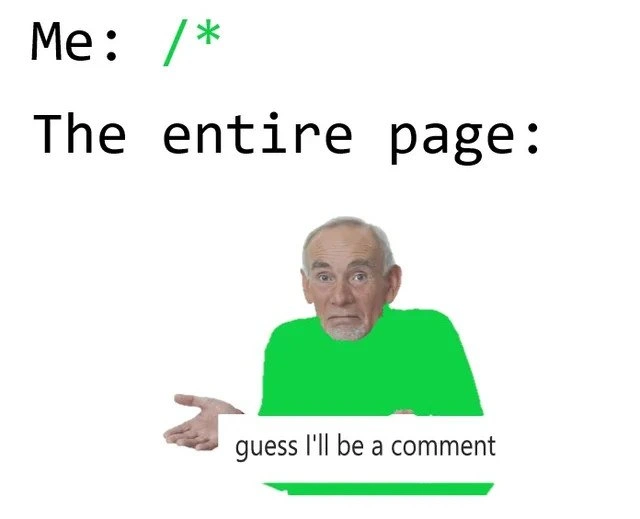
That’s what this meme is joking about, but with computer code. The developer accidentally told the computer, “Hey, start ignoring now,” and forgot to say “you can pay attention again.” So the computer ignored the entire rest of the webpage! The picture shows a man all in green shrugging and saying “guess I’ll be a comment,” which is like the whole page saying “Well, I’m not being heard, so I’ll just sit here quietly.” It’s funny in a silly way: one little mistake (like forgetting to close the secret note in code) made the whole page quiet and empty, and the page jokingly accepts its fate. It’s like putting a big cover over a book and forgetting to take it off, so none of the chapters after that cover can be read – oops!

Level 2: Where’s My */?

Let’s break down exactly what’s happening for newer developers or those less familiar with CSS and code comments. In coding, a comment is a piece of text meant for humans to read, not computers. It’s a way to leave notes or temporarily disable code. In CSS (and in languages like JavaScript), a block comment starts with /* and ends with */. Anything in between is ignored by the computer. For example:

/* This is a CSS comment. 
   It can span multiple lines. */
body {
  background-color: pink;
}

In the above snippet, the browser will ignore the text “This is a CSS comment. It can span multiple lines.” because it’s between /* and */. Only the body background-style will actually run.

Now, what if we forget to close a comment? That’s exactly the scenario in the meme. A stray /* means we typed the start of a comment but never put the closing */. The browser (or parser) then treats everything that comes after /* as part of the comment. Here’s an example:

/* Starting a comment and never closing it...
.navbar {
  color: green;
}
footer {
  display: block;
}

In a typical editor, once you type /* without a matching */, you’ll notice the rest of your file’s text might turn a different color (often green or gray). That’s a visual cue: the editor thinks all the remaining code is still inside a comment. The meme shows exactly that: the text /* is green, and the poor shrugging man is completely tinted green too, implying “yep, everything is commented out now.”

So, from a junior perspective or someone learning: forgetting that */ basically comments out your entire page’s code after that point. If this happens in a CSS file, all the styles that come after will not apply. Your webpage might suddenly lose its styling (everything might revert to default browser styles – text is unstyled, layout breaks). If it happens in a JavaScript file, the script will stop running at the /* and likely throw an error or just fail silently, because the rest of the JS code is seen as one giant comment.

The meme’s caption “guess I’ll be a comment” is a playful way of the page (or code) resigning itself to being non-functional. It’s using a known meme template: an elderly man shrugging as if to say “oh well, nothing I can do” (originally “guess I’ll die” in dark humor when there’s no solution). Here, the whole page shrugs greenly, saying “guess I’ll be a comment (and do nothing).” It’s CodingHumor about a CodingMistakes that is easy to make. The “Me: /*” at the top represents the developer’s action of starting a comment. “The entire page:” on the next line sets up that the consequence is on the whole page. The dev only intended to comment out a small part or was writing a note, but the forgot_to_close_comment error means the browser thinks the rest of the file is one big comment.

This is a common debugging frustration for front-end developers. If you’re new, the takeaway is: always close your comments! If your page suddenly breaks or styles vanish, and you see weird coloring in your code editor or your remaining code grayed out, check if you accidentally /* comment-ed out */ a huge chunk of your file. Modern editors often help by automatically inserting the closing */ when you type /* or by showing a warning. But it’s still an easy mistake when editing fast or commenting out multiple lines manually. We tag this as frontendhumor and bugs because it’s a humorous example of a bug that can stump you until you realize the simple cause.

In real-world troubleshooting, developers learn to spot this by looking at the file in an IDE: if half your code turns green (or whatever color comments are in your theme), that’s the clue, exactly like the meme’s visual. Browser developer tools can also hint at this – for instance, if you inspect your CSS and see that rules after a certain point just don’t appear or an error is flagged, it might mean the CSS didn’t parse past an open comment. It’s a “gotcha” that even seasoned devs sometimes hit, especially when merging code or dealing with large files. The meme captures that “facepalm” moment when you finally find the missing */ and everything goes back to normal. It’s equal parts embarrassing and relieving – and later, funny enough to joke about with fellow coders.

So, remember: /* starts a comment, */ ends it. If the second part is missing, the computer will ignore everything after, effectively commenting out the entire file. The humor here is in just how drastically one missing symbol can break everything, and how a page (or code) might “respond” by humorously saying it’s all just a comment now. For a new developer, it’s a lighthearted lesson: pay attention to syntax details, because something as small as a */ can decide if your code runs or silently sits in the ignore-bin.

Level 3: Block Comment Blackout

In CSS (and many programming languages), a single stray /* without a matching */ is like a tiny syntax time-bomb that can silently knock out your entire page’s styles or scripts. The meme humorously captures this: the developer types /* (colored bright green to mimic code editor comment syntax highlighting), and as a result “the entire page” turns green – meaning the browser treats everything after that point as one giant comment. It’s a classic bugs scenario where a trivial typo causes a massive effect. Experienced developers immediately recognize this as the infamous "unclosed comment" bug that can have you scratching your head in debugging_troubleshooting sessions.

Why is this so relatable? Because everyone from juniors to seniors has battled a mysteriously broken page only to discover a forgotten closing comment symbol. In CSS, the /* ... */ syntax denotes a block comment. Forget the */ and the CSS parser thinks you wanted to comment-out not just one rule but the rest of the file. All your beautiful styles below that stray /* simply won’t apply – the browser effectively says, “Oh, this is all just a note, I’ll ignore it.” The result: your page looks unstyled or elements behave oddly, and you’re pulling your hair out wondering why nothing after a certain point works.

This meme nails the shared frustration. The top text “Me: /”* (with /* in green) represents the innocent action – maybe you started writing a comment or temporarily disabled a snippet of code. But you slipped up by not closing it. The next line “The entire page:” sets up the punchline: Frontend devs know that feeling when the entire page seems to give up. The image of the shrugging old man filled in green is a riff on the famous “guess I’ll die” meme (signaling helpless surrender). Here he’s saying “guess I’ll be a comment” – the page resigned to being one big ignored comment. It’s a perfect metaphor for that moment when you realize one tiny mistake has rendered all your code that follows inert.

From a senior perspective, this joke is funny-’cause-it’s-true. It highlights a classic CodingMistakes scenario: a small oversight in syntax leading to a big DebuggingFrustration. It also pokes at how tools and editors indicate the problem – often by coloring everything green or gray after the unclosed comment. Many of us have had that “aha!” moment when we notice half the file text is green in our IDE, signaling we accidentally commented out a huge block. Until you spot it, an unclosed comment can masquerade as a more complex bug (“Why is all my CSS broken? Is it caching? Is it specificity? Did I push to the wrong environment?”). Nope – it’s just that /* you forgot to finish. In a way, this meme also hints at the importance of good editor practices or linters: modern setups will highlight or warn about an unterminated comment. But if you’re editing raw or the warning slips by, you end up in DebuggingTroubleshooting mode chasing ghosts. Seasoned devs chuckle because they’ve been there – one errant character creating a bugsInSoftware saga. And let’s be honest, it usually happens at the worst time (late Friday deploys, anyone?). The humor has an edge of FrontendHumor pain: something as simple as a comment marker can cascade into a “nothing works and I have no clue why” crisis.

In summary, level 3 appreciates the industry inside-joke: a CSS_comment_mistake like this is both trivial and catastrophic. The meme cleverly uses code-style visuals (monospace text, syntax highlighting green) plus the “shrugging man” meme to dramatize how the whole page figuratively shrugs and becomes inactive. It’s a gentle reminder (with a laugh) that in coding, sometimes the tiniest typos have outsized impacts. Every experienced developer has a war story of losing hours to a missing */ – making this meme painfully and hilariously on-point.

Description

A meme featuring the 'Guess I'll Die' format, where an elderly man with a perplexed, resigned expression shrugs. The top text reads 'Me: /*' with '/*' highlighted in green. Below that, it says 'The entire page:'. The man in the image is wearing a bright green shirt, and a caption below him says 'guess I'll be a comment' with a green underline. This meme humorously illustrates a common coding error where a developer starts a multi-line comment block ('/*') but forgets to close it ('*/'). In many IDEs, this causes the syntax highlighter to render all subsequent code as a single, massive comment, effectively disabling it. The green color is significant as it's the standard color for comments in most development environments, visually reinforcing the joke that the entire page has resigned to its fate as a comment
Comments

7
Anonymous ★ Top Pick The quickest way to refactor a legacy module is to just type '/*' at the top. It's not a bug, it's a feature freeze
  1. Anonymous ★ Top Pick

    The quickest way to refactor a legacy module is to just type '/*' at the top. It's not a bug, it's a feature freeze

  2. Anonymous

    Feature flags are overrated - just leave an unclosed /* in main.css and you’ve got a zero-line dark launch with 100% user opt-out

  3. Anonymous

    The same developer who meticulously documents every function parameter will somehow forget to close a comment block and spend 20 minutes wondering why half the application vanished into the void of interpreted nothingness

  4. Anonymous

    Ah yes, the classic '/* everything is now a comment - or green' moment. Every senior frontend engineer has that muscle memory twitch when they see an asterisk in CSS, knowing it's either about to select the entire DOM tree or accidentally comment out half the stylesheet. It's the web equivalent of `rm -rf /` but with more neon green and fewer career-ending consequences. The real veterans know the pain of debugging this at 2 AM when the client reports 'the website looks like The Matrix threw up on it.'

  5. Anonymous

    The ultimate refactor guarantee: no regressions when nothing executes

  6. Anonymous

    Typed /* in critical CSS and accidentally shipped our most effective feature flag: everything - welcome to comment-driven architecture

  7. Anonymous

    Accidentally shipping a lone /* is the ultimate enterprise kill switch - lexer flips to comment mode, CSS vanishes, and your design system becomes Times New Roman-as-a-Service

Use J and K for navigation