When the Code Works but You Have No Idea What Changed
Why is this Debugging Troubleshooting meme funny?
Level 1: Poof, It's Fixed
Imagine your favorite toy robot suddenly stopped working. You press the buttons over and over, but nothing happens. You get frustrated and call a parent or friend to help. But the moment you show it to them, the robot lights up and starts working perfectly again — as if by magic! Now they ask, "What was wrong with it?" and you just shrug, because honestly, you have no idea. One minute it was broken, the next minute it fixed itself. You’re happy (your toy is running!), but also a little confused because you don't know why it broke or how it got better. This meme is funny for the same reason: in the coding world, sometimes problems just vanish like that toy’s glitch. It leaves everyone scratching their heads, feeling relieved but also laughing at how mysterious it was.
Level 2: Works by Magic
In plain terms, this meme highlights the mystery of a bug that fixes itself. As a developer early in your career, you learn that debugging (finding and fixing errors in code) is usually like detective work. You change one thing at a time, run the code, and see if the issue is resolved. But sometimes, something unexpected happens: the code starts working and you’re not sure what you did to make it happen. It’s as if the problem just vanished by magic.
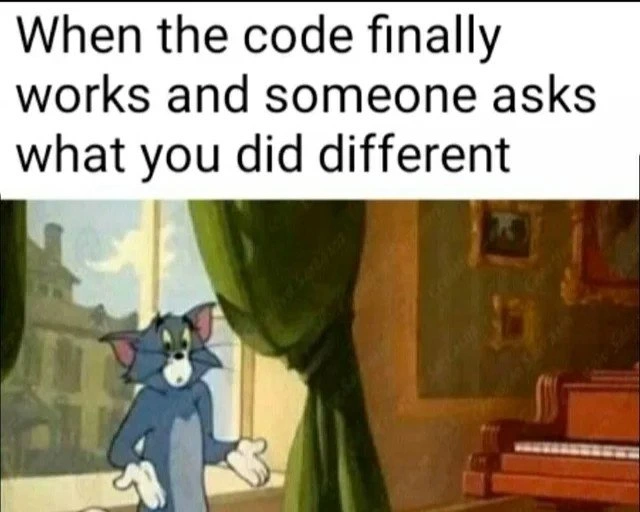
The top caption sets the scene: “When the code finally works and someone asks what you did different.” The picture below shows Tom — the famous cat from the Tom and Jerry cartoons — standing with his arms out and a puzzled look. He’s basically doing the universal "I have no idea" shrug. This is exactly how a programmer feels after an accidental fix. You’re happy your program isn’t crashing anymore, but when your teammate asks “So, what was the issue?” you’re left thinking “I wish I knew!”.
Why would code suddenly work without a clear reason? A few common real-world scenarios:
- Reset effect: You might have restarted the application or your computer as part of troubleshooting. In doing so, you cleared some hidden state or cache. Suddenly everything works, but it’s not because you understood the bug — you just hit a global reset button.
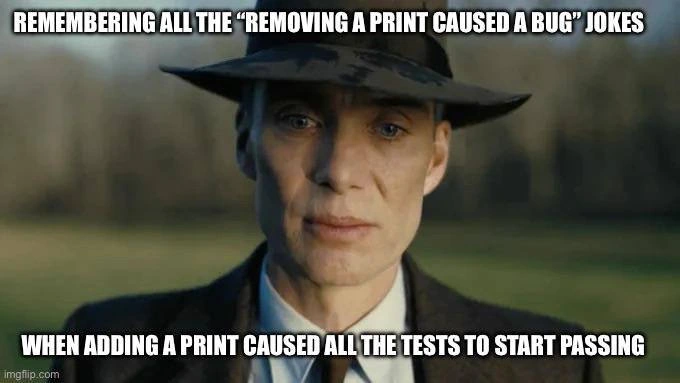
- One tiny change: Perhaps you added a print statement to see some output or tweaked a minor setting. That shouldn’t logically fix the bug... yet after this small change, the error disappeared. It feels confusing because that tweak seemed unrelated.
- Elusive timing: Some issues (especially in complex or multi-step programs) depend on timing. Just running the program again at a different moment or with slightly different data might avoid the problem. You didn’t solve anything permanently; you just got a lucky run.
- External fixes: Occasionally, the bug wasn’t in your code at all. For example, a server your app talks to was down earlier, causing errors, and now it's back up. To you it looks like your code magically started working, but really an outside problem got resolved while you were testing.
For a junior developer, this situation is both relatable and a bit frustrating. You want to learn from bugs, but a bug that disappears doesn't teach you much. It’s also a little funny – you end up telling your team something like, "Umm, I just tried a bunch of things and... it works now." People might chuckle because every programmer has been there. In developer humor, there's even a term "Heisenbug" for a bug that seems to go away when you try to observe or debug it. (It’s named after a physics principle – basically a fancy way to say the bug is sneaky and hides when you're watching.)
The developer experience here is a mix of relief and worry. You’re relieved the issue isn't blocking you anymore. But you also feel uneasy, because not knowing the actual cause means you can’t be sure it won’t come back. It’s like when you fix something by accident – you’re glad it’s working, but you can’t fully celebrate because you’re not sure how long the fix will last.
In the end, the meme is showing a very real moment in debugging. The code works (hooray!), someone asks "what changed?" and you have to shrug and admit you don’t really know (d’oh!). Tom’s confused shrug in the picture says it all: sometimes the magic of computers working right is beyond even the programmer’s understanding, at least for that moment. And while it’s a little embarrassing to confess, it’s definitely a situation every coder finds highly relatable (and kind of funny, once it’s over).
Level 3: Shrug-Driven Development
Teammate: "Cool, it's working now! So what did you change?"
Developer: shrugs helplessly "Honestly... I have no idea."
This meme perfectly encapsulates a rite-of-passage moment in a developer's life: the mystery bugfix. You spend all day (or week) wrestling with a stubborn bug. When the code finally works, someone inevitably asks the post-mortem question — and you're standing there like Tom the cat, palms up, wearing that confused "I dunno" expression. The humor cuts deep because it’s a relatable pain: we've all been that developer with a blank look, realizing we have no clue which change (if any!) actually fixed the problem.
What's going on behind the scenes of this comedic scenario? Often it's the result of shotgun debugging – trying a dozen different things in desperation:
- Tweak some config files, restart the server twice.
- Clear every cache in sight (because why not).
- Change one little line, then change it back.
- Sprinkle a few
console.log()orSystem.out.println()calls for good measure. - Threaten the computer (only half-jokingly) and run the code again.
Finally, something you did (or something external) made the issue disappear. But since you tried so many things at once, you can't pinpoint which action mattered. When your teammate or manager asks "What fixed it?" you're stuck shrugging when asked, just like our friend Tom. It’s the hallmark of shrug-driven development: the code works and we’re relieved, but explaining why is an exercise in creative storytelling (or accepting ignorance).
Seasoned developers know this awkward dance well. In a daily standup or bug review, you might default to a vague answer like, "It turned out to be a caching issue" or "Just a minor tweak." (Translation: I rebooted the whole system and the problem went away, and I’m crossing my fingers it stays gone.) It's a mix of relief and dread – relief that the bug isn't blocking you anymore, and dread that it might come back because you haven't truly debugged the root cause. This is how debugging frustration often manifests: you’re happy the bug is gone but secretly uneasy.
There’s an unspoken developer vulnerability here. Admitting "I don't know what changed" can trigger a bit of imposter syndrome. We pride ourselves on logic and understanding, so a mysterious fix feels like we just got lucky rather than skilled. The meme nails the irony: you did everything and nothing, and somehow that worked.
From an organizational standpoint, this scenario is as classic as it is concerning. No one likes relying on luck in software. If your codebase has a Heisenbug lurking, the whole team gets jittery. QA might joke, "Works on your machine, huh?" The PM might raise an eyebrow, "Will it happen again?" And you're thinking, "I wish I could tell you it won't." The experienced folks know that mysterious fixes are essentially time bombs – issues resolved without clarity have a tendency to resurface, often at the worst time (Friday evening deploy, anyone?).
But in the moment captured by the meme, all you can do is mirror Tom’s resigned shrug. It’s funny because it’s true: sometimes coding feels like appeasing a capricious entity. You poke and prod, and suddenly the gods of code grant you a pass. The piano in Tom’s scene could well be the triumphant code running, and Tom’s baffled stance is every developer trying to explain the unexplainable. It's the ultimate "I guess turning it off and on again worked?" moment, wrapped in a classic cartoon image. All you can do is laugh it off, document whatever little you think might have helped, and move on – hoping you don't have to pull back that curtain again to chase the same bug.
Level 4: Heisenbug Uncertainty
At the deepest technical level, what's happening here is described by the infamous Heisenbug phenomenon. A Heisenbug is a bug so sneaky that it disappears or changes behavior when you try to debug it. The name riffs on the Heisenberg Uncertainty Principle in quantum physics: the very act of observing or measuring a system changes its state. In software, this translates to a scenario where adding a printf or running the code in a debugger miraculously makes the issue vanish.
What could cause such ghostly behavior? Often, it’s rooted in non-deterministic aspects of computing:
- Race conditions in concurrent code: If two threads are supposed to coordinate but don't (e.g. missing locks or proper memory barriers), the program's outcome depends on unpredictable timing. Inserting a log statement or breakpoint can slow one thread down just enough to avoid the collision, making the bug seem to disappear.
- Undefined behavior in low-level code: For example, reading from an uninitialized variable in C/C++ leads to arbitrary results. A trivial code change or different compiler optimization might incidentally alter memory layout (or skip an optimization), so the bug (like a crash or wrong value) doesn't show up after your "fix" — which might have been unrelated.
- Caching and timing side-effects: Modern CPUs and compilers do lots of clever optimizations. A bug might only occur when instructions execute in a particular fast sequence. Adding debugging output or running the program slower can flush caches or change timing enough that the sequence (and the bug) never occurs. Simply pausing a program can clear a backlog and hide a problem.
Under the hood, the system's state has countless moving parts. Memory addresses, CPU scheduling, branch prediction, JIT compilation quirks — all can differ between runs. We've seen cases where enabling debug mode or just recompiling the code makes an issue vanish by pure side-effect. It's equal parts fascinating and frustrating when you're left scratching your head. Veteran engineers, with some dark humor, even joke about cosmic rays flipping a bit in memory as the "cause" of one-in-a-billion glitches. When all logical explanations fail, you start considering anything!
This Heisenbug uncertainty means we sometimes end up saying, "It works now... but I'm not entirely sure why." The code’s behavior isn't 100% repeatable due to these underlying complexities. It's a humbling reminder that beneath our everyday debugging rituals, there's a layer of unpredictability in the machine. And every experienced developer knows that a "fix" you can't explain is one you can’t fully trust – it might just be lurking, waiting to resurface during the next 3 AM on-call incident or right before a big demo.
Description
Top text reads: "When the code finally works and someone asks what you did different" in bold black letters on a white background. Below the caption is a Tom-and-Jerry cartoon frame: Tom the cat stands in front of a large green curtain and a brown upright piano, arms slightly outstretched, palms up, with a confused "I don’t know" expression. Sunlight streams through a tall window showing an indistinct building outside, and warm indoor colors contrast with Tom’s blue-grey fur. The meme visually captures the developer moment when a mysterious, nondeterministic fix makes an elusive bug disappear, leaving the engineer unable to explain the root cause - classic debugging irony familiar to any software team
Comments
7Comment deleted
“Turns out commenting out a debug printf shifted the cache line just enough to make the data race miss - so I’ll file the root cause as ‘quantum alignment’ and call it an architectural pattern.”
The real nightmare isn't that it works - it's knowing you'll have to add "Fixed via cosmic ray bit flip" to the post-mortem deck and watch the VP of Engineering's eye twitch
The most terrifying words in software engineering aren't 'it's broken' - they're 'it works now.' Because when you can't explain what fixed it, you've just inherited a production system held together by quantum uncertainty and the programming equivalent of thoughts and prayers. Welcome to the Heisenbug retirement home, where bugs disappear the moment you try to observe them, and your git history becomes a archaeological dig site of desperate commits titled 'maybe this?' and 'I have no idea why this works.'
Different? Quantum debugging: stop touching it, wait for the cache TTL to expire, let Kubernetes reshuffle pods until the race condition picks a side
Heisenbug therapy: stared at the stack trace until the wavefunction collapsed to 'working'
I added one log line that created a happens-before edge, the race disappeared, and now leadership wants an RCA for my new ‘observability-based synchronization primitive’
One line under comment can be unbelievably timesaving. Comment deleted