The Dystopian Browser Warning: Monetization Over Security
Why is this WebDev meme funny?
Level 1: No Ads? No Entry!
Imagine you go to a free amusement park, and there’s a guard at the gate. You’re excited to get on the rides, but the guard stops you with a serious face. He points to a sign that says, “This park isn’t making any money from you right now.” You’re confused – it’s a free park, after all! The guard then says, “Since we’re not earning anything by letting you in, this is a problem. We have two options: either I can walk around with you and show you commercials while you play, or you should just turn around and go home.”
Sounds ridiculous, right? You just wanted to enjoy the park, and now someone is acting like it’s an error or a danger that no one is getting paid. In real life, that would be laughably absurd. But that’s exactly the feeling this meme is joking about, in an internet way. It’s like the web browser is the guard, the website is the free park, and the “ads and trackers” that make money are the commercials. The browser in the meme is basically saying, “Oops, this website isn’t showing you ads or tracking you – that can’t be right! Either let us put some ads in, or go back.” It’s funny because a browser would never actually do that; it’s making fun of how some websites seem more concerned about making money than letting you just enjoy them. The joke helps us laugh at how crazy it would be if the internet outright refused to work just because nobody made a buck – something so silly a kid can see it’s unfair!
Level 2: No Ads, No Service
This meme might look confusing if you haven’t encountered web advertising tech before, so let’s break down the terminology and context. It’s riffing on the clash between Web Development and online Marketing, especially around Data Privacy issues.
First, AdTech (advertising technology) is the umbrella term for tools and scripts that deliver online ads and track users. A common example is Google AdSense – if a site “supports AdSense,” it means the site displays Google’s ads to earn money. You’ve probably visited blogs or news sites with banners or pop-ups; many of those are coordinated by AdSense or similar ad networks.
Now, what’s a tracking pixel? Despite the name, it’s not literally part of your screen’s pixels turning evil. It’s usually a tiny invisible image or a small piece of code embedded in a webpage that reports back information. For instance, a tracking pixel might tell the site’s owner or a third-party that “User X visited Page Y at time Z.” It often comes from another domain – say, Facebook or Google Analytics – which is why we call it third-party data collection. “Third-party” means an outside company (not the site you’re directly visiting) is collecting data. They do this to build profiles of your behavior or see how effective an ad or campaign was. Ever notice how after looking at a product, you start seeing ads for it everywhere? That’s thanks to tracking pixels and cookies quietly working in the background of sites.
Okay, so what does it mean if a site doesn’t have these? It means the site isn’t actively running code to show ads or send your data to advertisers. From a privacy standpoint, that’s great – less snooping on you. But from a business standpoint, it could mean the site isn’t earning money from your visit. A lot of the “free” content on the internet is paid for by showing you ads or gathering data. That’s why many sites plead with you to disable your AdBlocker (software or browser extensions that block ads and tracking scripts). If you use an ad blocker, you might have seen messages like, “We notice you’re using an ad blocker. Please whitelist our site or subscribe, so we can keep offering content.” In other words, no ads, no service – the site is saying they can’t serve you content unless they can make some money from it, one way or another.
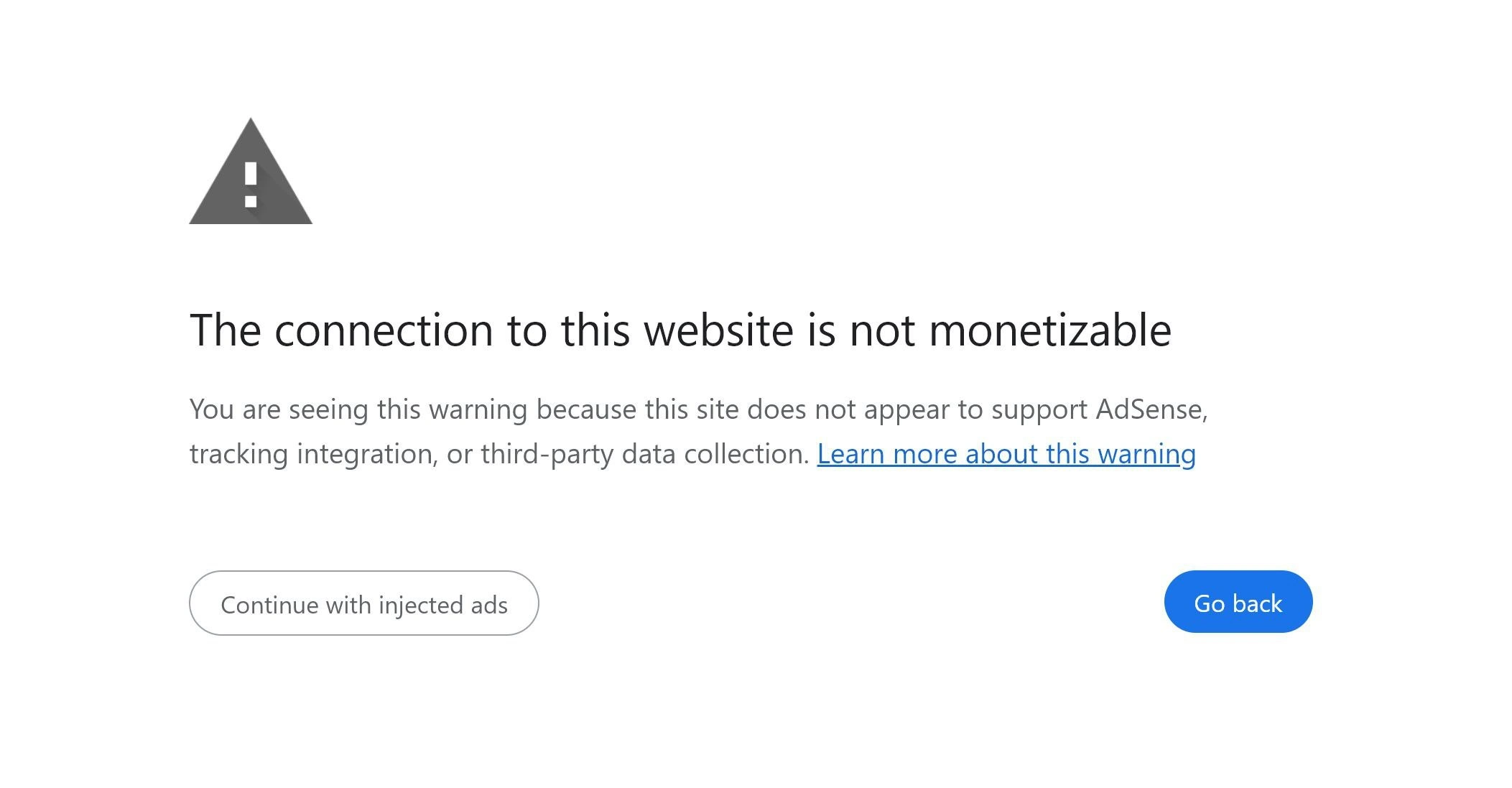
The meme takes this real dynamic and imagines it built into the web browser itself. Normally, a browser like Chrome, Firefox, or Edge will show a big warning page only for serious issues – for example, if a website’s security certificate is invalid or if the site is suspected of malware or phishing. You might recall seeing something like a full-page warning with a bold message, maybe a gray or red icon, and buttons to go back or proceed. Here, the meme uses that exact style but replaces the reason with “not monetizable.” The large text “The connection to this website is not monetizable.” isn’t a real browser message; it’s a made-up one that mimics the tone of a security/error alert. The subtext in the meme says, “This site does not appear to support AdSense, tracking integration, or third-party data collection.” Those are fancy words for “this site isn’t doing ads or tracking.” It’s basically listing the common money-making and data-gathering tools that a modern site might use, and stating none are detected. A real browser would never actually warn you about that – at least, not yet (thankfully!).
Now, check out the buttons shown in the image. The left button says, “Continue with injected ads.” This is a humorous twist. In genuine warnings, that left button might be something like “Proceed anyway” (meaning “yes, I understand the risk, take me to the site regardless”). Here it says “continue, but with injected ads,” as if the browser is helpfully offering: “Hey, this site itself isn’t giving you ads, so I can put some in for you if you like, to resolve the ‘problem’.” Of course, no browser actually does that. It’s poking fun at the idea that the browser is so concerned about the website making money or collecting data that it’s willing to add advertisements to make the site feel “normal.” The right button says “Go back,” which is what you’d see in a real error – it means go back to the previous page (since this site is supposedly not safe… or in this joke, not profitable).
So why is this funny to developers? It’s the exaggeration of a trend they know. Developers build sites, and they often have to include all sorts of ad scripts, analytics, and third-party tags because that’s how the site earns revenue or gathers marketing info. Many devs have experienced situations where, say, the Google Analytics code was accidentally left out, and someone from marketing treats it like an urgent bug: “We’re not collecting user data on page X! Fix it ASAP!” The tracking_pixel_fail scenario is real – maybe an ad network’s script fails to load and your inbox gets an alert because revenue is being lost every minute it’s down. Yet, from a pure technology perspective, the site’s main functionality is fine; it’s just the ads or tracking that failed. It’s an “error” only in terms of dollars and cents, not an error that breaks the user’s ability to read or use the site. This meme takes that idea and ironically elevates it: imagine even the networking protocol and browser treat lack of ads as an official error condition (402 Payment Required). In other words, no ads, no entry.
We also have that code “402” in the title and image, which not everyone knows about. In HTTP (the protocol your browser uses to get pages), status codes like 200, 404, 500, etc., indicate what happened with the request. 404 Not Found means the page wasn’t found; 500 means there was a server error. 402 Payment Required is a real code defined in the spec, but it’s kind of a placeholder – it’s reserved for “some future use” where maybe you’d have to pay to access a resource. In practice, 402 is rarely used on the actual web. It’s almost like an inside joke among web developers: “402 – Payment Required (but nobody uses it).” So the meme’s title about the browser throwing a 402 for missing tracking pixels is tongue-in-cheek: it implies the page won’t load because a “payment” in the form of ad revenue or data wasn’t provided. It’s a smart way to use a real but obscure web concept to get a laugh. For a junior dev or someone new to web stuff, just know 402 is an error code that literally means payment needed, and here it’s being creatively used to say “advertising needed.”
Finally, consider the categories: WebDev, Marketing, DataPrivacy. This is exactly the intersection the meme lives in. Web developers care about making a site work and maybe care about user privacy and performance. Marketing folks care about making money from the site and understanding the users. These goals can clash. Tracking users raises PrivacyConcerns, but it’s standard practice in online marketing. A site with no trackers is better for your privacy, but it might mean no easy revenue stream for the site owners. The meme jokes that the browser (which one might hope is on the user’s side) is instead siding with the advertisers: literally warning you that a site isn’t tracking you. It’s absurd – which is exactly why it’s funny. It helps if you know how a real browser warning looks and have seen how much modern websites depend on ads. If you’re newer to web development, think of it this way: the meme is saying “This website isn’t doing the usual spying-on-you-for-money, and the browser finds that so unusual that it’s treating it like an error.” It’s a sarcastic commentary on the state of the web, but presented in a nerdy, clever format that mixes genuine tech elements (like HTTP 402 codes and UI design) with comedic exaggeration.
Level 3: HTTP 402 – Profit Not Found
This meme takes a playful jab at the modern web’s monetization-first mindset by mimicking a serious browser error. It imagines a world where your browser refuses to load a site because it can’t find any ads or tracking scripts making money off you. The bold warning “The connection to this website is not monetizable” parodies real HTTPS security alerts (like “Your connection is not private”) – except instead of security, it’s complaining the site isn’t generating revenue. The gray triangle with an exclamation mark in the image instantly evokes those tense browser safety warnings, but here it’s a browser UI parody laced with ad-tech jargon. Seasoned web developers can’t help but smirk, because we’ve all seen priorities skewed where missing ads or analytics cause as much alarm as a real outage.
At the heart of the joke is the little-used status code HTTP 402 Payment Required. In the HTTP standard, 402 has always been meant for future “microtransaction” scenarios – a code reserved in case the web started handling payments within HTTP. Decades later, 402 is mostly a historical footnote (you’ll practically never see it in the wild), which makes it ripe for satire. Here it’s as if the browser throws a 402 error because the website isn’t paying somebody (with ad inventory or data). In other words, “Payment Required: no tracking pixel detected!” It’s a clever http_402_payment_required_joke – twisting an unused error code into commentary. The meme suggests that, these days, if no one can exchange your visit for cash or data, some systems might treat it as an error condition.
To any engineer who’s integrated ad scripts, the reference to “missing tracking pixels” hits close to home. A tracking pixel is typically a tiny invisible image or snippet of code that reports your visit and behavior back to an advertising or analytics platform. It’s the backbone of user tracking in AdTech. For example, a marketing team might insist on adding the Facebook Pixel or Google Analytics code to every page to collect user data. If that tracking integration fails – say an ad script is blocked by an AdBlocker or the third-party server is down – the site’s content still works fine, but the business side freaks out. It’s not uncommon in some organizations that a dropped analytics event or a broken ad (adsense_dependency) is treated with the same urgency as a 500 Internal Server Error. The meme exaggerates this mindset: it imagines the browser itself acting like a panicked marketing exec, halting the show because it can’t phone home to the ad network! The line “You are seeing this warning because this site does not appear to support AdSense, tracking integration, or third-party data collection” reads like an IT incident report from a digital marketing team. It satirically implies that a webpage without Google AdSense or surveillance scripts is as disturbing as a webpage with an invalid SSL certificate.
Let’s break down the parody alongside a real browser warning:
| Normal Browser Warning (Security) | Parody Browser Warning (Monetization) |
|---|---|
| Headline: “Your connection is not private.” Meaning: Encryption or trust problem. |
Headline: “The connection to this website is not monetizable.” Meaning: No revenue/tracking detected. |
| Details: Mentions encryption, attackers, or invalid certificate (e.g. “Attackers might be stealing your information”). | Details: Mentions lack of AdSense, no tracking integration, no third-party data collection (essentially “no one is snooping or earning $$ from you”). |
| Action Buttons: “Back to safety” (go back) or “Proceed anyway” (ignore risk). | Action Buttons: “Go back” (since site is not profitable) or “Continue with injected ads” (fix the ‘problem’ by forcefully adding ads). |
By copying the visual style and language of a security error, the meme highlights an uncomfortable truth: some companies value user data and ad revenue as much as users’ security or privacy. The absurd “Continue with injected ads” button is a brilliant touch. In real warnings you might get a button to proceed at your own risk; here, proceeding means the browser will kindly stuff some ads and trackers in for you – because heaven forbid you experience the web without surveillance and monetization! It’s poking fun at how browsers (especially ones backed by big advertising companies) and websites increasingly behave. For instance, Google’s Chrome (built by an ad-funded giant) has proposed changes that could weaken ad blockers. And many websites detect you’re using an ad blocker and display their own version of a not_monetizable_warning – a popup saying “Please disable your ad blocker or subscribe.” The meme just takes that premise to its extreme and injects it into the browser’s core behavior.
Seasoned engineers chuckle (maybe a bit ruefully) because the humor is too real. We’ve dealt with bug reports or emergency pages where everything on the site worked – except the ad impressions or tracking pixels. Suddenly, that’s treated as a top-priority bug. It’s a running joke in development circles that sometimes it feels like “if it’s not tracked, it didn’t happen.” Here, if it’s not monetized, it’s “not allowed.” The meme captures the friction between WebDev ideals (deliver content, serve the user) and Marketing demands (maximize data and profit). It’s essentially describing a profit-driven 404, a “Profit Not Found” error. And as dark as the humor is, it reflects genuine PrivacyConcerns – the fact that a site free of trackers is so out of the ordinary that our (fictional) browser thinks something must be wrong.
Why is this funny? Because it flips the script: instead of browsers protecting users from dangerous sites, it imagines them protecting companies from “unprofitable” users. It’s a sharp satire of the ad-driven internet economy. Anyone who’s ever groaned at a bloated page full of ads or shaken their head at a meeting where revenue was prioritized over user experience will appreciate the joke. In short, the meme uses an absurd browser_ui_parody to voice a real gripe: the web’s supposed to be about information and freedom, not just an endless opportunity to cash in on every click – but lately, it’s hard to tell where the open web ends and the ad machine begins. The next time a tracking_pixel_fail incident gets treated as a site outage, remember this meme and have a good laugh (or cry).
Description
A screenshot of a fake browser warning page. The page has a clean, white background. At the top, there is a grey triangular warning symbol with an exclamation mark inside. The main heading in large black text reads, 'The connection to this website is not monetizable'. Below this, a smaller paragraph explains: 'You are seeing this warning because this site does not appear to support AdSense, tracking integration, or third-party data collection. Learn more about this warning'. At the bottom, there are two buttons: a outlined, greyish button on the left says 'Continue with injected ads', and a solid blue button on the right says 'Go back'. This meme is a sharp satire of the modern web's priorities, parodying standard browser security warnings (like HTTPS errors). Instead of alerting the user to a security risk, this fake warning flags the site's lack of monetization features. The humor, especially for senior developers, comes from its cynical and uncomfortably plausible take on how browsers and the ad-tech industry could evolve, prioritizing revenue generation over user privacy and experience. The punchline 'Continue with injected ads' suggests a dystopian future where the browser itself forces ads onto non-commercial sites

Comments
28Comment deleted
My browser now has two modes: 'Your connection is not private,' which is a security issue, and 'Your connection is not monetizable,' which is apparently an existential crisis for the entire ad-tech industry
Guess we’ve finally implemented RFC-irony: abort the TLS handshake if the CPM header is null
We've gone from "This site uses cookies" to "Warning: You're not being tracked" - the only industry where user privacy is treated as a critical infrastructure failure
A brilliant inversion of Chrome's 'connection not secure' warnings - instead of protecting users from security threats, this satirical dialog 'protects' ad networks from privacy-respecting websites. The 'Continue with injected ads' button is chef's kiss: it perfectly captures how the modern web treats user consent as a speed bump rather than a boundary. For architects who've wrestled with GDPR compliance and ad tech integration, this hits differently - it's the dystopian future where browsers warn you about sites that *don't* harvest your data, because apparently respecting privacy is now the exceptional case requiring user acknowledgment
AdSense: Because your pristine no-tracker SPA deserves a SQL-injection-style ad embed anyway
New browser workflow: TLS handshake, then an LTV handshake. When CSP denies the injected ads, it’s logged as a Sev‑1 because the revenue SLO breached
Security by marketing: when CSP blocks trackers, raise a cert‑error interstitial - HTTP Strict Tracking Security enabled
Don't give them ideas, please Comment deleted
where i can find list of such websites.. Comment deleted
I hope all google employes will die from cancer Comment deleted
Not all Google employees, but whoever takes care of data usage Comment deleted
just use any non-chromium browser Comment deleted
>Google sales gonna go down >they rollback Comment deleted
I doubt most people even know that most browsers are based on chromium Comment deleted
otherwise all the chromium-based browsers wouldn't claim they're an "alternative for chrome" Comment deleted
nah, you will find chinese apps like "Ad free browser free" Comment deleted
(which has even more ads because devs are greedier than google) Comment deleted
Already using firefox and lineageOs Comment deleted
lineage is android too Comment deleted
I use waterfox and librefox Comment deleted
> Any non-chromium browser > Is backed by Google and acts as the best interests of Google Firefox cough* cough* Comment deleted
Burn it all to the fucking ground Comment deleted
they should say compliant instead of monetizable 😁 Comment deleted
PoV: you are using Brave I'm not even joking: https://github.com/lobsters/lobsters-ansible/issues/45 Comment deleted
This looks like what my mobile Carrier tends to send me Comment deleted
@RiedleroD Comment deleted
is the bot ok? Comment deleted
😂😂😂 Comment deleted