Web Dev's Kilobytes vs. Game Dev's Gigabytes
Why is this GameDev meme funny?
Level 1: Carry-On vs Moving Truck
Imagine you have two friends packing for a trip. One friend has a tiny carry-on suitcase. They carefully decide what to bring, leaving behind even small things because they want their bag to be super light. They’re happy that their bag is, say, 5 grams lighter after removing an extra pair of socks. Now your other friend shows up for the same trip with a giant moving truck. 🚚 They’ve thrown everything they own into it – clothes they don’t wear, toys they don’t play with, even trash that they forgot to remove. The truck is overflowing and weighs a ton, but they don’t seem to mind. In this story, the first friend is like a web developer, celebrating that tiny 30 KB saving (those socks they left behind), and the second friend is like a game developer, delivering an enormous 110 GB package (the overstuffed moving truck) without worrying about the unused junk inside. It’s funny because normally you’d expect everyone to pack efficiently for a trip – but here we see one person over-optimizing every little thing, and another person not bothering to optimize at all. The contrast is so extreme that you can’t help but laugh: it’s like using a teaspoon to measure sugar for one friend, versus dumping the whole bag of sugar in for the other!
Level 2: Lean Pages vs Loaded Games
If you’re a newer developer, this meme is contrasting how web developers and game developers think about file sizes and downloads. On the web side, developers worry a lot about how small their websites are (in terms of data). A difference of 30 KB (which is 30 kilobytes, or about 30,000 characters of text) in a website’s homepage can be a big deal. Why? Imagine you’re on your phone with a slow connection: a smaller website means it appears on your screen faster. Web developers use tricks like code splitting – which means breaking up their JavaScript code into smaller pieces and only loading each piece when necessary. By doing this, the first page load can skip downloading things the user doesn’t need right away. For example, if a site has a fancy interactive map feature that’s 30 KB of code, they might keep it in a separate file and only load it when the user scrolls to the map. This makes the initial visit to the homepage quicker. Tools like Webpack help with this by bundling code smartly. Frontend folks also remove unused code (imagine cleaning out any functions or libraries you ended up not using – that’s called tree shaking). All these methods reduce the bundle size (the total KB of all the files the browser has to download initially). It’s a point of pride to get a website to load as fast and light as possible; entire job roles (web performance engineers) exist to shave off those kilobytes and milliseconds. You might have heard of performance budgets or seen waterfall charts in Chrome DevTools – it’s all about keeping sites lean and efficient.
Now compare that to game development. If you’ve ever installed or updated a video game, you’ve probably seen those huge file sizes: dozens of gigabytes. 1 GB (gigabyte) is 1,000 MB (megabytes), and 1 MB is 1,000 KB (kilobytes), roughly speaking. So 110 GB is ridiculously large – that’s 110,000 MB, or about 110,000,000 KB. In other words, the game patch mentioned is literally millions of times larger than the 30 KB the web dev was fussing about! Game developers in 2020 were known to push out massive updates. For instance, a patch might be so big because it includes new levels, high-resolution cinematics, voice-over files, and sometimes data that isn’t even used anymore. It’s like they copied the whole game and more into the update. Why would they do that? Often, it’s just easier from a development standpoint: making a smaller patch that only includes exactly the changed pieces can be complicated. It requires careful tracking of every asset and sometimes creating a special “delta” (difference) update. Instead, many studios just package a lot of content together and ship it out in one go, to make sure all players have the same files. They might not notice a few unused assets sneaking in, or they don’t have time to clean up – the result is update_bloat.
This is funny because it’s so relatable to developers and gamers alike. As a junior web developer, you might have been taught to always optimize and avoid unnecessary files. Maybe you’ve minified your JavaScript (making the file smaller by removing spaces/shortening names), compressed images, or split a big code file into smaller chunks. You might have felt proud seeing your site load faster or a Lighthouse performance score go up after cutting 30 KB of unneeded code. Meanwhile, as a gamer (or just someone installing software), you’ve probably groaned seeing a “Update: 50 GB download required” notification, wondering why it’s so huge. Perhaps you or a friend had to clear disk space because a single game kept growing to 100+ GB with each patch. It’s a stark difference: web devs worry about kilobytes, game devs operate in gigabytes. The meme jokes about this contrast in priorities.
We also see how context matters. Websites are accessed by potentially millions of users, many on slow networks or limited data plans. If a site is too heavy, people might leave (or “bounce”) because it’s taking too long. So every kilobyte matters for WebDevelopment user experience. On the flip side, when someone buys or downloads a game, they usually expect that a big download is coming. Games today have high-fidelity art, huge worlds, and lots of audio, so tens of gigabytes are normal. Game companies assume players are willing to wait longer and use up more bandwidth once, in order to get the full rich game content. Plus, games often come with their own installer or use platforms like Steam, which handle large files more robustly than a web browser would. Still, even within game circles, a 110 GB download including junk files is seen as overkill. It can feel like inefficiency or laziness – like the developers didn’t bother to trim the fat. That’s why this tweet hits home: it playfully calls out how one group of developers is super careful about waste, while the other group seems almost carefree about it.
To put it simply, web devs are on a “diet” (keeping things lean), and game devs are at an “all-you-can-eat buffet” when it comes to data. Neither is inherently wrong – they just have very different constraints and habits. As a newcomer in tech, it’s useful to understand these perspectives. It explains why your web mentor gets anxious about a 50 KB image, and also why your new game download is 100 GB. They live in different worlds of optimization. And that contrast makes for great developer humor on Twitter and forums – it’s a shared chuckle about how crazy our industry can be.
Level 3: Shaving Bytes vs Shipping Bulk
In the world of WebDev and GameDev, this meme highlights a comical performance paradox that senior developers know all too well. On the Frontend side, engineers obsess over every single byte — employing techniques like code splitting and aggressive bundling optimizations to shrink their JavaScript bundle_size by even 30 KB. Why? Because for a high-traffic website, saving 30 KB on the initial page load can meaningfully improve WebPerformanceMetrics (think faster Time to Interactive and happier users on slow mobile networks). Frontend teams treat each kilobyte as sacred; they’ll refactor code, eliminate unused functions (thanks to tree shaking in tools like webpack_bundling), and split code into chunks that load on demand. All this effort just to trim the fat off their pages. It’s not unusual to see a multi-hour sprint planning discussion about whether lazy-loading a module could shave 0.1 seconds off load time – that’s the level of FrontendPainPoints we’re dealing with here.
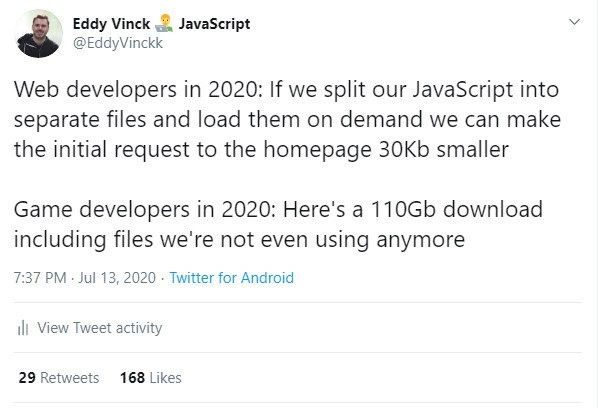
On the other side, we have GameDevelopment in 2020 – a realm where patch files can be monstrously large. Game developers often ship updates or releases that are 110 GB (gigabytes) or more, sometimes including stale or unused assets that aren’t even needed anymore (classic asset_bloat!). It’s a running joke in the industry (and a real PerformanceIssue for players) that a game patch might casually include high-resolution textures, audio files in 20 languages, or entire level files that the game no longer uses. From a seasoned developer perspective, this feels like the polar opposite of web practices: instead of trimming, they’re tossing everything in. The meme underscores this absurd contrast: web devs meticulously remove 30 KB of JavaScript to optimize a site, while game devs might release a patch bloated with 110 GB of data, potentially including files we’re not even using anymore. The humor lands because anyone who’s waited for a gargantuan game update (and watched their drive fill up with redundant files) can relate to the insanity.
There are real technical reasons behind this contrast. Websites live and die by initial load speed and bandwidth constraints: a smaller homepage footprint means faster render on first visit, lower download_sizes for users (important on mobile data), and even better SEO rankings. The entire JavaScript ecosystem has evolved to emphasize efficiency — frameworks support lazy loading, and bundlers enforce size budgets. In fact, tools like Webpack or Rollup perform sophisticated static analysis to exclude unused code and support dynamic import() calls so that rarely-used components don’t burden the initial page. For example, a front-end dev might write code like:
// Web developer splits code to reduce initial load
import('./extraFeatures').then(module => {
module.init(); // Only loads this chunk when needed
});
This way, extraFeatures.js (say, 30 KB of optional functionality) isn’t part of the main bundle – it’s pulled in only if and when the user actually needs it. The result? A leaner initial bundle, maybe the homepage JS goes from 300 KB down to 270 KB. That’s a big win in web land, where every kilobyte and millisecond counts. Frontend devs will celebrate a 30 KB saving like they cured world hunger, because on a slow 3G connection that could shave significant time off loading. It’s almost an art of minimalism: serving just what you need at first, then progressively loading more.
Contrast this with game development practices. Modern games often use huge compressed archives or packfiles for assets (textures, models, audio). Updating one small piece of that archive can require re-shipping the whole thing if the patching system isn’t granular. Add to that a typical release cycle: tight deadlines mean game devs focus on gameplay and graphics optimizations, often sidelining the cleanup of unused content. The result? Massive game_patch_size and dreaded update_bloat. It’s not that game developers love wasting space – it’s often a pragmatic choice or a limitation of their tools. If removing unused files or implementing delta patching would delay the release, management might shrug and say “Ship the whole 110 GB, we’ll fix it later (maybe).” And so players end up downloading an everything-and-the-kitchen-sink update. Here’s a tongue-in-cheek pseudo-view of how patch release might as well be handled:
// Game developer's patch packaging pseudo-code
const allFiles = gatherAllFiles('./GameAssets'); // grabs even old, unused files
packagePatch(allFiles, { version: 'v2.0' }); // creates one giant patch file
releasePatch('Game_Update_v2.0.zip'); // 110 GB, sorry not sorry
This is obviously exaggerated pseudo-code, but it reflects reality: game patches often scoop up entire directories. Patch_management_headaches are real – figuring out intricate diffs for a million files is hard, so sometimes it’s deemed simpler to bundle everything. Experienced devs will also recall the disk_space_requirements nightmares: some gamers have had to delete other games because a single update grew so large! The meme’s humor taps into these shared experiences: the web engineer’s pride (and pain) in micro-optimizing versus the game engineer’s resigned acceptance that “large downloads happen.”
From a systems perspective, it’s a classic resource_optimization_tradeoff. Web apps optimize network usage and initial load time above all, because they operate in an environment of transient user attention and slow networks. In the browser, every kilobyte and HTTP request matters; users will bounce if a page is sluggish. In contrast, games (especially AAA titles) assume a one-time heavy download in exchange for rich content and offline performance. Gamers will wait hours to play a new release or patch, so studios prioritize runtime performance (smooth 60+ FPS gameplay, high-resolution art) over download size. If pushing ultra HD textures means a bigger download, so be it. And if some unused files tag along because the build pipeline wasn’t tidy — well, it might not impact the gameplay, so it’s tolerated. Veteran developers see the irony: the web world treats a 30 KB savings as a huge victory, while the game world can toss around 5 GB of junk without blinking. No wonder this tweet resonated — it’s poking fun at how different our priorities can be in tech, even when both camps talk about “performance.”
Description
A screenshot of a tweet from Eddy Vinck (@EddyVinckk) on a light-themed Twitter interface. The tweet presents a humorous contrast between two software development disciplines in 2020. The first part reads: "Web developers in 2020: If we split our JavaScript into separate files and load them on demand we can make the initial request to the homepage 30Kb smaller". The second part follows: "Game developers in 2020: Here's a 110Gb download including files we're not even using anymore". This meme highlights the vastly different constraints and priorities between web and game development. Web developers obsess over performance and minimizing bundle sizes for faster load times, celebrating kilobyte-level savings. In contrast, the game development industry, driven by high-fidelity graphics and massive amounts of content, often ships enormous game clients, sometimes with significant bloat. The humor resonates with senior engineers who understand these differing engineering cultures, where one side's major victory is a rounding error to the other
Comments
7Comment deleted
The web dev spends a week shaving 30Kb off the bundle. The game dev accidentally commits a 30Gb uncompressed texture. Both get a 'good job' from their manager
Web CI: “❌ Bundle grew 34 KB, fix before merge.” Game CI: “✔ Artist nudged one pixel, Unreal repacked the 110 GB .pak; delta patch is only 109.8 GB - ship it.”
Meanwhile, enterprise developers are still arguing whether that 30kb reduction justifies the 3-month refactoring sprint, while their Java monolith quietly consumes 8GB of heap just to serve a login page
Ah yes, the eternal dichotomy: web devs agonizing over tree-shaking 3KB from their bundle while game devs ship a 110GB 'patch' that includes three deprecated texture atlases, two unused game engines, and the entire development team's Spotify playlists. One group treats bytes like they're rationing during wartime; the other acts like storage is infinite and bandwidth grows on trees. Meanwhile, both are technically correct about their constraints - web devs face the tyranny of mobile networks and Core Web Vitals, while game devs know players will wait 8 hours for a download if it means better graphics. It's the classic 'measure twice, cut once' versus 'ship everything, let the player's SSD sort it out' philosophy
Frontend agonizes over tree-shaking 30KB; game pipelines ship 110GB because the delta updater is just rsync with --delete=false - TTFB vs time-to-buy-more NVMe
Web devs herald 30KB tree-shaking wins like micro-optimizations in prod; game devs just ship the entire asset forest - priorities shift when your perf bottleneck is the user's ISP
We spent two sprints on tree‑shaking and dynamic imports to save 30 KB; meanwhile a “minor patch” rebuilds the manifest so Steam redownloads 110 GB - delta patching is an architecture decision, not a gzip level