Skip to content
DevMeme
1671 of 7435
Client Wants a WordPress Site, AWS Engineer Deploys an Enterprise Cloud
AWS Post #1867, on Aug 6, 2020 in TG

Client Wants a WordPress Site, AWS Engineer Deploys an Enterprise Cloud

Why is this AWS meme funny?

Level 1: Building a Rocket for a Bike Ride

Imagine you ask a handyman to build you a small tool shed in your backyard, just enough to store a lawnmower. The next day he shows up with blueprints for a multi-room concrete bunker with security cameras, backup generators, and a helipad on the roof! That’s what’s happening in this joke. The client wanted something simple – like a basic little house (the WordPress site) – but the engineer built a gigantic fortress (the complicated AWS setup). It’s like using a rocket ship to deliver a pizza. Sure, it will definitely get the job done, but it’s way more than necessary. This makes us laugh because the engineer went totally overboard, doing much more than what was asked. The feelings at play are exaggerated enthusiasm on the engineer’s side (they pulled out all the high-tech stops), and surprise on the client’s side (“I just needed something simple, and you built this?”). It’s a funny reminder that just because you can build something super fancy, doesn’t mean you always should – especially when all you needed was a straightforward solution.

Level 2: Not-So-Simple Setup

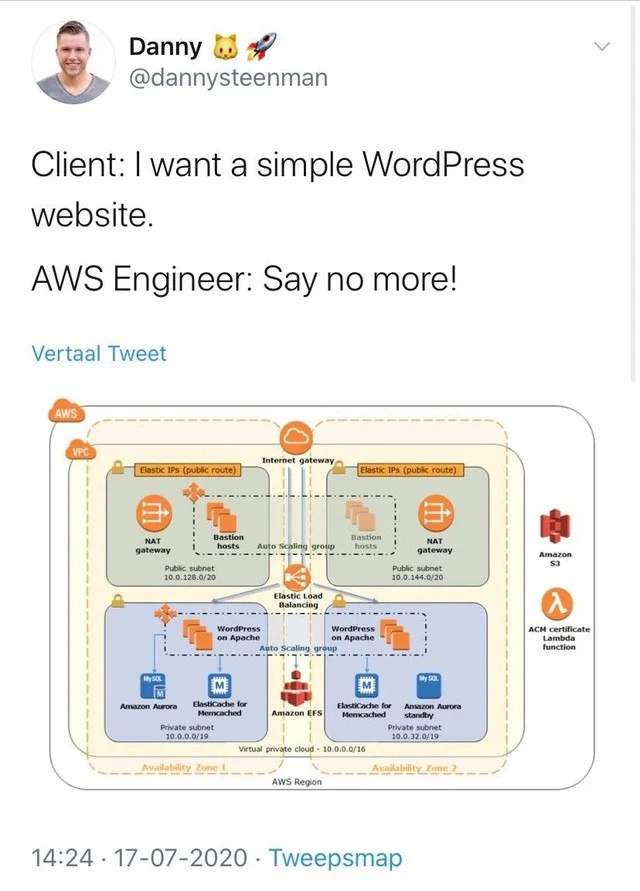
If you’re newer to AWS or web infrastructure, let’s break down what’s going on in that crazy diagram. The client just wanted a WordPress site – WordPress is a popular CMS (Content Management System) for building websites and blogs. Normally, you might run WordPress on one server: a single computer that serves the web pages and also runs a MySQL database to store the content. It can be as simple as launching one EC2 instance (Elastic Compute Cloud virtual machine) with a standard LAMP stack (Linux, Apache, MySQL, PHP) and calling it a day. But our AWS engineer went all-out and set up a whole cloud environment with many moving parts, almost like it was a big corporate application. Here’s what that entails in plainer terms:

  • Virtual Private Cloud (VPC): Think of this as your own private network inside AWS. It’s like a fenced-off area where you control who and what can get in or out. In the meme’s diagram, the entire rectangle labeled “VPC” is that private network for the WordPress project.
  • Availability Zones (AZs): These are distinct data centers (or groups of servers) within an AWS Region. By using two AZs, the engineer is making sure the site keeps running even if one data center has an issue. It’s a bit like having two separate power grids for redundancy. Each AZ in the diagram has a copy of the setup.
  • Public vs. Private Subnets: Inside the VPC, they separated resources into sub-networks. Public subnets are connected to the internet (through an Internet Gateway, the little cloud icon). Private subnets are isolated from direct internet access for security. In the picture, the upper green boxes are public subnets (one per AZ) and the lower blue boxes are private subnets. The WordPress servers live in the private subnets so they aren’t directly exposed to the wild internet.

Now, because the WordPress instances are in private subnets (no direct internet), how do they get software updates or let admins access them? The engineer included a couple of things for that:

  • NAT Gateway: This is a managed service that lets servers in a private subnet initiate outbound connections to the internet. Imagine the WordPress server needs to download a plugin or security update – it can send that request out through the NAT gateway. The NAT device has a public IP and acts as a middleman, so the servers themselves remain hidden. AWS charges for NAT Gateway usage (data transfer fees), which is why people joke about it – if you’re not careful, it can quietly rack up costs. In the diagram, each public subnet has a NAT gateway (one per AZ) labeled with an icon and “Elastic IPs (public route)”. Those Elastic IPs are static public addresses for the NATs.
  • Bastion Hosts: These are like secure entry doors for the engineers. A bastion host is just an EC2 instance (often a small one running Linux) that sits in the public subnet. To do maintenance on the WordPress servers (which are in private subnets), an admin would first connect (via SSH) to the bastion host. From that bastion, they can then reach into the private network to, say, log into the WordPress server. This way, the private servers don’t accept any direct connections except from the trusted bastion. It’s an extra layer of security – only the bastion is exposed to the internet (typically locked down to certain IPs).

Next up, the actual WordPress application tier:

  • EC2 Auto Scaling Group: Instead of one server, there’s a group of servers set to auto-scale. That means AWS can automatically launch or terminate instances based on traffic or load. If the site suddenly becomes popular, the Auto Scaling group can spin up additional WordPress servers to handle it. When traffic dies down, it can remove unnecessary ones. In the diagram, you see two WordPress on Apache icons (one in each AZ) under an “Auto Scaling group” label – that implies it can grow beyond those two as needed. For a small site, auto-scaling might never actually trigger, but it’s configured just in case.
  • Elastic Load Balancer (ELB): This is a service that sits in front of the WordPress servers and distributes incoming requests (people visiting the site) across all available servers. It’s like a traffic cop ensuring no single server gets overwhelmed and that if one server is down, the others still get the traffic. In our setup, the ELB is shown in the middle connecting to both WordPress instances. So when someone visits the website, the request goes to the load balancer first, and then the ELB forwards it to one of the WordPress servers. The user doesn’t know or care which server serves the page – and if one server fails, the load balancer automatically stops sending traffic to it.

Now storage and database – the persistent parts of WordPress (because you want your posts and data to stay around and be consistent across all those servers):

  • Amazon RDS (Aurora MySQL): Instead of installing MySQL on the WordPress server, the engineer used Amazon RDS, which is a managed database service. Specifically, they chose Amazon Aurora, which is Amazon’s cloud-optimized version of MySQL. Aurora automatically handles replication of your database to make it fault-tolerant. In the diagram, Amazon Aurora is shown with a primary instance in one AZ and a secondary (standby) in the other AZ. This means if the primary database goes down (or that AZ has an outage), the standby can take over so the site can keep running. This is great for reliability – your data is safely stored and replicated – but of course it’s more complex than a single local database. For a beginner, think of it like having two synchronized copies of the database in two locations, managed by AWS so they stay in sync.
  • Amazon ElastiCache (Memcached): ElastiCache is a service that provides in-memory caching. They used the Memcached engine (one of the popular caching servers). In plain terms, this means they set up a cache cluster to store frequently accessed data in RAM (memory) for quick retrieval. WordPress can use a cache like this to store results of common database queries or rendered pages, so it doesn’t need to hit the database every time. It makes the site faster, especially under load. In the architecture, having a cache is a typical performance tuning step. But seeing a dedicated cache service for a “simple site” is part of why this is funny – it’s really thorough.
  • Amazon EFS (Elastic File System): EFS is basically a shared network drive that many servers can access at once. WordPress needs this if you have multiple servers because by default WordPress stores uploaded files (images, etc.) on the local disk. With two or more WordPress servers, you want a centralized place for those files so that all servers show the same content. EFS provides that by letting all the WordPress instances mount the same file storage. It’s like having a shared folder in the cloud that all your web servers can read/write to. In the diagram, EFS is depicted at the bottom center, connected to both WordPress nodes. It ensures, for example, if you upload a new image or plugin via WordPress admin, it doesn’t just save on one server’s disk (which would be invisible to the others) but goes to this network storage that everyone uses.
  • Amazon S3: S3 stands for Simple Storage Service. It’s object storage for things like files, images, backups, etc. The meme shows S3 on the side, which likely means they might use S3 to store media assets (some setups offload WordPress media to S3 for scalability) or backup the database/site regularly to S3. S3 is extremely durable storage (your stuff is redundantly stored across multiple systems). For our purposes, S3 could be where nightly backups of the site go, or where the WordPress media library is kept and served (via a plugin, perhaps). It’s not uncommon to use S3 so that serving images or downloads doesn’t burden the web servers.

Finally, security and extras:

  • ACM (AWS Certificate Manager) and Lambda: AWS Certificate Manager is a service to provision and manage SSL/TLS certificates (those are what enable HTTPS, the secure lock icon in your browser’s address bar). The diagram references an ACM certificate and a Lambda function. Likely, the Lambda function automates the process of renewing the certificate or validating domain ownership for it. Basically, instead of someone manually updating the site’s HTTPS certificate every year, the Lambda (a small piece of code running on AWS) will ensure the certificate from ACM stays up-to-date. This is a pretty advanced detail to include – it shows the engineer even thought of automating certificate management for this “simple” site. In simpler terms: they made sure the site will always have a valid security certificate without any manual steps, which is something large sites automate.

Whew! That’s a lot of AWS components. To put it in perspective, a junior developer or someone new to cloud might normally just have one server and maybe a backup. Here we have multiple servers, multiple availability zones, and specialized services for database, caching, storage, and security. It’s essentially how you’d design a highly available, scalable web application in AWS. The funny part is applying all these heavyweight design patterns to a tiny project. If you’re a newcomer, imagine your first WordPress blog: you might have simply used a shared hosting service or one EC2 instance with everything on it. That’s totally fine for low traffic. But as you learn more about AWS, you discover tools like load balancers, auto-scaling, and managed databases, and it’s exciting to use them. In fact, early-career devs sometimes do over-engineer their pet projects as a learning exercise or just to feel “professional.” It’s like learning about a bunch of power tools and then trying to use them all on one simple woodworking job. So this meme’s scenario is the extreme version of that: the engineer treats a basic WordPress site as if it’s Amazon.com on Black Friday. It’s educational to see how each piece works – and we’ve described them – but it’s also amusing because, realistically, you wouldn’t need all that for a little blog. The client probably expected a quick, simple setup, while the engineer delivered a full-blown production-grade architecture. For a junior dev, the takeaway is understanding what each of these AWS services does, and also learning that sometimes the simplest solution is best. Over-engineering (adding unnecessary complexity) can be a pitfall in real projects. This meme playfully reminds us to match the solution to the actual requirements.

Level 3: Hello World, Enterprise Edition

At first glance, this meme shows an AWS cloud architecture diagram that looks ready to handle a mission-critical enterprise application – yet it’s supposedly for a “simple WordPress website.” The humor hits experienced developers immediately: it’s a classic case of OverEngineering in the cloud. The client just wanted a basic blog or CMS, something you could run on a single server, but the AWS engineer heard “simple website” and went full enterprise stack. We’re talking multi-AZ (multi-Availability Zone) redundancy, auto-scaling groups, load balancers, dedicated database clusters – the whole nine yards. It’s the kind of CloudArchitectureDesign you’d see in an AWS whitepaper or a reference architecture diagram, complete with those orange service icons and dotted boxes. In other words, the engineer built an entire production-grade fortress for what was likely a low-traffic site. This is cloud humor at its finest: the client_vs_engineer mismatch where the techie goes overboard.

Look closely at that VPC diagram – it’s practically a data-center-in-a-box. We have a Virtual Private Cloud (VPC) spanning two Availability Zones (think of AZs as separate physical data centers). Each AZ has its own public and private subnets. In the public subnets, there are NAT gateways and bastion hosts. The NAT gateways allow outgoing internet access from the private subnets (so the WordPress servers can fetch updates), at the cost of those infamous nat_gateway_fees_joke that make AWS billing spreadsheets so spicy. The bastion hosts are jump servers that admins use to SSH into the private network – very “enterprise for simple site” energy here, adding extra security layers even for a humble blog. All inbound web traffic is funneled through an Elastic Load Balancing layer (an ELB in AWS terms) that distributes requests across multiple WordPress application servers. Yes, multiple – because our overzealous AWS engineer put WordPress on an Auto Scaling group of EC2 instances (virtual machines), one per AZ, so it can handle the Slashdot front-page effect just in case. The WordPress instances are essentially clones running Apache+PHP, ready to spin up or down with load. It’s a standard web tier design pattern taken to 11 – two AZ setup for blog and all.

Behind the scenes, the data persistence is equally overbuilt. Instead of a simple MySQL on the same box as WordPress, there’s Amazon Aurora (MySQL) via Amazon RDS acting as the managed database. Aurora is a high-performance, replicated database system: here likely one writer node in AZ1 and a standby reader node in AZ2 for failover. This provides high availability — which is great for critical apps — but for a personal WordPress site it’s like using a sledgehammer to crack a nut. The engineer even threw in ElastiCache for Memcached clusters in each AZ (labeled in the diagram) to cache objects and queries, accelerating WordPress page loads by storing frequently-used data in memory. Caching is a solid performance strategy, but seeing an elasticache_for_homepage setup for a basic site is part of the joke. It’s the “aws_reference_architecture_overuse” syndrome: deploying every AWS component you’ve read about, whether you need it or not. And let’s not forget Amazon EFS (Elastic File System) mounted to all WordPress instances – which means all servers share the same file storage for uploads and plugins. That avoids inconsistency between servers, but also adds the complexity of a network file system. Plus, there’s likely an Amazon S3 bucket somewhere in this mix (the diagram shows S3 at the side) for storing media assets or backups, because why not use another service if you can? To top it off, they even automated SSL certificate provisioning: see the ACM certificate Lambda function on the right. That Lambda probably handles renewing a TLS certificate via AWS Certificate Manager so the site stays HTTPS-secure without manual intervention. In short, every layer of this system is handled by a dedicated AWS service or component, following best practices for a large-scale production system.

So why is this funny to seasoned devs and cloud architects? It’s the ridiculous hidden complexity behind what should be a trivial project. We recognize the architecture: it’s something an AWS Solutions Architect might design for a high-traffic enterprise web application with strict uptime requirements. But applied to a “simple WordPress website,” it’s total overkill – a textbook example of wordpress_overkill_architecture. It reminds us of times when engineers (maybe ourselves included) got carried away applying design patterns and cloud best practices to a problem that didn’t truly need them. The meme exaggerates reality, but not by much – some cloud enthusiasts really do deploy personal blogs across multi-AZ clusters just because they can or because it’s “the proper way” in an enterprise context. It highlights that gap between what a client expects (probably a single server running WordPress for cheap) and what an AWS specialist might deliver (an industrial-strength solution). The seasoned perspective here is also a tiny eye-roll at the “Well-Architected” mindset taken to extremes: sure, this setup won’t go down even if an AZ drops and can handle spikes with ease, but the monthly AWS bill and maintenance complexity are going to be bonkers for a simple site. We’ve all seen instances of this “solution looking for a problem” in tech — it’s funny because it rings true. The engineer basically said “Say no more!” and unleashed a professional-grade arsenal for a job a $5/month shared host could do. CloudHumor often comes from these TechHumor contrasts between what we should do in theory and what’s actually reasonable. In the end, the meme pokes fun at our tendency to add layers of architecture just because they’re available, turning a straightforward task into an architectural marvel that nobody really asked for.

Description

A meme presented as a tweet from user Danny (@dannysteenman). The tweet begins with a client's simple request: "Client: I want a simple WordPress website." This is immediately followed by an enthusiastic and ominous reply from an engineer: "AWS Engineer: Say no more!". Below this text is a detailed and complex AWS architecture diagram for hosting a WordPress site. The diagram illustrates a highly available, multi-availability zone (Multi-AZ) setup within a Virtual Private Cloud (VPC). Key components shown include an Internet Gateway, NAT gateways, Bastion hosts in an auto-scaling group, an Elastic Load Balancer, multiple WordPress instances on Apache in their own auto-scaling group, Amazon EFS for shared file storage, ElastiCache for Memcached, and a multi-AZ Amazon Aurora database cluster. The architecture also incorporates Amazon S3 and a Lambda function for an ACM certificate. The humor stems from the extreme over-engineering of a solution for what should be a straightforward request. This satirizes the tendency for cloud engineers to design overly complex, expensive, and enterprise-grade systems when a much simpler solution would suffice, a phenomenon well-known to senior developers and architects
Comments

7
Anonymous ★ Top Pick The client wanted a blog, and the AWS engineer delivered a globally distributed, fault-tolerant, self-healing content platform with a five-figure monthly burn rate. It's ready to handle the traffic from their three weekly visitors
  1. Anonymous ★ Top Pick

    The client wanted a blog, and the AWS engineer delivered a globally distributed, fault-tolerant, self-healing content platform with a five-figure monthly burn rate. It's ready to handle the traffic from their three weekly visitors

  2. Anonymous

    Nothing says “Hello World” like dual-AZ auto-scaling WordPress behind an ALB, Aurora multi-master, ElastiCache, EFS and two NAT gateways - because if your cat blog can’t survive regional failover, have you even read the Well-Architected whitepaper?

  3. Anonymous

    The same engineer who insisted we needed Kubernetes for our internal wiki is now explaining why the WordPress site needs cross-region failover for the contact form

  4. Anonymous

    When a client asks for 'just a simple WordPress site' and the AWS Solutions Architect hears 'please design a fault-tolerant, multi-AZ, auto-scaling infrastructure with managed databases, distributed caching, and serverless certificate management' - because apparently $5/month shared hosting is for people who don't appreciate the beauty of a well-architected framework. The monthly AWS bill will be more complex than the actual website content

  5. Anonymous

    Nothing says 'simple blog' like NAT egress, EFS, Aurora, and two AZs - the $5 WordPress that triggers a Well-Architected review and a FinOps postmortem every month

  6. Anonymous

    Client asked for a simple WordPress; we delivered multi‑AZ ALB, ASGs, Aurora, ElastiCache, EFS, bastions, and dual NATs - eliminated every SPOF except the plugin update button

  7. Anonymous

    Simple WordPress? Nah, deploy the full well-architected framework - because one blogger's traffic spike deserves Multi-AZ RDS and ASGs

Use J and K for navigation