The Evolution of Web Development: From Trio to Titan
Why is this WebDev meme funny?
Level 1: Too Many Tools
Imagine you want to build a little sandcastle. In the old days (like 2007 in web terms), you’d just grab a bucket, a shovel, and start building – easy peasy. Now jump to 2019: to build that same sandcastle, suddenly you’ve brought in a giant construction machine with all sorts of gears, plus a crew of people wearing hard hats, and maybe even a robot or two. It’s completely over-the-top for the same end result – a sandcastle! It might get built faster or taller, but wow, it’s a lot of fuss. This meme is funny because it’s showing that something that used to be simple (making a website) now involves lots and lots of tools and equipment. It’s like using a huge high-tech kitchen just to make a single sandwich. The picture makes us laugh since the poor folks from “2007” are looking up like, “Do we really need that giant smoke-spewing machine to do our job?” It’s exaggeration, of course, but it feels kind of true. Over time, people kept adding more helpers and gadgets to make websites, and now it’s a big complicated operation. The joke is basically: building things got way more complex than it used to be, and seeing the old way versus the new way side by side is both amusing and a little absurd. Even if you don’t know all the tech words, you can relate to the idea of having too many tools for a simple task – and that’s why it makes us smile.
Level 2: Tooling Tsunami
Back in 2007, if you were building a website, you mainly dealt with just three things: HTML, CSS, and JavaScript. Let’s quickly explain those: HTML (HyperText Markup Language) is the basic language that defines the structure and content of a webpage (the headings, paragraphs, images, links – all the raw information). CSS (Cascading Style Sheets) is what you use to style that content – setting colors, layouts, fonts, making things look nice. JavaScript is the programming language that runs in the browser to make the page interactive – handling things like button clicks, animations, dynamic content changes. In “WebDev 2007” (as labeled in the meme), those three technologies were pretty much the whole frontend stack. If you knew those, you could create a functioning website and deploy it. A lot of sites were basically just those three files: index.html, styles.css, and maybe app.js for a bit of interactivity.
Now, the top half of the image – “WebDev 2019” – shows how much the landscape expanded. There’s a tsunami of tools and frameworks that modern web developers commonly use. Let’s break down some of the big items in that word cloud, and what they do in real life:
Angular, React, Vue: These are popular JavaScript frameworks or libraries for building user interfaces. Instead of writing plain JS to manipulate the page, developers use frameworks to structure their code and build complex, single-page applications (SPAs). For example, with React you break the UI into reusable components and let React efficiently update the page when data changes. Angular and Vue have their own approaches, but all three aim to make building large, interactive web apps more manageable than vanilla JS. In 2007, such frameworks weren’t mainstream (jQuery was as fancy as it got). By 2019, knowing at least one of these is almost required for front-end jobs. They help handle the complexity of modern web apps, though each has a learning curve.
Node.js: This is a runtime environment that lets you run JavaScript outside the browser (on a server or your own computer). Why is this in a front-end stack? Because by 2019, front-end developers use Node.js for tooling. For example, the development web server you run while building your app, the build scripts, and the package managers are all powered by Node under the hood. Also, Node lets you use JavaScript to write server-side code (instead of needing a separate language like PHP or Ruby), so some web developers became full-stack (handling both client and server). In short, Node.js allows JavaScript to be used everywhere, and it’s the engine behind many of our modern build processes.
Python, Django: These represent the server-side part of web development. Python is a programming language (different from JavaScript) and Django is a web framework written in Python. If you were a “web developer” in 2019, there’s a good chance you might need to know some back-end technology in addition to front-end, especially in smaller teams. Django is one example (others might be Node.js with Express, Ruby on Rails, etc.). The meme tosses Python/Django into the mix to show that the skillset grew beyond just the browser stuff; modern web devs often have to integrate front-end with a back-end API or even build both. In 2007, a front-end specialist might not touch the back-end at all – by 2019 the lines blurred, and many front-end folks run local servers or write some API endpoints too.
Git: This is a version control system – essentially software to track changes in code and collaborate with others. It’s how developers keep a history of their code and merge contributions from multiple people without stepping on each other’s toes. In 2007, not every web developer used version control (or they might have used simpler systems like SVN). But by 2019, Git is ubiquitous. Platforms like GitHub became central to how developers share code. The meme including “git” highlights that modern web dev isn’t just about writing code; it’s about managing it properly too. A junior developer today quickly learns that commands like
git commitandgit pushare part of the daily routine. Imagine working on a team project: Git lets you all work on the code simultaneously and then merge your changes together. It’s a lifesaver (and occasionally a headache) when collaborating on large codebases.Sass, Less: These are CSS preprocessors. Essentially, they are tools/languages that extend vanilla CSS. In plain CSS (the kind in our 2007 trio), you can end up repeating yourself a lot and it can get messy for big sites. Sass and Less introduced features like variables, nesting of rules, and mixins (reusable chunks of CSS) that make writing styles more powerful and organized. You write in Sass/Less syntax, and then a compiler converts it to regular CSS that browsers understand. By 2019, many projects used a preprocessor (Sass was especially popular) to keep their CSS maintainable. To a newcomer, Sass looks like magic – you can do things in your styles that you can’t in plain CSS – but it’s actually adding an extra build step (you need to process it). In 2007, none of that existed; you wrote raw CSS by hand. The trade-off is similar to other tools: Sass makes developers’ lives easier when styling large sites, but you have to introduce a tool to compile it.
npm, Yarn: These are package managers. npm (Node Package Manager) is the default way to fetch and manage libraries in the Node.js and front-end world. Yarn is an alternative client to npm that emerged later, but serves the same purpose: handling your dependencies. In modern web development, you rarely code everything from scratch. Need a chart on your dashboard? You might install a chart library. Need to fetch data? You might pull in an axios or use Fetch polyfills. With one command (
npm install <libraryName>), npm will download that library and all the other pieces that library itself depends on. This means modern projects often have hundreds of dependency packages. They all get stored in a folder callednode_modulesin your project. If you’ve ever looked in there and been shocked by how many sub-folders exist, that’s normal – it’s the “machine parts” of your project. In 2007, if you wanted to use someone else’s JS code, you might manually download a.jsfile and include it. By 2019, npm automated and standardized that process (at the cost of introducing a lot of files). Yarn does the same job with some tweaks (speed, etc.), and became popular as well. Essentially, npm/Yarn are what let the modern web dev world share and reuse code at massive scale. The meme listing them means: “hey, in 2019 you’re definitely managing a boatload of dependencies with a package manager,” which is a big change from the old days.Linters: A linter is a static analysis tool – it checks your code for potential errors, bad practices, or style deviations before you even run it. For example, ESLint can scan your JavaScript and warn if you used a variable without defining it, or if you have an unused import, or even enforce stylistic rules (like quote style or semi-colon usage). In large projects with many developers, linters keep the code style consistent and catch common mistakes (like forgetting a
breakin a switch statement). By 2019, linters were commonly part of the development workflow. Your IDE might highlight an issue as you type, or your project might not even build if the linter finds a serious error. In 2007, you mostly discovered errors by refreshing the page and seeing if it worked, or maybe by manually running some tests. Now the tooling proactively yells at you to prevent known pitfalls. It’s another example of how modern dev involves a lot of automation and tooling wrapped around the act of writing code.Bundlers: When you see “bundlers” in that list, think of tools like Webpack, Parcel, or Rollup. These are build tools that take all your JavaScript (and other assets) and bundle them into a final set of files for the browser. Let’s say in a React app you might have dozens of JS modules (
importing each other), plus CSS files, maybe images, etc. A bundler’s job is to crunch all that into a few optimized files (often just one or two.jsbundles and a.cssfile) that can be loaded efficiently in a browser. Bundlers also often handle tasks like transpiling (converting new JS syntax back to older JS for older browsers via something like Babel), compressing/minifying the code to reduce file size, and even hot-reloading in dev (auto-refreshing the page when you save changes). In simpler terms: instead of manually including 10<script>tags and 5<link>tags for CSS like you might in 2007, by 2019 you have a bundler that outputs one<script>that contains everything in an optimized way. This makes the site faster for users but requires a build step for the developer. Remember, earlier web dev (2007) often had no “build” at all – you wrote the code and it ran. In 2019, “running” a project usually means first running a build process to assemble the app. So bundlers are now a key part of the front-end workflow and are symbolized by that giant contraption’s gears in the meme.Electron, Native, Ionic: These terms hint that web development knowledge isn’t confined to the browser anymore. Electron is a framework that allows you to build cross-platform desktop applications using web technologies (HTML, CSS, JS). It basically packages a mini Chromium browser and Node.js into an app. Apps like VS Code, Slack, or Discord are built with Electron – they’re essentially web apps running on the desktop. So a web developer in 2019 might find themselves creating a desktop app without learning C++ or C#; they can use JavaScript and HTML! “Native” here likely alludes to React Native or native mobile development. React Native is a framework by which front-end devs can use React (JavaScript/JSX) to create actual native mobile apps for iOS and Android. Similarly, Ionic is a framework for building mobile apps with web tech (it wraps a web app in a WebView and provides UI components, often used with Angular). By listing these, the meme suggests that a modern web dev’s domain has expanded: it’s not just making pages for a browser, it’s potentially making apps that run on phones and desktops as well, using the same general web tech stack. In 2007, if you were a “web dev,” you wouldn’t be touching mobile app development at all (the first iPhone had just come out!). By 2019, a web developer might be asked to also package their skills into making a mobile app or an Electron app. So the scope of knowledge got wider.
REST API: This stands for Representational State Transfer Application Programming Interface. It’s a style of web service for communication between client and server. In practical terms, modern front-end applications (especially SPAs built with React/Angular/Vue) talk to back-end servers via RESTful APIs – usually by sending HTTP requests and getting JSON data in response. For example, your React app might call
GET /api/usersto fetch a list of users from the server. In 2007, many websites were rendered on the server (each page was assembled with data and sent as HTML). By 2019, it became common to separate front-end and back-end: the front-end is a client that fetches data asynchronously through APIs. That means today’s front-end dev needs to understand how to work with APIs, handle responses, and perhaps even design them. Including “rest api” in the word cloud emphasizes that a modern webdev must be comfortable with server communication and data fetching, which wasn’t such a big part of a front-end role back when pages were mostly static or server-generated.Markdown: This is a lightweight markup language for formatting text. If you’ve ever edited a README on GitHub or written in a forum that uses
**bold**or_italics_syntax, that’s Markdown. It’s widely used by developers for documentation because it’s easy to write and read in plain text, and can be converted to HTML. By 2019, writing documentation in Markdown is second nature to devs – whether it’s project docs, wikis, or even blogging. The meme sneaking “markdown” in there hints that a modern dev isn’t just coding; they’re also expected to maintain documentation and communicate effectively. In 2007, documentation might have been Word docs or plain HTML pages; by 2019, Markdown (often stored in your Git repo) is the norm for project notes and docs. It’s another small example of how the developer workflow has many more facets now (coding, testing, documenting, packaging, etc.).
Whew! 😅 That’s a lot of pieces. If you’re a junior developer looking at that list, it might feel overwhelming – like a tsunami of new concepts beyond the basic HTML/CSS/JS you started with. That feeling is exactly what the meme is capturing, in a humorous way. The image shows the simple farm tools vs the giant machine. As a newcomer, you might recall the first time you set up a project with a framework: instead of just opening an index.html in your browser, you had to run npm install (which downloaded hundreds of packages into node_modules), maybe run a development server (like npm start with create-react-app or an Angular CLI), and your head was spinning with all the new commands and config files. It feels like “Why do I need this massive engine running just to say Hello World on a webpage?”
The key is, each tool in that list serves a purpose. Modern web apps are more like complex software applications, and these tools help manage that complexity. The frontend bloat and complexity can seem like overkill when you’re making something simple, but imagine building a big app like Facebook or Gmail for the web – you’d be thankful to have frameworks and build tools to organize and optimize everything. Nevertheless, the contrast can be funny. For someone learning web development, 2007’s approach is actually where we all start: you learn the basics of HTML and CSS first. Then as you advance, you learn one framework (maybe React) and suddenly discover there’s a whole ecosystem around it (Node, npm, webpack, etc.). That learning journey can feel like going from driving a little car to operating a spaceship. The meme is basically saying “Web dev used to be simple… and look at it now!” with a wink.
If you’ve ever joined a software team, you might have experienced this first-hand. You start on a project and they tell you, “Alright, first clone the repository, then run npm install. Don’t forget to configure your environment variables. We use React for the front-end, and our styles are in Sass. Run npm run build to bundle it, and oh, you’ll need to have Node v10 installed and Yarn too.” It’s a lot of setup just to get the project running. The first time you see a package.json file listing dozens of dependencies, or a webpack configuration file, you realize there’s a lot under the hood. But don’t panic – as complicated as it seems, these tools automate many things that you’d hate to do by hand (like optimizing images, ensuring compatibility, splitting code for faster loads, etc.). The tsunami of tooling, when mastered, actually empowers a developer to create much more powerful web experiences than we could in 2007.
So, in summary, “WebDev 2007 vs 2019” highlights a real trend: the web tech stack grew from a simple three-pillars setup into a huge ecosystem. For a junior developer, the meme is both funny and a little comforting – it’s not just you feeling this, everyone sees how crazy it’s gotten! The term FrameworkFatigue you might hear is real: there’s a mild exhaustion in the community from having to learn new frameworks or tools every year. But it’s also exciting because it means web development is an ever-evolving field. The best approach as a newcomer is to learn the fundamentals (those peasants with HTML/CSS/JS) well, and then take on the new tools one by one. Over time, that big scary steampunk machine starts to make sense – it’s not one giant beast, but lots of smaller parts, each doing a specific job. And who knows, in a few years you’ll be the person on top of it, confidently pulling the levers (writing code, configuring tools) while newcomers look at you and go “Whoa, how do they manage all that?” 😄
Level 3: The WebDev Industrial Revolution
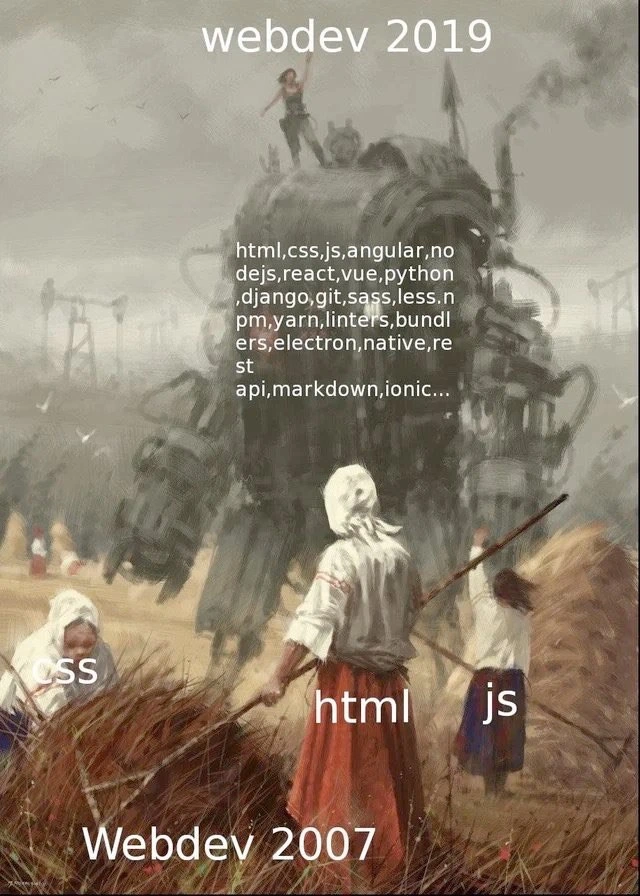
The meme paints a stark timeline comparison of WebDevelopment practices, and any seasoned engineer can immediately feel the punch. In 2007, front-end work was almost pastoral – the image shows peasant women harvesting a field, labeled HTML, CSS, and JS. Those were basically the only tools you needed to build a website: a simple trio, a three-file stack. By 2019, looming over them is a gigantic smoke-belching steampunk contraption labeled with dozens of technologies. This monstrous machine represents the tech stack overload of modern web development. It humorously exaggerates how a simple webpage (the humble field) now often involves a huge, complex toolchain (the roaring engine of frameworks and tools). It’s as if a quiet farm chore turned into an industrial factory operation. Seasoned devs who lived through this shift laugh (or groan) because it’s so true.
Why is this funny? Because it hits on framework fatigue and the absurd pace of framework churn. Over a decade, we went from a straightforward stack to a maze of libraries and frameworks. In the late 2000s, a typical website might be handcrafted with static HTML for content, CSS for presentation, and a dash of vanilla JavaScript (or maybe some jQuery) for interactivity. Fast-forward to the WebDev 2019 era: building even a modest web app often means juggling a long list of acronyms and tools – Angular, React, Vue (take your pick of JavaScript frameworks du jour), plus Node.js runtimes, module bundlers, transpilers, CSS preprocessors like Sass, package managers like npm or Yarn, and so on. The meme’s word cloud (html, css, js, angular, nodejs, react, vue, python, django, git, sass, less, npm, yarn, linters, bundlers, electron, native, rest api, markdown, ionic...) reads like a hiring ad for a “Front-End Engineer” today. It’s poking fun at how ModernVsLegacy expectations have shifted: what was considered a full stack in 2007 is trivial now, and the modern stack is a multi-layered monster.
This dramatic growth in stack complexity didn’t happen for no reason. Web apps became far more capable and ambitious. By 2019, users expect web applications to be as interactive as desktop apps and as sleek as mobile apps. Achieving that requires more than just three files – hence the rise of powerful JavaScript frameworks. AngularJS (around 2010) was one of the first big ones, introducing a structured approach to building single-page apps. Then came React (circa 2013) with its component-based architecture and virtual DOM, and Vue.js followed, offering yet another take. Each framework arrived to solve real problems (managing complex UIs, state, and interactions) that vanilla JS or jQuery struggled with in large projects. But the unintended side effect is what we see in the meme: a proliferation of frameworks and the expectation that a pro dev knows all of them (or at least can hop between them). It’s a framework frenzy out there, and keeping up can be exhausting. Experienced devs nod knowingly at the term “JavaScript fatigue” – the weariness from constantly learning and re-learning new front-end technologies. The framework monster in the image embodies that fatigue: it’s powerful, but intimidating and ever-changing, belching smoke as it churns through the latest hype-driven additions.
Beyond frameworks, notice how the machine has many other parts labeled: Git, Node.js, Django, npm, linters, bundlers, Electron, REST API, Markdown, Ionic, and more. Each of these represents a layer of complexity that wasn’t prominent in 2007. For example, version control with Git became non-negotiable – by 2019 every team uses Git (or similar) to manage code, whereas in 2007 some smaller projects might have gotten by emailing zip files or using simpler systems. Tools like npm (Node’s package manager) and build systems mean today’s front-end developer often operates a whole pipeline just to run a website. In 2007, deploying a site might mean FTP’ing a couple of files to a server. In 2019, “deploying” a front-end likely involves running a build command that processes thousands of files through a bundler, then pushing the output to a cloud platform. There’s infrastructure and automation (Continuous Integration pipelines, etc.) now wrapped around front-end work that simply didn’t exist in simpler times. The meme exaggerates it as a steam-powered juggernaut, but any senior dev will tell you there’s truth there: spin up a modern webapp and you’ll see a flurry of console messages as it installs hundreds of packages and compiles assets. The first time you do npm install on a fresh project and watch it pull in a forest of dependencies, you truly feel the stack_complexity_growth. 😅
The front_end_bloat problem is another painful reality behind the humor. That enormous steampunk rig isn’t just a metaphor for complexity; it’s a nod to how heavy modern web solutions can be. In 2007, a simple webpage might have been a few kilobytes of HTML and CSS. By 2019, it’s not unusual for a single-page app to ship megabytes of JavaScript frameworks and libraries to the browser. All those bells and whistles can slow things down, much like an over-engineered machine that takes longer to get going. Developers often joke that our websites now use more computing power and memory than entire operating systems did in the past. The meme resonates because we’ve all opened a web page that made our laptop’s fans spin up like a jet engine – that’s the smoke-belching beast in action. It’s a comical reminder that progress sometimes comes with literal overhead.
There’s also an undercurrent of nostalgia and “be careful what you wish for.” Each piece of that modern stack was introduced to make life easier or solve a problem, yet collectively they’ve made the whole setup more complex. It’s a classic case of adding layers of abstraction: you gain powerful capabilities but lose the simplicity. Veteran devs have witnessed this cycle: we start simple, we encounter limitations, we introduce a tool to fix it, and repeat – until we’ve engineered a Rube Goldberg machine for even basic tasks. As a result, there’s an inside joke that modern web dev can feel like using a sledgehammer to crack a nut. Sure, the nut cracks perfectly and with great automation… but wow, that sledgehammer is heavy! The meme’s steampunk framework monster is basically a gigantic, gear-grinding sledgehammer cracking the same nut that our 2007 peasant devs handled with a small tool. That absurdity is what draws out the laughs (and groans).
Real-world experience backs this up. Many of us who built websites in the 2000s remember how straightforward it was to get started. Now, mentoring a newbie, you might have to explain why setting up a simple “Hello World” project requires installing Node, cloning a repo, running npm start, configuring webpack or Babel, dealing with dependency updates, etc. There’s an infamous story of a tiny npm package called left-pad that got unpublished in 2016 and consequently broke thousands of builds worldwide – all because so many projects indirectly relied on this 11-line function to pad strings. When that single gear fell out of the modern machine, a lot of things ground to a halt. Incidents like that are almost a rite of passage in modern webdev: they highlight how interconnected and fragile the software complexity can become. In 2007, if one of your three files had an issue, you’d debug it and move on. In 2019, if one of hundreds of dependencies has a hiccup, you might get pager alerts at 3 AM. It’s funny in hindsight because it’s true – the more moving parts, the more chances for chaos (and dark-humor-loving Cynical Veterans have plenty of late-night war stories about builds failing for baffling reasons).
The meme also speaks to the framework_churn and hype problem in our industry. There’s always a “new shiny” tool. Teams often rebuild perfectly working apps just to use the latest framework, whether it’s migrating from AngularJS to Angular 8, or from React class components to hooks, or switching from LESS to Sass to PostCSS to CSS-in-JS, etc. The developer on top of the steampunk machine, standing triumphantly, is like the dev who’s just mastered the newest framework or tool and feels on top of the world – for now. The joke is that the very next year there might be another smokestack to climb. Many senior engineers have gone through multiple hype cycles (remember when Backbone.js was hot? then Angular, then React…), and they smirk because they know how quickly “essential” knowledge can change. This shared history creates a camaraderie in sighing and laughing at memes like this. It’s the “here we go again” sentiment.
Importantly, the humor doesn’t just come from cynicism – there’s also a sly appreciation of how far web tech has come. We did gain incredible capabilities in those years. By 2019, you could write a web app that runs offline, feels as responsive as native software, and even packages into a mobile app or desktop app. We got here by stacking layer upon layer. The IndustryTrends_Hype side of it is that sometimes we stack more than we strictly need, just because it’s the trend. The meme exaggerates to make a point: maybe not every simple website needs a full microframework and a dozen build steps – but many teams use them by default. It’s a lighthearted critique of our tendency to use a “one-size-fits-all” heavy solution even for small problems. After all, the peasant women in 2007 were doing just fine harvesting with basic tools, weren’t they? 😉
In summary, this meme is funny-’cause-it’s-true satire of software complexity creep. It captures the timeline_comparison of webdev_2019_vs_2007 in one dramatic image. Seasoned developers laugh (and maybe shed a tear) because they remember the simple days and now daily confront the steampunk framework monster themselves. It’s a commentary on tech_stack_overload, on how web development’s stack complexity growth sometimes feels like an over-engineered spectacle. And yet, it’s the reality of modern front-end work. The meme hits that perfect nerve where we’re both impressed by what we have and bewildered by how complicated it got. Every gear in that machine has a purpose, but together it sure looks like overkill for plowing the same old field of HTML, CSS, and JS. That mix of pride and absurdity is the core of the joke.
Description
This meme uses a painting by Jakub Różalski, which depicts a pastoral scene of peasants working in a field with a giant, steampunk-style robot looming in the background. Text overlays create a comparison between two eras of web development. The bottom of the image is labeled 'Webdev 2007', with the peasants individually labeled 'html', 'css', and 'js'. The top is labeled 'webdev 2019', and the giant robot is covered with a long, comma-separated list of modern technologies, including 'html,css,js,angular,nodejs,react,vue,python,django,git,sass,less,npm,yarn,linters,bundlers,electron,native,rest api,markdown,ionic...'. The meme humorously and effectively illustrates the explosion in complexity within the web development ecosystem over a decade. It contrasts the simple, foundational trio of technologies from the past with the vast and often intimidating landscape of frameworks, tools, libraries, and concepts that a modern developer must navigate. For senior developers, this is a deeply relatable commentary on 'JavaScript fatigue' and the relentless pace of technological churn
Comments
7Comment deleted
The 2007 stack could run on a potato. The 2019 stack requires three cloud regions, a dedicated DevOps team to debug the bundler config, and it still complains about a peer dependency
2007: tweak index.html and hit upload. 2019: change one hex code, trigger 600 MB of node_modules, four Docker containers, and a Slack debate on whether that color belongs in a theme provider or a Kubernetes ConfigMap
The real tragedy isn't the complexity - it's that we spent 12 years building abstractions over JavaScript instead of just admitting we needed a better language, and now we're too invested in the sunk cost to turn back
Remember when 'full-stack developer' meant you knew HTML, CSS, and JavaScript? Now it means you've survived the framework wars, mastered at least three competing build systems, can explain why your node_modules folder is larger than your entire codebase, and still have PTSD from migrating Angular 1 to Angular 2. The real skill isn't knowing all these tools - it's knowing which 80% of them you can safely ignore while still shipping production code
2007: HTML/CSS/JS haystack. 2019: Babel tower of bundlers - one merge conflict and it all comes tumbling down
Somewhere between 2007 and 2019, “ship index.html” evolved into “orchestrate a Node runtime, 1,200 transitive deps, linters and bundlers, then wrap it in Electron to display the same markup.”
2007: HTML/CSS/JS and FTP. 2019: the same three files, but via Angular/React/Vue, Sass/LESS, npm/yarn, linters, bundlers, and an optional Electron wrapper - somewhere along the way the deliverable became the toolchain