The Evolution of Web Dev: All Roads Lead to JavaScript
Why is this WebDev meme funny?
Level 1: One Tool for Everything
Imagine you’re building a treehouse. When you’re just starting out, you might only have one hammer to bang some wood together – that’s the beginner stage (just one big HTML hammer, so to speak). As you learn a bit more, you get a hammer, a saw, and a paintbrush – now you can build with nails, cut wood, and paint it (that’s like having HTML, CSS, and JavaScript: one tool for structure, one for style, one for interactive bits). Then you take on a big complex treehouse project – suddenly you have a whole toolbox with dozens of tools: different wrenches, screwdrivers, drills, maybe even some power tools for special tasks. This is the advanced stage where you’re using lots of different tools (programming languages), each for a specific job. It’s a lot to manage, but it lets you build a really fancy treehouse with plumbing and electricity (just like an advanced website has databases, server code, and so on).
Now here comes the funny part: imagine the master builder arrives and says, “I’m going to build the ultimate treehouse using only one tool!” And he pulls out a gigantic Swiss Army knife – it has all sorts of gadgets in one massive tool. It looks kind of absurd, but he insists this one mega-tool can do everything. This is the expert stage in the meme: the one giant JavaScript circle. It’s like using a single super versatile tool to do every job instead of a bunch of separate tools. It’s funny because you’d think an expert would have an even more complicated toolbox, but instead they’ve gone back to just one (very fancy) tool. The humor comes from that surprise and exaggeration – the idea that the highest skill level means putting all your eggs in one basket (or all your code in one language). In real life, it highlights how today many top-tier websites indeed rely mostly on JavaScript to do just about everything. It’s as if the carpenter became so skillful with that Swiss Army knife (JavaScript) that he builds the whole house with it. The idea is a bit silly, and that’s why it makes us grin: it’s a playful reminder that in technology, sometimes the “expert solution” is unexpectedly simpler (at least on the surface) than we’d imagine, using one tool to rule them all.
Level 2: JavaScript Everywhere
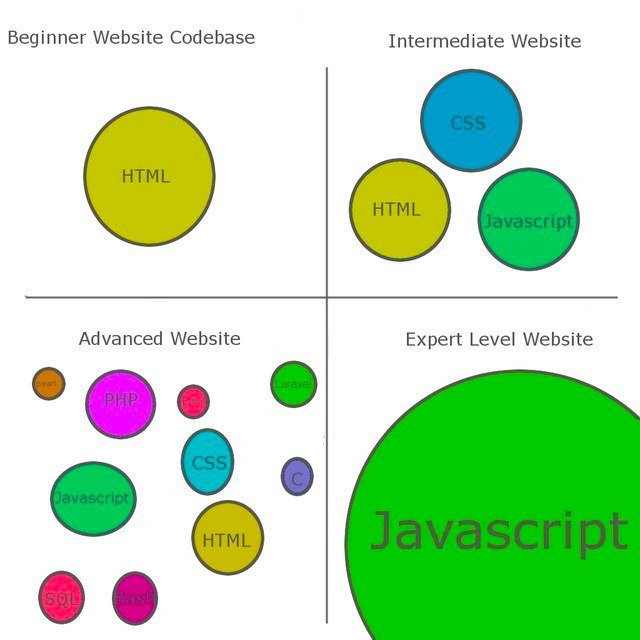
Let’s break down the four quadrants of this meme, which depict the progression from a simple webpage to an advanced web project, and finally to an expert-modern stack dominated by JavaScript. Each colored circle represents a programming language or technology, and its size shows how big a part it plays in the website’s code.
Beginner Website Codebase (top-left quadrant): Here the only big circle is HTML (colored olive). HTML is the foundational markup language of the web – it’s what you use to put text, images, and links on a page. A beginner’s website might be literally just an
.htmlfile or two. There’s no separate styling file or fancy logic; everything is basic content structure. For example, a newbie project might be a simple<html><body>Hello World!</body></html>page. All the formatting might even be done with plain HTML tags (like<b>for bold), and there’s likely no JavaScript at all yet. In other words, the novice coder’s focus is on learning how to structure a webpage, and HTML alone can accomplish that for a very simple site.Intermediate Website (top-right quadrant): Now we see three circles of roughly equal size – HTML (olive), CSS (blue), and JavaScript (teal). This represents a typical front-end stack once you move past the basics. CSS (Cascading Style Sheets) is introduced to handle the presentation and design: colors, layouts, fonts, spacing, all the visual polish. The intermediate developer has learned to separate content (HTML) from style (CSS), making things look nicer. And then there’s JavaScript, which at this stage is used to add interactivity and dynamic behavior in the browser. For instance, our intermediate dev might include a little script to validate a form, create an image slideshow, or open a pop-up menu. Now the website isn’t just a static page; it can respond to user actions. At this point, the codebase has three distinct parts: HTML for structure, CSS for looks, and JavaScript for behavior. This trio – HTML/CSS/JS – is the core of FrontendDevelopment. Most web developers start combining these as they progress, and they learn how each plays a role in making a richer user experience.
Advanced Website (bottom-left quadrant): This one is packed with many small circles: HTML, CSS, JavaScript, plus a bunch of other colors labeled PHP, SQL, Bash, Python, Perl, C, and even Laravel (a popular PHP web framework). This represents a complex, multi-tier web application – something a seasoned developer or a larger team would work on. At this stage, the website isn’t just files that a browser opens; there’s a whole backend (server side) and database behind it. Let’s unpack it:
- PHP/Python (pink and red circles): These are examples of backend programming languages. Instead of just serving static HTML, a server-side language like PHP or Python runs on the web server to generate HTML dynamically, handle form submissions, authenticate users, etc. For example, when you login to a site, a Python or PHP script might check your credentials against a database.
- SQL (magenta circle): SQL stands for Structured Query Language. It’s used to communicate with relational databases (like MySQL or PostgreSQL). An advanced site usually has a database to store persistent data (user accounts, posts, product info, etc.). SQL queries retrieve or update that data. In our meme’s “Advanced” quadrant, the SQL circle shows that a database is now a key part of the stack.
- Bash (another red circle): Bash is a shell scripting language used primarily on Linux servers. Including Bash suggests there are shell scripts or command-line operations as part of the project (maybe deployment scripts, cron jobs for scheduled tasks, or automation tasks on the server). Advanced developers often write Bash scripts to manage servers or batch-process data.
- Perl (orange) and C (purple): These might be smaller components or legacy pieces. Perhaps there is a specialized task or legacy code written in Perl (an older scripting language popular in the early web days) or in C (a low-level language, maybe used for a high-performance module or an extension). Not every advanced web project uses these, but their presence in the meme implies a really mixed tech stack – possibly the project grew over time and accumulated different languages for different needs. This is not uncommon in long-lived systems: e.g., a company might have had a Perl script from 2005 still running for some functionality, or a piece of C code for heavy image processing included in an otherwise PHP/Python app.
- Laravel (green circle): Laravel is a modern web framework for PHP, helping structure large PHP applications. Mentioning Laravel means the advanced site likely isn’t just raw PHP scripts; it’s using a framework to organize code (which is something experienced developers do to manage complexity). It’s another indicator of the project’s size and sophistication – frameworks, multiple languages, and lots of moving parts.
So, the “Advanced Website” is essentially a full-stack web application with many components:
- The frontend still has HTML, CSS, and JavaScript (those didn’t go away; they’re just smaller circles among others, meaning they’re part of a bigger system now).
- The backend is handled by languages like PHP, Python, or other server-side tech, possibly interfacing with a framework (Laravel) to serve content.
- There’s a database (SQL) for storing data.
- There are likely server scripts (Bash or others) for maintenance tasks or deployments.
- It’s polyglot: each language has a specific duty, and mastering an “advanced” stack means being at least familiar with all these technologies working together. A junior developer stepping into such a project might feel overwhelmed – suddenly you have to juggle front-end code, back-end code, database queries, and maybe even environment scripts. This is why this quadrant is crowded with many circles: an advanced website’s codebase can look like a tangled ecosystem of different technologies. It’s powerful but complex.
Expert Level Website (bottom-right quadrant): Now the meme throws a curveball – instead of even more little circles, it shows one enormous bright-green JavaScript circle dominating the entire quadrant. Any remaining other languages are so tiny you hardly see them. This depicts a modern trend often jokingly called “JavaScript Everywhere” or a full-stack JavaScript application. Essentially, the meme suggests that at “expert” level, developers choose to consolidate everything into JavaScript. In practical terms, this means:
- Using Node.js on the backend, so you write your server code in JavaScript instead of PHP, Python, etc. Node.js is a runtime that lets JavaScript run on a server (outside the browser). It’s built on Chrome’s V8 engine, so it’s very fast and capable. With Node.js, one team can use the same language for both client and server.
- On the frontend, using robust JavaScript frameworks/libraries like React, Angular, or Vue (all JavaScript-based) to build the user interface. These frameworks often involve writing your UI interactions, and even your HTML structure, in JavaScript (for example, React uses JSX, which is JavaScript mixed with HTML-like syntax).
- Even for style, while CSS is still used, many “expert” setups use things like CSS-in-JS or style frameworks that are tightly integrated with JavaScript. For instance, you might write your styles in a JavaScript file using a library, and it injects CSS for you. So CSS might not even be written in separate files by hand – it could be managed by JS tools.
- For data storage, you might use a database that speaks JSON (JavaScript Object Notation) natively, like MongoDB, or use ORMs that let you query in JS. Or you might use serverless functions (again JS) with cloud storage. The point is, from top to bottom, the logic is all in one language.
- Other tooling like build processes (bundlers, linters, deployment scripts) can also be JavaScript-based (for example, using Node scripts or libraries like Webpack). So the entire development pipeline becomes JavaScript-centric.
In summary, the “Expert” quadrant is highlighting a real-world scenario: a unified stack where JavaScript is the dominant (or sole) language powering the entire application. This is often called being a “JavaScript monolith” (all major components in JS) as opposed to a polyglot system. It’s a bit of an exaggeration to call this the only “expert” way – in reality, expert developers might choose different stacks for different needs – but the humor here is in the reversal of expectation. You might think an expert project uses more languages and exotic tech than an advanced one, but instead it uses fewer – basically just one language – and relies on that one language’s ecosystem to do everything.
The tag JavaScriptEverywhere is apt: JavaScript started on the browser, but now it’s everywhere in the stack. This unified approach has some practical benefits:
- Developers can work on front-end or back-end without switching languages in their head.
- Code can be shared between client and server (for example, form validation logic can run in the browser and on the server, both written in JS).
- The team needs expertise in one primary language (JS) which can simplify hiring and training.
However, there’s also an implicit joke for those learning: even though it’s “one language,” the JavaScript ecosystem is vast and can be as complicated as dealing with multiple languages. The meme’s giant JavaScript circle might feel simpler (just one thing), but inside that circle a lot is going on. There are countless frameworks, libraries, and tools in JavaScript land – from frontend frameworks like React, to backend frameworks like Express.js, to build tools like webpack, and package managers like npm or Yarn. So “one language” doesn’t necessarily mean a beginner-level simplicity. It means the expert has chosen JavaScript as the one tool and then mastered all its many sub-tools and conventions.
For a junior developer, the key takeaway is understanding the progression:
- Initially, you start by learning the basics: HTML to create pages, then CSS and JavaScript to make them look good and do stuff.
- As you become intermediate, you get comfortable using those together to build interactive sites.
- When you tackle an advanced web project, you realize there’s more than just what runs in the browser – there’s code running on servers (in languages like PHP, Python, etc.), databases to manage data (using SQL), and many support scripts and frameworks. The tech stack broadens significantly.
- Finally, a current expert-level approach in the industry is to streamline everything by using one powerful and versatile language – JavaScript – across the board. This doesn’t mean an expert can’t use other languages; it means they architect the system so that a single language handles most of the work. It’s a strategy that can reduce complexity on one axis (fewer languages to juggle) while introducing complexity on another (many frameworks and big JavaScript codebases to manage).
The meme is funny to developers because it subverts the expected trajectory. Usually, one imagines adding more and more skills as you advance (and indeed, the Advanced Website quadrant shows that hectic multi-language setup). But then, Expert flips the script: it’s like saying, “After all that, the real pro just uses JavaScript.” It highlights the current reality in a playful way: if you look at many “cutting-edge” web projects today, they really are dominated by JavaScript (with Node on the server, React on the client, maybe even JavaScript running in places we never thought it would). This resonates especially in FrontendDevelopment circles, where JavaScript frameworks are extremely popular and the notion of being a “full-stack JavaScript developer” is often seen as a modern, in-demand skill set.
To visualize the progression, here’s a summary of each stage and its technologies:
| Website Stage | Main Technologies | What’s Happening |
|---|---|---|
| Beginner | HTML | A simple static page. HTML provides structure and content. No separate styling (maybe inline styles at most), no scripting. It’s the starter setup for a webpage. |
| Intermediate | HTML, CSS, JavaScript | A classic front-end trio. HTML for structure, CSS for layout & style, JS for interactivity. The site looks nicer and responds to user actions (e.g., clicks) thanks to JavaScript. |
| Advanced | HTML, CSS, JavaScript, PHP/Python (server), SQL (database), Bash (scripts), etc. | A full-stack application. Front-end still uses HTML/CSS/JS, but now there’s back-end code (e.g., PHP or Python) running on a server to handle things like data fetching or user login. A database (SQL) stores data. Bash scripts or other languages might be used for background tasks. Many technologies work in concert. |
| Expert | JavaScript (everywhere: Node.js, plus JS frameworks), minimal HTML/CSS | An all-JavaScript solution. The same language powers the browser code and the server code (Node.js). HTML/CSS are still present but often generated or managed by JS frameworks. The stack is unified, using JavaScript for virtually everything (hence one giant circle). |
As you can see, JavaScript’s role grows from nothing (at beginner) to everything (at expert). That’s why the meme labels the expert-level codebase as essentially “just JavaScript” – it’s emphasizing the idea that a “truly advanced” modern site might be built with a single primary language. This trend has been so noticeable in recent years that it became a running joke: “Is there anything JavaScript can’t do?” People have used JS to write servers, mobile apps, desktop apps, even program robots and drones! It’s literally JavaScriptEverywhere now, which is both an amazing testament to the language’s versatility and a light-hearted point of contention in LanguageWars. Some developers love the convenience of one language; others miss the days when different layers used languages best suited to each task. That tension – between using the “right tool for the job” versus the “one tool that can do every job” – is exactly what this meme humorously captures.
Level 3: One Script to Rule All
At the expert end of this meme’s chart, we see an enormous JavaScript circle eclipsing everything else. This exaggeration nails an industry trend: Full-Stack JavaScript becoming the ultimate one-size-fits-all solution in modern WebDevelopment. Why is this funny to experienced devs? Because it satirizes how, after years of accumulating separate tools for each job, the “expert” web stack comes full circle to a monolith – with JavaScript reigning as the single dominant language. It’s a tongue-in-cheek nod to LanguageWars we've witnessed over decades: once upon a time, a truly Advanced web application was a polyglot beast (HTML for structure, CSS for style, PHP/Python for server logic, SQL for queries, maybe some Perl scripts or a dash of C for special cases). Each language had a special role: PHP or Python handled backend logic, SQL managed data, Bash scripts glued deployments together. The codebase looked like a patchwork quilt of technologies – powerful but complex to maintain. We called this the “LAMP stack” (Linux, Apache, MySQL, PHP) or similar, a rite of passage for many senior engineers.
But enter Node.js (circa 2009) and the rise of powerful JS frameworks, and suddenly JavaScript wasn’t just for browser FrontendDevelopment anymore – it could run the backend too. The meme’s “Expert Level Website” hilariously exaggerates this reality: an all-JavaScript codebase where the same language drives everything from the server to the browser, perhaps even the database interactions (think JSON everywhere). We’ve effectively gone from a polyglot architecture to a JavaScript monoculture. The joke has an ironic edge: you’d expect an expert to use even more sophisticated, varied tools (maybe fancy compiled languages or cutting-edge specialized systems), yet here the “expert solution” is depicted as just one giant tool. It’s poking fun at the fact that JavaScript has become so dominant in WebDev that it’s practically swallowing the whole stack.
Seasoned developers see layers of humor in this. On one hand, it’s a shout-out to the very real JavaScriptEverywhere movement – using JS for the client, server (Node.js), desktop apps (Electron), mobile apps (with frameworks like React Native), you name it. It reflects our lived reality: the once humble scripting language for animating buttons now runs entire applications. On the other hand, it’s a gentle jab at the hype-driven development culture: we went from many diverse technologies to funneling everything through Node packages and transpilers. The enormous green JS circle could easily hide thousands of npm dependencies under the hood – a node_modules directory bursting at the seams. (Experienced devs smirk here, recalling the notorious “left-pad” incident when removing one tiny JS package broke half the internet.) The TechHumor lands because it’s ridiculous yet relatable: we’ve traded a pile of smaller circles for one supersized circle, but anyone maintaining a large JavaScript app knows that giant circle contains its own ecosystem of complexity.
In essence, the meme is winking at how “expert” web architecture paradoxically simplifies which language you use (hey, just JavaScript!) while acknowledging the immense complexity that single-language approach brings. It’s a commentary on industry evolution: early on, we needed multiple languages to achieve complex websites; now improvements in JS (and the V8 engine’s speed) let us consolidate. It’s both convenient (less context switching, one language to rule them all) and ironic (we end up re-implementing databases, servers, and even CSS tooling, all in JavaScript). Like a seasoned dev might quip: “We’ve eliminated all those other languages – by implementing them in JavaScript!”
“One language to rule them all, and in the browser bind them.” 🕸️ – Unofficial Web Dev Proverb
This senior-perspective humor resonates because it captures a core truth: in modern Frontend and backend development, JavaScript has become unavoidable, omnipresent – the final boss of the web stack. The meme cleverly charts that journey, and anyone who’s seen the chaos of a multi-language project and the subsequent shift to a unified JS stack will chuckle (perhaps wistfully) at how true it rings. The expert quadrant looks absurd at first glance, but it hits close to home: in today’s web ecosystem, JavaScript really has eaten the world of WebDevelopment, for better or worse.
Description
This image is a four-panel diagram illustrating the evolution of a 'Website Codebase' from 'Beginner' to 'Expert Level'. - The 'Beginner' panel contains a single large yellow circle labeled 'HTML'. - The 'Intermediate' panel shows three medium circles for 'HTML', 'CSS', and 'Javascript'. - The 'Advanced' panel depicts a polyglot environment with multiple circles of varying sizes for technologies like 'PHP', 'Javascript', 'CSS', 'HTML', 'SQL', 'Bash', 'Laravel', and others. - The final 'Expert Level Website' panel, serving as the punchline, is almost entirely consumed by one enormous green circle simply labeled 'Javascript'. The meme humorously critiques the trend in modern web development where the JavaScript ecosystem has grown to encompass the entire stack (frontend, backend, tooling, etc.). It contrasts the older 'advanced' model of using different languages for different tasks with the 'expert' model where the complexity is not in the number of languages, but in mastering the vast and intricate world of JavaScript itself. For experienced developers, it's a commentary on the 'JavaScript everything' philosophy, the rise of Node.js, and the massive scale of modern frontend development

Comments
7Comment deleted
The 'Expert Level' circle is actually just the 'node_modules' directory for a 'hello world' React app
Web enlightenment: begin with index.html, wander through a decade of polyglot microservices, then achieve “expert” nirvana by wrapping it all in a 700 MB node_modules folder and calling it a TypeScript monorepo
The expert level is just reimplementing a browser inside a browser with 47 layers of abstraction, but at least now your CSS is type-safe and your HTML compiles to WebAssembly
This diagram perfectly captures the modern web development journey: you start learning HTML to build websites, add CSS and JavaScript for interactivity, explore backend languages and databases for complexity, and eventually realize that 'expert level' just means rewriting everything in JavaScript - including your database, your build tools, your server, and apparently your entire career identity. The real expert move? Knowing when NOT to use JavaScript, but good luck explaining that to your Node.js-powered CI/CD pipeline running on a JavaScript-based infrastructure-as-code tool
Expert-level website: JavaScript all the way down - a monorepo where the same bug gets first-class support from React, Node, and the deploy script
Advanced: polyglot persistence nightmare. Expert: JS monolith - now your entire stack crashes on one npm audit fail
Expert-level website: the HTML is a 2 kB bootloader for 17 MB of transpiled JS, and the architecture diagram is package-lock.json with a legend