Skip to content
DevMeme
2105 of 7435
The Universal VPN Explanation Starter Pack
Networking Post #2353, on Nov 24, 2020 in TG

The Universal VPN Explanation Starter Pack

Why is this Networking meme funny?

Level 1: Secret Tunnel

Imagine you and your friend live in a big busy city and you want to share secret notes and toys without anyone else seeing. You come up with a clever idea: you dig a secret tunnel underground straight between your two houses. Now, whenever you want to send a message or a treat, you put it in a little box and send it through this private tunnel. Your sibling or the nosy neighbor can’t peek or grab it because the tunnel is hidden and only for you two. You put a lock on the box too, just in case, so only your friend with the key can open it at the other end. Pretty safe, right?

That’s basically what a VPN is like – it’s a secret passage for information. People keep using the tunnel example because it paints a clear picture: the tunnel keeps your stuff safe from strangers. Over time it became a bit funny, because no matter who explains it, they always say “think of it like a tunnel!” It’s like if every teacher used the exact same story – after a while, you’d giggle and say, “Yes, yes, the tunnel, we know!” But they do it because it really does help you imagine how your information travels safely. So this meme is amusing because it’s showing how every computer expert ends up talking about a tunnel when they explain this concept. It’s a joke that even though we’re talking about high-tech internet secrets, in the end we all just talk about simple tunnels to get the idea across. And hey, who doesn’t love a good secret tunnel story? It makes a complicated thing sound a lot more friendly and fun.

Level 2: Secure Tunnel Basics

So, what is a VPN and why does everyone compare it to a tunnel in the first place? Let’s break it down in simple technical terms. VPN stands for Virtual Private Network:

  • Virtual: It’s not a physical connection like a cable you can touch; it’s created by software.
  • Private: It’s for you and authorized systems only – no one else should be able to snoop on the communication.
  • Network: It links your device and a remote network, so they function as if directly connected on the same local network.

When you use a VPN, you’re essentially extending a secure, private network over a public one (like the Internet). Think of connecting your home laptop to your office’s internal network while you’re actually at home: the VPN makes your laptop act like it’s sitting in the office, even though it isn’t. How? By creating a protected tunnel across the internet between your laptop and the office network.

Now, this “tunnel” isn’t a physical tunnel, of course. It’s all digital – just data packaged and transmitted – but calling it a tunnel is a handy analogy. Here’s how a basic VPN connection works in real-world terms: your computer takes the data it wants to send to the office network (say you’re trying to open an internal company webpage). Before that data leaves your laptop, the VPN software encrypts it. Encryption means scrambling the data using complex math so that anyone intercepting it on the way can’t read it. It’s like putting your letter into a secret code – only someone with the right key can decode it. After encrypting, your computer wraps that coded data in an outer packet with the address of the VPN server (this is the encapsulation part, though you can imagine it simply as putting your secret letter inside an envelope addressed to a secure gateway). This envelope goes out over the public internet to the VPN server. When the VPN server receives it, it opens the envelope, decrypts the contents (because the server has the other key to decode your data), and then forwards the request to the internal office network. The response from the office network comes back to the VPN server, gets encrypted and encapsulated again, and the server sends it back to your computer over that secure channel. Your VPN software then decrypts it so you can see the result. Throughout this journey, anyone watching the internet traffic in between just sees you talking to the VPN server in gibberish code – they have no clue what websites or resources you accessed. In effect, you have a private conversation within a busy public space.

This is where the tunnel analogy comes in: imagine the internet is a big, busy highway where everyone can see everyone else’s cars and where they’re going. Using a VPN is like driving through a special isolated tunnel that runs alongside the highway – other drivers see a tunnel, but they can’t see your car once it’s inside. They don’t know what route you’re taking in the tunnel, and they can’t intercept your car. You’ll enter the tunnel at your end (your computer) and pop out at the other end (the VPN server, which is like the tunnel exit near your office network). To any observer, your car disappeared into a tunnel and later came out, but what happened inside (which turns, which exits you took) is hidden. The terms “VPN tunnel” or “tunneling” are actually used by network engineers to describe this exact process of encapsulating and transporting data securely. So it’s not just a cute comparison – it’s part of the official lingo in networking protocols (for example, tech folks talk about “tunneling protocols” like L2TP, IPsec, or OpenVPN).

If you’re new to IT, you might recall your company’s IT person saying something like, “You need to connect to the VPN when working remotely. It’s like a secure tunnel to the office.” This meme is highlighting how every IT person seems to use that same description. And honestly, it’s because it works. For someone who doesn’t know the intricacies of encryption or network routing, picturing a simple tunnel gives a general idea: my data goes through a safe, hidden path to its destination. It conveys the feeling of security and directness.

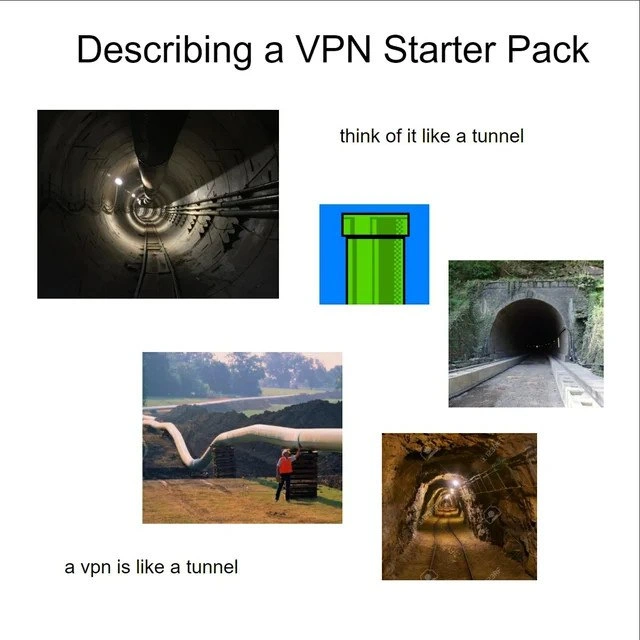
The images in the meme are exactly the kind of visuals you’d see in an introductory presentation:

  • A picture of a long tunnel or a pipeline to suggest a sealed, direct route.
  • Even a whimsical image like a Mario Bros. green pipe might appear if the presenter wants to get a chuckle and say “your data warps from one place to another unseen, just like Mario going through a pipe to a secret area.” It’s geeky, but it makes the point.
  • The variety of tunnel pictures (train tunnel, utility tunnel, mine shaft) all send the same message: enclosed pathway. That’s the core concept of a VPN: an enclosed, private pathway through a public network.

Additionally, this meme calls itself a “Starter Pack.” On the internet, a starter pack meme is a collage of images or phrases that define the basics of a person, concept, or idea. For example, a “JavaScript Developer Starter Pack” might jokingly include images of coffee, messy code, Stack Overflow posts, and console log jokes. Here, the “Describing a VPN Starter Pack” means if you’re going to describe a VPN, you’ll need the following standard items: the phrase “VPN is like a tunnel” and a bunch of tunnel pictures to illustrate it. It’s tongue-in-cheek because it implies that every explanation out there pretty much uses those items.

For a junior developer or someone just learning networking, this meme is funny once you’ve gone through that learning process yourself. The first time, you hear the tunnel analogy and you go “oh, cool, that makes sense.” The tenth time, you’re like “yep, got it, everything’s a tunnel, folks.” It’s poking fun at how predictably we package the explanation. But along the way, you’ve also picked up the real meaning: a VPN is a secure connection (thanks to encryption) that lets two networks talk as if they’re directly connected. And now you’ll probably catch yourself using the same trusty analogy when you explain it to someone else, because it’s kind of hard to resist – it just works so well as a teaching tool!

Level 3: Tunnel Vision in Networking

Why is this meme so hilariously on-point for anyone in IT or cybersecurity? Because it nails a very familiar scenario: explaining a VPN to someone and inevitably saying the magic word “tunnel.” The format here is the classic starter pack meme – a collection of images and phrases that together paint a picture of a stereotype. In this case, the stereotype is every network engineer or IT support person explaining a VPN. And what are the essential ingredients of that? Tunnels. Lots of tunnels. The meme shows a half-dozen images – from a dim underground utility passage to a cartoonish green Super Mario pipe – all scattered around with text like “think of it like a tunnel” and “a vpn is like a tunnel.” It’s essentially saying, “Yup, whenever we talk about VPNs, we always pull out the tunnel comparisons, and here’s the definitive collection of those go-to visuals.”

For seasoned developers and ops folks, this hits home because we’ve all been either on the giving or receiving end of this explanation. It’s practically reflex at this point. New hire needs access to internal tools from home? VPN time, and cue the tunnel analogy. Non-tech colleague asks why they must use this VPN thingy? “Well, you see, it’s like a tunnel…” (As we point to some stock photo of a long tunnel in our slide deck). The humor is in the overuse: after hearing “secure tunnel” for the hundredth time, you start to smile or roll your eyes – and that’s exactly what this meme is poking fun at.

In fact, the meme doubles down on the cliché by literally quoting us instructors verbatim. The top-center text > “think of it like a tunnel” and the bottom-left caption > “a vpn is like a tunnel” are exactly the kind of thing you’d hear in a security 101 briefing. It’s there twice, almost like an echo, which is a tongue-in-cheek way of saying: we don’t just say it once – we say it over and over. Repetition is part of the joke. The collage shows that no matter the context or the person explaining, they all tunnel-vision onto the same comparison. One image isn’t enough; the meme maker threw in every kind of tunnel they could find, exaggerating what we do in real life: “Oh, my first example didn’t land? Here, imagine this other tunnel!”

Let’s break down the elements seasoned folks recognize:

  • Dimly lit utility tunnel: The classic “tech” tunnel image. Dark, lined with cables – looks very serious and network-y. This is that slide background you use to impress upon folks that data travels in some secret subterranean way.
  • Super Mario green pipe: A fun, geeky twist. If the audience is younger or full of gamers, someone might say, “Think of the VPN like those warp pipes in Mario that zip you to a hidden world.” It’s absurd, but hey, if it makes the explanation more relatable, why not?
  • Concrete railroad tunnel: Plain and straightforward – a no-nonsense tunnel through a mountain. This one says, “Nothing to see here, just a normal tunnel doing tunnel things.” It’s basically the generic tunnel analogy image.
  • Huge white oil pipeline with a worker: This adds an industrial vibe. Sometimes folks say “pipeline” instead of tunnel. The idea is the same – your data flows inside a sealed pipe. The worker inspecting it even hints at the IT guy “maintaining the secure connection.” It’s overkill in literal imagery and that’s why it’s funny.
  • Narrow underground mine shaft with lights and rails: Yet another variant of an enclosed passage. By this point the meme is just flexing – “Look, whatever shape or size, if it’s a tunnel, it has been used to explain VPNs.” This one feels cozy but a bit claustrophobic, much like a tightly secured channel just for a single user’s data.

And of course, the text labels in the image drive it home: “Describing a VPN Starter Pack” is the title, meaning if you want to describe a VPN, here’s your toolkit. The bottom caption “a vpn is like a tunnel” is basically the catchphrase we’ve all said. The meme format itself is sarcastically instructional – as if giving new tech tutors a shopping list: grab a tunnel photo, compare your network to it, done. It’s self-aware humor from the ops/security community about our own teaching cliché.

The reason this resonates with experienced folks is that we remember the countless times this analogy has been wheeled out. It’s almost a rite of passage. Many of us have that one PowerPoint slide with a big pipe graphic, or we’ve resorted to the “secret tunnel” spiel in meetings. We chuckle because it’s true — we sometimes have a one-track mind (or shall we say one-tunnel mind) when it comes to explaining complex network security concepts. It’s not that we lack imagination, it’s that the tunnel analogy works so darn well. It’s simple and paints the picture immediately. So while we cringe a tiny bit at how overplayed it is, we keep using it. As a result, it’s become an in-joke: “Oh here we go, Bob is explaining VPNs again – five bucks says he uses the word tunnel in the first 30 seconds!”

This meme also hints at the broader culture of explaining tech to non-tech folks. In cybersecurity training or onboarding sessions, you’ll see engineers desperately trying to bridge the knowledge gap. We simplify and use real-world analogies (locks, keys, and in this case tunnels) to get the idea across. Over time, some analogies become almost too ubiquitous. The tunnel metaphor for VPNs is one of them, just like “think of firewall as a security guard” or “think of the internet as a highway.” They’re classics — so classic that they turn into gentle satire like this meme.

The feelings behind the laughter here are a mix of fondness and mild embarrassment. Fondness because the analogy has served us well and it’s kinda cute seeing it represented with a Mario pipe and all. Embarrassment because, gee, we really do sound like a broken record using the same line for 20 years. But hey, if it ain’t broke, don’t fix it, right? Networking pros see this meme and go, “Guilty as charged!” It’s a shared wink-wink among industry peers. Even the tags on the post like #NetworkHumor and #CyberSecurityMemes tell you this is meant for those in the know, who can laugh at the tunnel-obsession we collectively have. In short, it’s funny because it’s a mirror – we see our own teaching habits reflected and exaggerated, and we can’t help but smirk at the tunnel vision we apparently all share.

Level 4: Tunnel Mode Magic

At the deepest technical level, the phrase "VPN tunnel" isn’t just a casual metaphor – it refers to a real networking technique known as tunneling. In network architecture, tunneling means one protocol is encapsulated inside another. A classic VPN uses this to send private network traffic through a public network as if it were a single, isolated stream. Imagine an IP packet (the basic unit of data on the Internet) that would normally roam free; a VPN wraps that packet inside another packet, often adding an extra header and encrypting the original content. This encapsulated packet is then sent across the internet. When it reaches the VPN endpoint, the outer wrapper is removed (decapsulated), revealing the original packet which is then delivered to its intended private network destination. It’s like those Russian nesting dolls – a packet within a packet – except the inner doll (your data) is locked up tight with encryption so no one can peek at it while it’s in transit.

To get a bit more concrete, consider how a typical corporate VPN (for example, an IPsec VPN in tunnel mode) works under the hood. Your computer and the VPN server first perform a cryptographic handshake – exchanging keys using something like a Diffie-Hellman algorithm or certificates – establishing a shared secret. Once that’s done, every bit of data you send is encrypted with a cipher (often AES, a strong encryption standard). The original IP packet (destined for, say, an internal company IP address) gets encrypted and shoved inside a new packet with a different destination (the VPN server’s address).

Your PC [Original IP Header | Data] 
   ⇒ **Encrypt & Encapsulate** ⇒ 
Outer Packet [VPN Server IP Header | Encrypted Inner Packet]

In this schematic, the outside world only sees packets going back and forth between you and the VPN server – and they look like gibberish because of encryption. The inner details (like that you’re actually accessing the company database or browsing an internal website) are hidden from prying eyes. This is exactly why engineers call it a tunnel: from the perspective of any observer on the public network, your data is traveling through an opaque conduit. Outsiders can’t see inside the tunnel; they only know data is moving. Just as cars disappear into one end of a mountain tunnel and emerge somewhere else, your packets disappear from the local internet into the VPN and pop out in the private network on the other side.

Academically, tunneling creates an overlay network – a network built on top of another network. It’s a bit like Inception for the Internet: a network within a network. This concept has been around for decades. Early protocols like GRE (Generic Routing Encapsulation) and later IPsec formalized “tunnel mode,” where entire IP packets are encapsulated as payload in new packets. The mathematics and protocols ensuring security inside that tunnel are quite sophisticated. We’re talking about cryptographic hashes for integrity (so no one can tamper with the packets en route without detection) and key exchange protocols to agree on encryption keys securely. All that heavy lifting happens behind the scenes in milliseconds.

It’s funny if you think about it: after all these advanced algorithms and packet gymnastics, how do we often explain it to a beginner? “Just think of it like a tunnel.” That’s it! We reduce the complex dance of network security protocols – RSA handshakes, AES encryption, HMAC checksums – to a single mental image of a tube. The meme brilliantly captures this irony. The Networking and Security pros who see this meme chuckle because they know the elegant machinery at play, yet they, too, have fallen back on the humble tunnel analogy to sum it all up. It’s a testament to how powerful a simple visual metaphor can be in conveying the essence of a complicated system built on layers of code and math.

Description

A 'starter pack' meme titled 'Describing a VPN Starter Pack'. The image is on a white background and contains five images and two short text phrases all related to the concept of tunnels. The images are: a dark, round, concrete utility tunnel with tracks and pipes; a pixelated green pipe from the Super Mario video games; the dark entrance to a train tunnel cut into a rock face; a large, white industrial pipeline snaking through a grassy field; and a dimly lit mining tunnel with railway tracks. The phrases, written in a simple black font, are 'think of it like a tunnel' and 'a vpn is like a tunnel'. The meme humorously mocks the universal and repetitive oversimplification used to explain how a Virtual Private Network (VPN) works. The 'tunnel' analogy is a staple for describing how a VPN creates a private, encrypted connection over the public internet, and this starter pack implies it's the only tool anyone ever uses for the explanation

Comments

12
Anonymous ★ Top Pick Explaining a VPN is like a tunnel. Setting one up is like trying to build that tunnel through a mountain of YAML files with nothing but a rusty pickaxe
  1. Anonymous ★ Top Pick

    Explaining a VPN is like a tunnel. Setting one up is like trying to build that tunnel through a mountain of YAML files with nothing but a rusty pickaxe

  2. Anonymous

    Sure, a VPN is a tunnel - just picture one lined with NAT stalactites, MTU black-holes, deprecated-cipher graffiti, and me spelunking for the lost IKE handshake at 3 a.m

  3. Anonymous

    After 20 years explaining VPNs, you realize the tunnel metaphor is both completely wrong (it's really packet encapsulation with cryptographic transforms) and somehow still the only thing that prevents a 3-hour discussion about OSI layers, IPSec vs SSL/TLS, split tunneling policies, and why the CEO's home printer still won't work over the corporate VPN

  4. Anonymous

    Every senior engineer has given this exact VPN explanation at least once - usually to a stakeholder who then asks if the tunnel needs maintenance. The real irony? We spend years mastering BGP, IPsec, and WireGuard protocols, only to realize the Mario pipe analogy is actually the most architecturally accurate: data goes in one end, emerges somewhere else, and nobody sees what happened in between. Though we conveniently omit the part where the pipe occasionally drops packets into a lava pit

  5. Anonymous

    It’s a tunnel - until MSS clamping, NAT‑T keepalives, DNS leaks, and split‑tunnel routes turn it into a multi‑vendor escape room

  6. Anonymous

    Tunnel analogies shine for demos - until MTU mismatches and split-tunneling turn your secure pipe into a leaky sieve

  7. Anonymous

    VPNs are "like a tunnel" - with split‑tunnel exits, NAT‑T potholes, MTU black holes, and an hourly IKEv2 toll; then Friday’s cert rotation closes it for “maintenance.”

  8. @yourbass86 5y

    Чот хуйня

    1. @lexanon 5y

      Why?

      1. @Maxtox3 5y

        +

    2. @lexanon 5y

      Жизненно. Перевод надписи сверху: Starter Pack описания VPN

  9. @mykolamor 5y

    The sponsor of this post is Nord VPN. Stay safe whenever, wherever you go. VPNs are like a tunnel, through which all your internet browsing data goes through. The scary global companies on the other side won't know, who is who. Plus, your data will be encrypted for improved safety!

Use J and K for navigation