Skip to content
DevMeme
447 of 7435
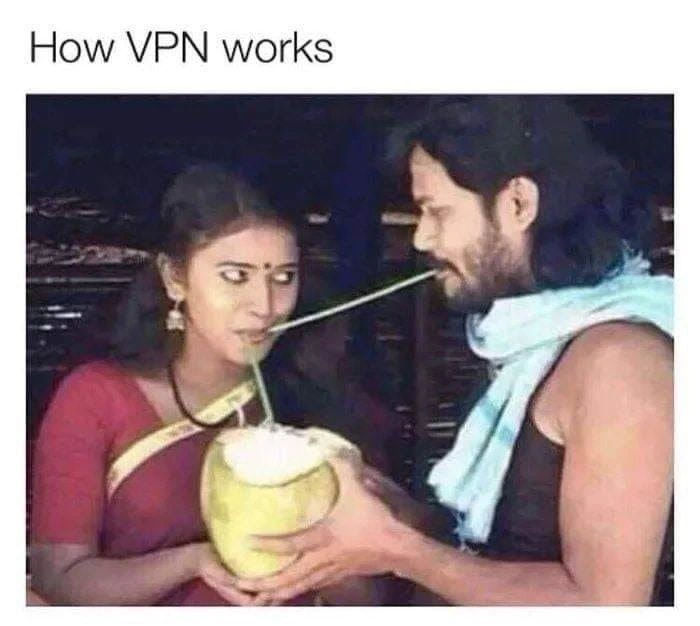
How VPNs Reroute Your Coconut Traffic
Networking Post #515, on Aug 5, 2019 in TG

How VPNs Reroute Your Coconut Traffic

Why is this Networking meme funny?

Level 1: Sneaky Sip

Imagine you really want to drink some yummy coconut water, but you don’t want anyone to know you’re the one drinking it, or maybe you can’t reach the coconut yourself. So you get your friend to help in a sneaky way. Your friend holds the coconut, and you use a long straw that goes through your friend to sip the coconut water. It looks like your friend is the one drinking from the coconut, but actually you are secretly drinking through the straw! It’s a funny and sneaky trick: you still get the juice, but anyone watching would think your friend is the one doing the sipping.

This is basically what happens with a VPN, but with computers and the internet. Your computer wants some information (the coconut water) from a website (the coconut). Instead of grabbing it directly, it asks a special friend computer (VPN server) to get it. You then drink it through a “straw” connecting you and your friend (that straw is like a private, safe hose for data). The website only sees your friend (not you) drinking, so your identity stays hidden. It’s funny because it’s like a secret sip 🍹 — you get what you want, and no one knows how it happened except you and your helpful friend.

Level 2: Tunnels and Straws

Let’s explain this in simpler technical terms. VPN stands for Virtual Private Network. Think of it as a secure, private route for your internet traffic, even though it’s running on the public internet. In networking, a tunnel is exactly what it sounds like: a path that’s dug through (or built on top of) a network to carry data privately between two points. And tunneling is the act of encapsulating one network connection inside another. The meme’s straw is a perfect visual for a tunnel – it carries liquid (data) from point A to B through an enclosed pipe, so that the liquid isn’t exposed along the way.

Now, let’s map the parts of the meme to the real-world tech components to make it crystal clear:

  • The woman drinking represents the client – this is you or your device (like your computer or phone) initiating a connection.
  • The man with the coconut represents the VPN server – a remote server that your device connects to first. He’s the intermediary.
  • The coconut stands for the destination server or resource you want to access – say a website or any internet service (it’s the thing you want to get data from).
  • The straw running through the man’s mouth is the VPN tunnel – the special connection from your device to the VPN server that all your data travels through. It’s as if your data has a private pipe to flow inside.

In a normal situation without a VPN, you (the client) would just drink straight from the coconut – i.e., your computer would connect directly to the website and request the data. But what if you can’t or don’t want to do that directly? Maybe the coconut is in a locked garden (the website is geo-blocked or your network admin blocked it), or maybe you don’t want others around to see you drinking from it (you want privacy). This is where the VPN comes in: you ask the friendly man to help. You connect your straw to his mouth, and he connects to the coconut.

In tech terms, when you use a VPN, your device first creates a connection to the VPN server. Importantly, this connection is typically encrypted — meaning all the data traveling through the straw is scrambled so that onlookers can’t read it. This is what we call a secure tunnel. If someone on the local network or an ISP tries to spy on the data, they’ll just see random encrypted bytes (kind of like seeing a straw but not knowing what drink is inside).

Once this secure tunnel (straw) is established, any request you want to send to a website goes through the VPN server first. For example, if you want to visit example.com, your computer doesn’t go straight to example.com. Instead, it sends that request through the encrypted tunnel to the VPN server. The VPN server then forwards the request to example.com on your behalf. When example.com (our coconut) sends back the data (the coconut water), it goes to the VPN server first. The VPN server then sends it back through the tunnel to you. To the outside world, it looks like the VPN server is the one accessing example.com – your identity (IP address and location) stays hidden behind the VPN.

Here are a few key terms explained, in the context of this scenario:

  • Client: This is you, the user. In networking, the client is the device that initiates a connection to request something. In the picture, the woman is the client who wants the coconut water (data).
  • Server: The server is the system that provides a resource or service. The coconut can be seen as the server that has the resource (delicious data). Normally you’d contact it directly.
  • VPN Server: A special kind of server that acts as a secure intermediary. In the meme, the man is playing this role. Your device connects securely to the VPN server first.
  • Tunnel/Proxy: The straw is functioning as a tunnel, which is like a private route through a public space. It’s also similar to a proxy because the VPN server is acting on your behalf. The term proxy means an agent or intermediary that makes requests for you.

One way to think of it outside the coconut analogy is the mail forwarding analogy: Imagine you want to send a letter to a famous celebrity (the website), but you don’t want them to know your home address or maybe your direct mail isn’t allowed through. So you send your letter in a sealed envelope to a trusted friend (VPN server) who lives in a place with direct access. That friend opens your envelope, takes the letter inside (which has the celebrity’s address on it), and mails it to the celebrity for you. The celebrity sees the friend’s return address, not yours. When the celebrity replies, they send the response to your friend’s address. Then your friend puts that reply in a new envelope and sends it back to you. In this story, the contents of the letters are like encrypted data (only you and the celebrity, if using end-to-end encryption, can read them), and the friend is just relaying. If the letters themselves aren't encrypted, then your friend could read them – similar to how a VPN handles your data: it keeps it safe from others, but the VPN company could see it, so you choose a trusted friend.

So, a VPN basically creates a secure private channel (like a tunnel or a straw) between your device and the VPN server. This protects your network traffic from being seen or tampered with by others along the way. It also means that to the rest of the internet, your traffic appears to be coming from the VPN server, not from you. This is why VPNs are popular for security (like protecting your data on public Wi-Fi) and for privacy/anonymity (hiding your IP address and location). It’s also how people access content that’s restricted in their region: you connect to a VPN server in a country that has access, and from the content provider’s perspective, it looks like you’re a user from that allowed region (since your request comes from the VPN server’s location).

The meme with the coconut is a lighthearted way to demonstrate all this. When you see that straw going through the dude’s mouth, think “tunnel through a VPN server”. When you see the coconut and the lady enjoying the drink, think “getting data through a proxy”. It’s an amusing image, but it really does capture the essence of networking with VPNs: indirect, protected, and a bit of a life-saver when you need it. And remember, while the straw in the meme is visible, in real VPNs the “straw” is invisible to others (encrypted), adding that vital security layer.

Level 3: Straw as a Service

This meme humorously nails a concept that seasoned developers and IT folk know well: a VPN is basically a middleman you hire to handle your internet traffic. It's depicting a trusted man-in-the-middle, which is ironic because normally a "man-in-the-middle" in security is something scary (like an attacker intercepting your data). Here, however, the man in the middle (literally the guy with a straw in his mouth) is providing a service — a secure tunnel-as-a-service, if you will. The subtitle "How VPN works" paired with this absurd coconut-drinking setup immediately clicks for anyone who’s struggled to explain VPNs to others. Instead of a dry lecture about encryption and routing, we get a RealWorldAnalogies gem: a physical straw running through a friend’s mouth to reach the coconut. It's absurd enough to be funny, but it’s also a nearly perfect one-to-one mapping for the idea of tunneling your connection through another server. This is classic TechHumor where a bizarre real-world image suddenly makes an abstract tech idea relatable and memorable.

Let’s break down the scene like an experienced network engineer explaining the joke:

  • The woman trying to drink the coconut water represents the client (like you, the user on your device).
  • The coconut full of water is the target resource (say a website or data on the internet you want to access).
  • The man holding the coconut and letting the straw pass through his mouth is the VPN server (the intermediary system that fetches data on your behalf).
  • The long green straw connecting the woman to the coconut through the man is the VPN tunnel (the secure, indirect route the data takes).
  • Their blurred faces? That touches on privacy/anonymity – just as their identities are obscured in the photo, a VPN obscures your identity online.

The humor here comes from how literal the analogy is. The creators took "tunneling" and made a literal tunnel (a straw) through a person. If you've ever tried to explain tunneling to a junior dev or a non-tech friend, you know analogies are your best friend: "Imagine your data is going through a secure tunnel..." Usually, we keep it imaginary, but this meme says, "Nah, let's show it with coconuts and straws." The result is both enlightening and chuckle-worthy. The woman’s expression (even if blurred) might suggest a bit of “Is this really going to work?” — which is exactly how it feels to trust a new VPN for the first time, hoping all your traffic will indeed be safe and sound.

For those in networking or security, there's an extra layer of wit. We often throw around terms like tunnel, end-to-end encryption, and proxy. Here, the straw is literally a tunnel and the man is effectively both a proxy and a bodyguard. It’s a comic reminder that a VPN doesn’t magically teleport your data; it relays it via another server. Every seasoned developer knows that using a VPN means you're basically handing your traffic to someone else (hopefully someone you trust, like a reputable VPN provider) in exchange for privacy from the rest of the world. If that friend in the meme decided to take a sip or swap the coconut with something else, the whole trust falls apart. In real terms, this reminds us: VPNs protect you from the internet, but you have to trust the VPN. That notion is implicitly joked about by the very setup — you better really trust a friend to stick a straw through their mouth for you!

The meme also captures a common scenario we’ve all faced: you want to access something (maybe a website or a service) that you either can’t reach directly (due to network blocks, geo-restrictions) or don't want to reach directly (to stay anonymous). So what do you do? You route through a VPN server in some friendly location. It's like saying, "Hey buddy, can you grab that for me while I hide behind you?" Whether it was streaming a show only available overseas or just securing your connection on public Wi-Fi, most of us have had that moment where a VPN saved the day. This image portrays that in a hilariously low-tech manner: instead of high-speed fiber optics and encryption algorithms, we have a good old straw and a cooperative friend.

From an industry perspective, this meme also pokes fun at how we often describe complex digital concepts with everyday metaphors. It's part of why it's so relatable — even if you don't know the first thing about network protocols, you can look at this and intuitively get the gist of "traffic goes through someone else". For the seasoned devs, there's a nod and a wink: we all know there's a ton of engineering behind making that "straw" secure and fast, but at the end of the day, the concept really is just routing through another node. It’s a humorous simplification that strips away the jargon and shows the core idea nakedly (and ridiculously) to the world. And admit it, the next time someone asks you how a VPN works, you'll probably think of this coconut picture and smile.

Also, kudos to the detail that their faces are blurred “for anonymity.” That’s a clever touch by the meme maker (or whoever edited the image). It's not only respecting the individuals’ privacy, but it's thematically spot-on: VPNs are about anonymity. Blurring out the faces is like saying, "We’ve protected the identities here — just like a VPN would." As an experienced observer, you appreciate these little Easter eggs in a tech meme. They show that the creator really understands the dual aspects of a VPN: the technical (tunneling through a host) and the human (privacy and trust). This blend of accurate technical analogy with situational comedy is what makes the meme pure gold in the NetworkHumor department.

In summary, the meme is funny because it's true. It's taking a dry concept from network security protocols and delivering it in one snapshot that’s equal parts educational and absurd. It turns out a Networking concept can be explained with a coconut and a straw – and once you see it, you can’t un-see it. This is tech relatability at its finest: anyone who has set up a VPN or troubleshot a connection issue can laugh and say, "Yep, that's basically what's happening under the hood." And for those who haven't? Well, now they have a mental image they'll never forget when they hear the word "VPN tunnel." (Just maybe don’t try the coconut trick literally 😅 — in the real world, you might get a mouthful of coconut water you weren’t expecting!).

Level 4: Packet Inception

At the deepest technical level, a VPN (Virtual Private Network) operates by using tunneling protocols and encryption to encapsulate your data packets inside other packets, much like the straw carries coconut water hidden through the man's mouth in the meme. This process is essentially packet encapsulation – one data packet is wrapped inside another. When you send a request over a VPN, your device first encrypts the original packet (the one meant for the coconut server) and then wraps it in a new packet addressed to the VPN server (the friend in the middle). The network only sees this outer packet heading to the VPN server, not the true final destination inside. The VPN server then decrypts your inner packet and forwards it to the actual target (the coconut). This layered approach is why we call it a tunnel: the original data travels through an intermediary host, hidden inside another communication channel, very much like that straw running through someone else’s mouth.

In practice, this is achieved with protocols like IPsec, OpenVPN (SSL/TLS), or WireGuard, which handle the heavy cryptography and packet-wrapping under the hood. They establish a secure channel (often using strong encryption algorithms and key exchanges) so that all traffic between your device and the VPN server is scrambled and unreadable to eavesdroppers. Anyone watching the network (perhaps a nosy ISP or a malicious hacker on public Wi-Fi) would see only gibberish data going to the VPN server’s address. They wouldn't know you're actually requesting sweet coconut water from a specific site. This is analogous to how the straw keeps the coconut water enclosed: an outsider might see you two passing a straw, but not taste or alter the water inside it. The networking magic here involves altering the usual packet routing: your IP packets get a new outer header. The outer header lists your source as the client (woman’s device) and destination as the VPN server (the man). Inside the payload of that, the original header shows the true destination (coconut) and your actual request.

Let's visualize the packet tunneling with a pseudo-network example:

// Pseudo representation of VPN tunneling (encapsulation and forwarding)
{
  "client": "Her device (Woman)",
  "vpn_server": "Friend's server (Man)",
  "target": "Coconut server (Website)",
  "direct_connection": {
    "src": "HerDevice_IP",
    "dst": "CoconutServer_IP",
    "data": "GET /coconut_water"
  },
  "vpn_tunnel_connection": {
    "outer_packet": {
      "src": "HerDevice_IP",
      "dst": "VPN_Server_IP",
      "data": "Encrypt( inner_packet )"
    },
    "inner_packet": {
      "src": "HerDevice_IP",
      "dst": "CoconutServer_IP",
      "data": "GET /coconut_water"
    }
  },
  "what_coconut_sees": {
    "src": "VPN_Server_IP",   // appears from the friend
    "dst": "CoconutServer_IP",
    "data": "GET /coconut_water"
  }
}

In the above, the inner_packet is like the portion of straw carrying the actual drink. The outer_packet is the visible part going to the VPN server, analogous to the straw going into the man's mouth (with the liquid hidden inside). The coconut (target server) ultimately sees a request coming from the VPN server’s IP (the friend’s identity), not from the original client. This is identity cloaking at the packet level — your IP address is masked. Thanks to encryption, intermediate routers or onlookers can’t peek at the inner packet contents (they can't taste the coconut water in transit). All they know is you’re sending something to the VPN server.

Crucially, this tunneling is bidirectional: the response from the coconut will go back to the VPN server (since it thinks the VPN server made the request), and then the VPN server encrypts that response and sends it back through the tunnel to you. From a theoretical standpoint, the VPN forms a secure overlay network on top of the public network. Concepts from networking like encapsulation (one protocol inside another) and decapsulation happen at the VPN endpoints (like inserting the straw and then removing it on the other side). In academic terms, it’s a practical application of layered network architecture — a private communication channel is established over a shared infrastructure. By design, this also breaks direct end-to-end visibility: the coconut server never directly sees the client; it sees the VPN as the client.

One thing to note is that a VPN isn't end-to-end encryption all the way to the final resource (unless that resource itself is using a secure protocol like HTTPS). The VPN provides encryption between the client and the VPN server (the straw is secure between the woman and the man), but from the VPN server to the coconut, the traffic might travel normally on the internet (hopefully also encrypted if using HTTPS, otherwise the VPN server could sip or see the data in plain form). This is why you must trust your VPN provider — they become the intermediary who can see the decrypted contents of what you send or receive (if it's not additionally encrypted at the application level). In our analogy, you trust the friend not to steal a gulp of your coconut water or spill it. The faces in the image are blurred, humorously echoing how a VPN blurs your identity to the outside world. This all captures the essence of network security protocols at play: by cleverly wrapping and routing packets, VPNs offer privacy and bypass certain network restrictions, albeit with the caveat that you have shifted trust to the VPN server. The beauty is in this networking sleight-of-hand: by design, the internet can treat an encrypted tunnel like just another data stream, while inside it your private conversation flows unseen — a network connection within a network connection, Inception style.

Description

The image is a single-panel meme with the text 'How VPN works' at the top. The photo below shows a man and a woman sharing a drink from a single green coconut. The woman, on the left, is drinking directly from the coconut with a short straw and has a suspicious, sideways glance at the man. The man, on the right, is also drinking from the coconut, but with an extremely long, bent white straw that loops from the coconut over to his mouth, illustrating an indirect connection. The meme uses this visual gag as a simple analogy for how a Virtual Private Network (VPN) functions. The coconut represents a resource or the internet, and the long, convoluted straw humorously depicts the VPN tunnel that reroutes a user's connection through an intermediary server to mask their origin, much like the man is getting the same drink but through a non-obvious, indirect path. This is a classic example of explaining a complex technical concept with a simple, funny, real-world metaphor

Comments

7
Anonymous ★ Top Pick This is how the corporate VPN works. The connection is secure, but the latency is so bad you can feel the coconut milk fermenting on its way through the straw
  1. Anonymous ★ Top Pick

    This is how the corporate VPN works. The connection is secure, but the latency is so bad you can feel the coconut milk fermenting on its way through the straw

  2. Anonymous

    Enterprise VPN design: AES-256 tunnel, perfect forward secrecy, and the blind faith that the endpoint chugging all your packets isn’t also running tcpdump

  3. Anonymous

    Finally, a networking diagram that accurately captures the latency when your VPN endpoint is in a different hemisphere and you're both competing for the same 10Mbps of bandwidth while someone's running a torrent in the background

  4. Anonymous

    This meme perfectly captures VPN architecture: two clients thinking they're getting exclusive access to the resource, when in reality they're just sharing the same backend infrastructure with slightly different entry points. The real question is whether this is a split-tunnel or full-tunnel configuration, and who's paying for the coconut's egress bandwidth

  5. Anonymous

    VPN: a long straw to HQ - private sip, 200ms latency, and DNS still yelling your order to 8.8.8.8

  6. Anonymous

    VPNs: secure encapsulation for your packets, delivered at the throughput of a cocktail straw across a transatlantic tunnel

  7. Anonymous

    A VPN doesn’t remove the trust boundary - it relocates it; congrats, your coconut vendor is now your ISP

Use J and K for navigation