The Pinnacle of Unoptimized Game Development
Why is this GameDev meme funny?
Level 1: Shiny but Slow
Imagine you have a toy race car that has all the coolest features – bright lights, sounds, and even a little screen on it. It looks super awesome and shiny when it’s all turned on. But there’s a catch: with everything running, the batteries drain really fast. When you try to drive the car, it barely moves. It’s so slow that it’s almost funny, because you expected it to zoom like a rocket with all those features. In this meme, the game is like that toy car. The developer made the game graphics very fancy and sparkly (lots of pretty lights and details – like the toy’s lights and sounds). But the computer (like the toy’s battery) can’t keep up with all of it at once, so the game runs very slowly. It’s beautiful to look at, but it moves like a snail. The joke is essentially, “Look how cool I made it… but now it can barely even run!” It’s a fun way of saying sometimes when we make something extra fancy, it might not work smoothly because we pushed it too far.
Level 2: Max Settings, Minimum FPS
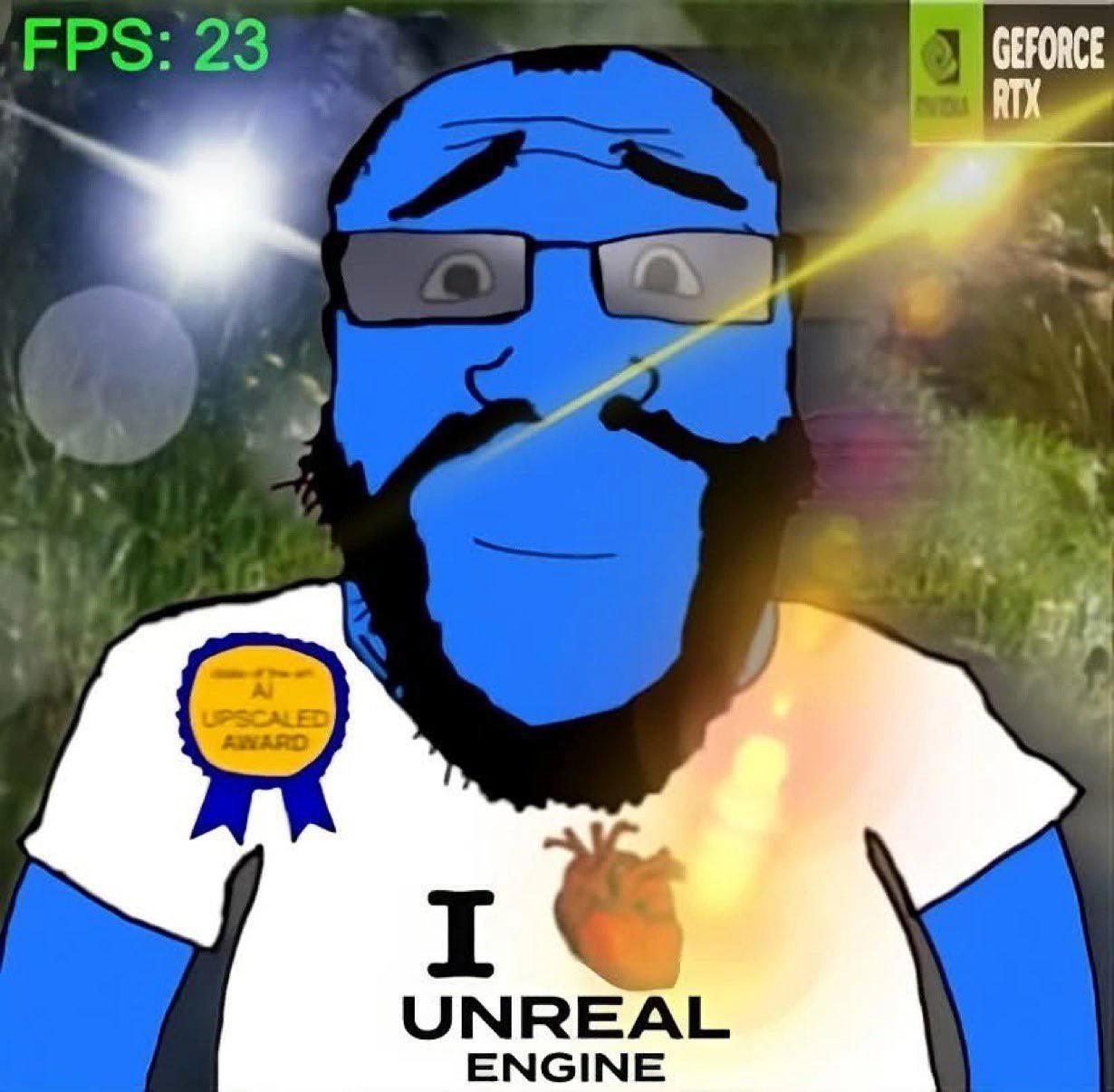
Let’s break down what’s happening in simple terms. The image shows a developer character (the blue Wojak) who loves Unreal Engine (a very powerful game engine used to create high-end games). He’s enabling every fancy graphics feature possible in his GameEngine. Unreal Engine is known for making it easy to turn on stunning visuals – you can add realistic lighting, detailed textures, dense forests of trees, and cool effects like lens flares (the bright streaks of light you see in the image). This developer has an NVIDIA RTX graphics card (see the “GEFORCE RTX” logo in the corner). RTX cards are powerful GPUs (Graphics Processing Units) that support ray tracing.
Now, ray tracing is a technique in graphics where you simulate rays of light bouncing around the scene, just like in real life. It makes shadows and reflections look incredibly real. However, it’s computationally expensive – meaning it takes a lot of the GPU’s power to do. In older graphics (what we call rasterization), the GPU would take shortcuts to draw things faster, even if it was a bit less realistic. With ray tracing, we’re doing a lot more math for each frame. Think of it like PerformanceOptimization in reverse – instead of optimizing for speed, we’re adding realism that slows things down.
To compensate for that slowdown, our developer also enabled AI upscaling features, specifically something called DLSS (Deep Learning Super Sampling). DLSS is a technology by NVIDIA that uses artificial intelligence (AI) to boost frame rates. Here’s how it works: the game renders the scene at a lower resolution (say, 1080p instead of 4K). That’s quicker for the GPU to draw, so it improves performance. Then the DLSS algorithm steps in and upscales the image to a higher resolution, using a trained neural network to predict what the extra pixels should look like. Essentially, it’s like a smart zoom that tries to maintain image clarity, so you get the Performance of low resolution with visuals close to high resolution. The ribbon on the character’s shirt saying “AI UPSCALED AWARD” is a joking way to show he’s proud of using this fancy AI technique. It’s as if he got a little award for turning on DLSS and other AI-based enhancements.
Despite all this clever tech, the top-left of the image shows FPS: 23 in bright green text. FPS stands for Frames Per Second. It measures how many images (frames) the system can generate each second. Higher FPS means smoother motion (games usually aim for 60 FPS or at least 30 FPS). 23 FPS is a low frame rate for a game – even though it’s close to 24 (which is what movies use), it feels choppy in a game, especially if you move or interact. In the meme, 23 FPS is ironically just below the “cinematic” 24, implying the demo is almost a movie, but not quite — it’s just stuttery enough to be noticeable. The phrase “limps along at 23 FPS” in the title really paints the picture: the demo is running, but very sluggishly, almost hobbling rather than running smoothly.
So why is it so slow despite an RTX card and DLSS? Because the developer cranked everything to the max:
- Ultra graphics settings: He likely set the game’s graphics to the highest quality (
EpicorUltrain Unreal terms). This means maximum detail in models and textures (the surfaces of objects), and expensive effects turned on. - Ray tracing on: As mentioned, this adds realistic lighting and reflections but demands a ton of GPU work. It’s like asking the computer to draw the scene not with quick cheats, but with real physics of light.
- Lots of foliage & bloom: The background is full of lush greenery with heavy bloom (bright light glow). Rendering a dense forest is hard because of the sheer number of leaves and shadows. Bloom is a post-process effect that makes bright areas bleed light (like the sun through trees), which is pretty but adds more calculations for each frame.
- AI upscaling (DLSS): He did turn this on to try to rescue the frame rate. You can see he’s aware of performance issues (hence the “AI upscaled award” – he’s acknowledging the need for help). DLSS likely improved things from an even lower FPS to 23, but clearly it wasn’t enough to get to a smooth experience.
- Hardware limits: Even though NVIDIA RTX GPUs are strong, they have limits. Every GPU has a certain amount of processing cores, memory bandwidth, etc. If you ask it to do too much in one frame, it just can’t keep up. Think of it like even a fast runner can’t carry too many weights at once without slowing down.
For a junior developer or someone new to GameDevelopment, the lesson here is: there’s always a trade-off between graphics quality and performance. This meme humorously demonstrates DeveloperExpectationsVsReality. The developer expected that with the newest tech (RTX card, Unreal Engine, DLSS) he could get both amazing visuals and high FPS. In reality, if you push graphics to the extreme, the frame rate will suffer. It’s not that the tech doesn’t work – ray tracing did make the scene look beautiful, and DLSS did try to help – but you have to balance things. Game developers often have to decide which features to dial back so that players get a smooth experience. For example, they might use ray tracing only for some effects, or lower the resolution of shadows, or rely on simpler lighting for less important objects, etc.
The comedic angle also lies in that number 23. If you’ve ever worked on a project or even in school on something performance-related, seeing an important metric just below your target can be both frustrating and funny. It’s like scoring 59% on a test that needed 60% to pass – so close, yet so far. Here the target was a smooth or at least cinematic 24 FPS, and our dev hit 23 FPS. Ouch! The meme exaggerates the scenario (most would tweak settings to avoid that), but it’s poking fun at our tendency to go overboard with cool features and then facepalm at the result.
In short, this level breaks down the situation: The developer used Unreal Engine with all the high-end Graphics features (ray tracing, high resolution, special effects) turned on, relying on an NVIDIA RTX GPU and DLSS to handle it. The result was a beautiful scene that runs like a slideshow. It’s a classic PerformanceOptimization lesson wrapped in humor: even the best hardware and tools have limits, and you have to balance eye candy with frame rate. The meme is basically saying, “Haha, we’ve all been there – you maxed out the settings to make it look gorgeous, but now it’s choppy as heck!” It’s a gentle ribbing of our developer habit of dreaming big and then getting a reality check from the hardware.
Level 3: Cinematic Slideshow
For experienced devs and graphics veterans, this meme hits that too-familiar nerve: the eternal arms race of GameDevelopment where as soon as hardware lets us do something cool, we overdo it until performance tanks. The blue Wojak character proudly sports an “I ❤️ Unreal Engine” shirt with an “AI Upscaled Award” ribbon. He’s the archetype of a passionate real-time graphics programmer or an enthusiastic game artist who’s won some internal accolade for implementing the latest visual tech. Maybe he integrated ray_tracing for lifelike lighting and reflections, cranked up the foliage density, layered on eye_candy post-processing effects like crazy bloom and lens flares, and then said, “Don’t worry, we have DLSS and AI upscaling; the frame rate will be fine!” It’s the DeveloperExpectationsVsReality gag: expecting buttery smooth Performance because of fancy GPU features, versus the reality of seeing your demo trudging along at a mere 23 FPS.
The humor is especially rich if you know the culture around “cinematic” frame rates. There’s an old joke in gaming: when a game performs poorly, someone might quip, “It’s okay, 24 FPS is cinematic!” In film, 24 frames per second is standard, giving that characteristic motion blur and feel. But in interactive GameDev, 24 FPS feels sluggish — most players and devs aim for a minimum of 30 FPS or, more ideally, 60 FPS for smooth input and motion. Here, the demo is running at 23 FPS, which is hilariously just below even that cinematic bar. It’s like boasting you made the perfect movie scene, except the projector’s frame rate is off and everything’s stuttering. We’ve basically got a high-tech slideshow instead of a game — hence “cinematic slideshow.”
From a senior developer perspective, this scenario also pokes fun at RealWorldTradeoffs and project decision-making. We’ve all seen a situation where a team or a lone dev enables every high-end feature (“RTX on everything, 4K textures, ultra shadows, 16x anisotropic filtering, let's go!”) without budgeting for the performance cost. It’s the gamedev equivalent of a kid in a candy store: turning on ray traced global illumination, ray traced shadows, volumetric fog, you name it, because each individually makes the scene look jaw-dropping in stills. But collectively, the poor engine is overburdened. Even a top-tier NVIDIA RTX card can struggle when you throw the kitchen sink of effects at it. There’s an almost masochistic humor here: we finally have awesome hardware and techniques like DLSS that were supposed to save us, and yet we still find ways to drop below acceptable performance. Seasoned devs know this pattern well — as hardware improves, we just increase our appetite. Remember the meme “But can it run Crysis?” from the late 2000s? Crysis was a game so ahead in graphics that it melted GPUs of the time if you maxed it out. In 2025, the spirit lives on: But can it run my fully ray-traced Unreal scene at 60 FPS? Apparently not — it limps at 23.
This meme also winks at the tendency to trust new tech as a silver bullet. DLSS (the AI upscaling tech) is amazing — it truly can boost performance by rendering fewer pixels and using AI to fill in details. Many devs treat it like a magical wand to recover FPS: “We’ll just enable DLSS, so turning on ray tracing won’t hurt, right?” But DLSS has limits. If your base resolution is too low or you overload the GPU with work (ray tracing calculations, heavy physics, etc.), DLSS can’t perform miracles. It might raise you from, say, 15 FPS to 23 FPS – better, but not salvation. The “AI Upscaled Award” badge on the character’s shirt satirically commemorates that he used AI upscaling (perhaps bragged about it at a conference or internal demo) as a badge of honor, yet here he is, proudly wearing it while the scene is still choppy. It’s the participation trophy of optimization: “You tried AI, good for you, but it’s still slow.”
Moreover, seniors will chuckle at the eye_candy_vs_performance dilemma. Companies market features like ray tracing and “cinematic quality” graphics, and engineers implement them with genuine passion for realism. But when demo time comes, you often have that cold sweat moment looking at the performance counter in the corner (just like the green “FPS: 23” in the meme image). Everyone in the room exchanges nervous glances: “Is it... is it actually below 24 FPS right now?” Been there, done that. It’s funny after the fact (painful during). The meme’s laser streak across the dev’s face (with a dramatic lens flare) epitomizes the absurdity: even the meme image is self-aware, overloading on flashy effects to the point of parody. The NVIDIA GeForce RTX logo shining bright in the corner is essentially saying “Hey, you paid for the big guns, and you still got a slideshow.”
In essence, the senior perspective sees a cautionary tale dressed in humor. It’s reminding us that in game development and high-end graphics, you must respect the budget of milliseconds. If you blow it chasing ultra-realism, you get a Performance nightmare. The trade-off between visual fidelity and smooth performance is unrelenting. As veterans might dryly joke, “Our render pipeline can do anything… as long as you don’t mind it doing it at 20 FPS.” The meme is both a laugh and a wince for those who’ve optimized frames at 3 AM, debating whether to disable a beloved effect so the game stops hitching. It’s funny because it’s true: all that HardwareHumor about monstrous GPUs and yet, here we are, stuck under 24 FPS because we just had to have that last lens flare.
Level 4: RTX vs Reality
At the cutting edge of GraphicsProgramming, this meme spotlights the collision between theoretical rendering ideals and real-time constraints. In a perfect world (or a pre-rendered Pixar movie), you can unleash physically accurate ray tracing everywhere: every photon of light bouncing through a scene obeys the rendering equation, creating photorealistic lighting and shadow nuances. Unreal Engine even offers a path-tracer for offline renders that produces gorgeous frames—if you’re willing to wait seconds or minutes per image. But in GameDev, you have a prohibitively tight frame budget. Real-time graphics means crunching that entire scene in, say, 16 milliseconds for 60 FPS or about 41ms for a cinematic 24 FPS.
Here, the developer has flipped every next-gen switch: hardware ray tracing, high resolution, post-processing bloom, likely even global illumination and DLSS. Each of these features hits the GPU with additional work. Modern GPUs like the NVIDIA RTX series introduce specialized RT cores for ray-triangle intersection tests and Tensor cores for AI tasks (like DLSS). These are dedicated silicon to make ray tracing and AI upscaling feasible within a frame. Yet, even with those, there’s an immutable fact: real-time ray tracing is doing orders of magnitude more computations than traditional rasterization.
Consider what’s happening under the hood: instead of simply drawing triangles and texturing them (the old raster pipeline), ray tracing casts many rays per pixel into the scene. Each ray must traverse acceleration structures (like a Bounding Volume Hierarchy, BVH) to find what it hits. The GPU essentially performs a depth-first search through that BVH for potentially millions of rays, then calculates lighting via shader programs or even Monte Carlo integration for global illumination. Those lens flare and bloom effects add additional fullscreen post-processing passes, each eating more frame time. Meanwhile, DLSS (Deep Learning Super Sampling) tries to claw back performance by rendering at a lower resolution and using a neural network to upscale frames. DLSS leverages prior frame data and motion vectors, running a fancy AI model that approximates the detail of a higher resolution image. It’s advanced stuff — essentially the game is part rendering engine, part AI inference engine at this point.
Even so, there’s a limit to hardware throughput. The meme’s FPS: 23 counter in neon green is a tongue-in-cheek marker of defeat: after all the clever tricks (ray tracing, AI upscaling, etc.), the demo is still under the 24 FPS mark. That number isn’t random; 24 FPS is the gold standard of film frame rate—the minimum for motion to feel “cinematic” to the human eye. Falling short at 23 FPS is an almost poetic frustration: the tech promised movie-quality real-time graphics, but physics and silicon had other plans. It’s as if the engine’s render loop is solving a huge system of equations every frame and just can’t converge in time. In formula terms, if $FrameTime = 43\ \text{ms}$, then $FPS \approx \frac{1}{0.043} \approx 23$. No matter how much you beg or optimize, you can’t beat that math without cutting complexity. PerformanceOptimization in this realm often means sacrificial trade-offs: fewer rays, denoisers to cover up noise from low sampling, lowered resolution, simplified shaders, or other cheats that artfully violate physics to save milliseconds.
In summary, the meme highlights a fundamental Hardware reality: each new generation of GPU hardware (even your shiny RTX card) pushes the boundary, but game developers equally push fidelity to gobble up every ounce of that power. The result is a constant tango between visual fidelity and performance. Enable RTX On and you might suddenly watch your FPS fall off a cliff — a phenomenon jokingly summarized as “RTX on, FPS gone.” This Wojak developer is experiencing exactly that. Beneath the humor is a reminder of the RealWorldTradeoffs at play: our appetite for eye candy often outpaces even the most advanced real-time rendering tech. The laws of algorithms and hardware are unforgiving, and the meme gives a nod to those of us who have chased ultimate realism only to be humbled by a chugging frame rate.
Description
A satirical meme featuring a crudely drawn, blue-skinned cartoon character with a beard and glasses, based on the Soyjak meme format. The character wears a white t-shirt with the text 'I ❤️ UNREAL ENGINE', where the heart is a realistic anatomical heart. An award ribbon on his shirt reads 'AI UPSCALED AWARD'. The scene is set against a blurry, lens-flare-heavy background. In the top-left corner, a performance counter reads 'FPS: 23' in green text, indicating a very low frame rate. In the top-right, the NVIDIA 'GEFORCE RTX' logo glows, signifying a powerful graphics card is in use. The humor stems from the deep contradiction: despite using a high-end RTX GPU and the powerful Unreal Engine, the result is a terribly performing application running at an unplayable 23 frames per second. It mocks developers or enthusiasts who are proud of their graphically intensive but poorly optimized creations, and satirizes the buzz around 'AI upscaling' as a magic bullet for performance issues

Comments
14Comment deleted
That's not a performance issue; it's just the garbage collector running a full mark-and-sweep on every single frame. It's a feature for ensuring memory purity
Ray-traced god-rays are cool until you need a sprint to debug ‘variable-time seconds.’
After 20 years in the industry, you realize the real Unreal Engine feature isn't Nanite or Lumen - it's the ability to make a $4000 RTX card perform like integrated graphics while compiling shaders for the 47th time this session
When your RTX card costs more than your car but Unreal Engine still renders at cinematic 23 FPS - turns out 'real-time ray tracing' was more aspirational than literal. At least the upscaling award makes it look like 24 FPS
23 FPS: when Lumen, RT shadows and AI upscaling turn a 16.67 ms budget into a 43 ms ‘cinematic’ feature
Unreal + RTX + “AI upscaled”: 23 FPS - the classic optimization where you rebrand it “cinematic” and push performance to Phase 2
Unreal with RTX upscaling: Scaling visuals to 11 while FPS humbly clocks in at 23 - true architectural romance
Viiiiiva la libertaaaaa Comment deleted
Well tbh you can still optimize in ue too... Game devs (or tbf game publishers) just don't care any more Comment deleted
They don't care because most users don't care. Game culture just dead Comment deleted
Step 1 of UE5 optimization is downgrade it to v5.4. Comment deleted
Why tho? Comment deleted
Something happened in recent updates? Comment deleted
Hard reliance on raytracing Comment deleted