When your Unity method’s parameter list becomes a CVS receipt
Why is this CodeQuality meme funny?
Level 1: All the Inputs
Imagine you’re at an ice cream shop, and the server asks, “How many toppings do you want on your sundae?” If you answered “Yes,” you’d end up with every single topping piled on! 🍨 You’d have chocolate chips, sprinkles, gummy bears, hot fudge, peanuts, cherries – the works – all heaped on one ice cream. It would be a huge, silly mess (and probably wouldn’t even taste good). This meme is joking about a similar idea, but in coding. A function in the code was given everything possible as an input, way more than any normal function would need, which is as over-the-top and funny as saying “I want all the toppings!” It’s making us laugh because the programmer did something obviously excessive, kind of like filling your cup with every drink at the soda fountain. It’s goofy and impractical, and that’s exactly why it’s amusing. The question “How many inputs?” with the answer “Yes” is a playful way to show just how ridiculously too many things were put in – and every developer who sees it chuckles, thinking, “Yep, that’s like taking all the cookies instead of just one.”
Level 2: Long Parameter List
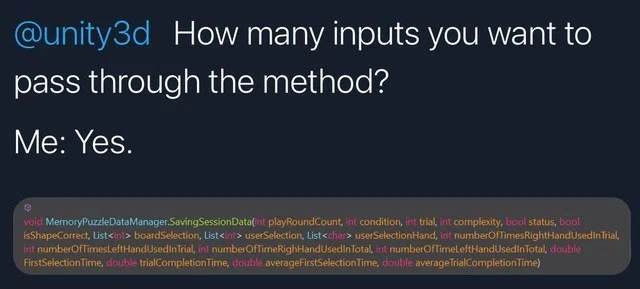
Let’s break down what’s happening in this meme in simpler terms. The image is styled like a Twitter post (dark theme, with the username in blue). It starts with @unity3d – that’s the official Twitter handle for the Unity game engine – followed by a question: “How many inputs you want to pass through the method?” Then on the next line it shows the reply: “Me: Yes.” Beneath this mock tweet, there’s a screenshot from a code editor showing a C# method definition. This method is named SavingSessionData (part of a MemoryPuzzleDataManager class) and it’s highlighted to show its long list of parameters.
In programming, a method (or function) often needs some information to do its job. These pieces of information are called parameters (or arguments) and they go inside the parentheses of the function definition. For example, a simple method might be DrawCircle(int radius, Color color) – it needs a radius and a color to know how to draw a circle. Usually, methods have just a few parameters. However, in the code shown, SavingSessionData has a whopping 17 parameters listed! This is extremely high; it’s like giving the method a huge checklist of data every time you call it.
Some of the parameters in the screenshot are:
int playRoundCount– an integer, maybe counting which round of the game the player is on.int condition– another integer, perhaps representing a game condition or level setting.int trial– could be the trial number (like attempt count).int complexity– possibly a difficulty level.bool status– a true/false value, maybe indicating if the session is completed or successful.bool isShapeCorrect– another true/false, perhaps whether the player’s answer was correct.List<int> boardSelection– a list of integers, possibly IDs of items on a game board.List<int> userSelection– a list of what the user selected (as integers).List<char> userSelectionHand– a list of characters, maybe recording which hand ('L'or'R') was used for each selection (since it’s a memory puzzle with hands involved).- Then a bunch more integers:
numberOfTimesRightHandUsedInTrial,numberOfTimesLeftHandUsedInTrial,numberOfTimeRightHandUsedInTotal,numberOfTimeLeftHandUsedInTotal– these sound like counters keeping track of how many times the player used their right or left hand, for the current trial and in total. - And finally a few doubles (decimal numbers):
FirstSelectionTime,trialCompletionTime,averageFirstSelectionTime,averageTrialCompletionTime– these seem to be timing metrics (maybe how fast the first selection was made, how long the trial took, and averages of those times across trials).
Reading that, you can tell this method is meant to save a bunch of data about a player’s session in a memory puzzle game. Essentially, whenever a round (trial) is done, they call SavingSessionData and feed it every piece of data gathered: from counts of hand usage to times and selections made. It’s like an exhaustive record of the gameplay stats.
Now, why is this considered bad or funny? In software development, there’s a concept of code quality which includes guidelines often called Clean Code principles. One guideline is: functions should ideally have a small number of parameters, because long parameter lists are hard to use and can indicate design problems. When a function has too many parameters, it is literally called a “Long Parameter List” code smell (yes, that’s the term professionals use!). A “code smell” doesn’t mean the code literally stinks, but it’s a metaphor for something in the code that’s probably a bad sign. It’s like a warning flag: “Hey, this might work now, but it could cause trouble later or be improved.”
Think about what it’s like to call this SavingSessionData function. If you wanted to use it in your code, you’d have to provide 17 separate values in the correct order. That’s tough to manage. For example:
// Example of calling the function with many arguments
dataManager.SavingSessionData(1, 0, 3, 2, true, true,
boardSelectionList, userSelectionList, userHandList,
5, 5, 20, 20, 2.0, 10.0, 2.5, 9.5);
Imagine looking at that call a week later – would you remember what each of those numbers means? Without the parameter names in front of you, 1, 0, 3, 2, true, true, ... 2.5, 9.5 just looks like a random dump of values. It’s very easy to make a mistake. For instance, if you accidentally swap two values like 2.0 and 2.5 in the call, the computer won’t know something is wrong because both are double types – but now your averageFirstSelectionTime might be wrong while your FirstSelectionTime is actually an average! These mix-ups can introduce bugs that are hard to track down.
Another issue is maintainability. Software often changes over time. What if tomorrow the game designer says, “We also need to save the player’s score for each trial”? With the current design, you’d have to add another parameter (e.g., int score) to this method. That means you must update the method definition and then find every single place in the code that calls SavingSessionData and add this new argument there. If there are 10 calls to SavingSessionData scattered around, you have to modify all 10. That’s a lot of work and a lot of room for error. And if another developer isn’t aware of the change, they might call the method without the new parameter and get a compile error. It becomes a headache for the team.
Now, how could we make this better? The key is encapsulation – a big word that basically means “group related stuff together.” All those 17 values are related; they’re all pieces of session/game data. Instead of passing them individually, we could create a class or struct (a simple data object) called something like SessionData or SessionStats. This object would have properties for playRoundCount, condition, trial, complexity, etc. Then our method can accept a single SessionData object:
// Defining a class to hold session information
class SessionData {
public int playRoundCount;
public int condition;
public int trial;
public int complexity;
public bool status;
public bool isShapeCorrect;
public List<int> boardSelection;
public List<int> userSelection;
public List<char> userSelectionHand;
public int numberOfTimesRightHandUsedInTrial;
public int numberOfTimesLeftHandUsedInTrial;
public int numberOfTimesRightHandUsedInTotal;
public int numberOfTimesLeftHandUsedInTotal;
public double firstSelectionTime;
public double trialCompletionTime;
public double averageFirstSelectionTime;
public double averageTrialCompletionTime;
}
// Now the method signature becomes much simpler:
void SaveSessionData(SessionData data) { ... }
When calling SaveSessionData, you’d create a SessionData object, set all those fields, and pass it in one go. The advantage is clarity: at the call site, instead of a blur of comma-separated values, you’d see something like SaveSessionData(sessionData). And inside that sessionData object, everything is labeled clearly.
Unity developers often use approaches like this (for example, using ScriptableObject assets or plain classes to store game data) to keep their code clean. The meme, however, is poking fun at the scenario where someone did not follow those best practices. Maybe they were new to Unity or just in a hurry. It’s a bit of developer humor saying, “We know we should design it better, but sometimes... we don’t.” The consequence is ridiculously long parameter lists that make other devs facepalm and laugh at the same time.
Let’s also decode the joke in the text. The question asks, “How many inputs do you want to pass through the method?” Usually, you’d answer with a number (like “3 inputs” or “maybe 4 at most”). But the answer given is “Yes.” This is a humorous way of saying “I’ll use as many as I want” or “all of them.” It’s like if someone asked you, “How many toppings do you want on your pizza?” and you answered “Yes” – it implies you want every topping. 😂 It’s an absurd response that breaks the expectation (since “Yes” isn’t even a number), and that absurdity is what makes it funny. In the context of the code, it implies the developer just kept adding inputs without limit.
Finally, the reference to a CVS receipt is a cultural joke. CVS Pharmacy is known (especially in the U.S.) for printing very long paper receipts, often feet long, even if you bought just one or two items. These receipts have lots of coupons and fine print, and people joke about how overly lengthy they are. Comparing a method’s parameter list to a CVS receipt paints a vivid picture: it’s comically overextended. So, the meme is equating “way too many parameters in a method” with “way too many lines on a receipt.” If you’ve ever seen a tiny purchase produce a huge receipt and had a laugh, this is the programming equivalent.
In summary, for a junior developer or someone new to these concepts: the meme highlights a common coding mistake (having a method take far too many parameters) and makes a joke out of it by exaggeration. It teaches a subtle lesson – keep your functions simple – while getting a laugh from those of us who learned that lesson the hard way. In game development (like with Unity) and elsewhere, cleaner code (with well-grouped data) is easier to work with than a giant, unwieldy function call. So next time you find yourself writing a method with a parameter list as long as your arm, remember this meme and consider if there might be a cleaner approach! 😉
Level 3: Parameter Overflow
At first glance, the code snippet in this meme is a code smell incarnate: a C# method with a parameter list so long it practically needs its own scroll bar. In the screenshot, we see MemoryPuzzleDataManager.SavingSessionData( with 17 parameters jammed between those parentheses. This is a textbook example of the long_parameter_list_smell – an api_design_anti_pattern where a function requires an absurd number of inputs. Seasoned developers immediately recognize this as a violation of Clean Code principles. It’s a technique that screams “we didn’t refactor; we just kept bolting on more stuff.” No wonder the meme caption jokes about a CVS receipt – those pharmacy receipts are notoriously long and filled with needless detail, much like this method signature.
So why is this funny to experienced devs? Because it’s relatable in the most cringe-worthy way. We’ve all seen (or written) a method like this at some point, especially under deadline pressure or in messy legacy projects. It’s the classic “just one more field” syndrome: every time a new piece of data was needed, the developer simply added another parameter. Rinse and repeat, and soon the function’s parameter list grows out of control. The tweet-style setup jokes, “How many inputs do you want to pass? Me: Yes.” – implying the dev answered “all of them”. This format is a nod to an internet meme where answering “Yes” to a “How many?” question means “I’ll take as many as I can get.” It humorously captures the indiscriminate addition of parameters. The Unity account being tagged (@unity3d) adds a tongue-in-cheek twist, as if even the game engine is bewildered: “Really, you want to pass that many variables into one method?!”
From a senior developer’s perspective, a method with this many parameters is an obvious red flag. It likely indicates poor encapsulation and a missing abstraction. In fact, there’s a well-known refactoring for this exact problem: Introduce Parameter Object. Instead of passing 17 separate values, you’d create a class (say, SessionData) to hold all those related fields. Then SavingSessionData could take just one SessionData object. This isn’t just pedantry – it dramatically improves code readability and maintainability. With an object, you label each field with a name, so you know which value is which, and you reduce the chance of swapping arguments by mistake. It also groups the data logically: clearly all these pieces belong to a “session” concept. When a function’s parameter list starts to read like a config file for a rocket launch, it’s begging for refactor.
Let’s consider what calling this monster of a method looks like in practice:
// Hypothetical call to the monstrous method:
sessionManager.SavingSessionData(5, 2, 7, 3, true, false,
new List<int>{1,2,3}, new List<int>{1,3,2}, new List<char>{'R','L','R'},
2, 1, 10, 5, 1.234, 3.456, 1.111, 3.333);
// Who can remember what each of those literal values means? It's a nightmare to maintain.
Looking at that call, even a veteran developer’s eyes would water. Is that 5 the playRoundCount or the trial? What do the two booleans control again? It’s incredibly easy to mix up arguments. For example, numberOfTimesRightHandUsedInTrial and numberOfTimesRightHandUsedInTotal are both integers – swap them accidentally and the compiler won’t complain, but your data will be garbage. Bugs love to lurk in such ambiguity.
Moreover, such a long parameter list hints at deeper design issues: perhaps the function is trying to do too much at once (violating the Single Responsibility Principle). Maybe SavingSessionData is not just saving data, but also calculating averages, validating selections, and updating counters – all in one go. A better design would split responsibilities or at least use objects to carry state. In a well-factored Unity game, for instance, you might have a SessionStats class that accumulates all these values as the game runs, then you call something like sessionStats.Save() or pass sessionStats into a saver method. That way, you’re dealing with one coherent unit of data instead of seventeen disconnected pieces.
The humor also lies in the shared pain: every experienced programmer has encountered a function like this (or inherited a codebase full of them). We chuckle because we remember the frustration: trying to add one more parameter and hunting down every function call across the codebase to update it; or attempting to understand what a method does, only to be greeted by a wall of parameters and thinking “there’s got to be a better way!”. The “CVS receipt” analogy nails the absurdity – just like a tiny purchase yielding a mile-long receipt, a single function needed a mile-long list of inputs. It’s overkill to the point of comedy.
And yes, let’s not ignore the context: Unity game development. Unity uses C# and encourages rapid prototyping. In game jams or rushed dev cycles, it’s not uncommon to see less-than-ideal code structure because the priority is “make it work now.” A developer might quickly write SavingSessionData(int score, int time, bool success, ...) to save a few values. As the game’s design evolves (e.g., “oh, now we need to track which hand the player used, and how many attempts, and average times…”), they just keep tacking new parameters onto the method. Before you know it, the method signature is a Frankenstein of game state data. Ideally, one would stop and refactor – introduce new classes for those concepts, or at least use structures like ScriptableObjects (a Unity feature for storing data) – but under deadline or inexperience, that refactor might never happen. The result: a maintenance nightmare that everyone recognizes as soon as they see it. The meme is effectively a gentle roast of that scenario.
In summary, at the senior level this meme highlights a common anti-pattern in code: throwing everything including the kitchen sink into a single method call. It’s funny because it’s extreme, and because it pokes at a truth in software development: without discipline or refactoring, our code can become comically convoluted. The veteran laugh here is a mix of “haha, that’s ridiculous” and “ouch, I’ve seen that.” We laugh, and perhaps immediately feel the urge to go refactor some code out of guilty conscience. After all, as the joke suggests, when asked “How many inputs will you pass?” – a seasoned dev knows the correct answer is not “Yes.” 😅
Description
The meme is styled like a dark-theme tweet. In blue text it tags “@unity3d” followed by the question: “How many inputs you want to pass through the method?” On the next line, the reply simply says “Me: Yes.” Beneath the tweet is a code screenshot showing a C# method signature highlighted in a code editor: “void MemoryPuzzleDataManager.SavingSessionData(int playRoundCount, int condition, int trial, int complexity, bool status, bool isShapeCorrect, List<int> boardSelection, List<int> userSelection, List<char> userSelectionHand, int numberOfTimesRightHandUsedInTrial, int numberOfTimesLeftHandUsedInTrial, int numberOfTimeRightHandUsedInTotal, int numberOfTimeLeftHandUsedInTotal, double FirstSelectionTime, double trialCompletionTime, double averageFirstSelectionTime, double averageTrialCompletionTime)”. The absurdly long list of parameters satirizes poor API design, highlighting code smell issues like long parameter lists and maintainability headaches common in Unity C# projects, eliciting relatable developer humor about clean-code violations

Comments
20Comment deleted
Pro tip: when your Unity SaveSession method has so many parameters it’s flirting with the Ethernet MTU, you’re no longer passing arguments - you’re reinventing JSON with worse ergonomics
This is what happens when you treat method signatures like a NoSQL document - eventually someone will ask 'but can we also pass the kitchen sink?' and the answer will still be another parameter at position 47
When Unity asks how many parameters you need and you answer 'yes,' you end up with a method signature so long it needs its own scroll bar. This is the architectural equivalent of ordering everything on the menu because you couldn't decide - except instead of indigestion, you get a maintenance nightmare that makes every code reviewer weep. At this point, the method isn't just violating the Single Responsibility Principle; it's running a full-scale insurgency against it. Pro tip: if your method signature requires a parameter object, a builder pattern, and possibly a therapist, it's time to refactor
Unity: “How many inputs?” Me: “Yes.” At 18 parameters the call site is basically positional JSON, and every bug is a permutation we could’ve avoided with a Parameter Object and a domain model
This is the LongParameterList × PrimitiveObsession speedrun - just take a SessionTelemetry DTO and pass an ID; your stack trace deserves to fit on one monitor
Unity mantra: Why define a SaveData struct when one method can shoulder the parameter apocalypse?
A telescopic constructor Comment deleted
But it's life ) Comment deleted
if you have more than 3 parameters, then you are doing something wrong. Comment deleted
aye, just using the main config class to do this (& changing data along the way instead of collecting it once dumping happens) would be more efficient. Comment deleted
yeah exactly, that’s the right way to do imho. the function should be something like MemoryPuzzleDataManager.savesession(SessionData data). i know that code is joke but i’ve seen people coding like that so it just brings terrorizing memories about fixing bugs in those codes Comment deleted
aye Comment deleted
Yup, that is why we will make 20 overloads. Comment deleted
make it a struct Comment deleted
Exactly, thank you Comment deleted
* except for some edge cases Comment deleted
Can you pass object with this fields? Like in javascript: function({ param1, param2, param3}) {} Comment deleted
*Encapsulation left this chat* Comment deleted
that's why unity sucks btw Comment deleted
More like op's method sucks, that screams for a class or a struct at that point Comment deleted