Skip to content
DevMeme
5422 of 7435
The Absurdity of Self-Documenting Code Taken to Extremes
CodeQuality Post #5944, on Mar 27, 2024 in TG

The Absurdity of Self-Documenting Code Taken to Extremes

Why is this CodeQuality meme funny?

Level 1: Too Much Information

Imagine if you asked your friend what their dog’s name is, and they said, “MyDogWhoLovesToBarkAtTheMailmanAndPlayFetchInThePark.” 😲 That’s a pretty silly name, right? It tells you a lot about the dog – it barks at mailmen and loves fetch – but as a name it’s way too much! Normally, you’d just name the dog something short, like Buddy or Rex, and then you can explain those other details when you talk about him.

This meme is joking about the same idea, but with programming. In a game’s code, someone named each variable (think of variables like labels for things or little “buckets” holding information) with a whole sentence. Every variable is basically telling its whole life story in one go. It’s funny because it’s over-the-top. Just like nobody would actually call their cat ThisIsTheCatThatSleepsOnTheSofaAllDayAndPurrsLoudlyWhenHappy (they’d pick a simpler name like Whiskers), programmers usually keep names short and sweet, too. When the names get ridiculously long, it looks goofy and makes the code hard to read – which is exactly why developers see this and laugh. It’s a playful reminder that sometimes trying to be super clear can end up just being super silly!

Level 2: Long-Winded Variables

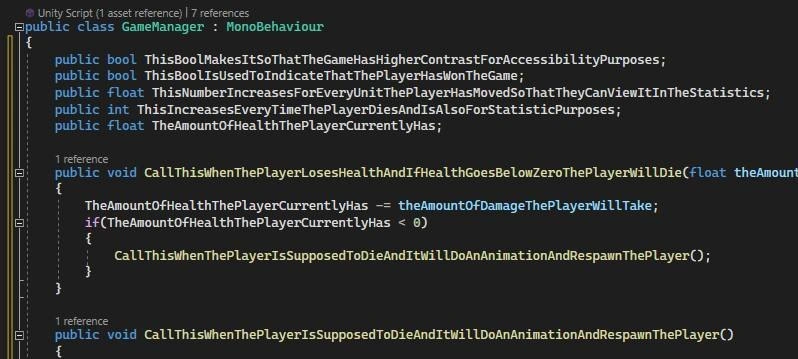
In this meme’s screenshot, we’re looking at a Unity C# script that’s meant to manage game state. Unity game scripts often inherit from MonoBehaviour (that’s the base class which lets them run in the Unity engine). The script is named GameManager, a common choice for a central controller in simple games. It has several public variables and methods. Let’s break down what we see and why it’s funny:

  • Public Variables: These are fields declared with the public keyword inside the class, meaning any other part of the code (or Unity’s editor) can see and modify them. The types include bool (a Boolean, storing true/false), float (a number with a decimal, e.g. 3.14), and int (an integer, e.g. 42). In Unity, public fields are often used to tweak values in the Editor or to make simple connections between objects. Here, each field holds some piece of game info: whether high contrast mode is on, whether the player has won, how far the player moved, how many times they died, and the player’s health.

  • Ridiculously Long Names: Instead of simple names like highContrastEnabled or playerHealth, each variable has a very long name that literally describes its entire purpose in one go. For example, ThisBoolIsUsedToIndicateThatThePlayerHasWonTheGame is a Boolean intended to be true when, well, the player has won the game. Another one, ThisIncreasesEveryTimeThePlayerDiesAndIsAlsoForStatisticPurposes, is clearly a counter that increments whenever the player dies, probably used for showing death count statistics. The names themselves read like sentences in English, just smashedTogetherWithoutSpaces (because in code you can’t have spaces in identifiers). This style is technically CamelCase (more precisely PascalCase since each word starts with a capital letter, including the first). CamelCase is a normal convention in C# for things like class names or properties, but here it’s been taken to an extreme length.

  • Self-Documenting Code – Taken Literally: There’s a programming idea that code should be self-documenting, meaning if you name things well and structure your code clearly, someone reading it can understand it without needing a lot of comments or external documentation. This snippet pushes that idea to the limit: the code has almost no comments, because the names themselves act as comments. It’s as if the developer thought, “Why write a separate comment or documentation when I can just put the entire explanation in the name?” The meme caption even mocks this with “Finally some code with no docs/comments required” followed by a clown emoji, implying this is a joke – normally, no one suggests using 50-character names as a serious strategy!

  • Why This Is a Problem: At first glance, a newbie might think, “Well, the names are super clear, so isn’t that good?” The issue is that such overly long variable names make the code hard to read and work with:

    • Readability: When you see a line of code, the important part can get lost in a wall of text. For instance, compare if (playerHasWon) {...} to if (ThisBoolIsUsedToIndicateThatThePlayerHasWonTheGame) {...}. The second one is a mouthful – you have to carefully pick apart each part of that mega-name to get its meaning. It slows you down.
    • Typos and Errors: The longer the name, the easier it is to make a typo. In the screenshot, one of the variables is TheAmountOfHealthThePlayerCurrentyHas – notice “Currently” is misspelled as Currenty (missing an "l"). In code, a tiny spelling mistake can break things or lead to two separate variables (if someone later declares TheAmountOfHealthThePlayerCurrentlyHas with the correct spelling, you’d have two different variables – yikes!). With short names, it’s easier to spot and avoid mistakes.
    • Editing Pain: Imagine you need to use or change this variable name in multiple places. You’d have to write out or select this gigantic name each time. Modern IDEs (Integrated Development Environments) do offer auto-complete, but even scrolling through a list of similarly long names can be frustrating. It’s also easy to pick the wrong one if several start with the same few words (like having both TheAmountOfHealthThePlayerCurrentlyHas and TheAmountOfHealthThePlayerHadAtCheckpoint – just hypothetical, but you see how that could confuse).
  • Common Naming Conventions: In clean coding practice, we try to choose names that are short but meaningful. You want enough info to convey the role of the variable, but not so much that it becomes unwieldy. For example, a typical approach for these might be:

    // Original from the meme:
    public bool ThisBoolIsUsedToIndicateThatThePlayerHasWonTheGame;
    // A more standard naming approach:
    public bool hasWon;  // true if the player has won the game
    
    // Original from the meme:
    public float ThisNumberIncreasesForEveryUnitThePlayerHasMovedSoThatTheyCanViewItInTheStatistics;
    // Simplified naming:
    public float distanceTraveled;  // total distance player has moved (for stats)
    

    In the simplified versions above, the variable names are much shorter (hasWon, distanceTraveled), but they still convey the key idea. We added a brief comment to give extra context. This way, the code is easier to read and we understand what’s going on. That’s usually a better balance.

  • GameDev Context – The Almighty GameManager: In Unity and many game projects, beginners often use a GameManager script as a catch-all place to put game state and logic. It’s convenient for small projects: you drop in one script that handles a bit of everything (win/lose conditions, player stats, settings, etc.). However, as a project grows, this can become unwieldy. The GameManager starts doing too much, which makes the code harder to maintain. Here we see that happening – the GameManager has to keep track of so many different things that the developer felt the need to write extremely specific names to avoid confusion. This is actually a sign that maybe the design should be split up: e.g., a separate PlayerStats component for move distance and death count, an AccessibilitySettings for contrast mode, etc. By dividing responsibilities, each class could have simpler, shorter names for its variables.

  • Why Developers Find This Funny: It’s the exaggeration of a real principle. We’re told “Use descriptive names!” and “Code should be self-explanatory.” Those are good tips, but this meme shows an absurd interpretation of that advice. Just as an example, consider if road signs followed this style – a stop sign might read: "ThisIsASignThatInstructsVehiclesToComeToACompleteStopAtThisIntersection" instead of just “STOP.” 😄 It’s clear, sure, but it’s overkill. Developers laugh because we’ve all seen code either with cryptic names (like x, y or tmp everywhere), or occasionally something like this where the pendulum swings too far the other way. It’s relatable humor in the programming world about finding the right balance in NamingConventions.

In short, the meme is a lighthearted reminder: yes, write code that’s easy to understand – but if your variable name feels like it could wrap to a second line, you’ve probably gone too far. Keep names informative but concise, and don’t be afraid to use regular comments or documentation for the details. Code is for humans to read as much as for computers to execute, and humans appreciate when it doesn’t read like a run-on sentence!

Level 3: CamelCase Chronicles

Behold the GameManager, where variables don't just have names – they have backstories. In this Unity C# script, every field is named like a novella in CamelCase (each word squished together with Capitals). The result is comically verbose identifiers that experienced devs recognize as a classic clean code principle gone wrong. We’re taught to use meaningful variable names for good CodeQuality, but here that advice got cranked past 11 into absurdity.

Take a look at these public fields:

  • ThisBoolMakesItSoThatTheGameHasHigherContrastForAccessibilityPurposes – a boolean that likely toggles a high-contrast mode for accessibility.
  • ThisBoolIsUsedToIndicateThatThePlayerHasWonTheGame – a bool that’s true if the player has won.
  • ThisNumberIncreasesForEveryUnitThePlayerHasMovedSoThatTheyCanViewItInTheStatistics – a float counting distance the player moved, for stats display.
  • ThisIncreasesEveryTimeThePlayerDiesAndIsAlsoForStatisticPurposes – an integer death counter for the player.
  • TheAmountOfHealthThePlayerCurrentlyHas – a float for the player’s current health.

Each name does describe its purpose in extreme detail. But the humor (and horror) here is how that detail sabotages readability. It’s like the code is wearing a clown wig while saying, “Look ma, no comments needed!” 🙃 In fact, the meme’s caption jokes “no docs/comments required by default 🤡”. The clown emoji underscores the sarcasm: sure, the code documents itself... by embedding an entire commentary into every identifier! This is self-documentation overdose.

For seasoned developers, a few things stand out immediately as code smells:

  • Excessive Verbosity: These names are so long they’re practically paragraphs. You have to mentally parse ThisBoolIsUsedToIndicateThatThePlayerHasWonTheGame into “This Bool is used to indicate that the player has won the game.” By the time you reach word 12, you’ve lost the plot. Reading such code is slow and error-prone, defeating the purpose of clarity.
  • Maintainability Nightmare: Imagine referencing these variables throughout the codebase. Every time the player wins or dies, other code might call something like GameManager.Instance.ThisIncreasesEveryTimeThePlayerDiesAndIsAlsoForStatisticPurposes++. 😱 Typing that without a mistake is tough (notice PlayerCurrentyHas even has a typo missing an l in “Currently” – easy to miss in a sea of letters). Refactoring or renaming these would be a pain, and diff logs would be full of gigantic identifiers.
  • Intent vs. Implementation: The method CallThisWhenThePlayerLosesHealthAndIfHealthGoesBelowZeroThePlayerWillDie(float damage) literally spells out the entire if-check logic in its name. Instead of a clean TakeDamage(damage) calling a Die() when health <= 0, the dev narrated the process. It’s both funny and alarming – you’re not supposed to encode the whole algorithm in the function name! Experienced devs might chuckle and think, “why not write the code logic in the name too, while you're at it?”

This pattern hints at deeper design issues. The GameManager here is a likely example of the God Object anti-pattern in GameDev – a single class hoarding all game state and behavior. Since it tracks everything from accessibility to player stats to health, the poor developer resorted to hyper-detailed names to avoid confusion between all these responsibilities. A senior engineer knows that a well-structured game would split these out (e.g. a StatsManager for statistics, a PlayerHealth component for health logic, etc.). Instead, cramming everything into one class and differentiating only via monstrous names is a recipe for chaos. The overly long names are symptomatic of trying to self-document a messy design rather than cleaning it up.

There’s an old joke in programming:

“There are only two hard things in Computer Science: cache invalidation and naming things.”

This meme dramatizes the naming problem. The developer clearly didn’t want ambiguous names – they went to extreme lengths (literally) to be explicit. It’s an exaggerated take on CleanCodePrinciples: yes, code should be self-documenting, but not by turning every identifier into a Wikipedia article. The best practice is to choose concise, meaningful names and use comments or documentation for additional context. Here, the names tried to carry all the context. As a result, the code is technically clear about what each bit does, but cognitively taxing to read. It’s like having variable names that scream the implementation at you; there’s zero mystery, yet it’s overwhelming. Seasoned devs find this hilarious because we strive to hit the sweet spot – enough detail to avoid confusion, but not so much that the code becomes an endless ramble.

From a Unity perspective, another irony is how these verbose fields would appear in the Unity Editor. Unity shows public fields in the Inspector with their variable names (unless a [SerializedName] or property drawer is used). A name like ThisNumberIncreasesForEveryUnitThePlayerHasMovedSoThatTheyCanViewItInTheStatistics would literally label a tiny Inspector field with that entire sentence in CamelCase 😅. A UI designer or level designer would squint at that. In practice, one might use a shorter name like distanceTraveled and add a [Tooltip("Total distance player has moved (for stats)")] attribute to give a friendly explanation in the Editor. That way, you get clarity and brevity. The dev here either didn’t know about such features or was making a tongue-in-cheek statement with these names.

In summary, this meme tickles developers because it’s a perfect storm of well-intentioned naming gone awry. It lampoons the idea that you can solve documentation by just making names longer. Every experienced coder has seen misguided attempts at “self-documenting code”, but this takes the cake. CodeMaintainability isn’t achieved by maxing out name lengths – it’s achieved by good structure and moderate, consistent NamingConventions. So when we see CallThisWhenThePlayerIsSupposedToDieAndItWillDoAnAnimationAndRespawnThePlayer(), we laugh (and maybe cry a little) at how literally it spells out what a simple RespawnPlayer() could convey. It’s both a joke and a gentle reminder: just because we can name a variable an entire sentence, doesn’t mean we should.

Description

A screenshot of a C# script within the Unity game engine editor. The code defines a 'GameManager' class that contains variables and methods with extraordinarily long and descriptive names. For example, a boolean variable is named 'ThisBoolMakesItSoThatTheGameHasHigherContrastForAccessibilityPurposes', and a method is named 'CallThisWhenThePlayerLosesHealthAndIfHealthGoesBelowZeroThePlayerWillDie'. This meme is a satirical take on the software development principle of 'self-documenting code,' where code is written so clearly that it doesn't need comments. The image pushes this idea to a comical and impractical extreme, highlighting the trade-off between descriptive naming and code readability/usability. It resonates with developers who have debated naming conventions and the appropriate level of verbosity in code

Comments

45
Anonymous ★ Top Pick This isn't just self-documenting code, it's a full-stack story. The compiler doesn't build it, it publishes it as a novella. Good luck hitting the 80-character line limit during a code review
  1. Anonymous ★ Top Pick

    This isn't just self-documenting code, it's a full-stack story. The compiler doesn't build it, it publishes it as a novella. Good luck hitting the 80-character line limit during a code review

  2. Anonymous

    I love how we micro-batched draw calls to hit 60 FPS, then stuffed every field with a 120-char “self-documenting” name - because why store the requirements doc in Confluence when you can cache-miss it in every dereference?

  3. Anonymous

    This is what happens when the PM says 'make the code self-documenting' and the junior takes it literally - now the variable names are longer than the actual implementation, and the code review tool crashes trying to display the diff

  4. Anonymous

    When your tech lead says 'make the code self-documenting' but you take it as a personal challenge to eliminate all need for comments, documentation, and human comprehension. This is what happens when you implement 'clean code' principles with the subtlety of a sledgehammer - variable names so descriptive they could double as user stories. At this rate, the next sprint will just be renaming 'i' to 'ThisIntegerRepresentsTheCurrentIndexInTheLoopThatIteratesThroughTheCollectionOfGameObjectsInTheScene'. The real kicker? This probably still compiles faster than a Gradle build, and the method names are *still* more concise than most enterprise Java interfaces

  5. Anonymous

    When your MonoBehaviour has CallThisWhenThePlayerLosesHealthAndIfHealthGoesBelowZeroThePlayerWillDie(), you’re not doing self‑documenting code - you’ve implemented Documentation‑Driven Development; the call stack is a user story and grep is a literary exercise

  6. Anonymous

    Immortality via MonoBehaviour: death state? Nah, just `currentHealth = maxHealth` - state machines are for mortals

  7. Anonymous

    Self-documenting code meets Unity serialization: the GameManager doubles as the PRD - rename one field and half your prefabs quietly reset

  8. @Sp1cyP3pp3r 2y

    i_hate_camel_case

    1. @ZgGPuo8dZef58K6hxxGVj3Z2 2y

      Isnt camelCase lower case at first char?

      1. @Sp1cyP3pp3r 2y

        mayBe

        1. @ZgGPuo8dZef58K6hxxGVj3Z2 2y

          Don’t worry I have a more cursed casing system

      2. @TERASKULL 2y

        yea, otherwise it's PascalCase

        1. @ZgGPuo8dZef58K6hxxGVj3Z2 2y

          Thats what I thought remembers me of VisualBasicTimes

      3. @trainzman 2y

        camelCase is, PascalCase is not

        1. @ZgGPuo8dZef58K6hxxGVj3Z2 2y

          I use a combination of both💀

          1. @Sp1cyP3pp3r 2y

            terminate yourSelf 👍

            1. @trainzman 2y

              Why, it's a common C# practice

          2. @TERASKULL 2y

            add some snake case To_spice_Things_up

          3. @ZgGPuo8dZef58K6hxxGVj3Z2 2y

            Parameters and local/private variables are camelCase, Class/Interface/Function/Property names are PascalCase

            1. @ZgGPuo8dZef58K6hxxGVj3Z2 2y

              Private variables inside a class are camelCase with a _ prefix

              1. @ZgGPuo8dZef58K6hxxGVj3Z2 2y

                Now you can cancel me

            2. @azizhakberdiev 2y

              in assembly we use lowercase in any case

              1. @ZgGPuo8dZef58K6hxxGVj3Z2 2y

                Noice

              2. @ZgGPuo8dZef58K6hxxGVj3Z2 2y

                To be fair we just pretend to care about casing yet we never use the same names with different casing. /s

  9. @Sp1cyP3pp3r 2y

    apart from math functions, they constantly need to reference Engine's library

  10. @TERASKULL 2y

    the gameplay logic is written like that, everything else is handled by the game engine. Unless you're fucked in the head and create a new engine in C++

  11. @posttrau 2y

    I hope this is not a real code but made just for a meme because it smells like a lot

  12. @trainzman 2y

    While Java uses camelCase for everything, it's common for C# code to use PascalCase for method names and camelCase for variables

    1. @Sava_SKk 2y

      classes in java are in PascalCase

      1. @trainzman 2y

        True yet not really relevant 3 days later

  13. @purplesyringa 2y

    nit pick: it's per se, not per say

  14. @qwnick 2y

    yes, just you :)

  15. @Supuhstar 2y

    [C.objective mostReasonableTokenLengths];

  16. @sin_fox 2y

    Tarkov sources leacked?

  17. @Dark_Embrace 2y

    if (health < 0) kill_player(); So 0 hp is not a death

    1. @sylfn 2y

      please use english in this chat

    2. @ZgGPuo8dZef58K6hxxGVj3Z2 2y

      uint health = 100;

  18. @ZgGPuo8dZef58K6hxxGVj3Z2 2y

    Pls yes also limit data size to 7 bits

  19. @ZgGPuo8dZef58K6hxxGVj3Z2 2y

    Make one for no rust

  20. @hannybu 2y

    https://ideogram.ai/g/Jo7C5SzaSeWlpA-6ZwnOWg/1 here's the stuff - https://ideogram.ai/ prompt: protester holding a sign reading "Neural Invalidi!" there 25x4 per day for each gmail very good in fonts protesters can be replaced on anything i started to use it for communication :(

  21. @Sava_SKk 2y

    like Main

  22. @Sava_SKk 2y

    but methods and variables are in camelCase

  23. @Sava_SKk 2y

    void main, int playerScore etc

  24. @zherud 2y

    Why is health a float? Wtf

  25. @ageek 2y

    😂😂

Use J and K for navigation