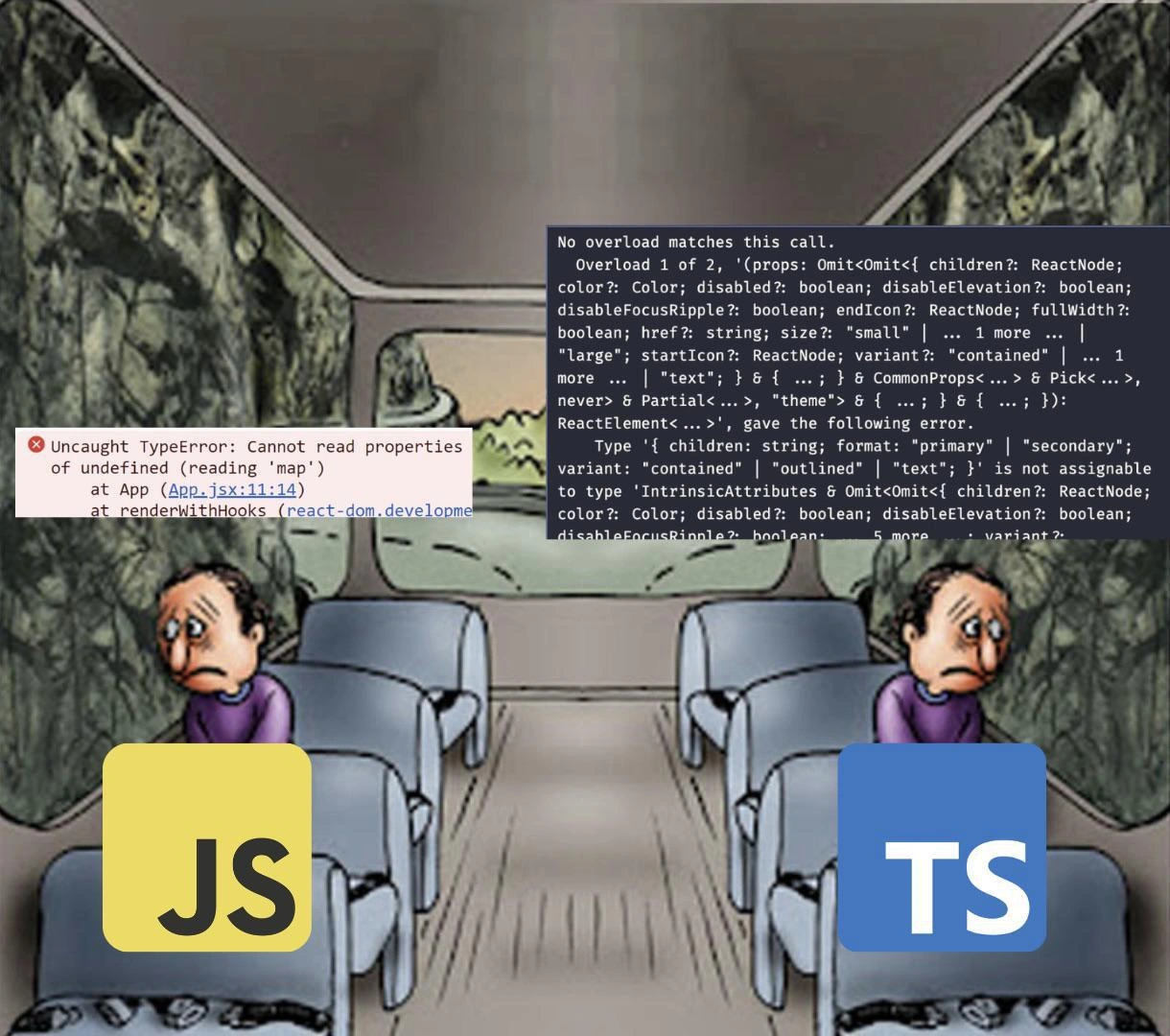
JavaScript vs TypeScript Two Guys on Bus Both Sad Different Error Messages
Why is this Languages meme funny?
Level 1: Better Safe Than Sorry
Imagine two friends riding a bus on a trip. One friend decides not to wear their seatbelt because it feels more free and easy. At first, they’re having a carefree ride, able to move around in the seat and relax. But suddenly, the bus hits a big bump in the road – that friend gets jolted really hard and bangs into the seat in front, getting hurt because nothing was holding them in place. The other friend buckled their seatbelt before the trip. When the bump comes, they might feel a tug, but the belt keeps them safe in their seat. They end up a bit shaken but absolutely fine, maybe even smiling because they’re glad they took that precaution. In this story, not wearing the seatbelt is like writing code without any checks – it’s smoother initially, until an unexpected bump (a mistake in the code) causes a crash. Wearing the seatbelt is like having those safety checks (types) in place – it takes a little effort to buckle up, but it means when something goes wrong, you’re protected. The lesson is simple: sometimes a little inconvenience up front can save you from a lot of pain later. It’s a classic case of better safe than sorry – just like our happy seat-belted bus passenger chose the safe ride, a programmer might choose some extra checks (TypeScript) so they can enjoy the journey without crashes.
Level 2: Undefined is Not a Function
Let’s break down the joke for developers who might not have encountered these exact issues yet, especially if you’re newer to JavaScript or TypeScript or working with a frontend library like React. The meme compares two scenarios: one where a problem is caught late while the program is running (JavaScript), and one where a problem is caught early during the code checking phase (TypeScript). Here are the key pieces:
JavaScript (JS) – Dynamic Language: JavaScript is a programming language commonly used to make web pages interactive. It’s dynamic, meaning you don’t have to declare types for your variables. You can do things like
let x = 5; x = "hello";and JavaScript won’t complain. This makes it quick to write code, but the downside is the language won’t help catch certain mistakes. If you mix things up (like treating anumberas if it were anarray), JavaScript only notices when it actually runs the code, not beforehand.TypeScript (TS) – Typed Superset of JS: TypeScript is like JavaScript with a safety net. It introduces static typing. That means you (or your tools) explicitly tell the program what types things are supposed to be, and TS will check that for you. For example, you might say
let count: number = 5;which means “count should always be a number.” If later in the code you docount = "hello";, TypeScript will immediately give an error before you even run the program. It’s basically a more strict way of writing JS. The catch is that browsers can’t run TypeScript directly – you run a compiler that transforms TypeScript into JavaScript (while checking types). So TS is a development-time tool; by the time your code is running in the browser, it’s back to plain JavaScript (with all the type mistakes already corrected or guarded against).Runtime error (JavaScript side): A runtime error is an error that happens when the program is running. It’s not caught beforehand. In the meme, the left side shows a classic runtime error:
Uncaught TypeError: Cannot read properties of undefined (reading 'map') at App (App.jsx:11:14) at renderWithHooks (react-dom.developme...)What does that mean? Let’s simplify it: “Cannot read properties of undefined” means the code tried to access something on a value that was
undefined. Specifically, it tried to read'map'– which is a function that arrays have – but the thing it was trying to use as an array was actuallyundefined. This often happens if you expect an array but haven't initialized it. For example:let items; // we declared items but didn't assign anything, so it's undefined console.log(items); // undefined items.map(x => x * 2); // ^ Boom! .map is a function that exists on Array objects, but 'items' isn't an array here. // JavaScript throws: "Uncaught TypeError: Cannot read properties of undefined (reading 'map')"The error message also shows where it happened:
App.jsx:11:14likely means in the file App.jsx at line 11, column 14, inside a React component. So maybe inApp.jsxthe code tried to do something likethis.state.items.map(...)orprops.items.map(...)without realizingitemswasn’t set yet. If you’re a newer developer, seeing an error like that pop up can be confusing: “undefined? I never wrote undefined anywhere!” – but it basically means something wasn’t given a value when you expected it to have one. This is a bug. In a running app, a runtime error like this would usually break the functionality – maybe nothing shows up on the page because the JavaScript stopped running at that point. It’s like driving and suddenly hitting a wall; everything after that point in the code doesn’t happen.Compile-time error (TypeScript side): A compile-time error is caught during the build/compilation step, before the code is actually running. The right side of the meme shows a TypeScript compile error. It’s long, but the key part starts with “No overload matches this call.” In simpler terms, TypeScript is saying: “I see you’re trying to call or use something in a way that doesn’t match any of the definitions I have for it.” In the context of React (as the error suggests), it often means you passed the wrong props to a component or called a function with the wrong arguments. An overload is just a term for a function that has multiple allowed ways to call it. The error message is listing the expected ways (“Overload 1 of 2, (props: ... )… Overload 2 of 2, (props: ... )…”) and none of them match what you did. Then further down it says:
Type '{ children: string; format: "primary" | "secondary"; variant: "contained" | "outlined" | "text"; }' is not assignable to type '...ButtonProps...'This part is crucial: it’s telling us the object we provided (with
children,format, andvariantproperties) doesn’t fit the expected type. Likely, the component (maybe a<Button>from a UI library) expectschildren,color,variant, etc., but not aformatproperty. Because we wroteformat="primary"(perhaps thinking of some API that isn’t actually correct), TS immediately flags it. In plain JavaScript, you could pass any prop name to a component – the component would just ignore unknown ones. You wouldn’t know you used the wrong prop name unless you noticed the feature not working. But in TS, using a non-existent prop (formatin this case) triggers a compile error. It’s like the TypeScript compiler is a strict editor reading through your component usage and saying “Hmm, I’ve never heard of aformatoption on a Button. That must be a mistake.” Yes, the error message is super verbose (it’s basically printing out the entire definition of what a Button can accept, which is why it’s so long and has all that{ children?: ReactNode; color?: Color; disabled?: boolean; ... }stuff), but at the end of the day, it’s saving you from a bug. The moment you see that, you can fix the code – maybe you meant to usecolor="primary"instead – and then the error goes away. The key point: the code never even ran yet. You caught and fixed the issue beforehand.To illustrate compile-time checking with a simpler example related to our
.mapbug above, imagine we’re using TypeScript:let items: string[] | undefined = undefined; items.map(item => item.toUpperCase()); // ~~~~ // Error: Object is possibly 'undefined'. // TypeScript stops us here because items might be undefined – we must handle that first.In this TypeScript snippet, we explicitly said
itemscould be an array of strings orundefined. Theitems.map(...)line gets a red squiggly (the~~~~underitemsI’ve shown) and TypeScript will output an error like “Object is possibly 'undefined'.” It refuses to compile this code until we deal with that, for example by doing:if (items) { items.map(item => console.log(item)); }or giving
itemsa default value if it’s undefined. This is a much shorter error than the overload one, but it’s the same principle: stop now, fix the bug before proceeding. The meme’s right side just shows a more complex real-world case, but fundamentally, it’s TypeScript catching a mistake early.React and the
.mapcontext: The mention ofApp.jsxand the use of.mapstrongly imply this scenario is a React application. In React (a popular JavaScript library for building user interfaces), you often render lists of elements by taking an array of data and using the array’s.mapfunction to turn each item into a React element. For example, if you have an array of users, you might dousers.map(user => <UserCard user={user} />)to render each one. This works great as long asusersis actually an array. Ifusersisundefinedornull(maybe the data hasn’t loaded yet, or an error occurred), thenusers.map(...)will throw the exact runtime error we see. React developers quickly learn to guard against this, e.g.,users && users.map(...)or provide a default empty array. TypeScript helps by reminding you with a compile error if you declared the type properly. But if you’re just using JavaScript, it’s on you to remember to do those checks. The meme’s left passenger error is a situation every React dev faces early on: you forget to account for the initialundefinedstate of something likeprops.items, and your app crashes. It’s a classic bug in front-end development.Type safety and code quality: The big picture is that using TypeScript is about increasing your code quality by preventing bugs. The trade-off is you spend a bit more time upfront writing or at least thinking about types, and occasionally wrestling with these confusing compiler errors. Early in your career, the first time you see a TypeScript error like the one in the meme, it can feel overwhelming – “Why is it so long? Did I break everything?” – but with experience, you learn that it’s actually very informative. A seasoned dev might skim that error and immediately know, “Ah, I passed a wrong prop to that component.” They might even appreciate how thorough it is. Using TypeScript forces you to be explicit and handle edge cases, which means fewer bugs make it to production. In JavaScript, it’s easier to start coding quickly (no need to define types), which is great for small projects or quick prototypes. However, as your project grows, the lack of a safety net can lead to more runtime errors that are hard to debug. There’s a famous saying in software: “Fail early, fail often.” In this context, TypeScript makes your code fail early (at compile time, in your development environment) so it doesn’t fail often in production. JavaScript lets you run immediately, but if there’s a mistake, you’ll only see the failure later when the code actually runs.
In short, the left side of the meme is an all-too-familiar JavaScript runtime error – scary because it’s unanticipated and stops the program when it’s already out in the wild. The right side is a TypeScript compile error – intimidating in size, but actually a friendlier scenario because it’s caught internally before anything is live. If you’re a newer developer, the meme is encouraging (in a humorous way) the idea that while TypeScript’s errors might look painful, they’re the good kind of pain that saves you from the really bad pain of chasing down bugs late. Or put another way: JavaScript might let you move fast, but TypeScript helps ensure you don’t break things. The two passengers on the bus have a choice: quick and risky, or careful and safe. And the meme is joking that the “careful and safe” passenger, though dealing with a big error message, is actually having a happier time in the end.
Level 3: Undefined Terror vs Typed Bliss
In this classic two-passengers-on-a-bus meme, each side represents a day in the life of a frontend developer choosing between vanilla JavaScript and TypeScript. On the left, the JavaScript developer (with the big yellow JS on their chest) is gazing miserably at a stone wall of a window, which in reality is the browser’s console plastered with an error: “Uncaught TypeError: Cannot read properties of undefined (reading 'map')”. In plain terms, their app just blew up because somewhere in their React code, they tried to use something that wasn’t there (calling .map on an undefined value). The code even points finger: App.jsx:11:14 – that’s likely where a React component attempted to render a list from some data that turned out to be undefined instead of an array. The left passenger’s face says it all: “How did this happen? Everything was working a second ago, and now it’s all dark!” It’s the runtime terror of JavaScript – your code runs without complaints until, suddenly, it hits a problem it can’t handle, and it crashes in the middle of execution. Anyone who’s written JavaScript has been in that seat: one moment you’re cruising, next moment you get the dreaded red error text and your heart sinks because you know you’ve got a bug hunt ahead. Seasoned devs joke that errors like “Cannot read property 'foo' of undefined” are basically the JavaScript theme song – inevitably playing in the background of every large project. They often rear their head at the worst times too: deploy day, demo with the boss, Friday at 5 PM – you name it. It’s the “oh no” moment every JS developer recognizes, usually followed by scrambling through stack traces to figure out which variable or API response was undefined.
Now look at the bus’s right side: the TypeScript developer (proudly sporting the blue TS logo) is smiling wide, basking in the sunshine of a compile-time win. What’s on their window? A massive, paragraph-long TypeScript error message. To the untrained eye, that wall of text looks intimidating (and honestly, even to the trained eye it can be a lot). It says: “No overload matches this call… Type '{ children: string; format: "primary" | "secondary"; variant: "contained" | ... }' is not assignable to type 'IntrinsicAttributes & Omit<Omit<{ children?: ReactNode; color?: Color; ... }>'”, and continues on and on. This is the kind of verbose output that might make a newbie panic, but our TS developer is grinning because they know this long message appeared before they ran the app. They haven’t even refreshed the page yet; their compiler/IDE caught a mistake in the code as they were writing it. This is the typed bliss: instead of a silent bug sneaking by and exploding at runtime, the TypeScript compiler loudly and verbosely complains immediately. It’s like a super-strict proofreader going through your code and marking everything it doesn’t like in red. Sure, it’s pedantic and sometimes exhausting (the error is practically a short novel detailing type omissions and mismatches), but it’s infinitely better than a runtime crash. The right passenger on the bus is happy because they get to fix the problem now, in a controlled environment, rather than having a user or QA find the bug later when it’s much costlier.
This meme perfectly captures a common experience in modern front-end development: the transition from JavaScript to TypeScript. Many of us have sat in that left seat early in our careers – puzzled why our app broke with an undefined is not a function error. Maybe you forgot to initialize state, or an API call returned null and your code assumed it was an array. In a React app, for example, you might do something innocuous like:
// Inside a React component render
<ul>
{props.items.map(item => <li key={item.id}>{item.name}</li>)}
</ul>
If props.items hasn’t been set yet (say, data is still loading and is undefined or null), React will throw that exact “Cannot read properties of undefined (reading 'map')” error. In pure JS, nothing warns you this could happen – you only discover it when it breaks at runtime (perhaps when a user tries to load the page and sees nothing but an error, yikes). Experienced JS devs have learned the hard way to defensively code around such issues (e.g., check if (items) ... or provide defaults), but without the language forcing you, it’s easy to slip up. This is the dark, rocky view out the left side of the bus: debugging a bug after it has already caused trouble. It’s not just the bug itself – it’s the uncertainty. How many more hidden undefined landmines are lurking in the code? The left passenger’s despair is the collective sigh of developers who’ve lost hours tracking down why something was undefined.
Now contrast that with the TypeScript workflow on the right side. When you write the same component in TypeScript, you’d likely have a prop type like items: ItemType[] (an array of ItemType). If there’s a chance items might not be there yet, you’d mark it items?: ItemType[] or items: ItemType[] | undefined. The moment you then try to do props.items.map(...), the TypeScript compiler (with strict null checks on) will underline props.items in red and scream something like “Object is possibly 'undefined'.” Essentially, it says “Hey, items might be undefined – you can’t just call .map on it without handling that case.” Yes, this feels like a nag. As a developer new to TS, you might groan, “Ugh, fine – I’ll add an if-check or a default value.” It’s extra work now, but guess what? That prevents the runtime crash entirely. The right passenger’s sunny view is knowing that when they run their app, it won’t crash at line 11 because they already dealt with that possibility. Instead of a user encountering the bug, the developer dealt with it during coding. It’s a huge relief. Seasoned engineers have learned to cherish that compiler nagging; it’s much nicer than an angry bug report at 3 AM.
The humor in the TypeScript error being ridiculously verbose is also a shared joke. Those who’ve used TS in a complex codebase (especially with heavy libraries like React + Material-UI, which the error snippet resembles) have seen errors that scroll for pages. The meme exaggerates this by plastering a big chunk of a TS error in the window. We laugh (and maybe wince) because we’ve been there: spending 15 minutes parsing an error message that feels like it was generated by the Terminator. “Overload 1 of 2... Overload 2 of 2... Omit<...> & Omit<...> & CommonProps… what are you even saying, TypeScript?!” It’s overwhelming at first glance. But experienced devs know that buried in that verbosity is usually a very clear clue – often at the end or indicated by the “is not assignable to type…” line. In this case, the clue is pointing out that format prop doesn’t exist on the component’s allowed props. Once you realize that, the fix might be as simple as: “Oh, I should use color="primary" instead of format="primary" for the Button.” Problem solved before the code even runs. The TypeScript dev’s smile isn’t because they love reading compiler errors for fun; it’s because they know that every fix they make from those errors is a bug they will never see at runtime. It’s proactive happiness – the sunshine of confidence that your app won’t blow up in front of a user in that particular way.
In summary, the meme strikes a chord with developers because it visualizes a trade-off we grapple with all the time: ease of writing code vs. safety of running code. The JavaScript side is the easy writing, dangerous running path – you just hop on the bus and go, hoping no rocks on the road (no unexpected types) derail you. The TypeScript side is the cautious, safe driving path – you take a bit longer to check everything (lots of compiler paperwork to file), but then you enjoy a smooth ride. Seasoned devs have felt the pain of the left side often enough that they’re willing to put up with the extra hassles of the right side. Or as many might put it: “I’d rather wrestle with a TypeScript error for 10 minutes now than debug a weird runtime crash for 3 hours later.” That’s the bliss on the right passenger’s face: it’s the face of someone whose future afternoon just got saved by a compile-time warning. And that is a feeling of pure frontend developer joy.
Level 4: Compile-Time Contracts vs Run-Time Chaos
At the heart of this meme is a programming language paradigm clash – the security of static typing versus the freedom (and peril) of dynamic typing. In theoretical terms, TypeScript imposes a compile-time contract on your code. Before your program ever runs, the TypeScript compiler acts like a strict mathematician, verifying that every variable and function call aligns with its type definitions. If your code passes this contract – i.e. it type-checks – you gain a guarantee (within limits) that certain errors won’t happen at runtime. This idea comes from type safety theory: a well-typed program won’t crash with type errors. TypeScript is essentially trying to bring that safety to the wild world of JavaScript. It’s embedding a bit of formal logic into the development phase, so that something like calling .map on an undefined value is caught as a compile-time error, not as a runtime surprise.
On the flip side, JavaScript is famously dynamic. It doesn’t ask you for any commitments up front – no type declarations, no guarantees. You can treat a variable as a string in one line and a function in the next, and JavaScript won’t complain… until things actually execute. This is the run-time chaos side of the contract: if you made a bad assumption (say, expecting an object when it was actually undefined), JavaScript only finds out while running the code. The result? A hasty runtime error slamming your app to a halt. From a computer science perspective, the JS approach maximizes flexibility (and was great for the rapid scripting and prototyping JavaScript was originally designed for), but it provides zero formal guarantees. It’s like driving without a safety belt – very free, but if an error happens, there’s nothing to cushion the blow.
One classic pitfall of dynamic languages is the notorious null or undefined error. In academic terms, this is often cited as Tony Hoare’s billion-dollar mistake – the cost of null-reference errors in software bugs. The left side of the meme (“Cannot read properties of undefined”) is exactly that billion-dollar mistake in action. TypeScript’s designers addressed this with features like strictNullChecks. When strictNullChecks are enabled, the compiler forces you to acknowledge the possibility of undefined. In essence, it won’t let you call .map or access a property on a value unless you’ve proven (via types or explicit checks) that the value isn’t null/undefined. This shifts a whole class of bugs – cannot read X of undefined, undefined is not a function – out of runtime. The trade-off is that you, the developer, must rigorously prove to the compiler that your code is safe, by handling all those cases or declaring types accurately. It’s a bit like a formal proof: extra effort up front, but if done correctly, you’re guaranteed not to experience certain failures later.
However, retrofittting a static type system onto JavaScript is a complex endeavor – and TypeScript’s type system has evolved into a powerful beast. Modern TypeScript supports advanced concepts like union types, intersection types, generics, function overloads, conditional types, mapped types – it’s so powerful that the type system itself is actually Turing-complete! This means, in theory, you can encode computations in the type definitions, and indeed the compiler sometimes essentially “executes” these types to infer if things match. The upside: you can express incredibly rich contracts about how your code should work. The downside: when something doesn’t line up, the error messages can resemble the output of a deeply confused AI writing a novel about your types. The meme showcases this with the verbose compile error on the right. That error isn’t random gibberish – it’s the compiler exhaustively explaining why your particular usage of a React component doesn’t match any of the expected definitions. It’s listing two overloads (two possible valid ways to call the component), then showing the giant type signature of the component’s props (with children?: ReactNode; color?: Color; disabled?: boolean; … variant?: "contained" | "text"; and so on) and pinpointing, in its overly elaborate way, that you provided a prop format: "primary" | "secondary" which is not part of that allowed set. In a structurally typed system like TypeScript, object types are compared by their shape. The compiler basically enumerated the entire shape it expected for the <Button> component’s props and found an extra "format" field in your object that shouldn’t be there, hence “not assignable to type...”. It’s pedantic, but there’s logic to the pedantry – the type system is proving a point.
From a design perspective, this contrast is actually highlighting a fundamental in computer science: early error detection vs late error detection. TypeScript (and static typing in general) is all about early detection – catching problems at compile-time is like preventative medicine. JavaScript’s approach is detect when running, which is more like emergency care – you deal with the problem after it’s already causing pain. There’s a famous principle that the earlier a bug is caught, the cheaper it is to fix. That’s exactly what TypeScript leverages. By moving the discovery of a bug to the coding phase (and not when the app is live), it reduces the cost and drama of the bug. The theoretical limit of this is formal verification – proving a program correct in all aspects before it runs (something done in mission-critical software with tools like Coq or Ada/SPARK, far beyond our everyday web dev needs). TypeScript isn’t full formal verification, but it’s a friendly neighborhood version of it, focusing on type correctness. It intentionally doesn’t try to prove everything (it can’t prove your logic is correct, or that your program halts – the Halting Problem looms as an impossibility there), but it can prove, for example, that “if this code compiled, you didn’t forget to handle the case where items is undefined before calling .map.” In summary, the meme’s bus ride encapsulates this academic trade-off in a funny way: one passenger (JavaScript) is living in a world of maybe it’ll work (where an unchecked assumption can send you off a cliff), and the other passenger (TypeScript) lives in a world of prove it will work (where the journey starts slower and bumpier due to all the checks, but it avoids the cliff entirely). It’s a ride through language design philosophy – and it just so happens to involve a lot of curly braces and angle brackets along the way.
Description
A meme using the 'two people sitting on opposite sides of a bus both looking sad at a rainy window' template. The left person has a JS (JavaScript) logo overlay and an error popup reading 'Uncaught TypeError: Cannot read properties of undefined (reading "map") at App (App.jsx:11:14) at renderWithHooks (react-dom.developme'. The right person has a TS (TypeScript) logo overlay and a massive TypeScript error message reading 'No overload matches this call. Overload 1 of 2, "(props: Omit<Omit<{ children?: ReactNode; color?: Color; disabled?: boolean; disableElevation?: boolean;...' with extensive type gymnastics involving ReactNode, CommonProps, Pick, Partial, and theme types. Both are equally miserable but for very different reasons -- JS gets cryptic runtime errors while TS gets novel-length compile-time type errors
Comments
10Comment deleted
JavaScript: your app crashes at runtime because undefined is not a function. TypeScript: your app never compiles because the type system wrote a doctoral thesis about why your button props are wrong
JavaScript lets you discover your mistakes in production at 3 AM. TypeScript lets you discover them at 3 PM, after a six-hour fight with a generic type that's somehow simultaneously a string and not a string
Sure, TypeScript’s compiler writes you a novel every build, but at least it lets you skip the midnight safari for that one undefined ‘map’ crashing prod
After 15 years of shipping production code, you realize the real type safety was the runtime errors we avoided along the way - but at what cost? Three screens of compiler output just to tell you that you forgot a question mark in an optional prop
TypeScript: where you trade runtime surprises for compile-time existential dread and error messages longer than your sprint retrospective
TypeScript's type guards lulled you into safety, but React props whispered 'undefined' at runtime - welcome to the eternal frontend merge conflict
Choose your view: JS gives you undefined.map at 3am via PagerDuty; TS gives you a 300-line refusal in CI at 3pm - after two decades, I’ll take the compiler yelling over customers yelling
mfw Comment deleted
They haven't seen errors in templated C++ code yet. Comment deleted
exactly Comment deleted