Skip to content
DevMeme
4606 of 7435
The Over-Engineered Blog: A Modern Web Dev Saga
Frontend Post #5053, on Dec 1, 2022 in TG

The Over-Engineered Blog: A Modern Web Dev Saga

Why is this Frontend meme funny?

Level 1: Super Team, Tiny Task

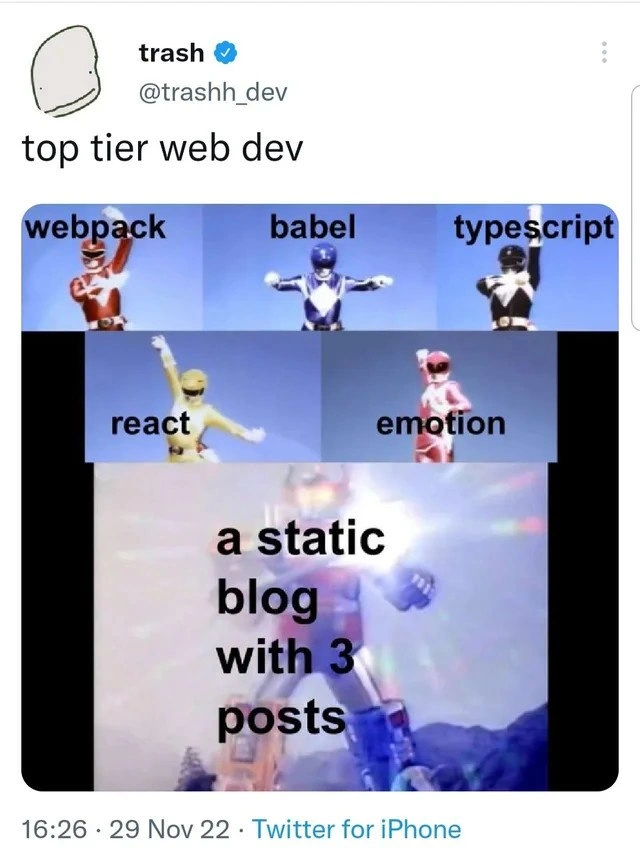
Imagine calling a whole team of superheroes to help you do a super simple chore – like using the entire Power Rangers team just to tie your shoes. Pretty silly, right? That’s what’s happening in this picture. We have five big powerful coding “heroes” (special tools with fancy names) all teaming up. But what do they end up making together? Just a little website with 3 posts (like 3 tiny pages)! It’s like using a rocket ship to go to the grocery store next door. It’s way too much power for such a small job, which is why it’s so funny. The meme makes us laugh because it shows how crazy it looks to use all that high-tech superpower just to do something very simple.

Level 2: Build Rangers Assemble

If you’re newer to front-end development, let’s break down the joke. The meme uses images of the Power Rangers (colorful superheroes who combine into a giant robot) to represent different web development tools. Each Power Ranger in the top panels is labeled with a tool’s name: Webpack, Babel, TypeScript, React, and Emotion. In the next frame, all the Rangers join together into their giant robot (the Megazord), and that giant robot is humorously labeled “a static blog with 3 posts.” Essentially, the meme is saying: we assembled all these powerful tools just to make a tiny little website. This is a form of frontend humor highlighting how developers sometimes use an extremely modern tech stack for a very simple project.

Let’s meet each tool and what it actually does in real-world web development:

  • Webpack – a module bundler. Webpack takes all your separate JavaScript files (and even your images, CSS, etc.) and bundles them into a few files (often one big file) for the browser. This helps when you have lots of modules; it glues everything together and can optimize the files for faster loading. Think of Webpack as a factory machine that packages many little pieces into one box for delivery.
  • Babel – a JavaScript transpiler. JavaScript evolves quickly, and not all browsers understand the newest features. Babel translates your fancy new JavaScript (or TypeScript/JSX) code into older plain JavaScript that all browsers can run. It’s like writing in modern slang and having Babel as an interpreter so even an old browser from 2013 “gets” it. If you use cutting-edge language features or syntax, Babel ensures compatibility by converting that code.
  • TypeScript – a superset of JavaScript that adds a type system. In JavaScript, you don’t have to declare types (you can just do let x = 5 or x = "hello" later), which can sometimes cause errors if you mix things up. TypeScript makes you specify types (like saying let x: number = 5), which helps catch mistakes early (e.g., you’d get an error if you tried to treat x like a string later). It then compiles down to regular JavaScript. So, TypeScript is used to make code more robust and self-documented, especially in bigger projects.
  • React – a popular UI library/framework for building user interfaces in a component-based way. Instead of writing raw HTML, with React you write components (often in a JSX format that looks like HTML + JavaScript). React handles updating the DOM (the page’s structure) efficiently by using a virtual DOM under the hood. It’s great for interactive apps where the UI changes a lot based on user input or data changes. Using React for a static blog is like using a powerful Lego Mindstorms kit to build a simple model – it works, but it might be more elaborate than needed for something that doesn’t have a lot of interactivity.
  • Emotion – a CSS-in-JS library. Normally, websites use CSS files to style HTML elements (colors, layouts, fonts, etc.). CSS-in-JS (like Emotion) is a technique where you write your styles in JavaScript, and it attaches those styles to your components. Emotion lets developers style React components by writing CSS syntax inside JavaScript files. It’s convenient for large apps because the styles can be scoped to components and even dynamic (changing styles via props or state). In our context, it’s basically a styling tool – doing the job that a simple .css file could do for a small site, but in a fancier way.

Now, normally if you were building a large, modern web application, all these tools might work together: you write your code in TypeScript and JSX (for React) with styled components (Emotion). Then you run a build process — Webpack (often with help from Babel and other plugins) will transpile and bundle this code. Babel makes sure the code works in all browsers by converting the new syntax, and Webpack outputs optimized files (one JavaScript bundle, one CSS bundle, etc.). The end result is a set of static files (HTML, CSS, JS) that you can deploy. This whole pipeline is common in professional front-end development and typically runs in your development environment or as part of a CI/CD build system before deployment.

However, the meme is funny because it shows this entire build chain being used for something very small: a static blog with 3 posts. A static blog means a website that basically consists of a few fixed pages or articles. The content doesn’t change dynamically for each user; it’s the same for everyone (like a personal blog where you have three written posts). You could make a static blog by just writing three HTML files and hosting them – no need for fancy interactivity or heavy code. There are even simple static site generators (like Jekyll or Hugo or Eleventy) that take Markdown files and turn them into a static blog without much complexity.

Using all these modern tools for such a simple site is an example of over-engineering – using a more complicated solution than necessary. It’s as if someone wanted to write a short note but instead of using a pen and paper, they set up a full printing press. 😄 Framework fatigue is a term you might hear: it describes how developers can get exhausted by the constant stream of new tools and the pressure to use them all. This meme humorously highlights that feeling. A newcomer might think, “Do I really need to learn React, Babel, Webpack, TypeScript, and a CSS-in-JS library just to make a simple blog?” The answer, in reality, is no for a simple site — but the fact that it happens (and quite often in the industry) is what makes it funny.

The tweet text calling this setup “top tier web dev” is sarcastic. It implies that some people equate being a “top” developer with using all the latest tools, even when they’re not necessary. It’s poking fun at that mindset. For a junior developer, the meme is a lighthearted caution: just because these tools are popular doesn’t mean every project needs the whole stack. It’s important to understand what each piece does (which hopefully now you do!) and use them when they make sense, not just because everyone else is. The humor comes from recognizing the mismatch between the gigantic effort (five powerful tools combined) and the tiny result (three static posts). In other words, the Frontend world sometimes throws a huge party to accomplish a very small thing. And if you’ve felt a bit overwhelmed by all the frontend tooling out there, this meme says: you’re not alone, and even experienced devs find it over-the-top sometimes (and we can all laugh about it).

Level 3: Mighty Morphin' Stack

Modern WebDev adventures sometimes feel like an episode of Mighty Morphin’ Power Rangers: each hero (or tool) combines to form one giant solution. In this meme, the heroes are the front-end build tools — Webpack, Babel, TypeScript, React, and Emotion — uniting into a colossal Megazord of a tech stack just to deliver what? A static blog with 3 posts. The visual gag (coming as a Twitter screenshot captioned “top tier web dev”) perfectly captures the absurdity of over-engineering and tooling bloat in modern frontend development. It’s poking fun at how an entire build chain and suite of Frameworks get assembled for a trivial task, illustrating the framework fatigue and dependency bloat that seasoned developers know all too well.

From a senior developer’s perspective, the humor cuts deep: we’ve all seen projects where a full arsenal of tools was brought in for something that could have been done with plain HTML and CSS. Consider each “Ranger” in this meme: Webpack (the red Ranger) is a powerful module bundler, typically used in large applications to manage and optimize numerous files. Babel (blue Ranger) is a source code transformer – essentially a transpiler that converts fancy modern JavaScript (or JSX/TypeScript) into older, widely compatible JavaScript. TypeScript (black Ranger) adds a strict type system on top of JavaScript for reliability in large codebases. React (yellow Ranger) is a heavyweight UI library for building interactive interfaces with a virtual DOM. And Emotion (pink Ranger) is a library for writing CSS-in-JS, dynamically styling components. Each of these tools is powerful and makes sense in a complex, interactive web app or rich frontend interface. But when they join forces Voltron-style, the end result in the meme is a giant combined robot labeled “a static blog with 3 posts” – a hilariously tiny outcome for such an epic tech lineup.

Why is this so relatable? Because it highlights a common industry pattern: using a massive Modern Tech Stack for even the simplest projects. In theory, a static blog (just a few pages of text and images that hardly ever change) could be served by straight HTML files or a lightweight static site generator. Yet here we’re assembling a megazord of tooling as if we’re building the next big single-page app. It’s like bringing a rocket launcher to a water gun fight. 😅 The meme exaggerates to make a point: modern developers sometimes reach for the same complex stack they use at work, even for a personal project or a blog with a handful of posts. There’s an underlying commentary on FrontendPainPoints: the mental overhead of managing so many moving parts (config files, build steps, dev servers, etc.) just to end up with static content. Experienced devs chuckle (perhaps a bit ruefully) because they’ve been there — spending more time configuring webpack.config.js, .babelrc, and tsconfig.json than actually writing blog content. The phrase “top tier web dev” in the tweet is tongue-in-cheek: it implies that using all the hottest tools (React! TypeScript! CSS-in-JS!) must mean you’re doing cutting-edge work, even if the actual task is negligible. It’s satirizing how our industry sometimes equates complex stack with quality, when sometimes it’s plain overkill.

There’s also historical context here. In earlier days of the web (think simple HTML sites in the 90s or early 2000s), deploying a blog with three posts would be trivial – maybe just three .html files and a bit of styling. As the Web evolved, we gained amazing tools like bundlers and transpilers to solve real problems (module loading, backward compatibility, large-scale app structure). But now we’ve swung so far that even a simple static site often goes through the full CI/CD pipeline and build process. The meme exaggerates that trend for comic effect. It’s a jab at how Frontend development has transformed: the simplest “hello world” might involve installing hundreds of node_modules. The combined Megazord stance with a lens flare as if achieving something monumental – “a static blog with 3 posts” – is a hyperbole that lands because it’s grounded in truth. Everyone in web development has either inherited a project or set one up where the tooling felt disproportionately complex for what it delivered. It’s a shared joke about our own tendency to use what we’re comfortable with (or what’s trendy) rather than what’s necessary.

In practice, each of these tools brings benefits, but using all of them for a tiny blog is an overdrive mode that senior devs recognize as overkill. It’s akin to assembling the full Avengers team to change a lightbulb. Sure, it’ll get changed with a lot of spectacle, but you might’ve just used a stepladder. The meme resonates because it exaggerates a real FrontendHumor situation: the gap between simple needs and complex solutions we sometimes employ. And ultimately, it’s a lighthearted roast of our tendency to complicate things – a senior dev will laugh and think, “Yep, that’s top tier web dev for you – five allied megatools to serve one tiny static site. Been there, done that, got the t-shirt (printed with a Webpack logo).”

Description

This meme uses the Power Rangers Megazord formation sequence to satirize over-engineering in modern web development. The image is a screenshot of a tweet from the user 'trash' (@trashh_dev) with the caption 'top tier web dev'. The meme consists of six panels. The first five feature individual Power Rangers, each labeled with a popular frontend technology: 'webpack' (Red Ranger), 'babel' (Blue Ranger), 'typescript' (Black Ranger), 'react' (Yellow Ranger), and 'emotion' (Pink Ranger). The final, largest panel shows these rangers combined into the mighty Megazord, which is ironically labeled 'a static blog with 3 posts'. The humor lies in the massive disparity between the complexity of the tools used and the simplicity of the final product. It's a relatable commentary on the tendency for developers to use a heavy, complex technology stack suitable for a large-scale application to build something incredibly simple, like a small personal blog


Comments

7
Anonymous ★ Top Pick The `node_modules` directory for this three-post blog is larger than the entire blog's content, including drafts. The Lighthouse score is great, but the CI pipeline takes longer to run than it took to write the articles
  1. Anonymous ★ Top Pick

    The `node_modules` directory for this three-post blog is larger than the entire blog's content, including drafts. The Lighthouse score is great, but the CI pipeline takes longer to run than it took to write the articles

  2. Anonymous

    Nothing like spinning up a webpack-babel-TypeScript-React-Emotion Megazord to render those three markdown files - wouldn’t want that ‘About’ page to ship without its own hydration strategy and 400 MB node_modules

  3. Anonymous

    The same engineer who spent three sprints optimizing webpack's tree-shaking to save 2KB is now explaining to the board why the blog takes 4 seconds to render "Hello World."

  4. Anonymous

    When your static blog's webpack config has more lines than your actual content, and your build pipeline takes longer to compile than it took to write those three posts. The real power move is explaining to stakeholders why you need TypeScript strict mode for a site that literally just renders markdown files

  5. Anonymous

    We assembled webpack, Babel, TypeScript, React, and Emotion to publish three static posts - then spent more time upgrading the toolchain than writing the fourth

  6. Anonymous

    Assemble webpack, Babel, TypeScript, React, and Emotion into a Megazord to render three static posts; the build artifact is 5 kB, the node_modules is a career

  7. Anonymous

    Webpack config longer than the blog posts - because static gen is too mainstream for elite devs

Use J and K for navigation