The Unattainable Confidence of Screen Sharing
Why is this Communication meme funny?
Level 1: The Fearless Presenter
Imagine you’re video-calling your friends and you hold up a drawing to your webcam to show them. Usually, you’d pause and ask, “Hey, can you guys see it okay?” That’s normal, right? You want to make sure everyone is actually looking at what you’re showing. Now picture someone who doesn’t ask at all – they just start showing the drawing and assume everyone can see it perfectly. Bold move, isn’t it? This meme is joking about wanting to be that confident. It’s funny because most of us aren’t that sure; we’d always check, just in case. We’re basically laughing at how brave (or maybe clueless) you’d have to be to not even ask, “Can you see what I’m sharing?” In other words, the meme wishes for a superpower: to never worry about technical glitches and to present stuff to others without any fear. The joke works because usually we’re a little nervous and always double-check – so someone who doesn’t is almost like a mythical hero of video calls.
Level 2: Is This Thing On?
Let’s break this down to the basics. In a remote work meeting (over Zoom, Microsoft Teams, Google Meet, or any video call software), screen sharing is when you show your computer screen to everyone else in the meeting. It’s super useful: instead of saying “imagine my code editor,” you can literally display your code or slides so others can see what you see. But because this is technology, people have developed a habit to make sure it’s working. As soon as someone starts sharing their screen, you’ll almost always hear them ask: “Can everyone see my screen?”
Why do they always ask that? Well, sometimes screen sharing doesn’t work perfectly. Maybe the presenter clicked the wrong button or shared the wrong monitor. Perhaps there’s a delay and the others haven’t received the video feed yet. It could even be that one person’s software is glitching, showing a blank screen instead of the presentation. Asking “Can you see it?” is a quick way to verify that the communication is actually coming through. It’s a bit of communication overhead – an extra little step to ensure everyone’s on the same page – but it saves a lot of confusion. It’s the remote meeting equivalent of a teacher asking, “Can everyone at the back see the board?”
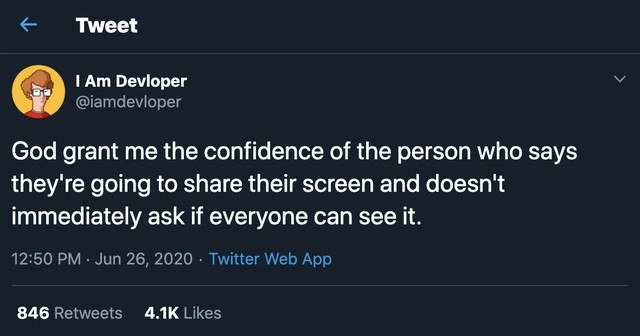
Now, the meme (a screenshot of a tweet) jokes about someone who doesn’t do this common check. The tweet says, “God grant me the confidence of the person who says they’re going to share their screen and doesn’t immediately ask if everyone can see it.” In simpler terms, it’s saying: I wish I were as confident as that one person who shares their screen and assumes everything is fine. This is funny to people who work in tech because developer humor often comes from very relatable situations at work. And trust us, on a big team meeting, asking if everyone can see your screen is standard practice. Not asking is so unusual that it feels almost legendary! It implies that person has zero doubt the technology is working – no screen_sharing_anxiety at all. Considering how often we’ve seen the “Uh, we can’t see your screen” problem, the idea of not double-checking feels either really brave or a bit naive.
During 2020, when almost everyone in tech was working remotely (think lots of Zoom meetings from home), these little habits became universal. Jokes and memes about “You’re on mute” or “Can you see my screen?” started circulating because every team, everywhere, was experiencing the same hiccups. It’s a form of relatable humor – we laugh because we’ve all been there. This particular meme uses the format of a tweet (white text on a dark background, with engagement numbers below) because tweets are a common way tech jokes spread. The account I Am Devloper (@iamdevloper) is famous in the developer community for sharing witty one-liners about programming life. So fellow developers saw this tweet, recognized the truth in it, and shared it widely. Those 846 Retweets and 4.1K Likes in the image? That means hundreds of people re-posted it and thousands liked it, which tells you that the experience resonated with a lot of folks.
To put it plainly: in a remote meeting, the polite and normal thing is to ask if others see your shared screen, just to make sure the tool is working for everyone. The meme humorously admires (or maybe teases) anyone who doesn’t ask – suggesting they must have the nerves of steel or blind faith in technology. It highlights a tiny quirk of RemoteWork culture that both beginners and experienced devs quickly learn: always double-check that your screen sharing is actually visible. Not doing so is so uncommon that it becomes a joke. After all, nobody wants to be five minutes into explaining a chart only to hear, “Sorry, we haven’t been seeing your screen this whole time.”
Level 3: Screen-Sharing Swagger
In the trenches of remote work, certain meeting rituals became as predictable as a for loop. One of those rituals is the presenter nervously asking, "Can everyone see my screen?" immediately after clicking the Share Screen button. This meme, a screenshot of a tweet by the popular developer humor account @iamdevloper, pokes fun at the absurd idea of a person so supremely confident in their screen-sharing that they never ask that question. It’s essentially a tongue-in-cheek prayer: “God grant me the confidence of the person who says they’ll share their screen and doesn’t immediately ask if everyone can see it.” For seasoned engineers on endless Zoom calls, this hits home because that person is as mythical as a unicorn.
Why is this so funny to developers? Because it satirizes a piece of shared pain in our daily remote work life. By mid-2020, the height of pandemic RemoteWorkCulture, most devs were living on video calls. We all know the remote meeting struggles: someone shares their screen and without fail follows up with, "Are you guys able to see my screen?" It’s practically the catchphrase of Zoom meetings (rivaled only by "You're on mute"). The tweet’s humor comes from imagining a fearless screen-sharing hero who skips this step entirely – a hero with video call confidence levels over 9000. The rest of us mere mortals chuckle because we always double-check. We’ve been burned too many times by glitchy screen-sharing to trust it blindly; seeing someone not ask for confirmation would be like spotting Bigfoot on a conference call. No wonder the tweet garnered thousands of likes – it zeroed in on a relatable humor moment every developer has experienced.
From a technical perspective, there are good reasons why “Can you see my screen?” is practically ingrained in our vocabulary. Video conferencing tools (Zoom, Microsoft Teams, Google Meet, you name it) do their best to indicate when screen sharing is live – maybe a little red or green border around your screen, an icon, or a text saying "You are presenting." But seasoned devs treat those UI indicators with skepticism. We’ve learned that what your computer shows and what others actually see aren’t always the same. Maybe you accidentally shared the wrong monitor (showing off your Spotify playlist instead of your code editor), or perhaps you shared a specific application window that promptly froze. Network lag or VPN hiccups can delay the shared content for others. And let’s not forget the classic scenario: you think you clicked "Share," but you actually didn’t, and you start enthusiastically explaining a dashboard that no one else can see. Communication overhead or not, asking for a quick visual confirmation can save you from minutes of embarrassing monologue directed at a blank screen on everyone else’s end.
This tweet’s prayer for godlike confidence stems from that very real screen_sharing_anxiety. Even the most battle-hardened senior engineers – people who refactor legacy code without breaking a sweat – feel a tiny jolt of worry when hitting “Present Screen.” It’s a mild “did I do this right?” paranoia born from experience. The one time you don’t ask for confirmation is exactly when Murphy’s Law strikes: your screen freezing or your colleagues seeing nothing at all. Then comes the awkward silence until a brave coworker interrupts, "Um... we can’t see your slides." Oof. That memory lives in every dev’s subconscious. So we ritualistically ask, “Can everyone see?”, as a defensive charm against the remote_meeting_struggles we know too well. The meme humorously canonizes someone who apparently lacks that worry – either because they have unshakeable faith in technology or (more likely) they’re blissfully unaware of how often things go wrong.
There’s also a social dynamic here that seasoned developers recognize. In large video calls, if the presenter doesn’t ask and something’s wrong, many viewers won’t immediately speak up. Maybe they think it’s their issue (“Is my Wi-Fi acting up?”) or they hesitate to interrupt. So the polite and efficient thing is for the presenter to ask proactively. It’s a tiny extra step, barely a second of effort, but it shows you care that everyone is on the same page. Skipping that step is almost an act of bravado. Tech humor often exaggerates reality to make a point, and here the exaggeration paints that bravado as almost superhuman. A developer who doesn’t double-check their screen share could also be the kind of daredevil who deploys on a Friday evening without monitoring – bold, possibly foolish, but undeniably confident. We laugh because we see ourselves not doing that. In reality, most of us have a healthy skepticism of any live demo or presentation. We’ve learned (sometimes the hard way) to verify everything: we ask if the screen is visible just like we run tests before merging code. The mythical screen-sharing hero in the tweet defies this hard-earned wisdom, and that ironic role reversal is hilarious.
In summary, at the senior developer level this meme is a nod and a wink to everyone who’s been scarred by awkward video calls. It’s meeting humor that perfectly captures how even trivial technical steps can become running gags in remote work life. The tweet format (a twitter_screenshot_meme with 846 retweets and 4.1K likes) gives it that familiar look we see reposted in Slack channels and developer subreddits. We’re essentially laughing at how conditioned we all are to distrust screen-sharing – and marveling at the idea of someone who doesn’t share that worry. “God grant me that confidence,” indeed, because the rest of us will be hovering over the Share button saying, “Just to be sure, can you all see this?” before we dare proceed.
Description
A screenshot of a tweet from the popular satirical tech account 'I Am Devloper' (@iamdevloper). The tweet, posted on June 26, 2020, reads: 'God grant me the confidence of the person who says they're going to share their screen and doesn't immediately ask if everyone can see it.' The screenshot shows the tweet has garnered 846 retweets and 4.1K likes. This meme perfectly captures the universal anxiety and muscle memory of anyone who has ever had to present or collaborate remotely. The act of sharing a screen is so fraught with potential technical glitches that it has become a standard ritual to immediately seek confirmation. The joke is that abstaining from this ritual isn't just normal - it's a sign of almost superhuman confidence, something to be prayed for. For experienced developers, who often have to lead demos, pair program, or troubleshoot live, this is a deeply relatable moment of shared vulnerability and a commentary on the unreliability of our collaboration tools
Comments
7Comment deleted
The truly confident engineer doesn't ask if you can see their screen; they just start presenting and wait for the inevitable '...you're still on mute' five minutes later
Screen sharing is the harshest eventual-consistency system: my local state shows the IDE, half the quorum reports PowerPoint, and the VP’s replica is stuck on my Slack DMs - classic split-brain with zero failover
After 20 years in tech, I've learned that the people who don't ask 'Can you see my screen?' are the same ones who deploy straight to production on Fridays - either they've transcended fear itself or they're about to learn why we have incident response teams
The real senior move is sharing your screen with 47 browser tabs open including 'how to exit vim', three Stack Overflow threads about the same problem, and your company's internal wiki page titled 'Why is production down again' - all while maintaining unwavering eye contact through the webcam and never once asking for confirmation
Skipping 'can you see my screen?' is like deploying without health checks - optimistic until you realize half the cluster is watching a cached thumbnail
“Can you see my screen?” is the Raft heartbeat of remote work - skip it and you risk a split-brain where half the team is staring at your calendar
Like kubectl apply -f prod.yaml without --dry-run: assumes the cluster's ready, ignores the inevitable 'node not found' panic