Skip to content
DevMeme
4577 of 7435
Starting web dev explained in one character: the humble “<”
WebDev Post #5022, on Nov 22, 2022 in TG

Starting web dev explained in one character: the humble “<”

Why is this WebDev meme funny?

Level 1: It All Starts with <

Imagine you want to build a huge sandcastle, and you ask a friend, “How do I even start building a castle like that?” Now picture the friend just gives you a single grain of sand and says, “Start with this.” 😄 It sounds silly, right? But it’s also true — every big castle begins with placing one grain of sand, then another. In the same way, a website that looks super complicated actually begins with one tiny character on the screen. In coding, that character is "<".

Why is this funny? Because the person asked a big question, and the answer was incredibly simple and short — just one little symbol. It’s like asking how to write a book and someone replies, “Just write the letter A.” Technically, they’re not wrong: every book starts with a single letter! The humor comes from how unexpected and basic that answer is. It reminds us that even the most amazing websites (or the biggest castles, or longest books) all start small. So, the joke in this meme is that the very first step to making a web page is just typing that < character. It’s a playful way to say: Don’t be overwhelmed, just begin with that first little step!

Level 2: Hello, HTML World

When you’re new to web dev, starting a website can feel like standing at the base of a mountain. But every mountain climb begins with a single step. In web development, that “step” is often writing your very first HTML tag. HTML is the standard language used to create web pages, and its syntax is built around pairs of tags enclosed in angle brackets. For example, to start a page, you typically write an <html> tag. That tag literally begins with the character "<".

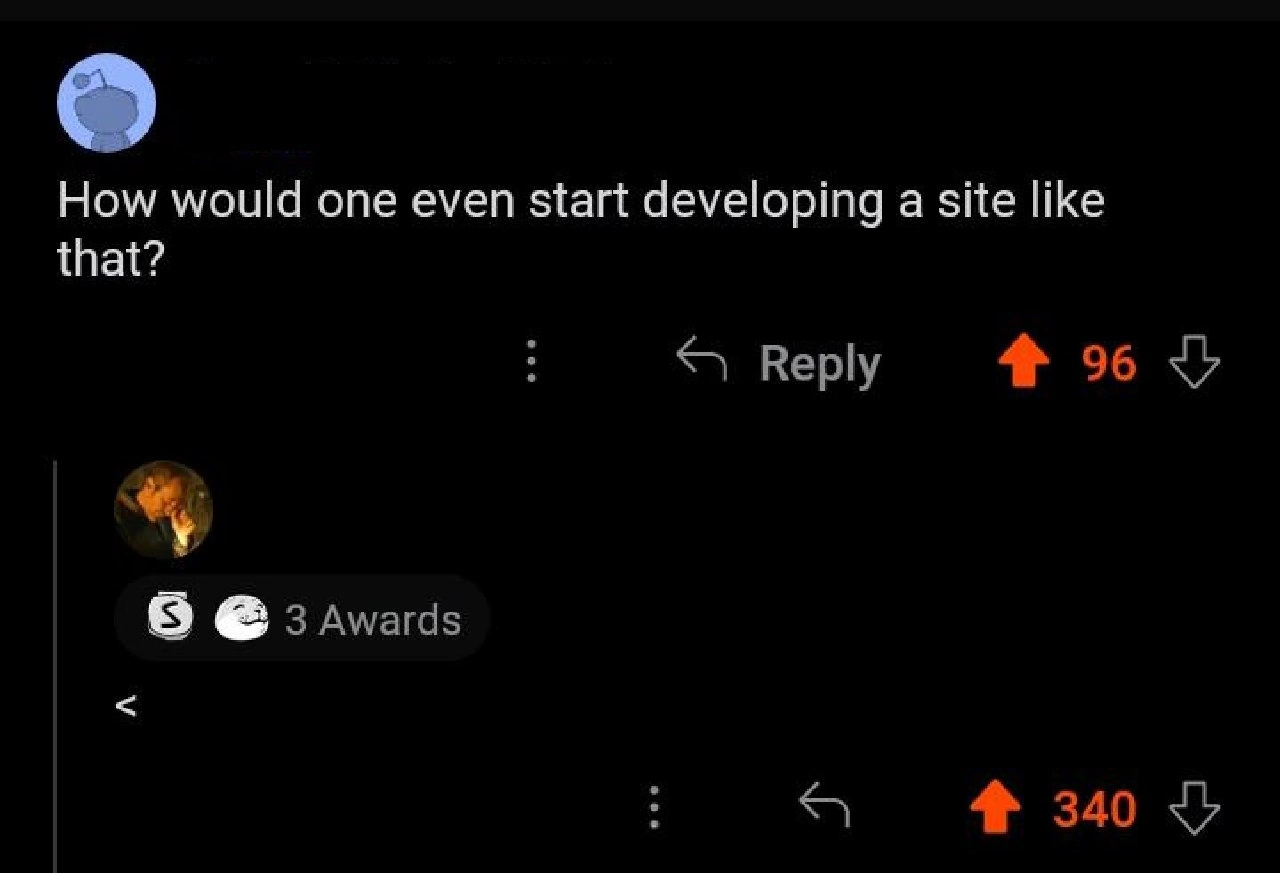
In the meme, the question "How would one even start developing a site like that?" is something many beginners ask. The witty answer "<" is a playful way of saying: "Start with HTML." It’s referencing the fact that an HTML document (and thus any website’s front-end) starts with an opening angle bracket. If you create a new file called index.html and type the following:

<!DOCTYPE html>
<html>
  <head>
    <title>My First Page</title>
  </head>
  <body>
    Hello world!
  </body>
</html>

Notice the very first character at the top: it's <. That’s the opening of the <!DOCTYPE html> declaration (which tells the browser about the document type) and right after that, the <html> tag begins. Every HTML element in the page, from <head> to <p> (paragraph) to <div>, starts with < and ends with a >. So the single-character reply in the screenshot is highlighting the most fundamental thing about building websites: you start by writing an HTML tag, and that begins with <.

Let’s break it down in simpler terms. Think of a website’s code as a story written in a special language. In HTML, we surround pieces of content with tags. A tag is like an instruction or a label, and we mark the start of a tag with <. For example:

  • <p> means "start a paragraph here."
  • <h1> means "this is a top-level heading."
  • <img> might insert an image.

All these start with that angle bracket symbol. The reply "<" was so highly upvoted because experienced people instantly understood: "Oh, they’re cleverly saying just begin with an HTML tag." It’s an insider way to answer a newbie’s big question with a tiny hint. The humor also comes from the fact that the answer is absurdly short — just one character — and yet it encapsulates a whole concept of starting Frontend development.

This exchange happened on Reddit (as you can tell from the dark background and the familiar orange upvote arrows in the screenshot, which is the Reddit UI in dark mode). The original question got some upvotes (meaning others had the same question or found it interesting), but the answer got 3 Awards and many more upvotes, indicating people loved it. On Reddit and other forums, giving such a concise answer is a mix of helpful and humorous. It’s helpful in that it points the learner toward HTML, but of course you’d need more than just one character to actually build the site. The joke lands because other developers remember wondering how to start, and someone essentially saying “just write < and go from there” is relatable humor. It’s a bit like those old Q&A threads where someone asks a very broad question and the top answer is just a witty, literal interpretation. In this case, the literal interpretation is the first character of the code they need to write.

For a junior developer or someone learning to code, the takeaway is: Every website’s journey begins with writing a basic HTML file. You open your code editor, create a file (often named index.html), and you type that first angle bracket. From there, you’ll write <html> and other tags, add content, style it with CSS, maybe add interactivity with JavaScript, and so on. But the entry point is that one angle_bracket kicking off your very first tag. The meme answer " < " distills this advice into a single keystroke. It’s as if someone asked "How do I start painting?" and an artist handed them a brush with one stroke of paint on the canvas. It might make you smile, but it also clues you in: just make that first mark.

Level 3: Small <, Big Dreams

Q: "How would one even start developing a site like that?" – a wide-eyed junior developer asks on Reddit (96 upvotes).
A: < – replies a seasoned dev, in just a single character (340 upvotes, 3 awards).

The exchange above is a perfect slice of WebDevelopment humor. A newcomer poses a big question about building a complex website, and an experienced developer responds with the most terse yet technically correct answer imaginable: the angle bracket <. Why is this funny to those in the know? Because every website (no matter how elaborate) literally begins with this humble character. In the world of HTML (HyperText Markup Language), an opening angle bracket is the FIRST thing you type to start an HTML tag. It’s the beginning of the <html> tag which kickstarts the structure of a page. So the reply " < " is both a cheeky FrontendHumor punchline and a truthful statement about where to begin.

For seasoned devs, there’s an inside joke here: newbies often ask "How do I even begin?" expecting a long roadmap, but the comedic answer reduces that vast journey to its absolute starting point – one keystroke. It’s a classic DeveloperHumor moment. The community upvoting it to the top (340 ↥ vs 96 ↥ for the question) shows that thousands of developers found this minimalistic answer hilarious and on-point. It’s an example of “less is more” in a technical context. The less-than sign is doing more than just start an HTML tag – it’s delivering a punchline.

This meme also highlights a relatable dynamic in the LearningToCodeJourney: when you’re new, front-end coding can feel mysterious, but there’s a universal starting step. The experienced coder’s one-character answer gently pokes fun at the broad question while secretly nudging: “Just start with the basics – open an HTML tag!” It’s a bit of nerdy wit that says: even the most complex websites are built from simple building blocks. The irony is that an answer so short feels less than helpful (pun intended) to the newbie, yet it’s fundamentally true. Every developer remembers the moment they typed their first < and made a browser display something. The veteran’s reply sums up that rite of passage in a single, italicized character.

Beyond the humor, there’s a nod to the fact that web dev really does begin at this character. In a code editor, the very first character of an HTML file is <. Omit it, and nothing works – the browser won’t know you’re writing a webpage! Seasoned devs chuckle because they’ve been there: creating an index.html and starting it off with <html>. It’s a simultaneously sarcastic and sincere answer. The terseness mimics the style of classic internet forums like Stack Overflow, where someone might quip RTFM (Read The Friendly Manual) without saying it outright. Here, instead of saying “start with HTML,” they just demonstrate it with the actual symbol. It’s the ultimate minimalist tutorial: Step 1 – type <.

So, this one-character reply is funny on multiple levels: technically accurate, comically brief, and dripping with that shared understanding among developers that even Facebook or Reddit itself ultimately began with a <html> tag. It’s a little reminder that no matter how daunting a project looks, the first step is often very simple. For the seniors reading, it’s a smug chuckle at how relatable that is. For the juniors, it’s a playful hint: don’t overthink it, just open your editor and start coding with <... the rest will follow!

Description

Screenshot of Reddit in dark-mode. The top comment, with a generic alien avatar, reads: “How would one even start developing a site like that?” and shows 96 upvotes. Directly beneath it, a reply with a user profile photo and a badge strip that says “3 Awards” contains only the single character “<”. That minimalist reply has 340 upvotes, far outscoring the original question. The joke is a developer in-joke: every HTML document - and therefore virtually every website - begins with an opening angle bracket, so the lone “<” is both technically correct and humorously terse

Comments

27
Anonymous ★ Top Pick Every web project starts with a lone “<”; six months later that innocent angle bracket is buried under 600 MB of node_modules, three micro-frontends arguing over CSS scope, and a Kubernetes cluster pretending it’s still just serving HTML
  1. Anonymous ★ Top Pick

    Every web project starts with a lone “<”; six months later that innocent angle bracket is buried under 600 MB of node_modules, three micro-frontends arguing over CSS scope, and a Kubernetes cluster pretending it’s still just serving HTML

  2. Anonymous

    This is the same energy as answering "How do we scale to 10 million users?" with "Kubernetes" - technically correct, wildly insufficient, and somehow still gets promoted to principal engineer

  3. Anonymous

    The real answer is always the same: you start by spending three weeks evaluating JavaScript frameworks, two months setting up the perfect build pipeline, another month debating monorepo vs polyrepo, then realize the site you're trying to replicate is just a WordPress blog with a premium theme. But hey, at least your webpack config is immaculate

  4. Anonymous

    Decades of microfrontends, SSR, and hydration drama - the canonical bootstrap remains the same: press '<', commit, and let the toolchain add 600MB of node_modules

  5. Anonymous

    Start with '<'; the rest is negotiating with the CSS cascade, hydration, and 1,000 transitive dependencies

  6. Anonymous

    Inspect element, grep for the root div - if it's buried under 5k lines of Tailwind and a Framer Motion fever dream, abort mission and pitch a static site rewrite

  7. @SamsonovAnton 3y

    Ехрlаin, рlеаsе!

    1. Deleted Account 3y

      <html> <head> <title></title> </head> <body> <h1></h1> </body> </html>

      1. @zxcvbnm1771 3y

        <!DOCTYPE html>

        1. @ZgGPuo8dZef58K6hxxGVj3Z2 3y

          <doctype HTML/> is the correct way CALM THE FUCK DOWN IT WAS A JOKE

        2. @pavloalpha 3y

          😂

        3. @RiedleroD 3y

          deprecated since HTML5

          1. @pavloalpha 3y

            Html 4 better

            1. @RiedleroD 3y

              no no no

              1. @pavloalpha 3y

                You If u use html5

          2. @dosse91 3y

            False, it was introduced with HTML5 and it's mandatory, otherwise the browser will operate in quirks mode

            1. @RiedleroD 3y

              huh? thought it was the other way around

              1. @dosse91 3y

                Nope :) https://www.w3schools.com/tags/tag_doctype.asp https://developer.mozilla.org/en-US/docs/Web/HTML/Quirks_Mode_and_Standards_Mode

        4. @callofvoid0 3y

          I still dont get why this thing is used

  8. Deleted Account 3y

    Well, it make sense

  9. @Johnny_bit 3y

    <?php 😂

  10. @ZgGPuo8dZef58K6hxxGVj3Z2 3y

    1. Type <! 2. Press Tab twice

    1. 𝙳𝚖𝚢𝚝𝚛𝚘 𝙼𝚒𝚗𝚝𝚎𝚗𝚔𝚘 3y

      emmet moment

      1. @ZgGPuo8dZef58K6hxxGVj3Z2 3y

        Or even better download library for blank website project

        1. 𝙳𝚖𝚢𝚝𝚛𝚘 𝙼𝚒𝚗𝚝𝚎𝚗𝚔𝚘 3y

          i personally just google "html hello world" and continue from that

          1. @ZgGPuo8dZef58K6hxxGVj3Z2 3y

            Yeah thats super great solution too but make sure to include as many css files with some template as you can

  11. @ghostgimli 3y

    >rm -rf *

Use J and K for navigation