Skip to content
DevMeme
6072 of 7435
The Classic 'It Works On My Machine' Defense, Questioned by a Penguin Colleague
Debugging Troubleshooting Post #6650, on Apr 16, 2025 in TG

The Classic 'It Works On My Machine' Defense, Questioned by a Penguin Colleague

Why is this Debugging Troubleshooting meme funny?

Level 1: It Was Fine at Home

Imagine a kid builds a toy race car that zooms perfectly on the smooth floor of his bedroom. He’s super proud of it. The next day, he brings the same toy car to a friend’s house, where the floor is thick carpet. The car’s wheels get stuck in the rug and it barely moves. The friend says, “Uh oh, your car isn’t working here.” But the kid just shrugs and insists, “Well, it was working fine at my house.” All the other kids would probably roll their eyes or giggle, because that answer doesn’t solve anything – it just ignores that the place is different.

This meme is making that same point with a programming twist. The developer is like that kid; her personal laptop is like the kid’s bedroom (the only place things run smoothly), and the QA test environment is like the friend’s carpeted floor (where everything falls apart). It’s funny because the developer is stubbornly acting as if only her own experience matters, even while everything’s obviously broken when anyone else tries it. Everyone else can see the problem, and her reaction is as silly as saying “it was fine at home” when the toy car clearly isn’t working at the friend’s place. In simple terms: just because something works in one special spot doesn’t mean it will work everywhere – and pretending everything is okay when others are having trouble is both comical and a bit frustrating.

Level 2: Environment Setup 101

Now let’s break this down in simpler terms. The phrase “works on my machine” is something developers say when a program runs fine on their computer but isn’t working on someone else’s computer (or on a server). It’s basically an excuse meaning, “Hey, it’s running on my PC, so if you’re seeing a problem, it must be your computer’s fault, not my code.” The meme takes this idea to the extreme: the developer’s laptop in the cartoon is visibly busted – the screen is cracked and sparks are flying – yet she’s still calmly saying everything is okay on her end. It’s a funny exaggeration showing her insistence that "my side is fine" even though her machine is clearly not fine (both literally and figuratively!).

Why would software work on one machine but not another? The answer is the environment. In tech, “environment” means all the settings and software that surround your code when it runs. This includes the operating system (for example, Windows vs. Linux), the version of runtime or language (like Python 3.9 vs Python 3.11, or Node.js 14 vs 18), the libraries/packages installed, the configuration files, and even hardware details. If any of these differ between two machines, you can get different results. It’s like how a recipe might turn out differently in another kitchen if you use a different oven or substitute ingredients.

New developers often hit this problem early on. Imagine you write a small game on your PC and it runs great. You email it to a friend, and boom – it crashes on start-up for them. What happened? Possibly you forgot that you installed a special library on your machine (say, a graphics or audio toolkit) that your friend doesn’t have. Your game code might be doing something like:

# On your PC, this file path exists and loads fine
with open("C:\\Users\\YourName\\Desktop\\config.txt") as f:
    settings = f.read()

It works on your computer because you have that file at that exact location. But on your friend’s computer, that file path probably doesn’t exist, so the program will throw a “file not found” error and crash. When you respond, “Huh, it works on my machine,” you’re telling the truth about your PC, but that doesn’t help your friend at all. You basically just stated, “It’s fine on my side,” while your friend is left with a broken game. Not very helpful, right?

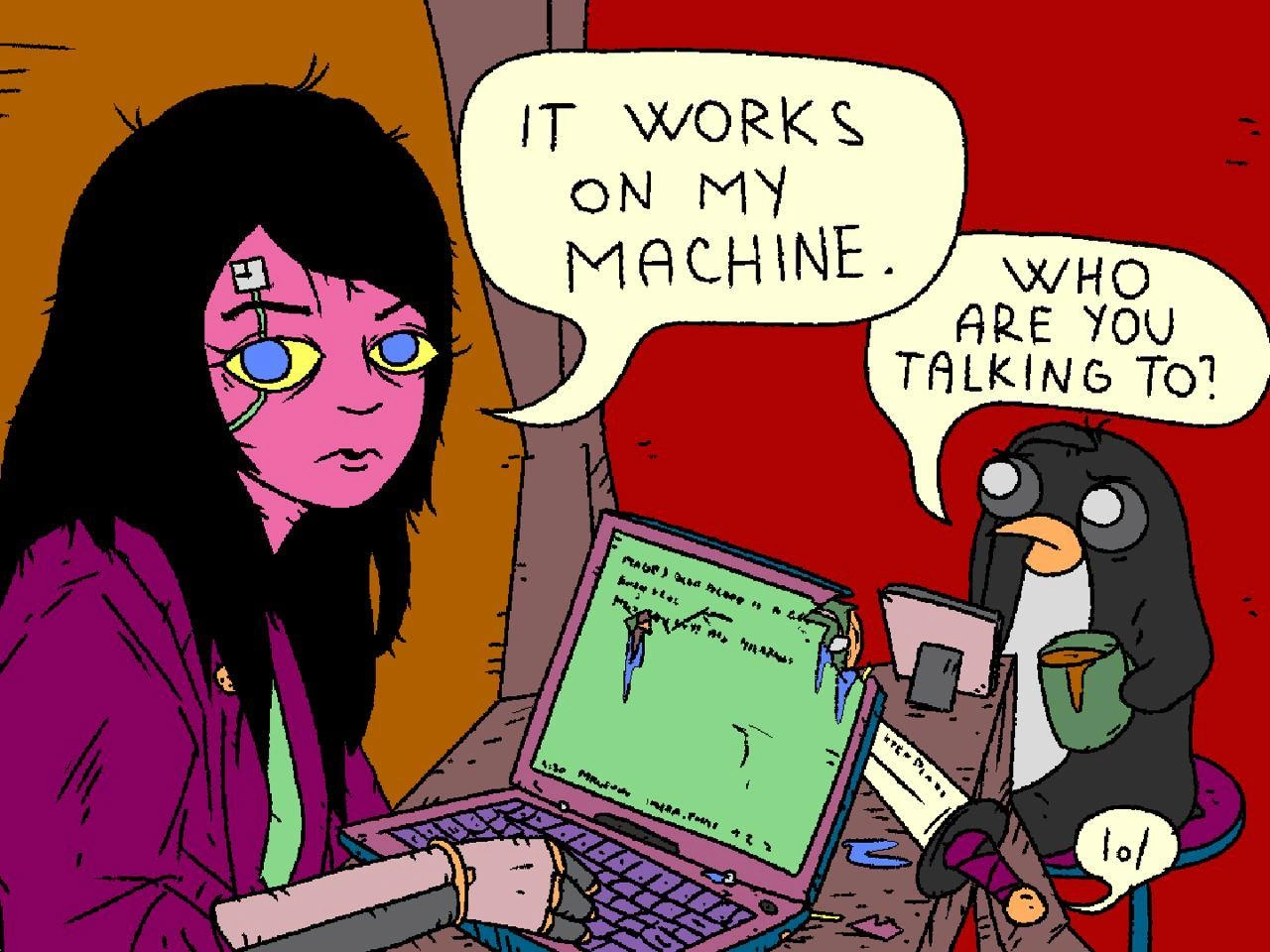
In the meme, the developer is doing exactly that. Her code likely runs on her own laptop, but QA (Quality Assurance, the team/testing environment that checks if the software works elsewhere) can’t get it to run. The little penguin character is actually Tux, the mascot of Linux. That’s a clue: many servers and test environments use Linux, while developers might be coding on Windows or macOS. If the dev wrote something that only works on her Windows PC, the Linux QA server (represented by that penguin) would have issues. The penguin asks, "Who are you talking to?" because from his perspective, saying "it works on my machine" is meaningless – the software needs to work on the test machine that everyone else is using. The penguin sipping coffee and the tiny "lol" in the corner add to the humor, basically saying, “This situation is ridiculous.” Even the background colors (orange behind her, red behind the penguin) emphasize that they’re in very different worlds or environments.

Let’s connect this to some concepts:

  • Debugging & Troubleshooting: When something only works on one computer, developers have to play detective. They compare environments to find what’s missing or different. Is a certain config file absent? Did we forget to install a library on the QA machine? Debugging this can be frustrating, which is why the meme resonates – we’ve all felt that “Why won’t it just work everywhere?!” frustration.
  • Configuration & Environment Setup: A big part of a developer’s job is setting up projects so they run on any machine. This includes writing setup guides or scripts, using package managers (like npm for Node.js or pip for Python) to list all dependencies, and avoiding hard-coded paths or machine-specific hacks. Good setup practices prevent the "works on my machine" problem by making sure your machine and my machine end up configured the same way.
  • DevOps & SRE: These terms refer to a culture and roles that bridge the gap between development and operations (like testing, deployment, server maintenance). In a DevOps approach, you’d never want a dev to toss code to QA with “works on my box” and wash their hands of it. Instead, developers and ops collaborate so that the testing environment is as close as possible to the development environment. This is called environment parity. The idea is that if everyone uses the same setup, we won’t get nasty surprises. For instance, teams might use a container (via Docker) that packages the app and its environment – from the OS on up – into one neat bundle. Then the dev, QA, and even production use that same container image. It’s like handing QA an entire replica of your computer’s software setup (minus the cracked screen!).

In simpler terms: the meme is highlighting a very common lesson in programming – it’s not enough for code to work on just your computer. Saying "well, it works for me!" is more joke than solution. To truly say software works, it should run on the devices or servers it’s meant for without hiccups. The developer in the cartoon is ignoring that, and that’s why the situation is both funny and familiar. We laugh because we’ve either seen it or done it. And if you’re new to coding, remember this scenario the first time you hear yourself say "but it works on my machine" – it’s a sign to double-check that you haven’t missed a step in setting up the project for others. 😉

Level 3: The DevOps Disconnect

The meme’s core joke is instantly recognizable to any experienced developer or SRE (Site Reliability Engineer). “Works on my machine” is the archetypal excuse that triggers eye-rolls in QA and Ops teams worldwide. It's funny because it’s a technically true but practically useless statement – a classic in the blame-shifting playbook. Here, the cartoon exaggerates it brilliantly: the developer's laptop is literally falling apart (cracked screen, sparks flying), yet she’s unfazed and proudly declares everything is fine for her. This is a not-so-subtle jab at how some devs will cling to their local success even when facing glaring evidence of a problem in other environments. The little penguin on the right (a nod to the Linux mascot Tux, likely representing the QA or production environment) is nonchalantly sipping coffee and asking, “Who are you talking to?” It's as if the only one listening to the "works on my machine" excuse is the developer herself – everyone else (including that tiny “lol” in the corner) is basically mocking the absurdity.

In real-world terms, this scenario plays out whenever there's a dev/test environment mismatch. A developer might run an app on her laptop with certain configurations and dependencies that aren't mirrored on the test server. The QA team then finds a bug: the app crashes or behaves oddly in the test environment. The dev, not immediately able to reproduce it on her own device, responds defensively with "It works for me!". Translation: "The problem must be on your side, not in my code." This is the start of the classic Dev vs QA standoff. Instead of collaboratively debugging, it becomes a tennis match of responsibility:

  • QA says, "There’s a crash in the login module; it’s not working on the test server."
  • Dev replies, "Weird, it works on my machine. Did you set it up wrong?"
  • QA (after a deep breath): "Our test environment is standard. Maybe your code has an undeclared requirement?"
  • Dev mutters, "Well, it runs fine over here... maybe the test server is missing something. Not my problem."

Why is this scenario so relatable? Because nearly every senior dev has lived through the tedious process of debugging a "works on my machine" issue. These bugs often boil down to configuration drift or missing pieces between environments. Common culprits include:

  • Missing dependencies: Perhaps the developer installed a library locally and forgot to add it to the project’s official requirements. On her machine, import magiclib succeeds, but the QA environment, unaware of this dependency, will throw an ImportError.
    import magiclib  # works fine on dev's laptop where 'magiclib' is installed
    magiclib.do_magic()
    
    On a machine without that package (like the QA server), this code would immediately crash with ModuleNotFoundError: No module named 'magiclib'. Now the poor tester is left scratching their head while the dev insists everything is A-OK on her side.
  • Different versions: The developer’s laptop might be running version 2.7 of a framework while QA has 2.9 installed. One tiny breaking change in that new version and boom – the app breaks in QA. On the dev box, everything still seems rosy with 2.7, so she has no clue there’s a version mismatch issue.
  • Environment variables or config files: Maybe the dev has a handy configuration file or environment variable set up locally (e.g. a DEBUG_MODE flag or a default DATABASE_URL) that isn’t present on the QA system. The code only works when that secret sauce is in place. In QA, where the variable is unset or different, things blow up immediately.
  • Operating system quirks: An example is file path case-sensitivity. On a Windows dev machine, a code path like Config.yaml might accidentally match a file named config.yaml. Windows isn’t case-sensitive by default, so it works for the dev. But the Linux server (which is case-sensitive) will treat those as two different filenames – result: "File not found" in QA. Similarly, maybe the dev runs the app on her beefy laptop with a tolerant GPU driver, but the QA environment is a minimal container that lacks that driver – leading to crashes that never happened locally.
  • Dev-only behaviors: Developers often run apps in a special development mode that does things automatically (like creating default data or using a local SQLite database). In a production-like mode, those conveniences are turned off. If the dev didn’t test in a mode similar to QA, she might miss that some setup step (like seeding a database or configuring an account) wasn’t done. It “worked on my machine” because her dev environment quietly did extra work under the hood that the QA environment rightfully doesn’t do.

This meme pokes fun at the absurdity of clinging to the "my machine" defense. The QA penguin essentially highlights how isolated and irrelevant that claim is – software ultimately needs to work on the target environment, not just the developer’s personal rig. Seasoned engineers know that simply saying "works on my machine" is about as useful as handing out an "Works on My Machine" certification and calling the job done. In fact, there’s an old tongue-in-cheek idea where frustrated ops folks joke, “Maybe we should ship the developer’s laptop to the customer, since that’s apparently the only place it runs!” The meme’s title about “violent QA feedback” is embodied by the destroyed laptop – a dark comic metaphor for how QA might feel when they hear that excuse for the millionth time. (Don’t worry, in reality QA won’t actually smash your computer. They’ll just file a very stern bug report 😉.)

Ultimately, this cartoon is a nod to the importance of DevOps culture in modern IT. DevOps is all about developers and operations (QA, IT, SREs) working together to prevent these exact problems. Practices like automated configuration management (using tools like Chef, Puppet, or Ansible), containerization, and continuous integration pipelines are there to enforce consistency and catch environment differences early. A seasoned DevOps engineer looking at this meme might chuckle and think, “Yup, this is why we script our setups and containerize apps – so we never hear that dreaded phrase.” The pain behind the joke is real: it’s much harder to fix a bug that only shows up on someone else’s machine. By highlighting the ridiculous extreme (the dev’s machine literally on fire yet she’s claiming victory), the meme humorously reminds us that in software, “Works on my machine” is not the same as “works in the real world.”

Level 4: Configuration Entropy

At the most technical level, this meme highlights how software environments drift toward disorder unless actively managed – a kind of "second law of thermodynamics" for DevOps. In theory, given identical initial conditions, code should deterministically produce the same output. However, in practice the initial conditions (the environment) are never truly identical across machines. Tiny differences in OS kernels, library versions, hardware, or configuration flags can cascade into wildly different behaviors – a phenomenon akin to chaos theory. A minuscule change (like a different version of a dependency) might be the butterfly wing-flap that causes a hurricane of bugs in QA.

From a computer science perspective, ensuring perfect environment parity is essentially a combinatorial explosion problem. Each developer machine, test rig, and production server has an enormous state space: environment variables, installed packages, file system differences, network settings, and so on. The number of possible permutations of these factors grows exponentially, making exhaustive testing of every combination infeasible (practically NP-hard in complexity terms). This is why a program might run flawlessly on one machine while crashing on another – the state space of "where it works" vs "where it fails" is too vast to fully map.

Modern engineering has attempted to reduce this entropy. Virtual machines and containers (like Docker) were essentially invented to freeze and replicate that state space. By encapsulating "my machine" into a reproducible unit, we minimize the unknowns. In an ideal world, we'd achieve a fully hermetic build – where the build and runtime contain everything needed, unaffected by the host system. The Twelve-Factor App manifesto even makes "dev/prod parity" a core principle, emphasizing that you should keep development, staging, and production environments as similar as possible. Yet, even with containers and cloud orchestration, subtle differences still slip in (network timeouts, file system case sensitivity, CPU architecture quirks). It's practically a law of nature in computing: configuration drift (like entropy) will happen over time and across systems unless continuous effort is made to counteract it.

The humor in the meme’s extreme portrayal – a developer calmly claiming “It works on my machine” while that machine is literally in flames – underscores an almost philosophical truth: code doesn’t run in a vacuum. It runs on physical, fallible machines with unique states. Seasoned engineers recognize this as the paradox of reproducibility. You can never fully prove a program will work everywhere; you can only accumulate evidence by controlling more variables. This cartoon simply pushes that idea to an absurd extreme: even if the developer’s laptop is a smoldering wreck (maximum chaos), she’d still claim success because in her isolated bubble, the code somehow ran. It’s a tongue-in-cheek nod to the reality that “works on my machine” is both trivially true and totally unhelpful from a systems theory standpoint – since the real challenge is making it work on every machine in a reliable, predictable way.

Description

A cartoon-style illustration depicts a tired-looking, pink-skinned cyborg developer with a robotic arm and cybernetic eye implant sitting at their laptop. They are saying, "IT WORKS ON MY MACHINE." in a speech bubble. Beside them, a small, cute cartoon penguin, resembling the Linux mascot Tux and holding a mug, looks on with a confused expression and asks in another speech bubble, "WHO ARE YOU TALKING TO?". A smaller bubble near the penguin contains the text "lol". The scene is set at a desk against a red background, capturing a moment of classic developer frustration. The meme humorously illustrates the concept of "rubber duck debugging," where a developer talks through their code to an inanimate object to find solutions. The phrase "It works on my machine" is a well-known cliché in the software industry, often used as a defense when a bug can't be reproduced locally, pointing to environment-specific issues. The joke is relatable to senior developers who have experienced countless hours of debugging environment inconsistencies and have found themselves verbalizing their frustrations to no one in particular. The penguin acts as the "rubber duck," making the developer's monologue comically explicit


Comments

17
Anonymous ★ Top Pick The real reason for containerization wasn't to solve dependency hell, but to finally have a valid comeback when someone says, 'It works on my machine.' Now we just say, 'Then ship your machine.'
  1. Anonymous ★ Top Pick

    The real reason for containerization wasn't to solve dependency hell, but to finally have a valid comeback when someone says, 'It works on my machine.' Now we just say, 'Then ship your machine.'

  2. Anonymous

    If only she’d mounted the entire workstation in a Docker container, the kernel panic would be someone else’s layer

  3. Anonymous

    After 20 years in the industry, you realize 'it works on my machine' isn't a bug report - it's a containerization requirements document that nobody asked for, complete with undocumented environment variables, that one symlink you made three years ago, and a hosts file entry you forgot existed

  4. Anonymous

    The penguin's question cuts to the heart of every senior engineer's nightmare: when 'works on my machine' becomes 'works on my machine, the CI pipeline, staging, and somehow still fails in prod because someone hardcoded localhost in a config that only loads on Tuesdays.' At 15+ YoE, you've learned that the real answer to 'who are you talking to?' is usually 'my past self who thought environment variables were optional documentation.'

  5. Anonymous

    “Works on my machine” is shorthand for: runtime dependency on my .bashrc, the Docker bridge IP, and a stale Okta token cached in Keychain

  6. Anonymous

    Localhost: where your uncommitted hacks and custom env vars make miracles, until prod's containerized reality check summons the sysadmin gods

  7. Anonymous

    The only stakeholder your laptop convinces is your laptop; pin deps and ship a hermetic build before prod files a P0 about glibc

  8. @ZgGPuo8dZef58K6hxxGVj3Z2 1y

    "Then shut the fuck up"

  9. @vladyslav_google 1y

    Sis hanging out with Linux🔥🔥

  10. @TheRamenDutchman 1y

    Ai?

    1. @patsany_horosh_mne_v_dm_pisat 1y

      no

      1. @TheRamenDutchman 1y

        Then why does the knife or the table's leg say “lol”?

        1. @patsany_horosh_mne_v_dm_pisat 1y

          easter egg maybe

        2. @azizhakberdiev 1y

          it's not lol, its a crying face

        3. @TERASKULL 1y

          rich comic lore. here's the source: https://lemmy.sdf.org/c/unix_surrealism

  11. @TheRamenDutchman 1y

    I can smell this gif

  12. @TERASKULL 1y

    the lemmy posts are migrating here finally

Use J and K for navigation