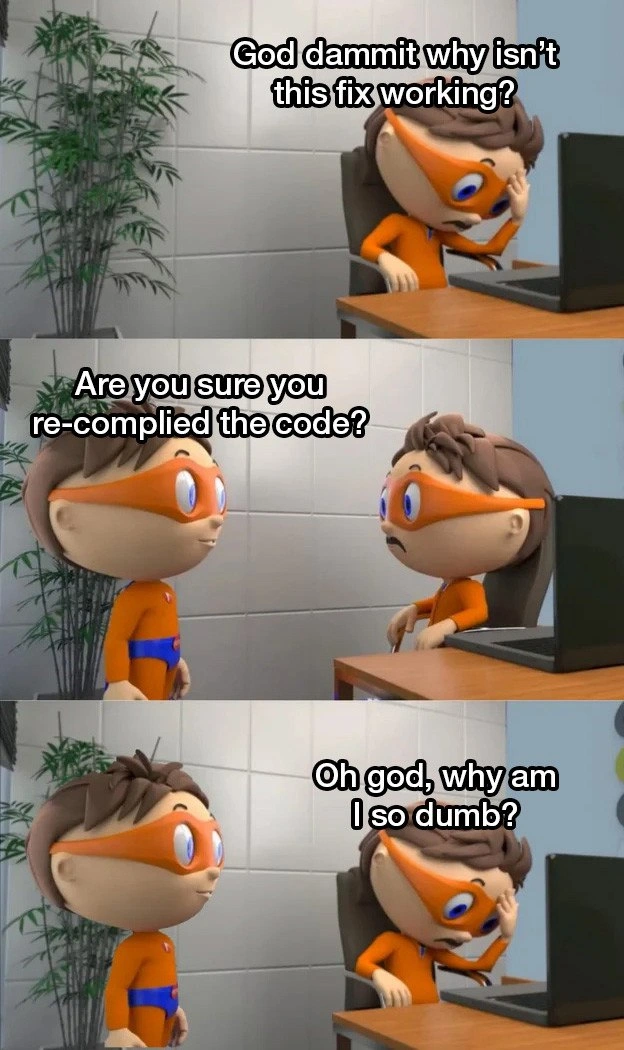
The classic 'did you recompile?' facepalm moment
Why is this Debugging Troubleshooting meme funny?
Level 1: The Missing Step
Think of it like this: a child is trying to get their toy car to run but it just won’t move. They push the button over and over, getting upset that it’s not working at all. A friend comes by and asks calmly, “Hey, did you put the batteries in the car?” In that moment the child realizes they skipped the most obvious step. Of course the toy can’t run without its batteries! They feel a bit silly for not thinking of it, but also relieved to discover what was wrong. In the same way, the programmer in the meme was frustrated that his “fixed” program wasn’t working, and the friend reminded him about the missing step: you have to rebuild the program. Just like the toy needed its batteries, the code needed to be recompiled to work with the new changes. It’s funny because we’ve all had times when we forgot something basic and then said “Oh no, how could I be so dumb?” But we also feel better knowing it was a simple fix. The meme makes us smile because it shows that even smart people forget simple things – and that a gentle nudge from a friend can save the day.
Level 2: Did You Build It?
Let’s break down what’s happening in simpler terms. When you write code in a compiled language, you don’t directly run that human-readable code. First, you use a compiler (a special program) to build an executable file from your source code. Compiling means translating your code (the text you wrote) into machine code (the 1s and 0s the computer actually executes). The result of compiling is often a new file, like an .exe on Windows or a binary on Linux – this is the program you run. Now, if you change the source code to fix a bug but forget to recompile, the program you run does not include your fix. You’re still running the old executable that was made before your changes. No matter how many times you run that program, it will behave as if the bug is still there, because in that program’s world, nothing changed. This is why the meme’s friend asks, “Are you sure you re-compiled the code?” It’s a polite way of saying, “Maybe your fix isn’t showing up because you never actually updated the app with that fix.”
For new developers, this is a classic gotcha. It’s easy to assume that once you edit and save the code, the computer somehow knows to use the new code. But with compiled languages (like C++ or Java), you have to rebuild. In interpreted languages (like Python or JavaScript), by contrast, you run the code directly, so this issue doesn’t come up – the script runs whatever is in the file at that moment. That difference can trip people up. Imagine you hit “Run” on your program, and it opens but nothing seems fixed. There’s no error message, nothing obviously wrong – it’s just still broken. Debugging frustration kicks in hard. Often the reason is simply that the running program wasn’t recompiled to include the fix. There’s no automatic magic linking the source file to the program’s behavior at runtime. Until you compile a new version, the computer happily keeps using the old one.
Here’s a short example to illustrate the point:
$ gcc program.c -o program # compile the program source into an executable named "program"
$ ./program
Hello, bug! # -> The program runs and shows the buggy output
# (Now we edit program.c to fix the bug, e.g., change "Hello, bug!" to "Hello, fixed!")
$ ./program
Hello, bug! # -> Oops, it's still the old output because we didn't recompile after editing
$ gcc program.c -o program # compile again to rebuild the program with our fix
$ ./program
Hello, fixed! # -> Now the program shows the updated message after recompiling
In the above sequence, running ./program after the edit still printed “Hello, bug!” because we skipped the rebuild step. Only after running gcc again (the compile command) did we get the new output “Hello, fixed!” from our corrected code.
In the meme, the standing friend is basically performing this sanity check for his buddy. The frustrated developer had been staring at the screen, wondering why nothing changed. The friend’s question “Did you rebuild the project?” instantly shines light on the likely problem. Sure enough, the fix was probably fine – it just never got applied to the running program. That moment is when the seated character drops his head on the keyboard in shame: “Oh god, why am I so dumb?” We’ve all felt that when we realize we overlooked a basic step. It’s a relatable mistake. The lesson for any coder is simple: when a bug fix isn’t doing anything, always double-check that you compiled and are running the latest build. It’s an easy thing to forget in the heat of troubleshooting. Don’t worry, even professionals forget to hit the compile button sometimes – and that’s exactly why this meme makes us grin.
Level 3: Stale Build Blues
This meme hits on a software developer’s classic facepalm moment: forgetting to recompile code after making a change. In the first panel our orange-costumed hero is despairing, “God dammit why isn’t this fix working?” Meanwhile, his friend casually asks the million-dollar question: “Are you sure you re-compiled the code?” – the programmer’s equivalent of “Have you tried turning it off and on again?” Immediately, every seasoned coder laughs (or winces) in recognition. We’ve all been there: spending an afternoon chasing an elusive bug, convinced our logic is faulty or the system is cursed, only to discover we never actually built the new code we wrote. The humor here comes from that too-real mix of frustration and relief when the simplest oversight is the culprit.
From a senior developer’s perspective, this scenario is a rite of passage in debugging. Compiled languages (like C++, Java, or Go) don’t automatically run your latest edits. You have to invoke the compiler or a build system to produce a new program binary. Until you do, you’re just running the old compiled code. The meme exaggerates the drama: our hero is agonizing over a “fix” that isn’t taking effect, because in reality the running program hasn’t been updated at all. The friend’s gentle question cuts through the chaos, pointing out a fundamental step that was missed. It’s funny because forgetting to hit build is such a simple mistake, yet it can completely stall even an expert. You might spend hours questioning your code, your sanity, and the universe, when the code itself was fine – it just never got turned into a new executable.
There’s an underlying commentary on Build Systems and developer habits here. Modern IDEs and continuous integration pipelines try to automate away the “Did you compile?” problem by rebuilding projects for you, but those can fail or be misconfigured. Many of us have stories of stale binaries or cached build artifacts causing chaos. Perhaps you ran an old executable from a different directory, or forgot that your editor didn’t auto-build on save. The result is the same: the bug persists because you’re literally testing the wrong thing (the old code). This meme nails that shared experience. The third panel’s caption – “Oh god, why am I so dumb?” – is the punchline we laugh at now, after having lived through it. It’s a mix of embarrassment and dark humor from the battlefield of debugging. Even the most battle-hardened engineer has slapped their forehead upon realizing a fix didn’t show up simply due to a missed rebuild. In short, always double-check the obvious before assuming your code fix failed – sometimes the only bug is the human who forgot to click “compile.”
Description
A three-panel comic strip featuring a cartoon superhero character. In the first panel, the character is at a computer, frustrated, with the caption: "God dammit why isn't this fix working?". In the second panel, another identical character asks, "Are you sure you re-compiled the code?", leaving the first character looking shocked. In the final panel, the character at the desk has their hand on their forehead in despair, saying, "Oh god, why am I so dumb?". The meme humorously captures a universal and humbling experience for developers working with compiled languages: spending time debugging a problem only to realize they forgot to recompile their code after a change. It's a rite of passage that even senior developers fall victim to, highlighting how easily the simplest steps can be overlooked during intense focus

Comments
7Comment deleted
Hot reloading is great until you work on a legacy C++ project and remember the most important debugging step is a full 'make clean' and a prayer
Nothing humbles a staff engineer faster than chasing a “heisenbug” for an hour and discovering the only nondeterminism was yesterday’s binary still sitting in the CI cache - turns out the hardest invalidation problem is ego
After 20 years in the industry, you'd think we'd remember to check if the build actually ran, but here we are, still discovering our changes are sitting uncommitted in a stash from last Tuesday's 'quick experiment'
After 15 years in the industry, you'd think we'd have evolved past this, but no - we've just gotten better at pretending the 30 seconds we spent staring at unchanged behavior was 'validating the build pipeline.' The real senior move is having a post-it note that says 'Did you actually rebuild?' stuck to your monitor, right next to 'Have you tried turning it off and on again?' because some truths are universal across all experience levels
Senior devs master CAP theorem, yet local builds remain their eternal single point of failure
Peak staff engineer moment: spend an hour modeling race conditions and the JVM memory model, then realize you never rebuilt and you’ve been debugging last week’s Docker layer
Nothing humbles a principal engineer faster than a two-hour RCA that ends with make dutifully serving last week’s binary because the timestamps never changed